Desk
Multi-panel view: tasks, email, calendar and activities on a single screen.
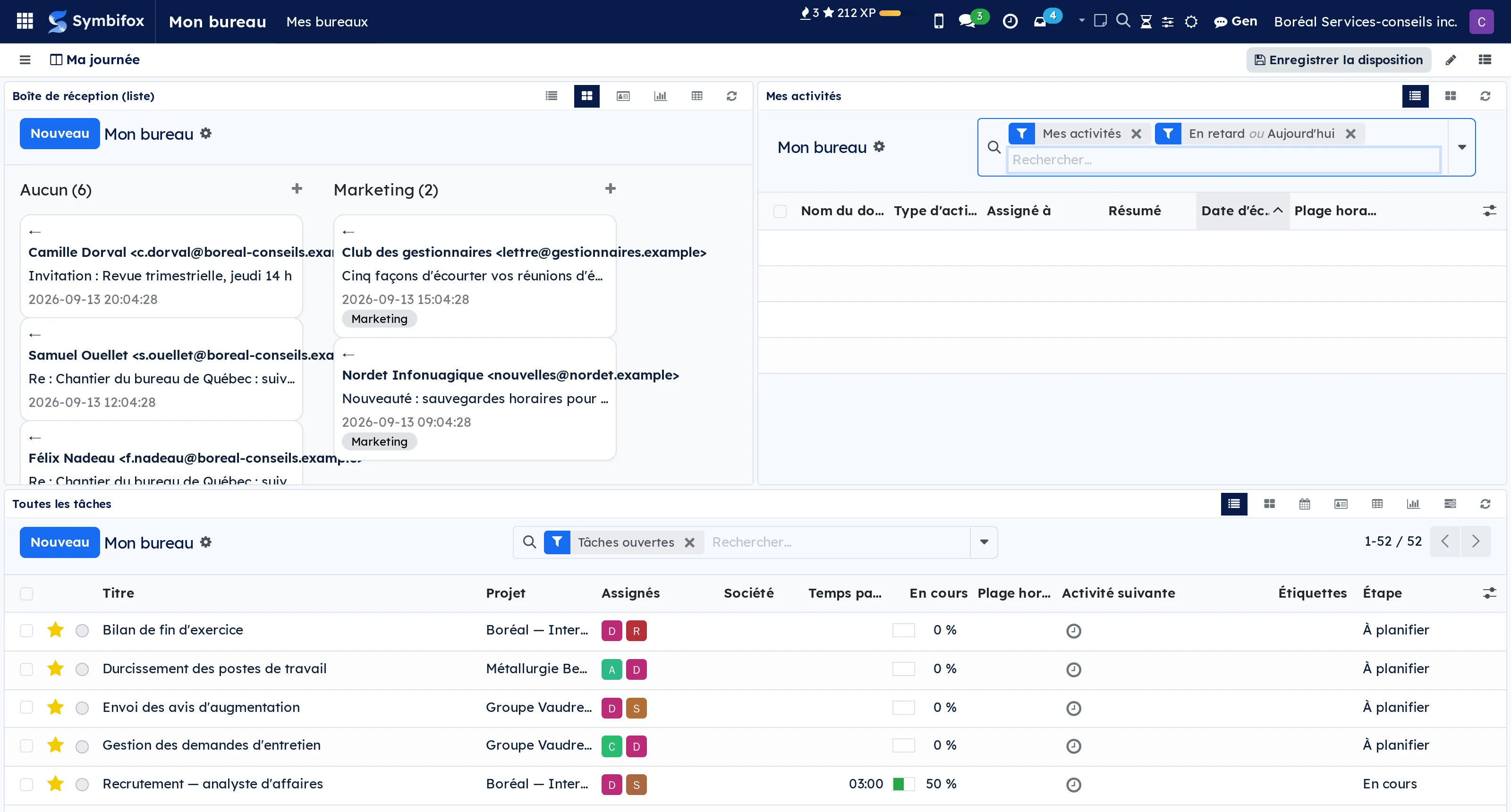
A working day rarely happens in a single screen. You jump from activities to tasks, from tasks to email, from email to the calendar, and every jump costs the time it takes to find your place again.
A desk is a named layout that puts those screens side by side. Each pane points at an existing screen and keeps its own search bar, view switcher and favourites: this is not a summarised tile, it is the full screen, usable where it sits.
You create as many as you have contexts. Six layouts, one keyboard shortcut per desk, and optionally a time-of-day slot: the morning desk opens in the morning, the portfolio review one in the afternoon.
⚠️ Desks are personal. A colleague's does not appear in your list, and that is deliberate: a layout imposed on everyone goes back to being a dashboard nobody looks at.
Comparable to Salesforce Lightning App Builder, open-source flavor
Shall we look at your case together?
Tell us what you run today. We will tell you honestly whether Symbifox helps or not.
The catalog grows almost every month.
What gets added, what we learn deploying it, and nothing else. You leave whenever you want.
One confirmation email, and nothing before you follow its link. Then 10 welcome emails, one a week, then the updates. No tracker, no resale.