Home screen
When you open Symbifox, what is waiting on you, ordered by who is blocked, instead of a grid of apps.
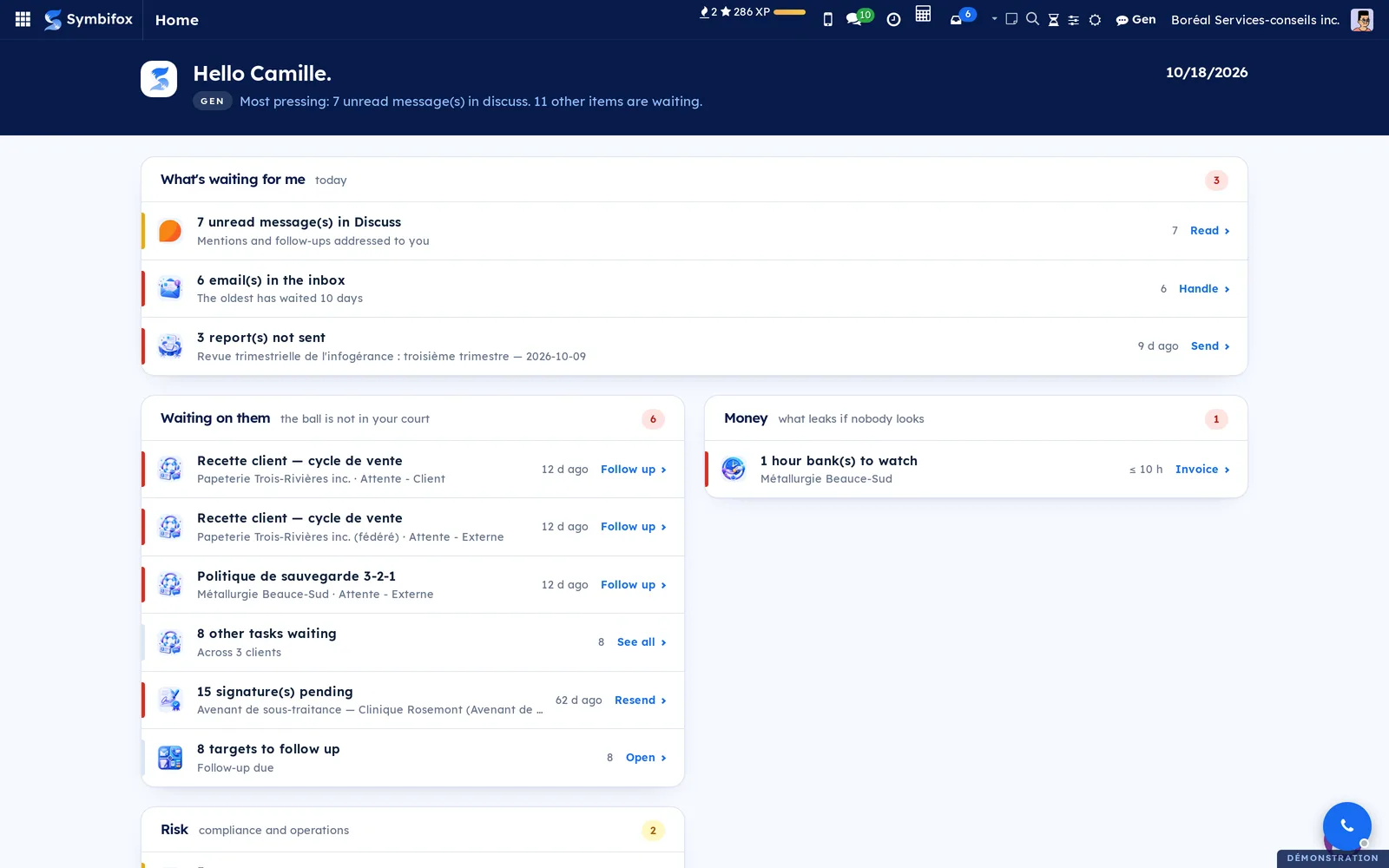
The home screen does not ask which app to open: it shows what needs you. Signals are sorted into bands: What's waiting for me (today's meetings, overdue activities, tasks due, email to handle), Waiting on them (tasks parked with a client, signature requests sent, deposits about to expire), money and risk. Each row carries the action that resolves it and opens the filtered list. An empty band disappears and no row ever shows a zero: a short screen means a quiet morning. Each person sees only what their access rights open, and a band whose app is not installed does not appear.
Shall we look at your case together?
Tell us what you run today. We will tell you honestly whether Symbifox helps or not.
The catalog grows almost every month.
What gets added, what we learn deploying it, and nothing else. You leave whenever you want.
One confirmation email, and nothing before you follow its link. Then 10 welcome emails, one a week, then the updates. No tracker, no resale.