Dark Mode
Dark mode in the Odoo backend, with the Blue Fox grey palette.
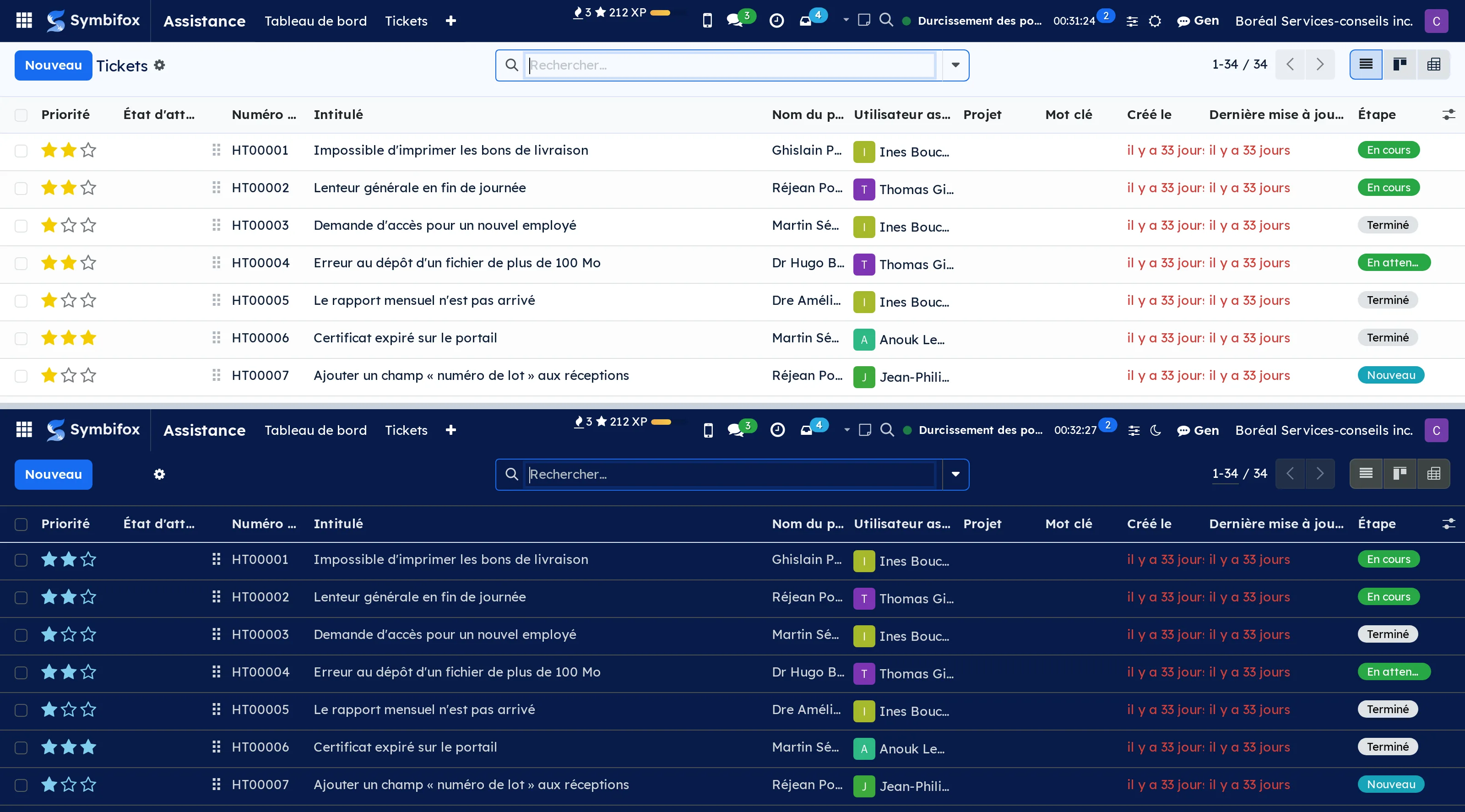
A management interface is looked at eight hours a day, and often in the evening. Odoo's pure white was never designed for that.
This module switches the interface to dark tones, on a restrained grey palette drawn from the brand colours. It is not a mechanical colour inversion: backgrounds, borders, hover states and warning colours are reworked one by one, so that the red of a passed deadline stays readable instead of turning brown.
⚠️ The brand blue is never used as text on a dark background. It stays a fill, a rule, an accent. A light blue set in letters on dark grey passes contrast checks on paper and tires the eyes in practice.
The choice is personal and is made from the account preferences. It is not imposed on the team and changes nothing in the documents produced: a PDF exported in dark mode is still a PDF on white.
Comparable to The Slack or Notion dark mode, inside Odoo
Shall we look at your case together?
Tell us what you run today. We will tell you honestly whether Symbifox helps or not.
The catalog grows almost every month.
What gets added, what we learn deploying it, and nothing else. You leave whenever you want.
One confirmation email, and nothing before you follow its link. Then 10 welcome emails, one a week, then the updates. No tracker, no resale.