Work categories
Classify work by category, and find it on hours, Gen conversations, notes, emails and meeting records.
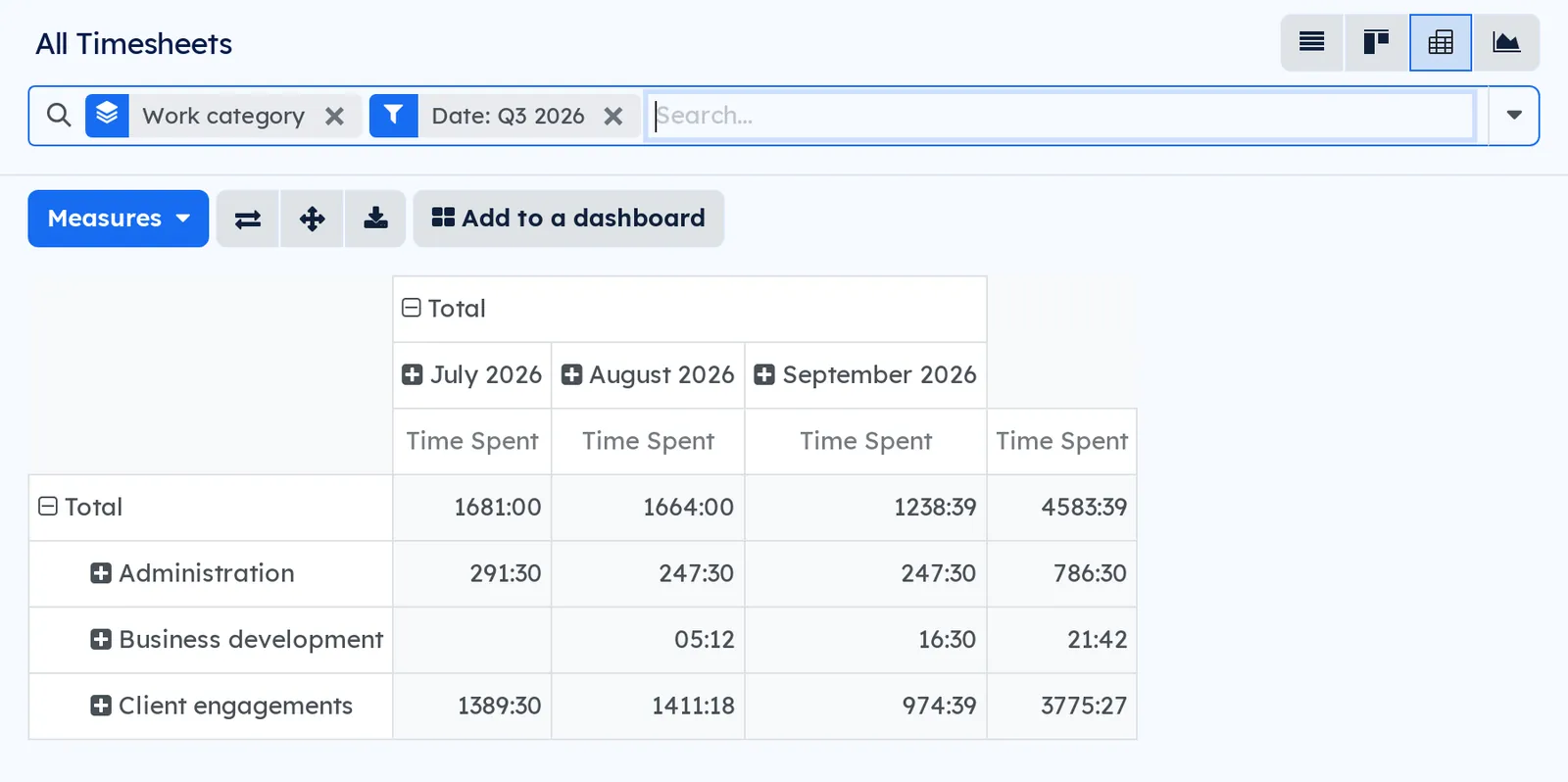
Knowing how many hours went to business development, and not just to which projects, usually takes an export and a spreadsheet.
A work category is a project label you tick as one: the label you already use will do. Set on a project or a task, it carries over by itself to the timesheets, Gen conversations, notes, filed emails and meeting records that belong to it.
The category is stored on every record: filter on it, group a pivot by it, export it like any other field. Each record also says where its category comes from: its label, its task, its project or the record it is attached to, and a category chosen by hand wins over all of them.
⚠️ One category per record, on purpose: an hours report that counted the same hour twice would give a wrong total. When a task carries two categories, their order decides.
Classifying is not editing: changing a project's category does not change the last modified date of its tasks, notes or emails.
6 add-on modules
TimesheetsHours by category, in the timesheet pivot and in the timesheet analysis.
Each timesheet line takes the category of its task, or of its project when time is entered without a task. The timesheet pivot and the hours analysis group by Work category, and a line can be given an override category.
GenA Gen conversation takes the category of the record it is attached to.BUSL-1.1
A conversation attached to a task, a project or any categorised record takes its category, which you can filter and group by in the conversation list.
⚠️ Only if its owner can read that record: attaching a conversation to something you cannot open tells you nothing about it.
Gen cockpitThe conversations' category in the Gen cockpit.BUSL-1.1
The Gen cockpit has its own list and search: this add-on brings the conversations' category there, as an optional column, a filter and a grouping.
NotesA note takes the category of the record it is attached to.
A note attached to a task, a project or any categorised record takes its category, which you can filter and group by in the note list.
The category never changes a note's last modified date: notes stay in the order of your own edits.
MeetingsA meeting record takes the category of its project.BUSL-1.1
Each meeting record takes the category of its project, or an override category, and the meeting list filters and groups by category.
EmailsA filed email takes the category of the record it is filed on.BUSL-1.1
An email filed on a task, a project or any categorised record takes its category, if its owner can read that record, and the email list filters and groups by category.
Shall we look at your case together?
Tell us what you run today. We will tell you honestly whether Symbifox helps or not.
The catalog grows almost every month.
What gets added, what we learn deploying it, and nothing else. You leave whenever you want.
One confirmation email, and nothing before you follow its link. Then 10 welcome emails, one a week, then the updates. No tracker, no resale.