Symbifox School
The family portal and the life of a private school: students, families, announcements, authorisations, admission, contracts, attendance, health, meals, work handed in, course contents, grades, report cards, files, timetable, Charlemagne, school calendar, child care, family billing and Relevé 24, in the school's Odoo.
A private school often keeps its families in one portal, its authorisations on paper, its admissions in another tool and its contracts in a word processor. Symbifox School brings all of it into the school's Odoo, where its invoicing and documents already live.
The core holds the schools, the school years, the levels from pre-K to Secondary V, the groups with their teachers and each school's profiles (special projects). A student is a contact, with a birth date and a permanent code. Each adult is linked to the student through ticked roles: parental authority, receives notices, signs, pays, may pick up, emergency contact, lives with. Shared custody, a partner who picks the child up without parental authority, a grandmother as emergency contact are recorded as they are.
These roles decide the rest: who receives an announcement, who signs a trip or a contract, who orders meals, who sees health information on the portal. The parental authority links feed the Law 25 consents: under 14, the parents are asked; from 14, the student.
Twenty-seven modules add to the core, each installable on its own.
27 add-on modules
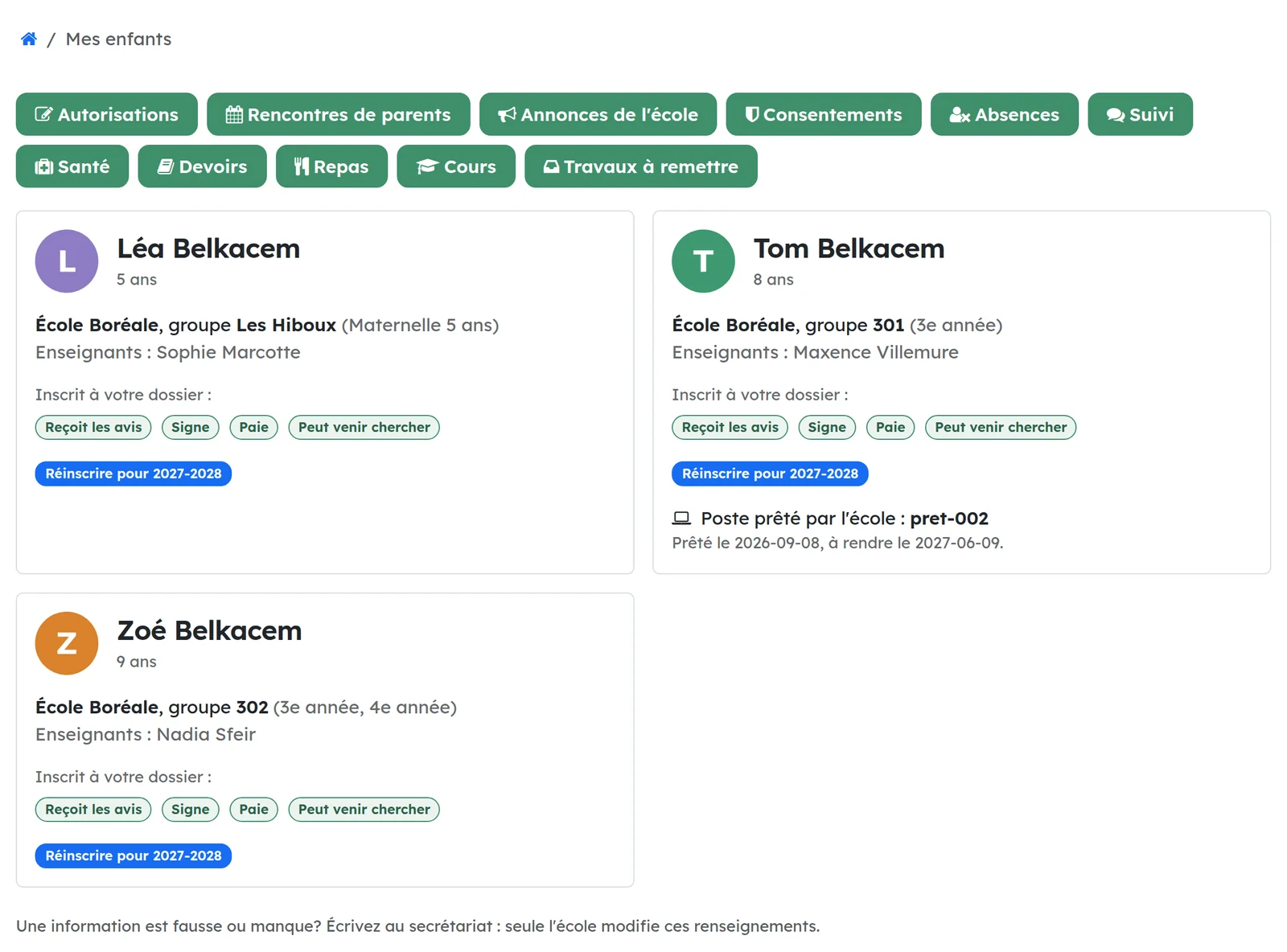
School: family portal“My children” on the portal: groups, teachers and each adult's roles, and the portal invitations.
On the portal, each parent sees their children, their groups, their teachers and the roles the school recorded for them. Only the school changes this information.
The office invites to the portal the adults who receive notices, for one student or for the whole school at once. Adults already on the portal or without a usable address are counted and named, never invited twice.
School: announcements to familiesAn announcement to the whole school or to groups: one email per parent, even with three children, and the read receipt.
The noticeboard gains the School families audience: the whole school or chosen groups. The families reached are computed on the day, from enrolments and guardian links.
Each adult receives one email, in their language, whose subject names their children: a parent of three receives one, not three. The announcement also shows on the portal. When it asks for confirmation, the parent clicks “I have read it” and the school sees who confirmed and when; opening the email does not count.
A teacher writes to the families of their own groups, and to nobody else.
School: authorisationsTrips, activities and overnight stays authorised in one click, on the portal or through a personal link without an account, with dated evidence.
The office writes the authorisation and sends it to the groups concerned. Each parent who signs receives a personal link that works without an account; parents with an account also find it on the portal.
“I authorise” or “I refuse”, in one click, and final: to change their mind, the family calls the school. One parent is enough by default (Civil Code art. 603), an overnight stay requires every parent who signs, and a refusal always wins.
Each answer keeps its evidence: date, channel, IP address, browser and the SHA-256 fingerprint of the text as sent, which can no longer be edited. A reminder goes out in one click, and authorisations past their deadline close by themselves.
School: Law 25 consentsPhotos, the group's contact list and educational platforms: four separate consents, asked of the right people.
Four separate school purposes, each with a plain text in French and English: photos and videos inside the school, those published outside the school, the contact list of the group's families, and outside educational platforms.
One button asks this year's consents for every enrolled student. Under 14, the request goes to the adults with parental authority; from 14, to the student (Private Sector Act s. 4.1 and 14). A student the request would get wrong, with no birth date or a minor without anyone holding parental authority, is left out and named in a note rather than asked by mistake.
School: contract for educational servicesThe Private Education Act contract, caps and mandatory mentions included, signed online by the parents.
The price is itemised as the regulation requires: admission fee, educational services, each accessory service and the total. The caps are constraints: 50 $ to study an application, 200 $ or a tenth of the price for admission, at least two instalments, a capped termination penalty.
The document prints the mandatory mentions, including sections 70 to 75 of the Act word for word and the face-uncovered clause of section 68.1. It goes out for electronic signature to the parents who sign, and what they sign is frozen once sent.
When the family terminates, the amount the school may keep and the refund due within ten days are computed (s. 72 to 74).
School: admission and re-enrolmentA public admission form, an application fee paid online or at the counter, an exam, a rank and a decision taken by a person; re-enrolment on the portal.
One campaign per coming year: levels offered, dates, fee and exam. The public form takes the student, one or two parents and their documents. The fee invoice stays a draft until the office has checked the application: an anonymous visitor creates no invoice.
The fee is paid online or at the counter, and the application moves on as soon as the invoice is paid. Then come the exam notice, the score, the rank per level, and the decision. The rank helps, but a person decides, and the decision records who and when (Law 25, s. 12.1). An accepted student is enrolled in one step, with the family links; applications not retained are purged along with the documents received.
Re-enrolment happens on the portal: one click per child for the parent who signs, confirmed once the registration fee is paid. Each step emails each parent, and a personal status page keeps them informed.
School: parent-teacher meetingsParents book on the portal one slot per teacher and per child, with no overlap.
The office enters the teachers' hours for a session, and the slots are generated. On the portal, each child shows the teachers of their groups and their free slots: one click books, one click cancels, until booking closes.
A child meets each teacher once, a parent never holds two meetings at the same time, and two parents clicking the same slot at the same instant are settled by the database. An email confirms the time, the teacher and the room, always in the school's time zone. Teachers see their schedule.
School: attendance and absencesAttendance by half-day or by period, absences declared by families on the portal, same-day notice.
The teacher takes attendance for their groups, by half-day in elementary or by period in secondary. Everyone is present by default, and the absences the family already declared are filled in, justified.
When the roll call closes, the adults who receive notices are told the same day about any unjustified absence, with a link to justify it. On the portal, the family declares an absence to come or justifies one after the fact.
The office sees the list of students with repeated unjustified absences: three days or more in thirty days.
School: conduct and monthly follow-upThe rules of conduct of regulation 10.01, breaches, graduated sanctions, notice to parents and monthly follow-up.
The rules of conduct of regulation I-13.3, r. 10.01, which also binds private schools since 2025: formal “vous”, cell phones, images captured without consent, bullying, violence. The school adds its own.
A breach counts the previous breaches of the same rule this year and suggests the next sanction; a person decides. The notice to parents is checked on the server: a suspension gives its reasons and the support measures, and sexual violence, from 14, is told to the parents only with the student's consent.
The annual report on bullying and violence is one table, and the monthly follow-up (Basic school regulation, s. 29.2) reminds the responsible teacher each month of the students whose parents got no news.
School: homework and calendarHomework, studies, projects and tests on the portal, and a calendar you subscribe to in Google Calendar or Apple Calendar.
The teacher posts the homework, studies, projects and announced tests of their groups. On the portal, each parent sees what is due for each child, by date.
Each adult has a personal calendar address: subscribed in Google Calendar or Apple Calendar, the children's due dates appear there and update by themselves. A new address stops the old one.
School: health and medicationA health alert for all staff, the detailed record for the Health group only, signed medication authorisations and the register of doses.
Two levels. All staff see a short health alert on the student, substitutes included. The Health group, named by the school, alone sees the detailed record, the emergency plan, the authorisations and the register: the Administration does not get it by default (need to know).
The medication authorisation goes to the parents who sign; its text is frozen when sent and the signature keeps its fingerprint, date and address. A refusal always wins. No dose is given without a valid authorisation that day, except emergency epinephrine, which any staff member records and the family is told about at once. A dose recorded is not rewritten.
On the portal, parents see the alerts, sign the authorisations and read the doses of the last 60 days.
School: caterer mealsMenus with their allergens, family orders on the portal, a prepaid balance or a monthly invoice, as chosen.
Each day's menu, with prices and allergens. On the portal, the parent who pays orders for each child up to the school's deadline, and cancels until the time set on the day.
Two ways to pay, as the school decides or as the family chooses: a prepaid balance, topped up by an invoice paid online or at the counter, or a monthly invoice. An order the balance cannot cover is refused, even when two go out at once.
A meal containing a student's declared allergy cannot be ordered, and the kitchen list shows every allergy. A closed day, a storm or a professional day, credits all its orders at once.
School: students' computersThe school's old computers, refurbished with Blue Fox OS: a directory account per student, the lab and computers lent for home.
Each student enrolled this year gets a directory account at the school, its name drawn from a sequence rather than the permanent code, grouped by level and class. The account follows the enrolments: active while the student is enrolled, suspended otherwise, without anyone thinking of it.
The office draws a password a young student can type, two words and four digits, shown once and never stored.
A computer under a loan profile is lent to a student: it opens to them at its next sync and closes again when returned, or if lost. The adults who receive the school's notices are told of the loan, seven days before it is due and once if it is overdue. On the portal, the child's card shows the computer lent.
School: work handed inStudents hand in their work on the portal, the teacher returns a corrected copy with the mark; scored quizzes go through Surveys.
On each homework, the teacher chooses how it is handed in: not online, as files or through a scored quiz. They attach documents for the students and set the total it is marked out of.
On the portal, the student or an adult with parental authority hands in up to five files, replaceable until the work is returned. After the end of the due day, at the school's time, the work is flagged late, or refused if the teacher wants it so.
The teacher returns a corrected copy, a comment and the mark, which the family sees only then. A quiz's score becomes the mark, and its answers are read only by the group's teachers and the office.
The school may offer two emails that each adult, or the student with their own account, ticks on the portal: a notice when work is returned, and a daily summary of work returned, due or late, and new course contents. Nothing is sent until ticked.
School: course contentsCourse contents in Odoo's eLearning, given to the students of a group and their parents, and renewed from one school year to the next.
An Odoo eLearning course tied to school groups takes their students, and the adults who receive their notices, as attendees, and follows the enrolments. It only removes those it added: a special education teacher invited by hand stays.
A school course is for its attendees only: PDFs, articles, video links and downloadable files, with no comments, reviews or karma points, and no email at each content.
“Renew for another year” copies the course and its files for the next year's groups.
School: the student on the portalStudents sign in to the family portal with their directory account, the one that opens the school's computers.
Each student directory account gets a portal user on the student's own card. The student signs in through the school's directory, with the password of the school's computers, and sees their homework, work and courses.
Signing in through the directory never creates a user, and a staff account of the same directory is refused. When the student leaves, their user is archived and the same door closes.
A student does not edit their card, reset a password nor delete their account. Under 14, they neither see nor give their own consents: their parents do.
Sign-in goes through the OCA auth_oidc module (authorization code), the only flow Authentik accepts since its 2026.8 release.
School: gradebookEvaluations and grades by course, each competency's result computed, the 20/20/60 weighting over the three terms and the ministerial exams.
The curriculum's subjects come with their way of giving results: by competency, by component or as a single discipline result. The three terms carry their report card deadlines (November 20, March 15, July 10) and the 20/20/60 weighting.
Each teacher enters the grades of their own courses, and of no one else's. The results of each competency, of the discipline and the group's average are computed from the grades, rounded the way the report card shows them, never typed twice: a parent can redo the arithmetic.
The final result follows the 20/20/60 rule, with the ministerial exam counting for its share. Until the Ministry's result is received, the final result stays provisional.
School: student's fileEach student's file and its eight regulatory pieces, the register of enrolment, the transfer to the receiving school and the copy given to the person.
A file per student opens with the first enrolment. It lists the eight pieces the regulation requires: which are there, which are missing, which do not apply and why.
The register of enrolment reads on screen and as a PDF. When a student leaves, the office prepares the transfer to the new school: it chooses what goes, and the package carries the SHA-256 of each file. The person concerned can receive a structured copy of what the school holds, and a school that closes produces a complete archive for the Minister.
The file belongs to the administration: neither teachers nor families have access to it. A log nobody edits says who created, replaced, downloaded or exported what.
School: report cardsReport cards made from the gradebook, sealed when issued, read by the families on the portal with a read receipt, and the written communications.
Each report card is generated from the gradebook: results are never typed, only the teachers' comments, each on their own subject, and the homeroom teacher's year-end decision.
Issuing seals the report card: its content and SHA-256 go to the student's file, and the PDF is printed from that sealed content. A correction is a new version, and the old one stays. A report card issued after the term's deadline is flagged late.
On the portal, the holders of parental authority read their children's report cards, with a read receipt. A student of age gets their own, which the parents no longer see. The email names the child and says nothing of the results. The first written communication and the monthly information go to the same people, by email or on paper.
School: Charlemagne transmissionThe headcount declaration, the local results and the ministerial exams sent to the Ministry's Charlemagne system: XML, signed and encrypted, put on its SFTP server.
The module follows the Ministry's teletransmission guide: headcount declaration (DJ), local results (RJ), exam registrations (IJ) and their results (UJ), made from the school's records. Each transaction is checked against the guide's structures before anything leaves.
The file is signed and encrypted with OpenPGP, put on the Ministry's SFTP server, and its answers are read back. A ledger of what the Ministry accepted says which is a creation, a modification or nothing, and is written only when an accepted answer comes back.
A simulation plays the whole circuit without encrypting or sending anything. The school provides its SFTP access and keys, kept encrypted on the server.
School: timetableThe timetable in a cycle of school days, rooms with no double booking, each child's week on the portal and a private calendar address.
The day's periods and a cycle of 9 or 10 days, or a plain week: the calendar knows which date is which day of the cycle and skips holidays and pedagogical days without losing its place.
Each course of a group has its day, period and room. A teacher, a room or a group is never in two places at once. The timetable is imported from a CSV file exported by a timetabling program, and every line that cannot be placed is reported.
On the portal, each adult sees the next seven days of their minor children and gets, per child, their own calendar address (iCalendar). Replacing it stops the old one, and only theirs.
School: school calendarThe calendar of each school and year: class days, pedagogical days, breaks, closures, and whether child care opens.
Each date of the year has its kind of day: class day, pedagogical day, school break, holiday or emergency closure, with an early dismissal time when needed and a note. A button makes the year's class days without touching those already set.
The calendar also says whether child care opens: yes on class days and pedagogical days, no on breaks and closures. The office can open it during spring break or close it on any day.
Every staff member reads the calendar; the administration keeps it. The other school modules read the date and time on the school's clock from it, never on the server's.
School: child careChild care periods, registrations and bookings, the daily sheet with arrivals and departures, and who may pick up a child.
The before-school, lunch and after-school periods follow the class days of the calendar, and pedagogical days have their own, with places and activities. The family asks for a regular registration on the portal, books a day, declares an absence; the child care manager puts the registration in force once the places are checked.
On a phone, the educator opens the daily sheet: the children expected, arrival and departure by buttons, on the school's clock. At departure, only the people allowed that day are offered: the family adults who may pick up, the authorized people, leaving alone when the permission covers the day and the hour.
The holders of parental authority add or remove authorized people and sign the permission to leave alone on the portal. A pick-up restriction (court order) is never offered at departure, and its detail stays with the manager. Each change is emailed to every holder of parental authority, in their language.
School: timetable and school calendarThe timetable follows the school calendar: the office enters each day once.
When a school keeps its calendar for a year, the days of that year's timetables follow it: a pedagogical day, a break or a closure leaves the cycle, and the days of the cycle are numbered again after each change.
An exam day is still marked in the timetable, on a class day. The published timetable, the family's week on the portal and its calendar link follow too.
At install, the calendar first takes what the timetables already hold: nothing entered in a timetable is lost. A school without a calendar keeps its timetable as before.
School: family billingThe fee catalogue, priced contracts, who pays and in what share, one invoice per paying adult on the contract's instalments, and termination as the Act provides.
The fee catalogue of each year holds the educational, accessory and optional services, by level and by profile, each one marked as child care for the Relevé 24 or not. A button prepares the contract of each enrolment, with the sibling discount by rank in the family.
The contract says who pays: shares in percent for shared custody, a bursary or a third party for a fixed amount first. Once the contract is signed and the office has checked the shares, each paying adult receives their invoice on the contract's instalments, with its PDF, sent by the school in their language. The other parent neither receives it nor sees it on the portal; it is paid online.
The amount paid counts only the money received. On termination, the school keeps what the Act allows, each paying adult receives a credit note, and the refund due becomes an activity at ten days. A contract invoice is corrected by a credit note, never by setting it back to draft.
School: Relevé 24The child-care fees each adult paid for each child, by calendar year: statements to hand to the families and to export to the software that makes the official slips.
The computation follows the money the school kept on each invoice: it settles the instalments in the order of the services, and only the services of the year count, at their child-care share. The admission fee, a bursary, a third party, a company and meals billed apart never count.
The statements are reviewed, then issued by the office. An issued statement is never rewritten nor deleted: when the payments change, it is flagged and can come back to review at today's amount, zero included.
Each paying adult reads and prints their own statements on the portal, in their language; the other parent does not see them. A CSV export of the issued statements feeds the software that produces the official slips. The module sends nothing to Revenu Québec and collects no social insurance number.
School: child care billingChild care billed each month to the adults who pay: rates, monthly tiers, late pick-ups, short-notice bookings, books of tickets bought on the portal.
The rates of each school and year: occasional period or day, day without class, child not booked, short-notice booking, late pick-up by blocks of minutes, book of tickets. Regular registrations are billed by monthly tier according to the periods per week, prorated on the class days when the month begins or ends part way.
What is due is computed again from what happened (bookings, daily sheets, registrations) until it is billed, then never changes. A booking cancelled too late stays due; cancelled in time or closed by the school, nothing is due. On the first of the month, last month is billed by itself: one invoice per paying adult, following the contract's shares, each line split between its child-care part and the rest, sent with its PDF.
On the portal, an adult with parental authority buys a book of tickets for the child and pays it online; the tickets pay the occasional periods, oldest book first. The Relevé 24 counts the child care paid too.
Shall we look at your case together?
Tell us what you run today. We will tell you honestly whether Symbifox helps or not.
The catalog grows almost every month.
What gets added, what we learn deploying it, and nothing else. You leave whenever you want.
One confirmation email, and nothing before you follow its link. Then 10 welcome emails, one a week, then the updates. No tracker, no resale.