

Part 2 · Clients, sales and relationships
Subscriptions
Keep the register of recurring payments, track their renewals and vendor bills, and rebill the ones you administer on a client's behalf.
The Abonnements (subscriptions) application keeps the register of everything your organization pays for over and over: online software, membership fees, hosting, certificates, domain names, recurring professional services. Each subscription carries its vendor, its cycle, its amount and its next renewal date, and is matched against the bills received. The ones you administer on a client's behalf are rebilled in one step, at cost or with a margin. It serves management, administration and accounting, who stop discovering an annual bill the day it arrives.
Overview#
A subscription is a recurring commitment to a vendor. It has a category (online software, membership fee, infrastructure, recurring professional service, domain name, certificate, hosting, other), a cycle (monthly, quarterly, semi-annual, annual, biennial, triennial, one-time or on demand) and an amount per cycle. From these last two values, Symbifox derives a monthly cost, the only way to compare an annual subscription and a monthly one in the same total.
A subscription can be held in your own name, or managed for the client: you pay the vendor, then rebill. There are three ways to rebill: at cost, with a percentage margin, or for a fixed amount. Symbifox then keeps the total paid, the total rebilled and the margin, over the whole life of the subscription.
Two signals are worth knowing. A dormant subscription is active, on a billable cycle, but has no recent vendor bill: the service may have died without anyone cancelling it. A price increase alert appears in the chatter (the message thread at the bottom of the form) when a bill received exceeds the expected amount by more than the threshold you set.
The application crosses paths with Invoicing, where vendor bills come from and client invoices go out, with Contacts for vendors and managed clients, and with Hosting management, which can create a subscription from a domain name.
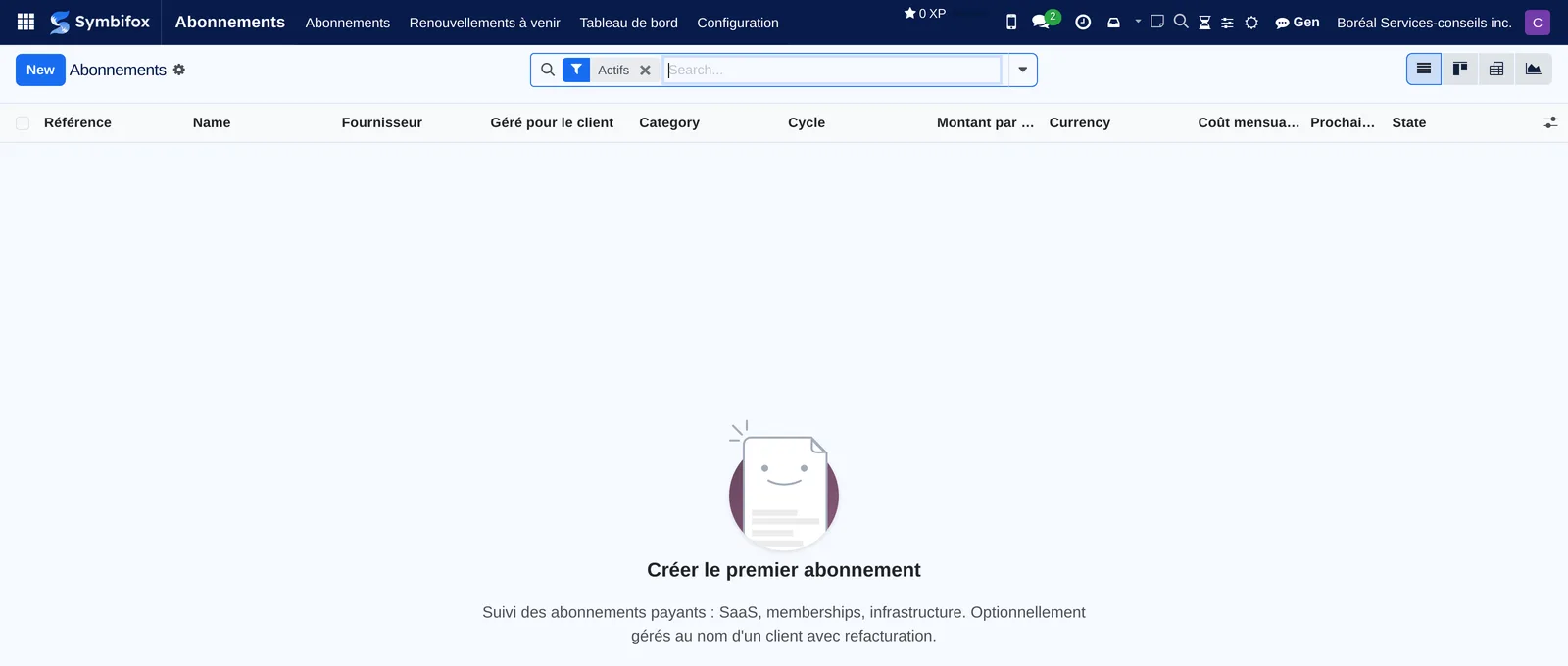
In the demo, no subscription has been entered: the home screen comes down to its columns and the help text that says what the register expects.
Configuration#
Access and permissions#
Two groups, set in Settings › Users, under the Abonnements category.
| Group | What it opens |
|---|---|
| Utilisateur (user) | The Abonnements menu: the register, the upcoming renewals and the dashboard. The person creates and edits subscriptions. |
| Gestionnaire (manager) | Everything above, plus the Configuration menu: tags, reports and automatic sends. |
Settings#
The application has no general settings page: each cadence is set where it applies. Préavis (jours) (notice period, days) is set subscription by subscription, and it decides when the renewal reminder comes up. Horizon renouvellements (jours) (renewal horizon, days) is set on the report, and decides the window the report covers. Seuil d'alerte hausse (%) (price increase alert threshold) is also set on the subscription.
Base data#
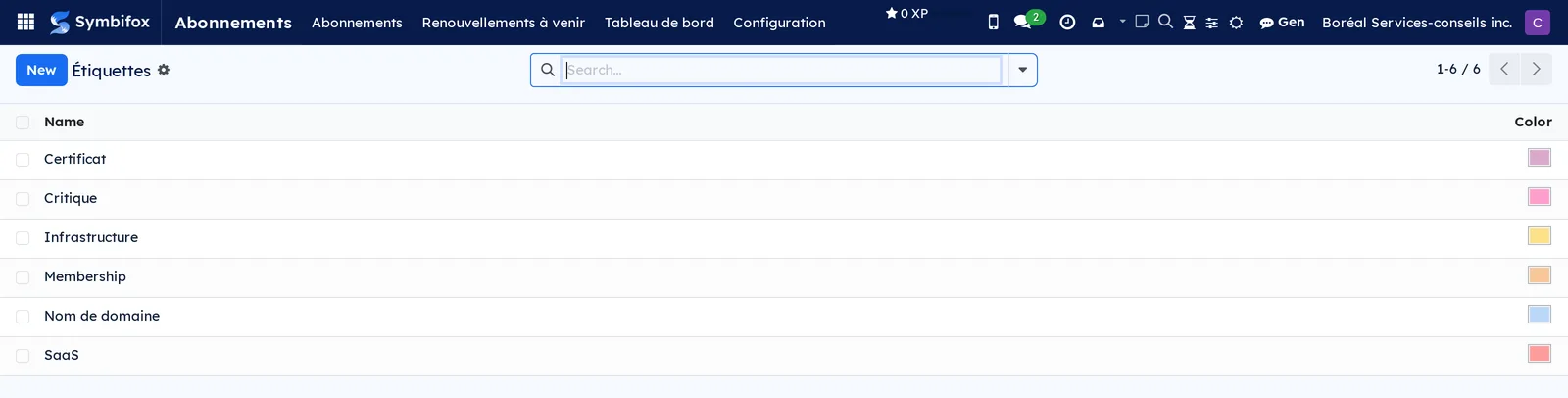
Étiquettes (tags) are the only data to prepare: they sort the register other than by category. The demo has six of them.
You also need vendor records in Contacts, records for the clients whose subscriptions you administer and, if you often rebill the same thing, a rebilling product and a sales journal in Invoicing.
Getting started#
This walkthrough enters a first subscription at Boréal and puts it into service.
- Open Abonnements › Abonnements, then select New.
- Enter the name of the service, then choose the Fournisseur (vendor).
- Choose the category and, if the subscription is held for a client, fill in Géré pour le client (managed for the client).
- In the Cycle & Montant (cycle and amount) tab, choose the Cycle, then enter the Montant par cycle (amount per cycle) and the start date.
- Adjust the Préavis (jours), that is, the time you need to cancel before an automatic renewal.
- Select Save, then Activer (activate).
The subscription changes to Actif (active), its Prochain renouvellement (next renewal) and its Coût mensualisé (monthly cost) are calculated, and it enters the dashboard totals. All that is left is to link the vendor's bills to it as they arrive.
Common tasks#
Link a vendor bill#
This matching is what keeps the register alive: without it, a dormant subscription goes unnoticed.
- Open the vendor bill in Invoicing.
- In the Abonnement (subscription) field, choose the contract it relates to.
- Select Save.
The bill appears in the subscription's Factures fournisseur (vendor bills) tab, the total paid updates, and the date of the last bill pushes back the dormancy flag. If the amount exceeds the expected one by more than the threshold you set, an alert is logged in the chatter.
Rebill a subscription to a client#
Prerequisite: the subscription carries a client in Géré pour le client, and Refacturé au client (rebilled to the client) is checked.
- Open the subscription, or the vendor bill, then select Refacturer au client (rebill to the client).
- Check the proposed Facture fournisseur (vendor bill); leave the field empty to rebill with no upstream bill.
- Choose the mode: Au coût (at cost), Coût + markup % (cost plus markup) or Montant fixe (fixed amount), then fill in the matching value.
- Check the Montant final refacturé (final rebilled amount).
- Adjust the Description de ligne (line description), the Produit (product), the Date de facturation (invoice date) and the Journal.
- Select Créer la facture client (create the client invoice).
The client invoice is created as a draft, linked to the subscription, and joins the Factures client (client invoices) tab. The margin is recalculated at once.
Track upcoming renewals#
- Open Abonnements › Renouvellements à venir (upcoming renewals).
- Go through the subscriptions whose next renewal falls within the next thirty days.
- For each one, decide whether to let it run or to cancel before the notice deadline.
A reminder activity is also raised on the subscriptions concerned, visible in your activity list.
Spot a dormant subscription#
- Open Abonnements › Abonnements.
- Filter on dormant subscriptions.
- For each one, check with the vendor whether the service still exists, then cancel it or correct the cycle.
A subscription is called dormant when it is active, on a billable cycle, and no vendor bill has come in for more than one and a half times the length of its cycle.
Change the state of a subscription#
- Open the subscription.
- Select Activer to put it into service, Suspendre (suspend) for a temporary interruption, or Résilier (cancel) to end it.
- Select Repasser en brouillon (back to draft) to correct a record created by mistake.
State changes are logged in the chatter, with their author and date.
Sort the register with tags#
- Open Abonnements › Configuration › Étiquettes, then New to add one.
- On a subscription, add the Étiquettes you want.
- In the list, group or filter by tag.
Tags sit on top of the category: “Critique” (critical) or “Infrastructure” say something the cycle and the amount do not.
Produce and distribute the subscription report#
- Open Abonnements › Configuration › Rapports et envois automatiques (reports and automatic sends), then the configuration you want.
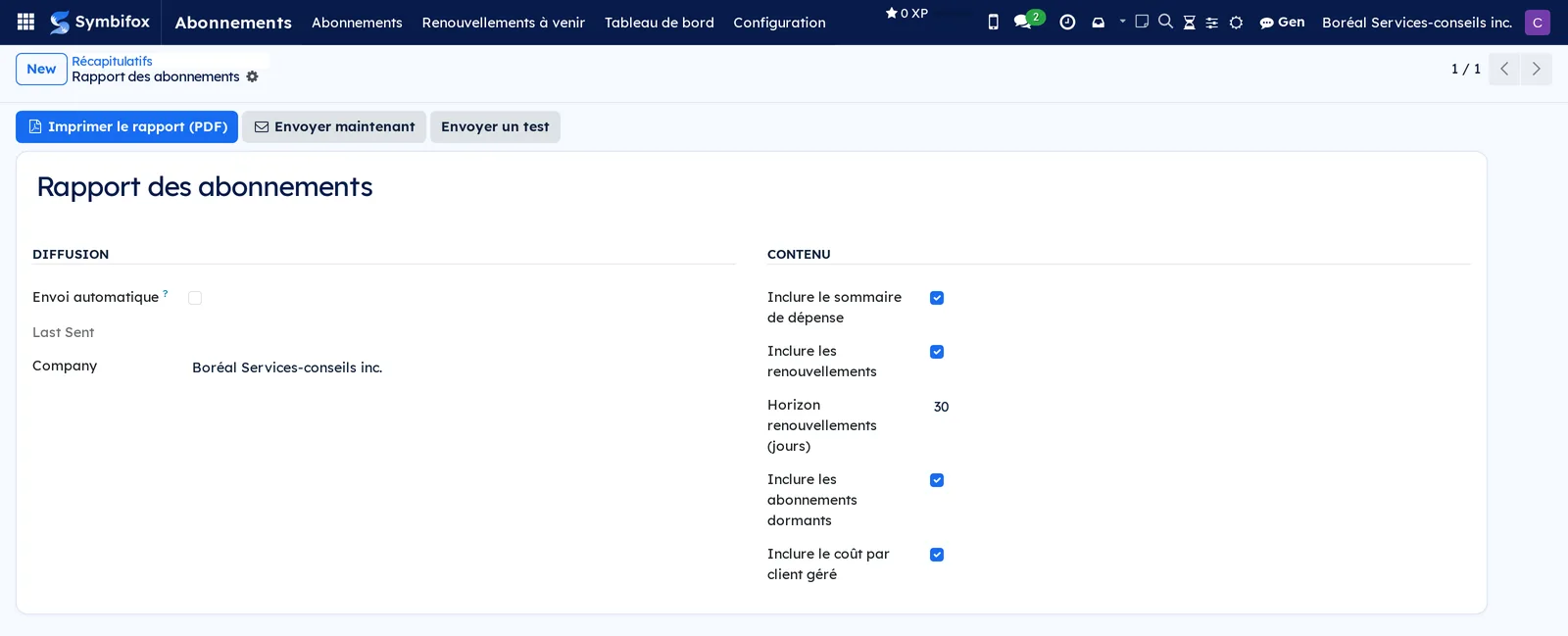
- Check what the report must contain: Inclure le sommaire de dépense (include the spending summary), Inclure les renouvellements (include the renewals), Inclure les abonnements dormants (include dormant subscriptions), Inclure le coût par client géré (include the cost per managed client).
- Set the Horizon renouvellements (jours).
- Select Imprimer le rapport (PDF) (print the report) to get it right away.
- For periodic distribution, add the recipients and check Envoi automatique (automatic send).
- If needed, select Envoyer un test (send a test) first, then Envoyer maintenant (send now).
The report comes out as a PDF, in the company's colours. The supplied configuration is in manual mode: nothing goes out until automatic sending is checked.
Open the vendor's portal#
- Open the subscription.
- Select Portail fournisseur (vendor portal).
The vendor's page opens in a new tab, at the address recorded in URL portail fournisseur (vendor portal URL). The Référence fournisseur (vendor reference) and the Méthode de paiement (payment method) noted alongside save you from hunting for who pays what, and with which card.
View a contact's subscriptions#
- Open the contact's form in Contacts.
- Select the shortcut at the top of the form that counts the subscriptions.
A client's form shows the subscriptions managed on their behalf; a vendor's form shows the ones the vendor bills.
Read the dashboard#
- Open Abonnements › Tableau de bord (dashboard).
- Choose the measure to total, for example the monthly cost.
- Cross rows and columns by vendor, by category, by managed client or by month.
- Switch to the graph for a quick read, or download the table.
This is where you read the organization's recurring total, and how it breaks down.
The menus, one by one#
Abonnements: the main menu, visible from the Utilisateur group up.
Abonnements › Abonnements: the full register, in list view by default, under the Actifs (active) filter, with card, pivot and graph views. The columns give the Référence (reference), the name, the Fournisseur, the Géré pour le client, the category, the Cycle, the amount per cycle and its currency, the Coût mensualisé, the next renewal and the state. Empty in the demo; the home screen then explains what the register collects.
Abonnements › Renouvellements à venir: the same list, limited to the next thirty days, in list and card views. Empty in the demo.
Abonnements › Tableau de bord: a pivot table, backed by a graph and a list, with the Measures selector and the flip and download controls. Empty in the demo.
Abonnements › Configuration: a grouping menu, for the Gestionnaire group only.
Abonnements › Configuration › Étiquettes: the list of tags and their free colour, which their badges show on the subscription form and kanban. Six in the demo: “Certificat”, “Critique”, “Infrastructure”, “Membership”, “Nom de domaine” and “SaaS”.
Abonnements › Configuration › Rapports et envois automatiques: the report configurations, their content and their distribution. One in the demo, named “Rapport des abonnements”, in manual mode.
Reference#
Fields of the Subscription form#
| Field | Description | Required or default |
|---|---|---|
| Name | The service as colleagues call it. | Required |
| Référence | Unique number assigned at creation. | Automatic |
| Fournisseur | The third party that bills the subscription. | Required |
| Géré pour le client | Client on whose behalf the subscription is administered. | Empty |
| Responsable (responsible) | Person who follows the subscription. | You |
| Category, Étiquettes | Nature of the service, and free sorting. | Online software |
| State | Brouillon (draft), Actif, Suspendu (suspended), Résilié (cancelled) or Expiré (expired). | Brouillon |
| Cycle, Montant par cycle | How often and how much is billed at each due date. | Mensuel (monthly) |
| Coût mensualisé | Amount brought back to the month, to compare and to total. | Calculated |
| Start date, Fin prévue (planned end), Prochain renouvellement | Start, known end, and next due date calculated. | Today |
| Préavis (jours) | Time needed to cancel before an automatic renewal. | 30 |
| Refacturé au client, Markup (%), Montant fixe refacturé (fixed rebilled amount), Produit de refacturation (rebilling product) | Rebilling terms for the managed client. | Cleared |
| Seuil d'alerte hausse (%) | Gap beyond which a bill received triggers an alert. | 15 |
| Total payé (vie), Total refacturé (vie), Marge (vie), Marge (%) | Lifetime totals paid, rebilled and margin. | Calculated |
| Dormant, Dernière facture fournisseur (last vendor bill) | Signal of a probable abandon, and date of the last bill received. | Calculated |
| Référence fournisseur, URL portail fournisseur, Méthode de paiement, Notes | Cues for finding the contract at the vendor. | Optional |
Fields of the rebilling dialog#
| Field | Description | Required or default |
|---|---|---|
| Facture fournisseur | Original bill; left empty for a flat fee with no upstream bill. | Optional |
| Coût (facture fournisseur) (cost from the vendor bill) | Amount taken from the original bill. | Prefilled |
| Mode, Markup (%), Montant fixe | At cost, with a percentage margin, or for a fixed amount. | Au coût |
| Montant final refacturé | What will go on the client invoice. | Calculated |
| Description de ligne | Wording the client sees on the invoice. | Required |
| Produit, Date de facturation, Journal | Accounting details of the invoice created. | Optional |
Fields of the report form#
| Field | Description | Required or default |
|---|---|---|
| Destinataires (recipients) | People who will receive the report. | Empty |
| Envoi automatique | Cleared, the configuration only produces the PDF on request. | Cleared |
| Horizon renouvellements (jours) | Window covered by the renewals section. | 30 |
| Inclure le sommaire de dépense, Inclure les renouvellements, Inclure les abonnements dormants, Inclure le coût par client géré | The four sections of the report. | Checked |
Reports and exports#
- Rapport des abonnements (subscription report): the summary PDF, with the spending summary, the renewals in the chosen window, the dormant subscriptions and the cost per managed client. Obtained through Imprimer le rapport (PDF), or sent by email.
- The dashboard downloads to a spreadsheet from its pivot view.
- Lists export through Actions › Export (see Common actions in every application).
Automations#
- Each day, a renewal activity is raised on the subscriptions whose due date, notice period deducted, falls in the alert window. A subscription whose notice period already covers the whole cycle is left out, for the reason explained in Understanding.
- Each day, the report configurations set to Envoi automatique go out to their recipients; those left in manual mode never go out on their own.
- When a linked vendor bill is saved, the totals are recalculated and an alert is logged in the chatter if the amount exceeds the threshold.
- The Dormant flag and the Prochain renouvellement are recalculated on their own, with no intervention.
Public pages and portal#
None. The register is an internal tool: a client sees what you rebill on their invoice, not the subscription behind it.
Modules that extend this application#
Three bridges, all discreet, all optional.
The second brings the recurring total to where the day starts.
The third removes a well-known double entry.
Understanding#
A register, not a sales contract. This application tracks what you pay, not what you sell by subscription. It lives on the vendor side: the fact that some lines are rebilled to a client is a consequence, not the starting point. That is why the vendor is required and the client is optional.
The monthly cost makes cycles comparable. Adding an annual subscription and a monthly one means nothing. By bringing everything back to the month, the application gives a recurring total you can follow from month to month, and compare from one vendor to another.
A reminder that always comes back stops being read. The renewal reminder comes up when the due date, notice period deducted, enters the alert window. On a monthly subscription with a thirty-day notice period, that condition is always true: the activity came back on every run, often already late, with no decision left to take. Those cases are now left out. Quarterly and longer cycles do not change: their window stays shut most of the year, and that is exactly what makes the alert useful when it opens.
Dormant does not mean cancelled. The flag reports an absence of bills, not the end of a contract. A vendor who bills late, a badly set cycle or a forgotten bill produce the same signal. It is an invitation to check, not a verdict.
The hosting bridge synchronizes nothing. It creates a subscription from a domain, once, at your request, then steps aside. Continuous synchronization between two registers that do not serve the same purpose always ends up overwriting a correction made by hand; better a bridge you cross knowingly.
Troubleshooting#
| Symptom | Likely cause | Fix |
|---|---|---|
| The Configuration menu does not appear. | You are not in the subscriptions Gestionnaire group. | Ask to be added to the group. |
| Refacturer au client has no effect, or is missing. | The subscription has no Géré pour le client, or Refacturé au client is cleared. | Fill in the client, check the rebilling box, then start again. |
| The Coût mensualisé stays at zero. | The Cycle is Unique (one-time) or À la demande (on demand), or the amount is empty. | Enter an amount and choose a periodic cycle. |
| No renewal reminder comes up on a monthly subscription. | The notice period covers the whole cycle: the window would never shut. | Reduce the Préavis (jours), or track those subscriptions through the report rather than through activities. |
| The report never goes out. | Envoi automatique is cleared, or no recipient is listed. | Add the recipients, then check automatic sending. |
| A subscription is marked Dormant although it is paid on time. | No vendor bill has been linked to it. | Link the bills received, or correct the cycle if it is longer than declared. |
| Créer un abonnement no longer appears on a domain name. | A subscription has already been created from that domain. | Select the shortcut at the top of the form that opens the linked subscription. |
See also#
- Invoicing: the vendor bills linked and the client invoices produced.
- Contacts: the records of vendors and managed clients.
- Hosting management: the domain names a subscription can be born from.
- My desk, Dashboard and Progress and To-do, Notepad and Timer: the summary card and the daily digest.
- Operating budgets, Common actions in every application.