

Part 7 · Platform, hosting and artificial intelligence
Seats
The seat entitlement of a hosted instance: what was purchased, what is occupied, how to add a seat and how to free one up.
The Sièges (seats) application shows how many accounts a hosted instance may open, how many are in use and how many remain. It is meant for the person who administers the organization's accounts, not for the team at work. It serves two purposes: adding a seat while knowing in advance what that commits you to, and spotting paid accounts that nobody uses. On an installation that is not under any subscription, the application stays inactive and imposes no cap.
Overview#
A hosting subscription buys a seat entitlement for the length of the term, not a monthly count of active users. The entitlement is bought once, holds until the end of the term, and is used up as accounts are opened.
The Mes sièges (my seats) screen brings all of this together on one page.
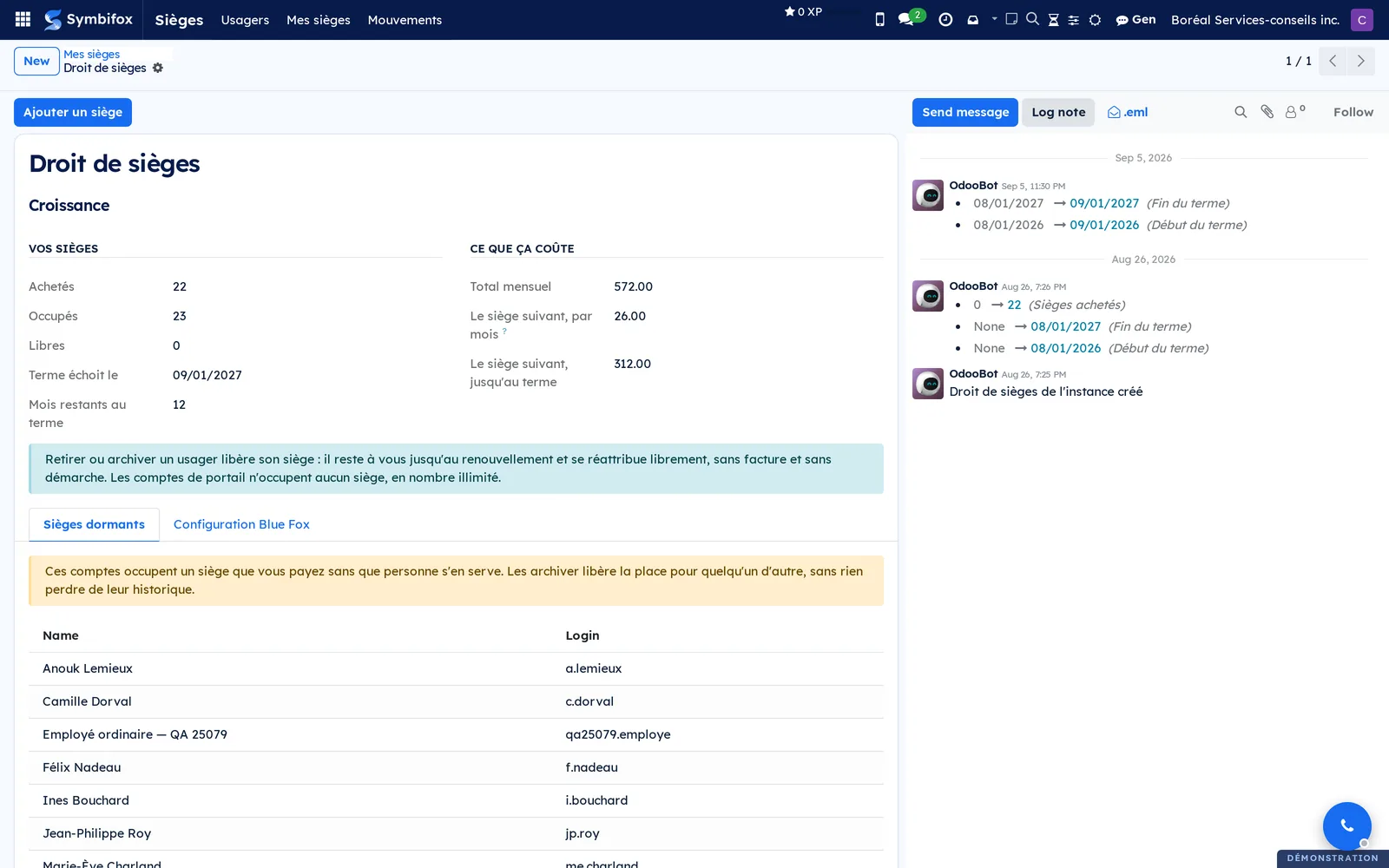
Four concepts are enough.
- Seat: the place an internal account takes up. A portal account takes up no seat, and there is no limit on the number of portal accounts.
- Entitlement: the number of seats purchased, with the start and end dates of the term.
- Movement: the record of a seat addition, with what it changes and the date it was requested.
- Dormant seat: an account that takes up a place although nobody has signed in with it for a long time. Declared technical accounts are left out, because an integration works without signing in.
The cap is not a wall but a toll gate. Creating an account beyond the entitlement is refused, but the administration adds a seat itself, through a screen that states what it commits you to before you confirm. The accounts themselves are created and edited in Settings and brand identity; Sièges only shows the side of them that touches the purchased entitlement.
Configuration#
Access and permissions#
A single group exists: Administration des usagers de l'instance (instance user administration). It opens the whole application, including adding seats. People without this group do not see Sièges in the main menu.
Keep this group for the one or two people who are accountable for the accounts. Adding seats commits the organization for the rest of the term.
Settings#
The application has no settings page. The host sets two things when it installs the instance, in the Configuration Blue Fox tab of the Mes sièges screen. The first is the number of seats purchased with the term dates; the second is the endpoint that receives seat additions. While these are empty, no cap applies and nothing leaves the instance.
The Seuil de dormance (jours) (dormancy threshold, in days) decides when an account with no sign-in appears in the list of dormant seats.
Base data#
There is no base data to create. The application reads the existing accounts and the entitlement set by the host.
Getting started#
This walkthrough reviews the state of the seats on the Boréal demo, then frees up a place.
- Go to Sièges › Mes sièges.
- Read the Vos sièges (your seats) section: Achetés (purchased), Occupés (occupied), Libres (free), Terme échoit le (term ends on) and Mois restants au terme (months left in the term).
- Open the Sièges dormants (dormant seats) tab and find an account that has never been used.
- Go to Sièges › Usagers (users) and open that account.
- Select Actions › Archive, then confirm.
- Return to Sièges › Mes sièges.
The Occupés counter has dropped by one and Libres has gone up by one. The place can be reassigned freely until renewal, with no invoice and no request.
Common tasks#
Add a seat#
When no free place is left and someone needs to join, you add a seat from the entitlement screen.
- Go to Sièges › Mes sièges.
- Select Ajouter un siège (add a seat).
- Enter the number in Sièges à ajouter (seats to add).
- Read what the dialog states: the entitlement before and after, the monthly difference, the amount up to the end of the term and the tier reached.
- Optional: enter a Motif (reason), which appears in the log.
- Select Confirmer (confirm).
The entitlement increases, and a movement is recorded and sent to the host. The chatter, the message thread at the bottom of the form, keeps a record of the change. The amounts shown come from the organization's subscription agreement.
Free up a seat#
You free a seat by removing an account's access, never by deleting the person: the history of their documents stays linked to them.
- Go to Sièges › Usagers.
- Check the account in the list.
- Select Actions › Archive.
- Confirm.
The account can no longer sign in, and its place becomes free again. The place remains paid for until renewal: someone else can take it at no extra cost.
Find dormant seats#
Paid accounts that nobody opens are the most common source of wasted seats.
- Go to Sièges › Mes sièges.
- Open the Sièges dormants tab.
- Go through the list, which gives the Name and the login of each account.
- For each account you do not need, follow Free up a seat.
The notice at the top of the tab recalls what is at stake: these accounts take up a paid place, and archiving them loses none of their history. An account declared as technical does not appear there, since it works without signing in.
Create an account from the application#
The Usagers menu offers a lighter form, enough to give someone access without going through the general settings.
- Go to Sièges › Usagers.
- Select New.
- Enter the Name and the Email Address.
- Make sure the Company is correct.
- Save.
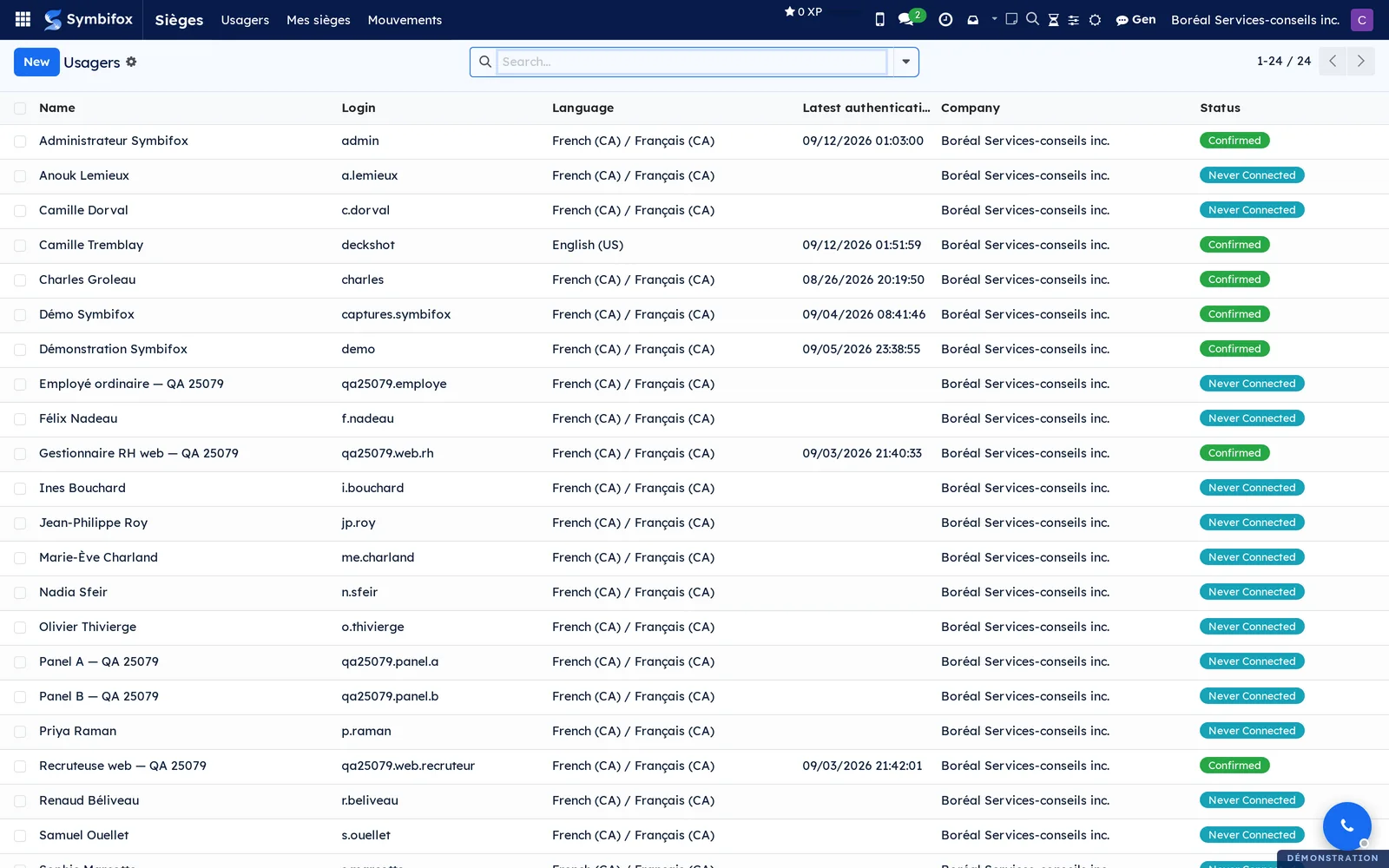
The account appears in the list with the status Never Connected and takes up a seat from then on. If no place is left, the creation is refused with a message that gives the price of one more seat. Add it from Sièges › Mes sièges, with Ajouter un siège, then try again.
Track movements#
The movement log answers the question “who added seats, when, and why”.
- Go to Sièges › Mouvements (movements).
- Read the columns: Date, Nature (type), Sièges (seats), Avant (before), Après (after), Écart mensuel (monthly difference), Montant (amount), Par (by) and Transmission.
- Open a line to see its reason and details.
The Transmission column shows whether the movement reached the host. A movement left pending is retried automatically; there is nothing to resend by hand.
The menus, one by one#
The Sièges entry in the main menu appears only to people who hold the user administration group. It opens three screens.
- Sièges › Usagers: the list of the instance's accounts, 24 on the demo. Columns: Name, Login, Language, Latest authentication, Company and Status. The status separates Confirmed accounts from those Never Connected, which gives a first reading of unused places.
- Sièges › Mes sièges: the seat entitlement screen, described in Overview. It holds Ajouter un siège and the two tabs Sièges dormants and Configuration Blue Fox.
- Sièges › Mouvements: the log of additions, empty on the demo as long as no seat has been added from the entitlement screen.
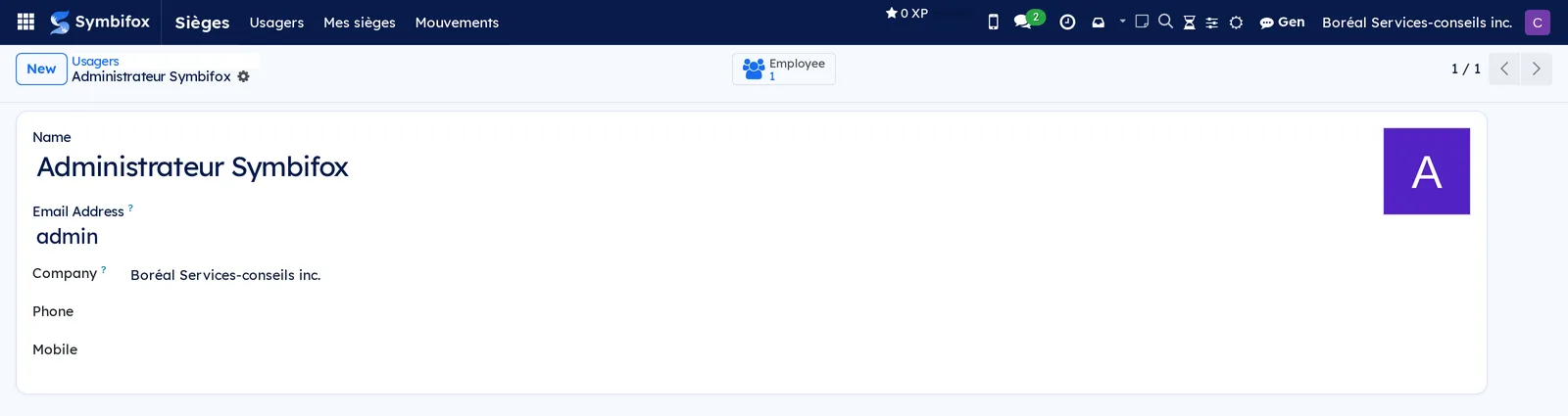
The account form opened from Usagers is deliberately short: name, address, company and contact details, with a shortcut to the matching employee record at the top of the form.
Reference#
Fields of the Droit de sièges form#
| Field | Description | Required or default |
|---|---|---|
| Référence (reference) | Identifier of the instance's seat entitlement. | Required |
| Sièges achetés (seats purchased) | Number of places covered by the subscription. Zero leaves the application inactive. | Set by the host |
| Début du terme, Fin du terme (term start, term end) | Bounds of the current subscription. | Set by the host |
| Occupés, Libres | Places taken by internal accounts, and the balance. | Computed |
| Palier (tier) | Current tier of the subscription agreement. | Computed |
| Total mensuel (monthly total) | Monthly amount of the current entitlement. | Computed |
| Le siège suivant, par mois (next seat, per month) | Difference between the current total and the total with one more seat. | Computed |
| Le siège suivant, jusqu'au terme (next seat, to the end of the term) | The same difference, applied to the months left. | Computed |
| Mois restants au terme | Full months before the term ends. | Computed |
| Seuil de dormance (jours) | Time without sign-in after which an account counts as dormant. | Value set at installation |
| Tab Sièges dormants | Paid accounts with no recent sign-in, excluding technical accounts. | Computed |
| Tab Configuration Blue Fox | Purchased entitlement, dates and transmission endpoint. | Reserved for the host |
Fields of the Ajouter des sièges dialog#
| Field | Description | Required or default |
|---|---|---|
| Sièges à ajouter | Number of places requested. | Required |
| Droit actuel, Droit après (current entitlement, entitlement after) | Number of places before and after the addition. | Computed |
| Total mensuel actuel, Total mensuel après (current monthly total, monthly total after) | Monthly amounts before and after. | Computed |
| Écart mensuel, À facturer maintenant (to bill now) | Monthly difference, and its carry-over to the remaining months. | Computed |
| Palier après, Change de palier (tier after, tier change) | Tier reached, and whether it changes. | Computed |
| Hors grille (outside the price grid) | Flags a request that the agreement does not cover. | Cleared |
| Motif | Free-text note copied to the movement log. | Optional |
Reports and exports#
The application produces no report. The movement list and the user list can be exported with Actions › Export, as everywhere in Symbifox.
Automations#
- A movement that could not be sent to the host is retried every six hours until it goes through. A movement created on an unconfigured instance is not a failure: it simply waits where it is.
- The counters for occupied places, free places and dormant seats are recalculated when the screen opens, with no action on your part.
- Creating an account beyond the purchased entitlement is refused, with a message that gives the price of one more seat and points to Ajouter un siège.
Public pages and portal#
The application has no public page and no portal page.
Modules that extend this application#
No satellite module extends this application. Sièges stands on its own, and most account management stays in Settings and brand identity.
Understanding#
Why an entitlement rather than a count. A subscription buys places for the length of the term. A person who leaves frees their place, and the organization reassigns it without a request or new cost. That is why an archived account does not need to be reported to the host: the purchased entitlement has not changed.
Why the cap is a toll gate. Blocking account creation outright would leave a new person waiting through an exchange of emails. The refusal gives the price and the way forward: stating the cost, then letting you confirm, gives the same control without stopping work. Confirming creates the movement, and the movement is a commitment.
Why the next seat does not cost the listed price of a seat. At a tier boundary, the agreement reprices every place, not just the new one. The screen therefore shows the difference between the two monthly totals, which is the amount actually billed. A unit price would be misleading.
Why show dormant seats. An account opened for an internship that ended two years ago costs as much as an account used every day. The list is deliberately prominent: it is there to reduce the bill, not to justify it.
Why the application may do nothing. Until the host sets a seat entitlement, no cap applies and nothing is sent anywhere. A self-hosted installation, which is not under any subscription, therefore communicates with no one. This is the default state, and it has no consequences.
Troubleshooting#
| Symptom | Probable cause | Fix |
|---|---|---|
| Sièges does not appear in the main menu. | The account does not have the user administration group. | Have the group added on the user's form, in the general settings. |
| Creating an account is refused, with a message about the number of seats. | The purchased entitlement has been reached. | Free up a place by archiving a dormant account, or add a seat from Sièges › Mes sièges, then try again. |
| The Occupés counter does not drop after someone leaves. | The account was edited but not archived. | Archive the account from Sièges › Usagers. |
| An integration account appears among the dormant seats. | It is not declared as a technical account. | Ask the host to declare it: this setting is not open to client administrators. |
| A movement remains pending transmission. | The host's endpoint is not configured, or it was unavailable. | Do not repeat the action: the automatic retry handles it every six hours. |
| The counters stay at zero and nothing is capped. | No seat entitlement has been set on the instance. | Normal on a self-hosted installation; on a hosted instance, report it to the host. |