

Part 0 · Getting started with Symbifox
Welcome to Symbifox
What Symbifox is, who this guide is for, how it is organized, its reading conventions, its demo company and where to find help.
This chapter introduces Symbifox, presents the guide and explains how to read it. It is for anyone about to work in Symbifox, whatever their role. It takes a quarter of an hour to read and saves you looking elsewhere for the conventions used in every other chapter. The rest of the guide assumes you have read it.
What Symbifox is#
Symbifox is an ERP built on Odoo 18 Community, as published by Odoo, with a suite of more than 200 modules by Blue Fox added on top. Odoo provides the core applications: contacts, sales, projects, invoicing, employees, calendar, website. The Symbifox modules add entire applications, such as Meetings, IT Audit or Secure Transfers, and enrich others with small touches, sometimes a single field or a single button. Nothing is removed from Odoo: what you already know about Odoo still holds here.
Everything runs on your instance: the database, the files, outgoing email, the calculations. An organization uses Symbifox hosted by Blue Fox or installs it on its own servers. This guide covers both cases without distinguishing them, except where the screen really differs. You are free to use the modules for your own operations, including adapting them to your needs. Only using them to provide a product or service to third parties, whether hosted, managed or resold, requires a written agreement.
Who this guide is for#
The guide is written for the people who use Symbifox every day: management, assistants, advisors, accounting, human resources. No prior knowledge of Odoo is assumed. The Configuration sections of each chapter are aimed instead at the person who prepares an application for their team: access rights, settings, and base data to create before work starts.
This guide does not cover server installation, module development or the technical administration of hosting. It describes what you see and do on screen.
How the guide is organized#
The guide has eight parts, from getting started to the platform.
- Part 0, getting started with Symbifox: signing in, the home screen, the actions common to all applications and the personal tools in the top bar.
- Part 1, communicating and meeting: Discuss, email, calendar, appointment booking, meeting reports, SMS and phone, letters and link pages.
- Part 2, clients, sales and relationships: contacts, CRM, prospecting, customer experience, subscriptions, electronic signatures, helpdesk, newsletters, surveys, website and editorial workshop.
- Part 3, projects, time and knowledge: projects, schedule, timesheets, hour banks, knowledge base, process maps and documents in Nextcloud.
- Part 4, finance: invoicing, purchases, expenses, operating budgets and donation collection.
- Part 5, people and team: employees, recruitment, gamification, security awareness, celebrations and floor plans.
- Part 6, security, compliance and privacy: the consent and Law 25 register, IT audit, secure transfers, one-time codes and music licences. Law 25 is Québec's Act respecting the protection of personal information in the private sector.
- Part 7, platform, hosting and artificial intelligence: hosting management, seats, the Gen assistant, no-code customization, settings and brand identity, mobile apps.
Each application chapter follows the same outline, always in the same order. It starts with an overview, the configuration and a getting started walkthrough. Then come common tasks, the menus one by one, and the reference for fields and reports. It ends with the modules that extend the application, a section explaining why things behave as they do, a troubleshooting table and cross-references. Looking for a specific procedure? Go straight to the common tasks. Discovering an application? Read the overview, then getting started. The first chapters of part 0 follow a freer outline, because they describe actions that cut across applications rather than one application.
The guide's conventions#
On-screen labels appear in bold, with the exact capitalization and accents of the interface. Menu paths are written with a chevron: Rencontres › Ordres du jour › À venir. Values to enter are in quotation marks, for example enter “Quarterly follow-up” in a title field. Technical module names appear only in Module callouts, in code formatting, so the administration knows what to install.
Several Symbifox modules were written in French, and their menus and buttons still show French in the English interface. The guide keeps those labels in bold exactly as they appear on screen, with their meaning in parentheses the first time. The path above, for example, reads Rencontres (meetings) > Ordres du jour (agendas) > À venir (upcoming).
Six callouts punctuate the text, and each has a fixed meaning.
| Callout | What it announces |
|---|---|
| Note | Useful detail that costs nothing to ignore. |
| Tip | A shortcut or habit that saves time. |
| Important | A condition to meet for the procedure to succeed. |
| Warning | An action whose consequences are hard to undo. |
| Example | A case taken from the demo database. |
| Module | The Symbifox module that provides the function described, what it adds to the screen and what to turn on. |
Procedures are numbered, one action per step, and start with the menu path. Screenshots show the interface in the light theme, at a constant width.
The demo company#
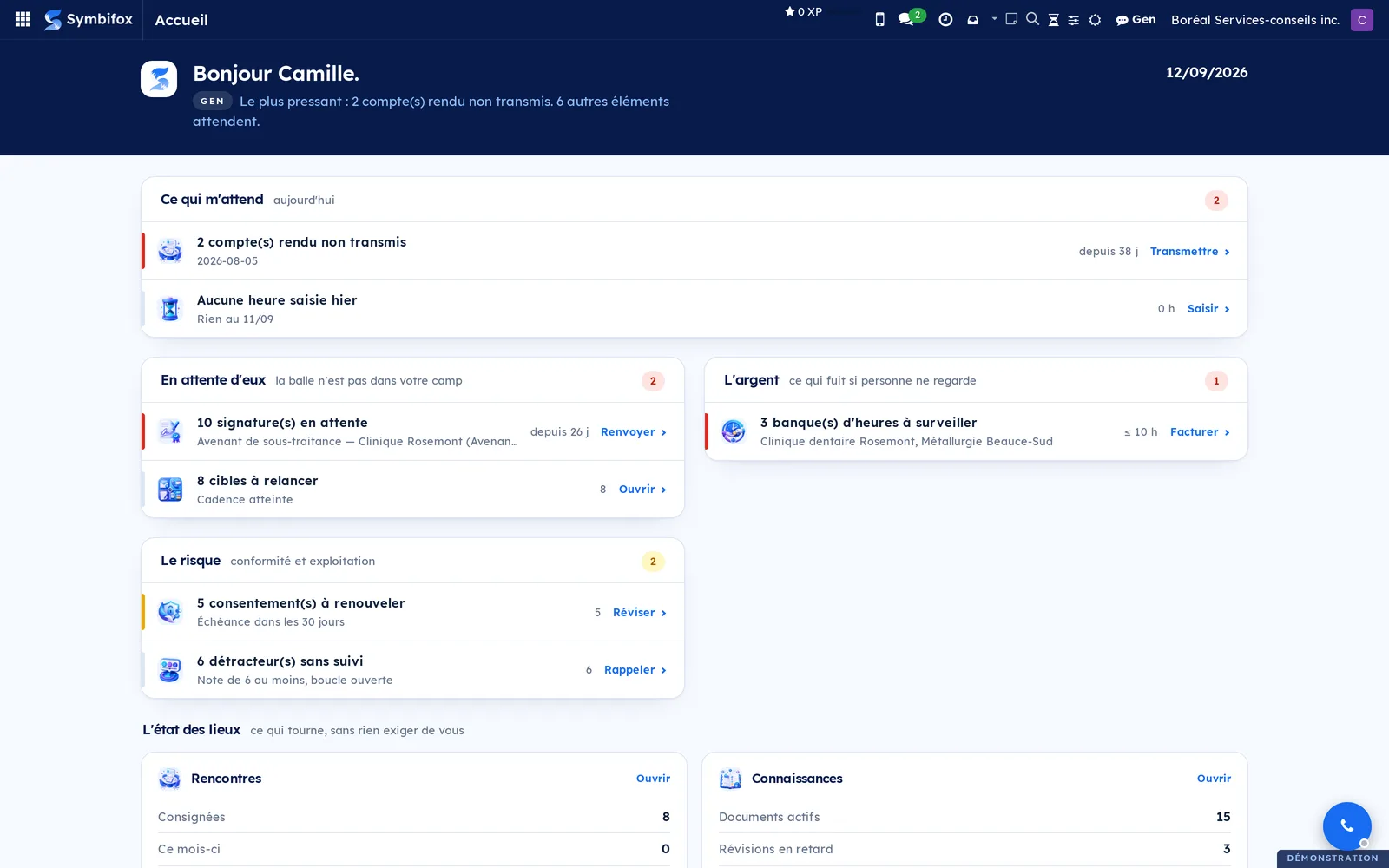
All the screenshots in this guide come from the same demo database, that of Boréal Services-conseils inc., an information technology consulting firm based in Montréal, with about twenty people. This company does not exist. Its clients, including Clinique dentaire Rosemont and Métallurgie Beauce-Sud, its projects, its invoices and its figures are fictitious and can be quoted freely. The person signed in on the screenshots is Camille Tremblay: her first name appears in the greeting banner and her avatar at the top right.
Boréal's home screen sets the tone of the guide. It shows what is waiting for Camille under What's waiting for me, and what is waiting on someone else under Waiting on them. It also covers the money, under Money, and the risk, under Risk.
A few published modules are not installed on this database. They are described in the chapter of their application, marked “module published, not illustrated”, with no screenshot.
Where to get help#
Your Symbifox administration is the first contact for accounts, access rights, data and the settings of your instance. Go to them for a password, a refused access or a module to install.
For anything else, write to bonjour@symbifox.com. The symbifox.com website presents the product and its updates. The module catalogue, with a page for each module, is at symbifox.com/applications.html. The published source code of the modules is at github.com/Symbifox/odoo-modules, with each module's licence.
See also#
- Signing in and finding your way: first sign-in, the home screen, the top bar and your preferences.
- Common actions in every application: views, search, the chatter and activities.
- Mobile apps and browser extension: Symbifox on an Android phone and in the browser.