

Part 6 · Security, compliance and privacy
Privacy (Law 25 and other frameworks)
Provable consents, document classification, a retention schedule, destruction campaigns and a sealed register, under Law 25 or another privacy framework.
Watch it
The Vie privée (privacy) application keeps the register of the consents you obtain, each person's contact preferences, and the life cycle of documents that contain personal information. It is for the person in charge of the protection of personal information, for management, and for anyone who asks for consent day to day. What you get: for each consent, the exact version of the accepted text, the date and the channel; for each destruction, a sealed register entry and a certificate. Québec's Law 25 (the Act respecting the protection of personal information in the private sector) is the built-in framework; other frameworks come as modules.
Overview#
The application's vocabulary fits in a few words. A purpose says why you collect a piece of information (marketing, recording a meeting, client reference). A notice is the text shown to the person. It is versioned, and each version carries a fingerprint (a hash), so you can later prove what was accepted. A consent links a person (the subject), a purpose, a notice version and evidence (signed file, screenshot, portal log). Contact preferences say through which channel a person agrees to be reached, with a Ne pas contacter (do not contact) switch that overrides everything.
The document side follows the same logic. The retention schedule sets a duration and a final disposition for each document type. A document classification ties a Symbifox record (a job application, a project file, an invoice) to a category of personal information, a sensitivity level and a retention schedule rule. A retention end date is calculated from them. Destruction requests and destruction campaigns remove the documents that have reached their term. Each run feeds the destruction register, which is immutable and chained by hash. Anonymization assessments document the three criteria of the Québec regulation before a data set is treated as anonymous.
All of this rests on a regulatory framework: Law 25 by default, or the GDPR, the UK GDPR, PIPEDA or New Zealand's Privacy Act 2020 when the matching module is installed. The framework holds the facts (authority, title of the person in charge, age of consent, reporting deadlines) that emails and certificates quote.
Each client organization can also carry its designation: the person in charge of the protection of its personal information and the address where it agrees to receive the notices that concern it. The breach notices a provider sends to its clients and the confidentiality-incident register rely on it; they have their own chapter, Confidentiality incidents and breach notices.
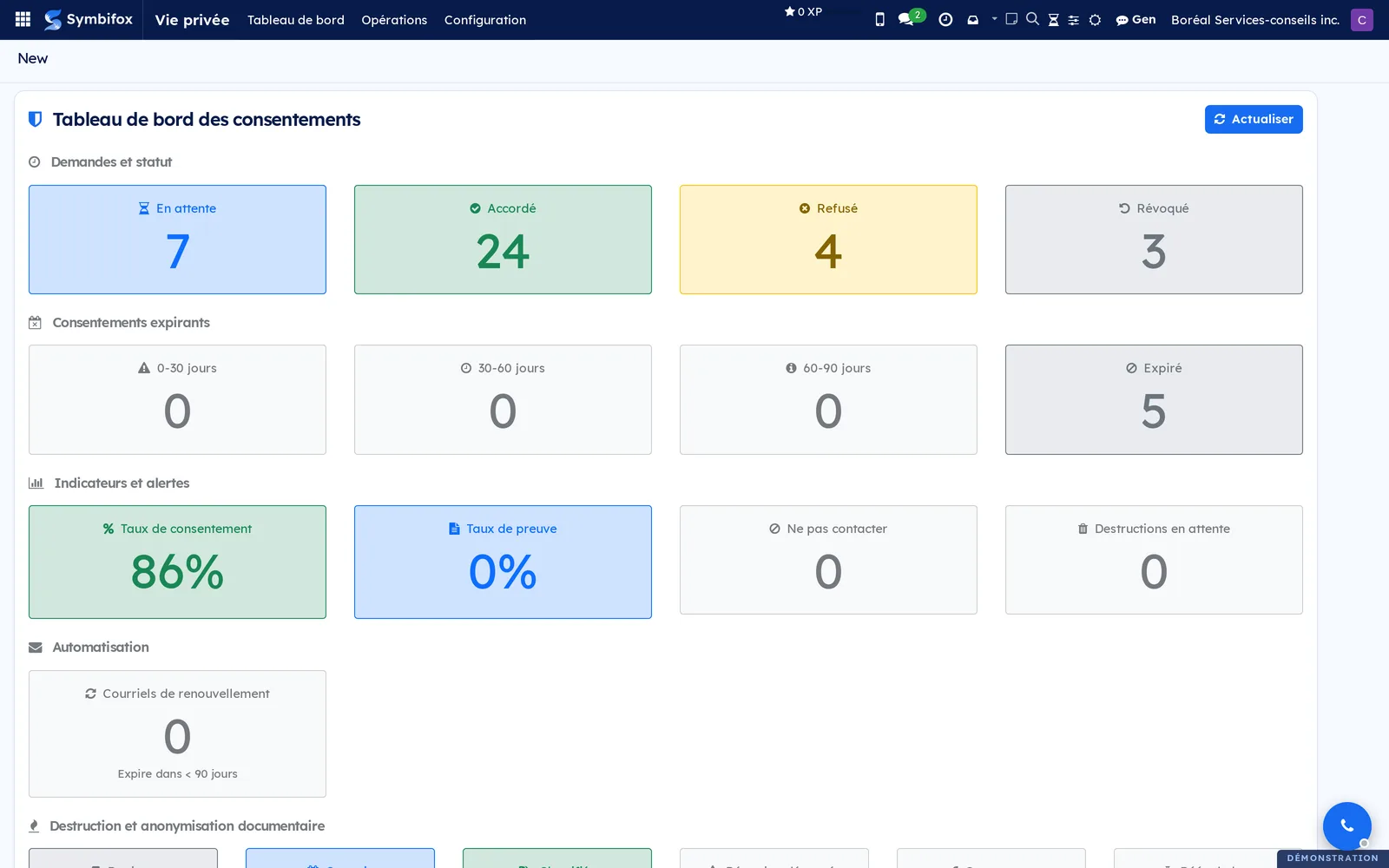
The dashboard opens the application. Each indicator is a button that leads to the matching filtered list.
The application plugs into Contacts (the Vie privée (Loi 25) tab, meaning privacy under Law 25, and shortcut buttons at the top of the form), into Project (the Consentements (consents) tab) and into the client portal, where the person answers a request directly. Signatures go through DocuSeal or LibreSign; Symbifox's native signature is described in Electronic signatures.
Configuration#
Access and permissions#
Three groups stack on top of each other. Utilisateur vie privée (privacy user) views consents, classifications and the register. Gestionnaire vie privée (privacy manager) creates and edits consents, classifications and campaigns, creates destruction requests, and sees the Configuration menu. It is also the only group that can change an organization's privacy officer designation. Responsable vie privée (privacy officer) approves and runs destructions, approves anonymization assessments and has access to the Registre de destruction (destruction register). You assign the groups in Settings › Users. Portal users see only their own consents and preferences.
Settings#
You choose the default regulatory framework on the company, in Settings › Companies, in Cadre de confidentialité par défaut (default privacy framework). You can override it record by record (consent, notice, retention rule, assessment). The signature integrations are set up under Vie privée › Configuration › DocuSeal or LibreSign; each configuration offers Tester la connexion (test the connection). Automatic reminders are defined under Séquences de courriel (email sequences).
Base data#
Before you ask for a first consent, check three things. The purposes: the demo ships eighteen (marketing, recording, transcription, reference, logo, case study, service communications, sharing with a third party, software agent, sensitive data, and six purposes specific to childcare services). The notices: one bilingual text per purpose, with at least one version in force. The retention schedule: eight rules are supplied (contracts, invoices, employee files, projects, correspondence, medical documents, credentials, consent registers), each with its legal basis. Before you send a notice to a client, also designate its privacy officer and its receiving address (see Designate an organization's privacy officer).
Getting started#
This walkthrough asks a Boréal contact for marketing consent, then records the answer.
- Open Vie privée. The dashboard appears with its counters.
- Go to Opérations (operations) > Consentements and select New.
- In Sujet (subject), enter “Clinique dentaire Rosemont” and select the contact.
- In Objet (purpose), choose “Communications marketing et infolettres”; in Modèle de consentement (consent template), choose the matching notice. The current version fills in by itself.
- In Méthode de collecte (collection method), choose “Courriel” (email), then select Save.
- Select Envoyer la demande (send the request). The status changes to En attente (pending) and the request email goes out with a link to the portal.
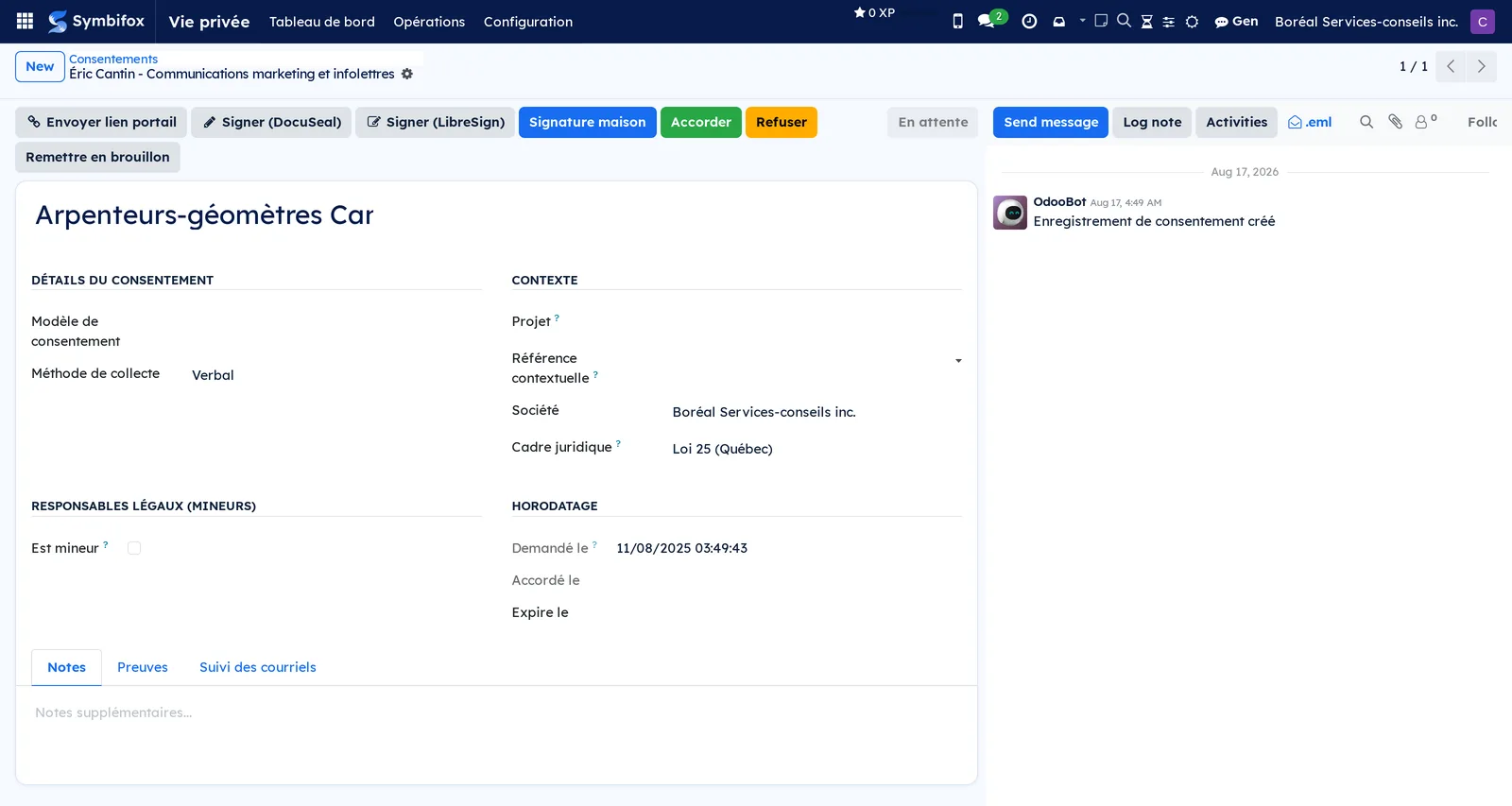
- To simulate the answer, select Accorder (grant). The status changes to Accordé (granted), Expire le (expires on) is set 730 days ahead, and a “Consentement accordé” proof appears in the Preuves (evidence) tab.
The consent form shows the status buttons and the evidence and tracking tabs.
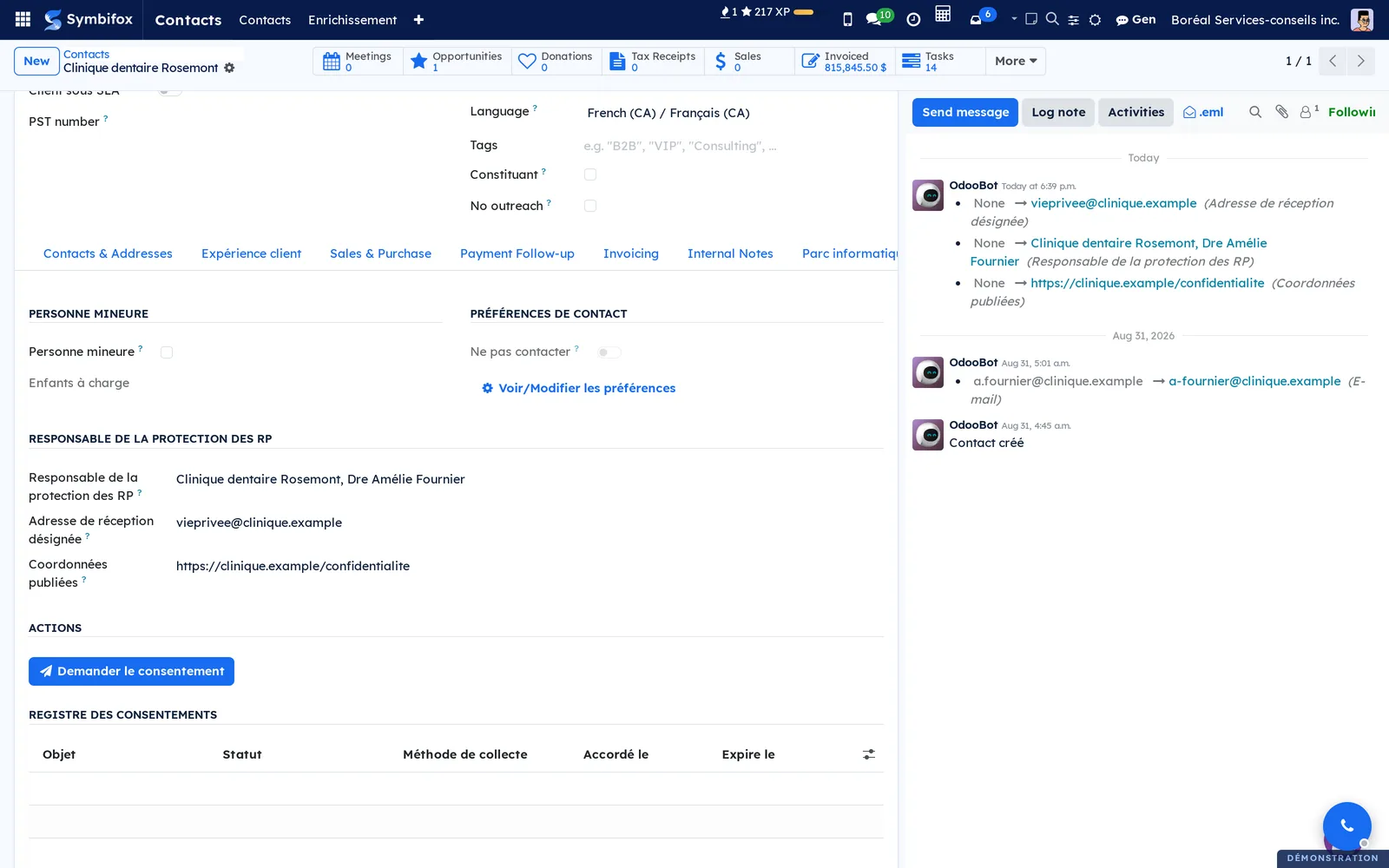
Then open the contact's form: the Vie privée (Loi 25) tab shows the marketing consent as granted.
Common tasks#
Request consent from a contact#
This is the shortest path when you have the person in front of you.
- Go to Contacts, open the contact's form and select Demander le consentement (request consent).
- In the dialog, choose the Objet and the Modèle de consentement, or a Groupe de consentement (consent group) for several purposes at once.
- Optional: link a Projet (project).
- Leave Envoyer une notification par courriel (send an email notification) checked and choose the Méthode de collecte.
- Select Créer les demandes (create the requests).
One En attente consent is created per purpose. If the contact is a minor, the emails go to the Responsables légaux (legal guardians) listed on the contact's form.
Request consents for a project#
A project often groups several contacts to whom the same purpose applies (recording meetings, for example).
- Go to Project, open the project and select Demander le consentement.
- Choose the Sujets du consentement (consent subjects) among the contacts, then the purpose and the notice.
- Select Créer les demandes.
The project's Consentements tab lists the requests. Statut des consentements (consent status) moves from “Aucun consentement” (none) to “En attente”, “Partiel” (partial) or “Tous accordés” (all granted).
Follow up on a pending request#
The contact did not answer, or did not receive the email.
- Go to Vie privée › Opérations › Demandes en attente (pending requests) and open the request.
- Select Envoyer lien portail (send portal link).
The “Your link” email goes out with the link and invites the person to answer the request. The same button appears on a granted consent: the email then invites them to view or withdraw it. The Suivi des courriels (email tracking) tab keeps the count of automatic reminders and the date of the last one; sending the link does not count. To send reminders automatically, see Set up a reminder sequence.
Have a consent request signed#
When the purpose requires a signature, the request can go through DocuSeal or through LibreSign (Nextcloud).
- Open the consent and select Signer (DocuSeal) or Signer (LibreSign) (sign).
- In the dialog, choose the Modèle DocuSeal or the Modèle LibreSign (DocuSeal or LibreSign template) tied to the purpose.
- Optional: add a Message personnalisé (custom message).
- Select Envoyer pour signature (send for signature).
The consent's DocuSeal or LibreSign tab tracks the signature status (pending, completed, declined, expired). Once signed, the consent changes to Accordé and the signed document becomes evidence.
Grant, refuse or withdraw a consent#
An agreement received through another channel (verbal, paper form) is recorded by hand; a withdrawal always goes through the dialog.
- Open the consent.
- For an agreement, select Accorder; for a refusal, select Refuser (refuse). Add the evidence in the Preuves tab (file, verbal confirmation note).
- For a withdrawal, select Révoquer (revoke), choose the Raison (reason) and, if needed, check Mettre à jour les préférences du contact (update the contact's preferences).
- Select Retirer le consentement (withdraw consent).
The status and its date are frozen. The chatter (the message thread at the bottom of the form) keeps every change.
Renew a consent#
A consent expires at the end of its default validity.
- Open the consent. The dashboard lists them by bracket: 0-30, 30-60 and 60-90 days.
- Select Renouveler (renew).
- Send the new request the same way as the first one.
The Renouvellement (renewal) tab links the old consent to the new one; Voir l'historique complet (view full history) shows the whole chain.
Manage contact preferences#
Preferences say through which channel a person agrees to be reached.
- Go to Contacts, open the contact's form and select Voir/Modifier les préférences (view or edit preferences).
- Check or clear Autoriser les courriels de service (allow service emails), Autoriser les courriels marketing (allow marketing emails), Autoriser les appels téléphoniques (allow phone calls) and Autoriser les SMS (allow text messages).
- To cut off every channel, check Ne pas contacter.
- If needed, fill in Langue préférée (preferred language), Heure de contact préférée (preferred contact time) and Raison du désabonnement (unsubscribe reason).
The contact form's Consentement marketing (marketing consent), Consentement enregistrement (recording consent), Consentement référence (reference consent) and Ne pas contacter indicators update. Preferences are created automatically on the first change; Préférences de contact (contact preferences) under Configuration lists them all.
Designate an organization's privacy officer#
A legal notice never goes to a guessed address: each client organization says who receives its notices, and where.
- Go to Contacts and open the organization's form.
- Open the Vie privée (Loi 25) tab.
- In the Responsable de la protection des RP (privacy officer) group, choose the person in the field of the same name.
- Enter the Adresse de réception désignée (designated receiving address), where the organization agrees to receive notices.
- Optional: enter the Coordonnées publiées (published contact details), the page of its website that publishes this person's title and contact details.
- Save.
Each change is recorded in the form's chatter. The group only appears on a company's form, and only a Gestionnaire vie privée can change it. An invalid address is refused. The designation is read on the organization itself, never on a parent company: attaching a client under another one does not redirect its notices. Your own company carries the same fields, in the Vie privée group of its form under Settings › Users & Companies › Companies. Its designated address is the one that consent emails give for reaching your privacy officer. A designated contact cannot be deleted while it is designated, and only an administrator can merge a form that holds or designates a privacy officer.
Classify a document#
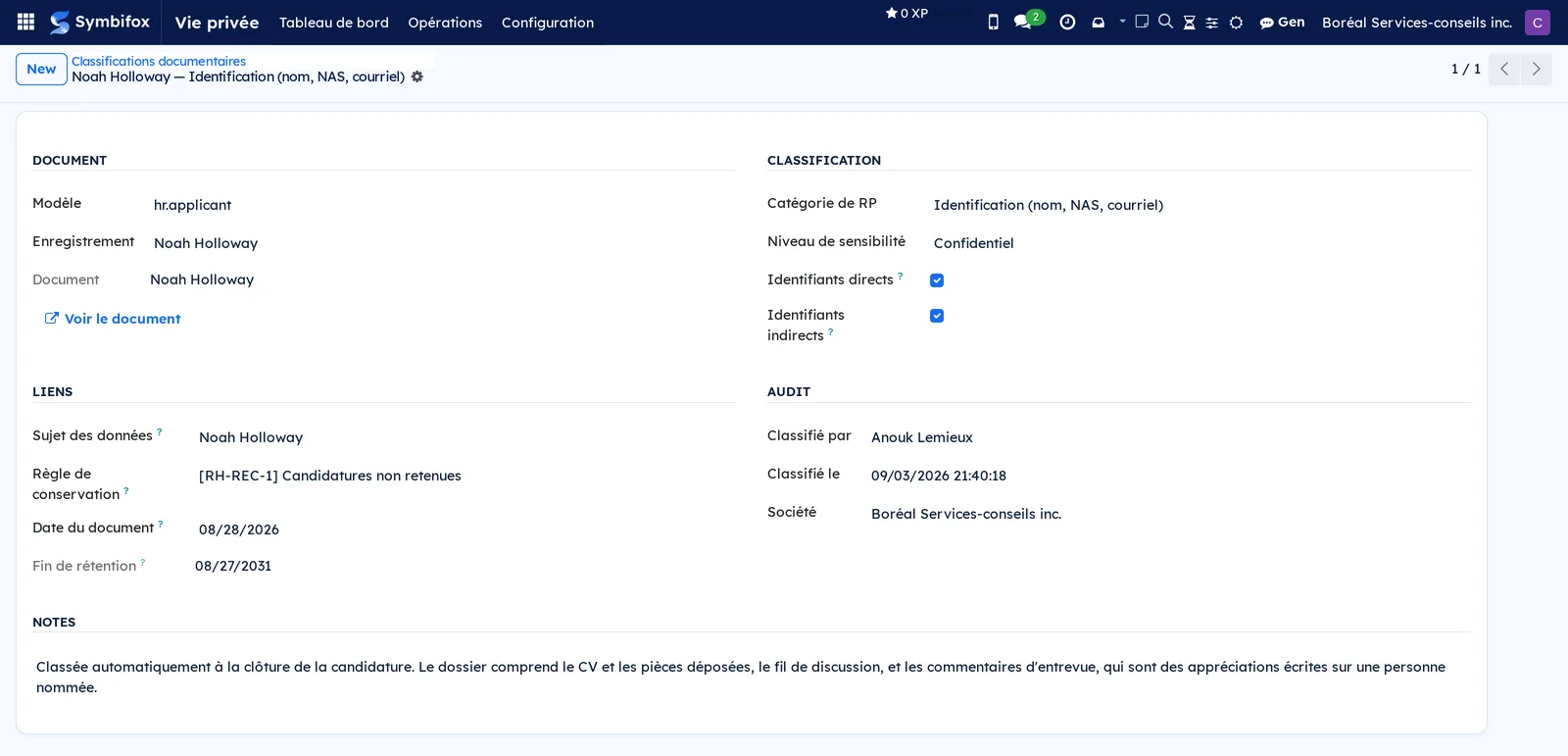
Classifying means stating that a record contains personal information and applying a retention rule to it.
- Go to Vie privée › Configuration › Classifications documentaires (document classifications) and select New.
- Enter the target Modèle (model) and Enregistrement (record). Only the allowed record types can be classified.
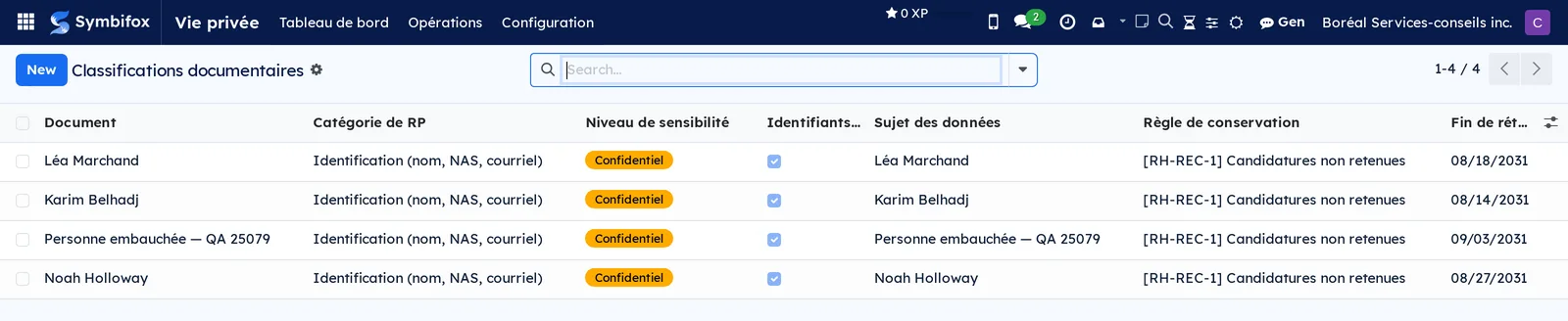
- Choose the Catégorie de RP (personal information category) and the Niveau de sensibilité (sensitivity level); check Identifiants directs (direct identifiers) or Identifiants indirects (indirect identifiers).
- Enter the Sujet des données (data subject), the Règle de conservation (retention rule) and the Date du document (document date).
- Select Save.
Fin de rétention (retention end) is calculated from the document date and the rule. The Voir le document (view document) link opens the classified record.
Create a retention rule#
The schedule sets how long a document type lives.
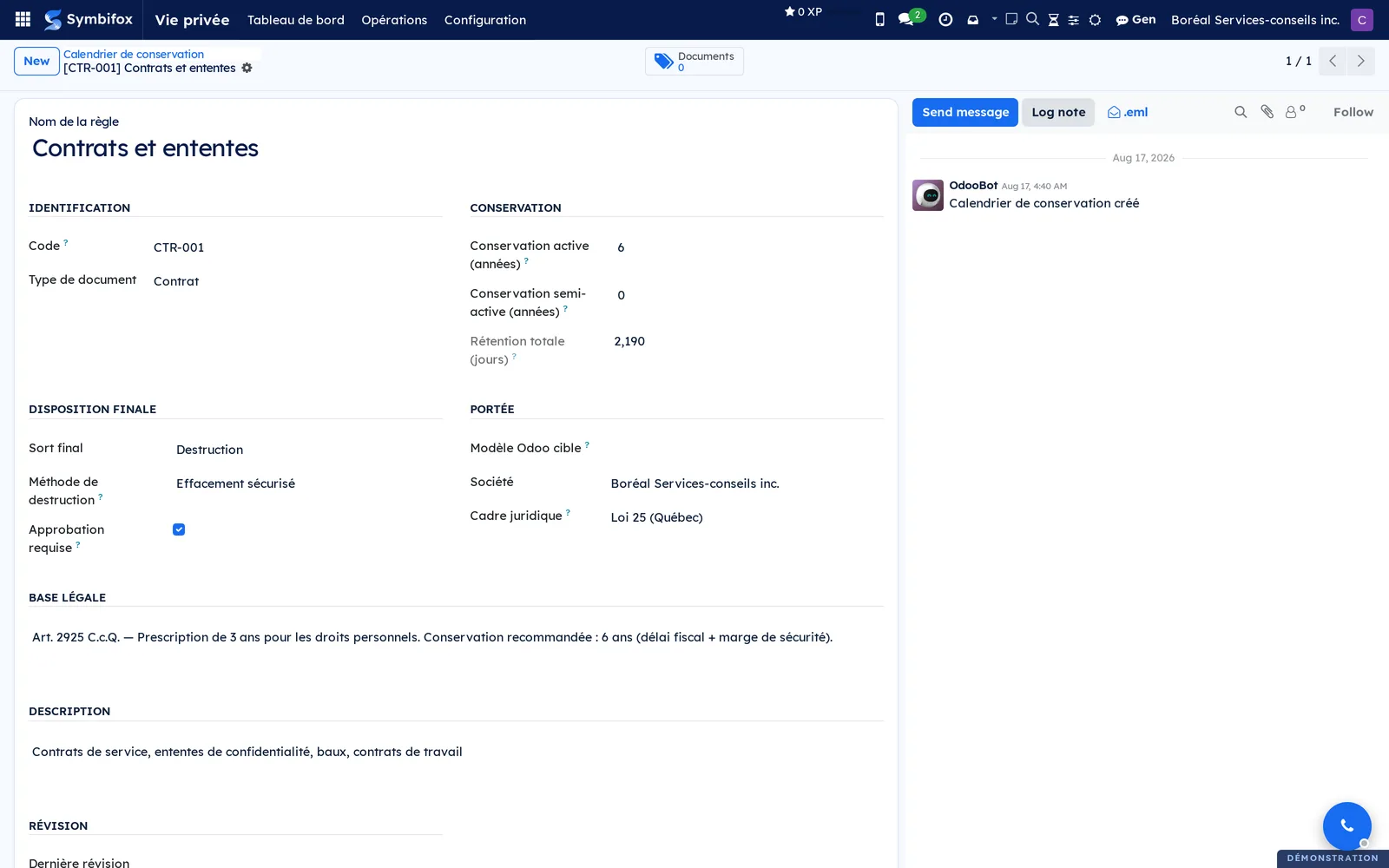
- Go to Vie privée › Configuration › Calendrier de conservation (retention schedule) and select New.
- Enter the Nom de la règle (rule name), the Code (for example “CTR-001”) and the Type de document (document type).
- Enter the Base légale (legal basis, required) and the Conservation active (années) (active retention, years); add the Conservation semi-active (années) (semi-active retention, years) if applicable.
- Choose the Sort final (final disposition) and the Méthode de destruction (destruction method); check Approbation requise (approval required) if an officer must approve.
- Select Save.
Rétention totale (jours) (total retention, days) is calculated. The Documents shortcut at the top of the form counts the linked classifications.
Launch a destruction campaign#
A campaign processes, as a batch, the documents whose retention has expired.
- Go to Vie privée › Opérations › Campagnes de destruction (destruction campaigns) and select New.
- Enter the Nom (name) and the Date limite (cut-off date); if needed, limit the campaign to one Règle de conservation.
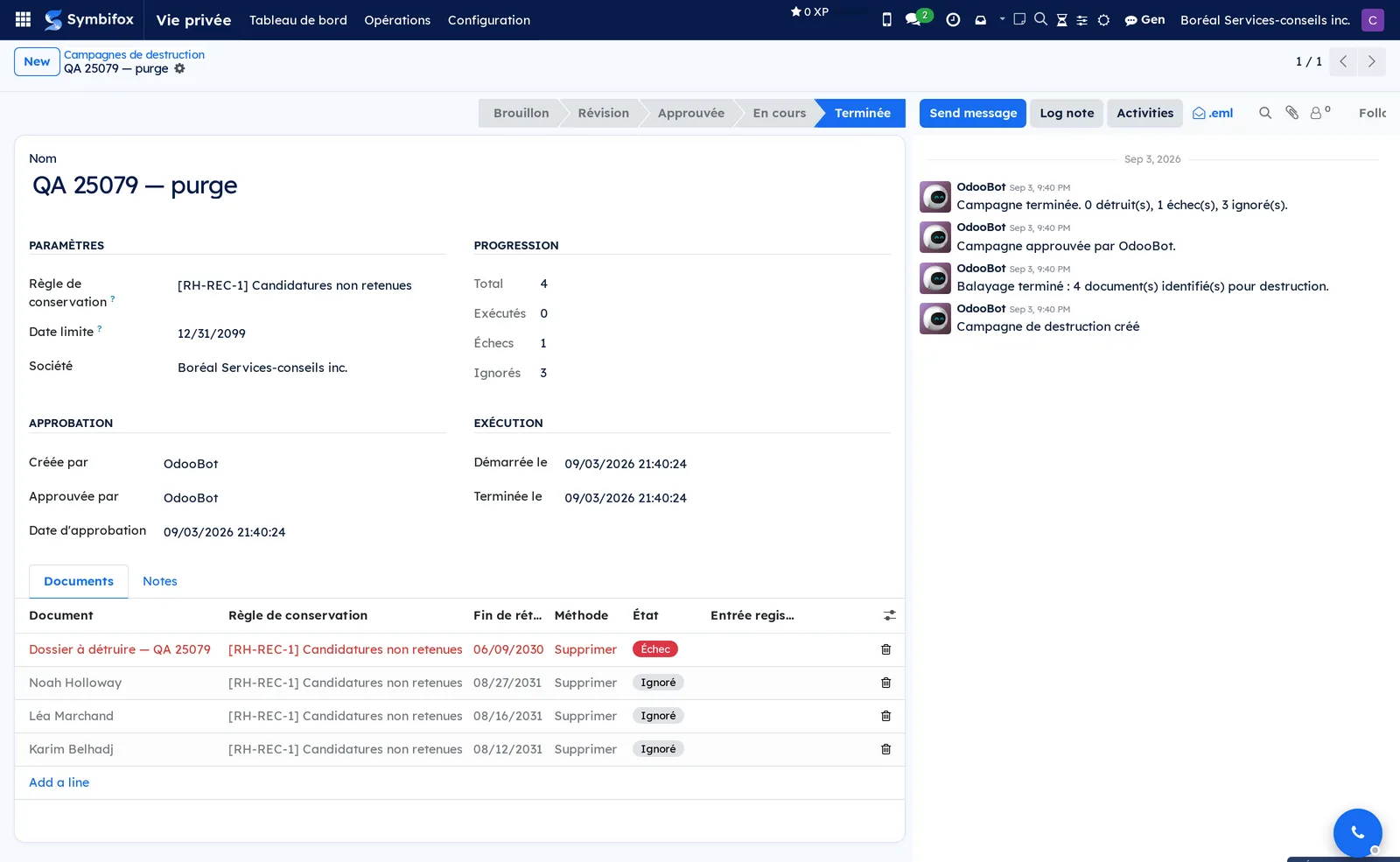
- Select Balayer les documents (scan documents). The Documents tab fills with the expired classifications.
- Review the list; on a line to leave out, select Ignorer (skip).
- A Responsable vie privée selects Approuver (approve), then Exécuter la destruction (run the destruction).
Each line changes to Détruit (destroyed), Échec (failed) or Ignoré (skipped), and one register entry is created per destroyed document.
Process a destruction request#
Requests are created automatically (retention policies, right to erasure) or by hand.
- Go to Vie privée › Opérations › Demandes de destruction (destruction requests) and open the request.
- Check the Type de demande (request type), the Date de destruction prévue (planned destruction date) and the Documents classifiés (classified documents) tab.
- Select Approuver (manager), then Exécuter la destruction (officer), or Annuler (cancel).
The request changes to Exécuté (executed). Journal d'exécution (execution log), Documents réellement détruits (documents actually destroyed) and Documents non détruits (documents not destroyed) say what happened, line by line. Print the destruction certificate from the print menu.
Respond to an erasure request#
A person asks for their information to be deleted.
- Go to Contacts, open the contact's form and select Actions › Demander l'effacement des données (droit à l'oubli) (request data erasure, right to be forgotten).
- Process the new request as described in Process a destruction request.
The request covers all of the contact's classifications. The linked project credentials are securely erased. An activity is created to delete by hand the Nextcloud folder given in Chemin du dossier Nextcloud (Nextcloud folder path).
Conduct an anonymization assessment#
Before you keep a data set in anonymous form, the assessment documents the three criteria.
- Go to Vie privée › Opérations › Évaluations d'anonymisation (anonymization assessments) and select New.
- Describe the data set in the Jeu de données (data set) tab, then select Démarrer l'analyse (start the analysis).
- Fill in the 1. Identifiants directs, 2. Individualisation, 3. Corrélation and 4. Inférence tabs (direct identifiers, individualization, correlation, inference): risk, analysis, measures.
- Record the Techniques used and the Intervalle de réévaluation (mois) (reassessment interval, months).
- Select Compléter l'évaluation (complete the assessment), then, as an officer, Approuver (RPRP) (approve as the person in charge of personal information).
Risque global (overall risk) keeps the highest of the three criteria. Effectivement anonyme (effectively anonymous) is true only if all three are low. When the interval is up, Créer une réévaluation (create a reassessment) opens an assessment linked to the previous one.
View and verify the destruction register#
The register is the document you produce on request.
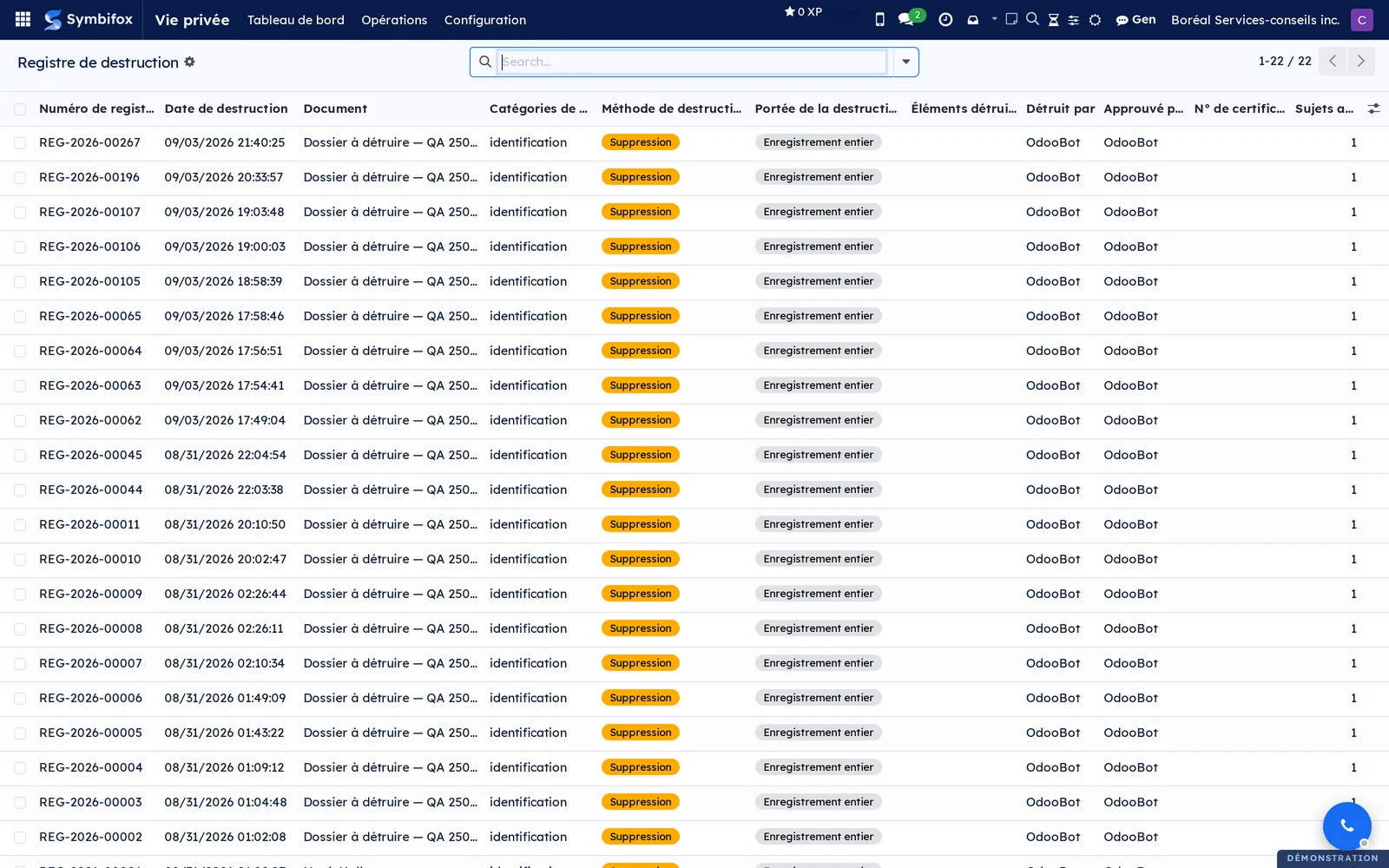
- Go to Vie privée › Opérations › Registre de destruction.
- Open an entry to read the description of the destroyed data, the method, the legal basis, the scope and the hashes.
Only the Notes field can be edited; nothing can be deleted. Each entry carries the hash of the previous one. A daily check recalculates the chain and creates an activity if an entry has been altered.
Set up a reminder sequence#
Reminders go out automatically to contacts who have not answered.
- Go to Vie privée › Configuration › Séquences de courriel and select New.
- Choose the Finalité (purpose), the rank in Séquence (sequence) and Jours après le précédent (days after the previous one).
- Choose the Modèle de courriel (email template). The “Rappel de consentement 1 (7 jours)” and “Rappel de consentement 2 (14 jours)” templates are supplied.
- Select Save.
Each day, pending requests that reach the delay receive the next step.
Publish a new version of a notice#
A version that has already been shown cannot be edited; you create a new one.
- Go to Vie privée › Configuration › Modèles de consentement (consent templates) and open the notice.
- Select Créer une nouvelle version (create a new version), then enter the Version number and the Date d'entrée en vigueur (effective date).
- Confirm.
The version's content is frozen with its hash, and later consents quote it. You still write in the Contenu en français (French content), Contenu en anglais (English content) and Résumé en langage clair (plain-language summary) tabs.
Choose the regulatory framework for a record#
A European client, or a Canadian client outside Québec, falls under another framework.
- Open the consent, the notice, the retention rule or the assessment.
- In Cadre juridique (legal framework), choose the framework you need.
The emails, certificates and legal mentions of that record follow the chosen framework.
The menus, one by one#
Vie privée › Tableau de bord (dashboard): a form of indicators with Actualiser (refresh). The En attente, Accordé, Refusé, Révoqué (revoked), 0-30 jours, 30-60 jours, 60-90 jours (days), Expiré (expired), Ne pas contacter, Destructions en attente (pending destructions), Registre (register), Ce mois (this month), Classifiés (classified), Rétention dépassée (retention exceeded), Campagnes (campaigns) and Rééval. dues (reassessments due) buttons each open the filtered list. The figure in Overview shows this screen.
Vie privée › Opérations: groups the day-to-day work screens.
Vie privée › Opérations › Consentements: the list of the demo's 43 consents, in list or kanban view, with the subject, purpose, status and dates. Filter by status or group by purpose.
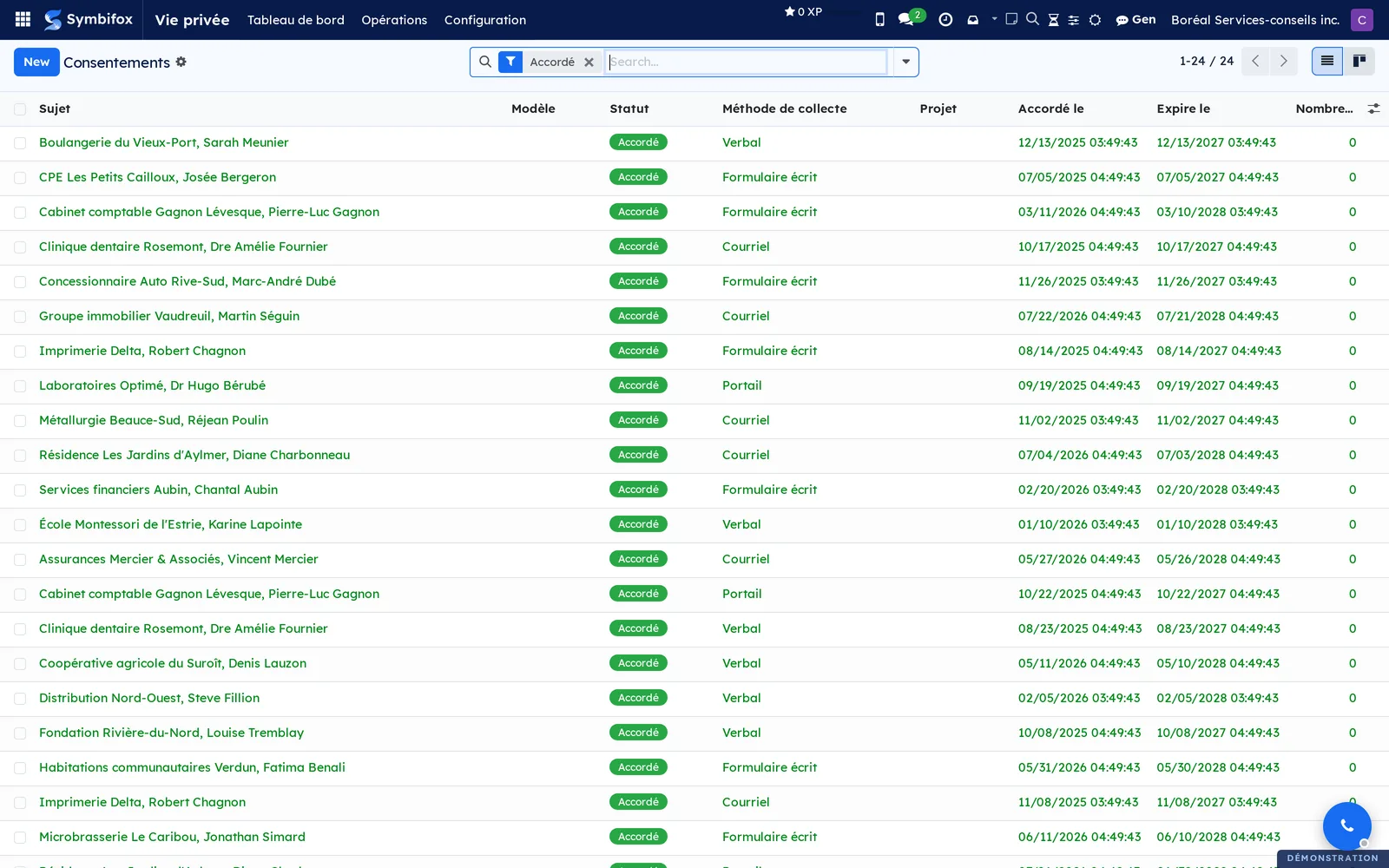
Vie privée › Opérations › Demandes en attente: the same list, filtered on the En attente status. This is the follow-up screen.
Vie privée › Opérations › Incidents de confidentialité (confidentiality incidents): the incident register, opened on the ones in progress. See Confidentiality incidents and breach notices.
Vie privée › Opérations › Breach notices (service provider): the breach notices sent to clients or received from a provider. Same chapter.
Vie privée › Opérations › Mesures sur incidents (incident measures): the measures taken following incidents, for managers only. Same chapter.
Vie privée › Opérations › Demandes de destruction: requests by type (consent, document, right to erasure, campaign), with their status and planned date. Empty in the demo: the help text explains that requests come from retention policies. Managers only.
Vie privée › Opérations › Registre de destruction: the demo's 22 entries, numbered REG-YYYY-NNNNN, with the date, method and legal basis. Officers only.
Vie privée › Opérations › Campagnes de destruction: campaigns and their status, from draft to completed, with counters of executed, failed and skipped documents.
Vie privée › Opérations › Évaluations d'anonymisation: assessments, their status and their overall risk. Empty in the demo.
Vie privée › Configuration: settings and reference data, for managers only.
Vie privée › Configuration › Cadres réglementaires (regulatory frameworks): the demo's five frameworks. The form has the Textes (courriels et certificats) (texts for emails and certificates), Bases légales (legal bases), Droits des personnes concernées (data subject rights) and Notes tabs.
Vie privée › Configuration › Modèles de consentement: the 19 notices, with the number of versions and the current version.
Vie privée › Configuration › Groupes de consentement (consent groups): sets of notices requested in one go. Empty in the demo.
Vie privée › Configuration › Préférences de contact: existing preferences, one line per contact. Empty in the demo: they are created from the contact's form.
Vie privée › Configuration › Politiques de rétention (retention policies): per purpose, how long to keep data after a consent expires or is withdrawn, and the destruction method. Empty in the demo.
Vie privée › Configuration › Calendrier de conservation: the demo's nine rules, with the code, document type, durations and final disposition.
Vie privée › Configuration › Classifications documentaires: the 26 classifications, with the document, category, sensitivity and retention end. Filter on exceeded retention to prepare a campaign.
Vie privée › Configuration › Séquences de courriel: reminder steps by purpose. Empty in the demo.
Vie privée › Configuration › DocuSeal: groups the two DocuSeal integration screens.
Vie privée › Configuration › DocuSeal › Configuration: the API address, the key and the default sender, with Tester la connexion. Empty in the demo.
Vie privée › Configuration › DocuSeal › Modèles DocuSeal: maps a DocuSeal template to a purpose. Empty in the demo.
Vie privée › Configuration › LibreSign: groups the two LibreSign integration screens.
Vie privée › Configuration › LibreSign › Configuration: the Nextcloud address and the access account, with Tester la connexion. Empty in the demo.
Vie privée › Configuration › LibreSign › Modèles LibreSign: PDF signature templates by purpose. Empty in the demo.
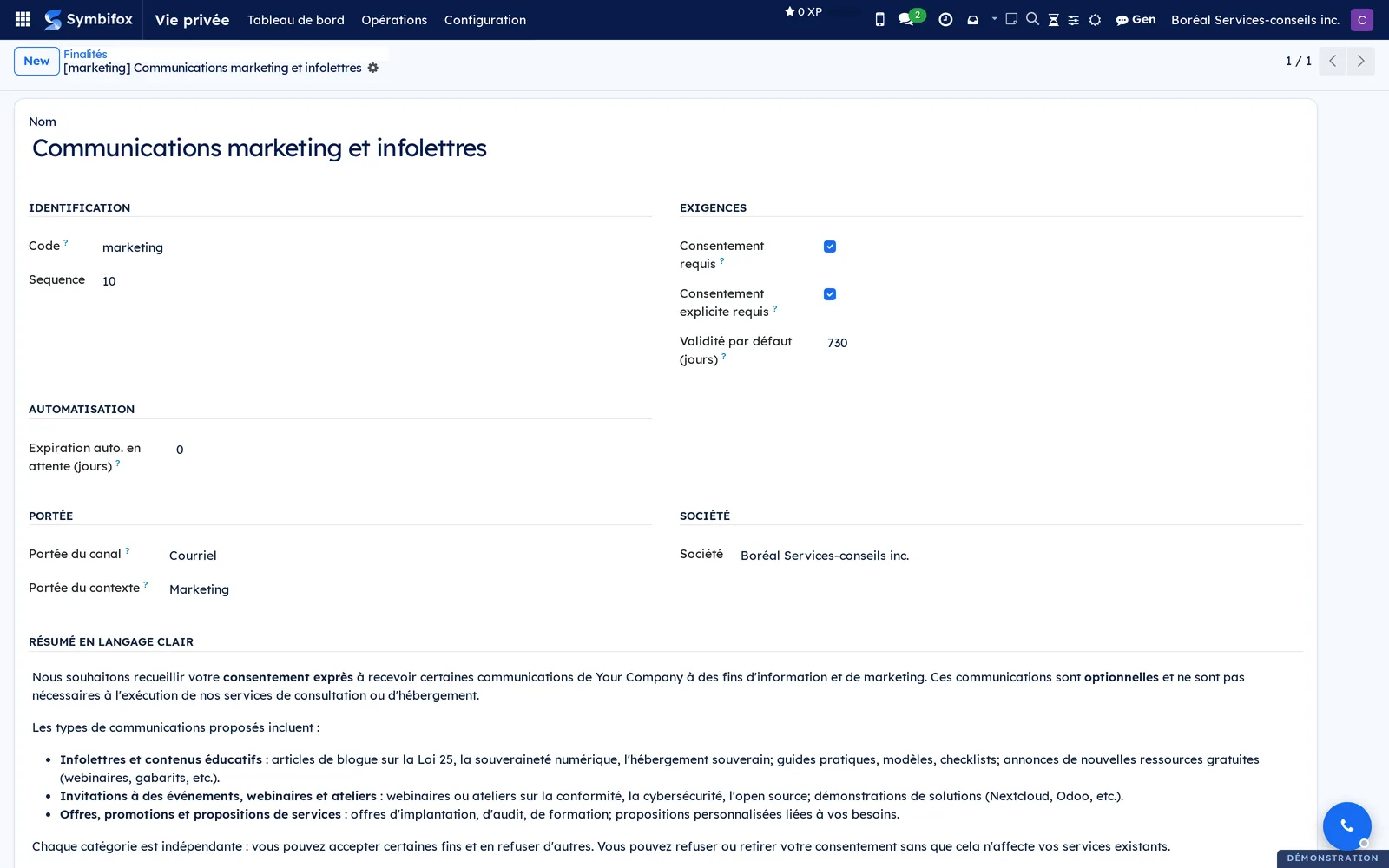
Vie privée › Configuration › Objets (avancé) (purposes, advanced): the demo's twenty purposes, with the code, the consent requirement and the default validity.
Reference#
Fields of the Consent form#
| Field | Description | Required or default |
|---|---|---|
| Sujet | The person whose consent is tracked | Required |
| Donné par (given by) | Legal guardians, for a minor | Optional |
| Est mineur (is a minor) | Under 14: special rules apply | Cleared |
| Modèle de consentement, Version du modèle (template version) | The notice and the exact version shown | Version filled in automatically |
| Objet | The purpose | Optional |
| Statut (status) | Brouillon (draft), En attente, Accordé, Refusé, Révoqué, Expiré | Brouillon |
| Demandé le, Accordé le, Refusé le, Révoqué le, Expire le | The status dates (requested, granted, refused, revoked, expires on) | Calculated |
| Méthode de collecte | Portail, Courriel, Signature numérique, Verbal, Formulaire écrit, Importé (portal, email, digital signature, verbal, written form, imported) | Optional |
| Projet, Référence contextuelle (context reference) | The file the consent belongs to | Optional |
| Raison de la révocation (revocation reason) | Entered through the withdrawal dialog | Empty |
| Renouvelé depuis, Renouvelé vers (renewed from, renewed to) | The renewal chain | Calculated |
Fields of the Purpose form#
| Field | Description | Required or default |
|---|---|---|
| Code, Nom | Unique identifier and label | Required |
| Résumé en langage clair | The text shown to people | Optional |
| Consentement requis, Consentement explicite requis (consent required, express consent required) | The type of consent expected | Cleared |
| Validité par défaut (jours) (default validity, days) | 0 = never expires | 0 |
| Expiration auto. en attente (jours) (automatic expiry while pending, days) | Expires a request left unanswered; 0 = never | 0 |
| Portée du canal, Portée du contexte (channel scope, context scope) | Courriel, SMS, Téléphone, Vidéo, En personne, Tous; Projet, Marketing, Réunion, Ventes/CRM, Général | Optional |
Fields of the Retention rule form#
| Field | Description | Required or default |
|---|---|---|
| Nom de la règle, Code, Type de document | Identifies the rule | Required |
| Base légale | The reference that justifies the duration | Required |
| Conservation active (années), Conservation semi-active (années) | The durations; Rétention totale (jours) is calculated | Active required |
| Sort final | Destruction, Anonymisation, Conservation permanente, Transfert (destruction, anonymization, permanent retention, transfer) | Required |
| Méthode de destruction | Anonymiser, Supprimer, Effacement sécurisé, Révision manuelle (anonymize, delete, secure erasure, manual review) | Optional |
| Approbation requise | An officer approves before destruction | Cleared |
| Cadre juridique | The framework applied to this rule | The company's framework |
| Dernière révision, Prochaine révision, Révisé par (last review, next review, reviewed by) | Tracks the annual review | Optional |
Fields of the Register entry form#
| Field | Description | Required or default |
|---|---|---|
| Numéro de registre (register number) | REG-YYYY-NNNNN | Assigned automatically |
| Date de destruction, Détruit par, Approuvé par (destruction date, destroyed by, approved by) | Who did what, and when | Required |
| Description des données détruites, Catégories de RP, Sujets affectés (description of the destroyed data, PI categories, affected subjects) | What was removed | Description required |
| Méthode de destruction | Anonymisation, Suppression, Effacement sécurisé, Archivage, Manuel (anonymization, deletion, secure erasure, archiving, manual) | Required |
| Portée de la destruction, Éléments détruits (destruction scope, destroyed items) | The whole record, or part of it with a list of what was removed | Scope required |
| Base légale | Text applied according to the framework | Required |
| Empreinte de vérification, Empreinte précédente (verification hash, previous hash) | The integrity chain | Calculated |
| Notes | The only field you can edit after creation | Empty |
Reports and exports#
Two documents print from the print menu: the Certificat de consentement (consent certificate), from a piece of evidence, and the Certificat de destruction (destruction certificate), from an executed request. Both are bilingual and quote the applicable framework. The destruction certificate carries a number and a verification hash, along with the Contenu certifié (certified content) the hash was calculated on. Lists export as they do everywhere in Symbifox.
Automations#
Eight tasks run every day: warn 30 days before a consent expires (an activity is created); mark expired consents; expire requests left unanswered past the purpose's delay; send the next step of the email sequences; create destruction requests for exceeded retention; run the destructions an officer has already approved; flag anonymization assessments due for reassessment; verify the integrity of the register chain. Seven email templates are supplied (request, “Your link”, expiry notice, two reminders, renewal confirmation, grant confirmation). All of them go to the same recipients as the request.
Public pages and portal#
A person signed in to the portal has the Préférences de confidentialité (privacy preferences) page (/my/privacy/preferences), where they turn each channel on or off and can choose Ne pas contacter. They also have their consent history (/my/privacy/consents), where they answer pending requests. The link received by email opens the request without an account; the IP address, browser and timestamp of the answer are kept as evidence. The link is valid for 90 days after the last email that carries it, including a notice written by hand: each send pushes its deadline back without changing it. Once expired, the page offers to send a new one to the same recipients as the request. Two technical addresses receive the callbacks from DocuSeal and LibreSign when a signature is completed.
Modules that extend this application#
The British variant is a separate module.
Clients elsewhere in Canada have their own framework.
New Zealand is covered the same way.
The last module is an installer rather than a feature.
Understanding#
Why a notice version cannot be edited. The proof of a consent is the exact text accepted on a given date. Each version carries a hash calculated on its content; editing the text would make the hash wrong. So you create a version, and consents quote the one they showed. A few older versions carry an Empreinte rescellée le (hash resealed on) mention: their hash was recalculated after a content cleanup. The module says so rather than pass it off as a seal from the time.
Why the register cannot be corrected. Each entry includes the hash of the previous one. Removing or editing an entry breaks the chain, and the daily check sees it. That is what makes the register enforceable. The price: an error is documented in Notes; it is never erased.
Why approval is human. No destruction runs until a Responsable vie privée has approved it; the daily task only runs what is already approved. A campaign processes its lines one by one: a failure on one document does not stop the others. Documents non détruits says which ones resisted (insufficient rights, record already deleted).
Why minors follow a separate path. Under Law 25, the age of consent is 14. Once their Responsables légaux (legal guardians) are recorded, a contact marked Personne mineure (minor) no longer receives any consent email (request, reminders, link, notices, confirmations): they all go to those guardians who have an email address, and the consent records Donné par. The threshold varies by framework (16 for the GDPR, 13 for the UK GDPR).
Why the module does not replace legal advice. The supplied frameworks, retention periods and legal bases are starting data that you can edit. The tool documents what you decide; the decision stays yours.
Limits. Signatures go through DocuSeal or LibreSign, not through Symbifox's native signature. Deleting a Nextcloud folder remains a manual step, prompted by an activity. The access requests mentioned on the module's website match no screen in the demo. The incident register exists: it has its own chapter.
Troubleshooting#
| Symptom | Likely cause | Fix |
|---|---|---|
| Remettre en brouillon has no effect on a refused consent | By design, a refusal cannot be reset | Select Renvoyer une nouvelle demande |
| Consent emails go to the parent, not the contact | The contact is marked Personne mineure | This is intended; check Responsables légaux on the contact's form |
| Envoyer lien portail refuses with “No recipient has an email address” | The contact has no address or, for a minor, none of their legal guardians has one | Add the address on the contact's or the guardian's form |
| A classification is refused for a given model | That record type is not in the list of allowed models | Classify the allowed parent record (contact, project, attachment) |
| Exécuter la destruction is missing | You are not a Responsable vie privée | Ask an officer to approve and run the destruction |
| A campaign scans zero documents | No classification has a Fin de rétention before the Date limite | Check the classifications and their Date du document |
| An activity reports an altered register entry | The daily check found a hash that no longer matches | Correct nothing; document it in Notes and inform management |
| Tester la connexion fails for DocuSeal | Wrong API address or key | Correct it under Configuration › DocuSeal › Configuration |
| Reminders do not go out | No sequence for this purpose, the delay has not been reached, or no recipient has an email address | Create the sequence or add the address; sends happen once a day |
See also#
- Contacts: the Vie privée (Loi 25) tab and the preferences.
- Project: a project's Consentements tab.
- Electronic signatures: Symbifox's native signature.
- IT audit: the other half of the Law 25 suite.
- Confidentiality incidents and breach notices: the incident register and a provider's notices.
- Recruitment: job applications classified automatically.
- Nextcloud and Collabora: LibreSign and client folders.