

Part 2 · Clients, sales and relationships
Editorial Workshop
The blog's publishing calendar, its measured cadence, the automatic checks, and the guard that holds back an article that is not ready.
Watch it
The Editorial Workshop, Atelier éditorial on screen, runs the production of your publications: what is in progress, how often the flow must come out, what blocks what, and what remains to do before publishing. It is for the people who write, review and decide what gets published. The Symbifox blog knows whether an article is published or not, and nothing else. The Workshop adds the missing layer, and it computes that layer rather than having it copied by hand. What you get: a calendar that does not lie, a guard that refuses to publish a text that is not ready, and a reasoned recommendation for the next article to release.
Overview#
An editorial entry carries one publication: its angle, its promise, its pillar, its sources, its languages and what remains to do. It is linked to a blog article, or stands alone when the publication does not go through the blog. A calendar is a publishing flow with its rules: the target cadence, the word floor, the required languages, and the pillars with their target share. A pillar is a blog tag category promoted to a tracked theme. A stage says where an entry stands, from Idée (idea) to Publié (published).
The design principle fits in one sentence: store only decisions, compute everything else. An article's pillar, the target cadence, the required languages, a fact-check verdict: these are decisions, and you enter them. The word count, the days since the last publication, each pillar's share, the state of the pre-flight guard: these are facts the database already knows, and they are computed each time the form opens. A calendar kept by hand drifts because it copies these facts; this one does not copy them.
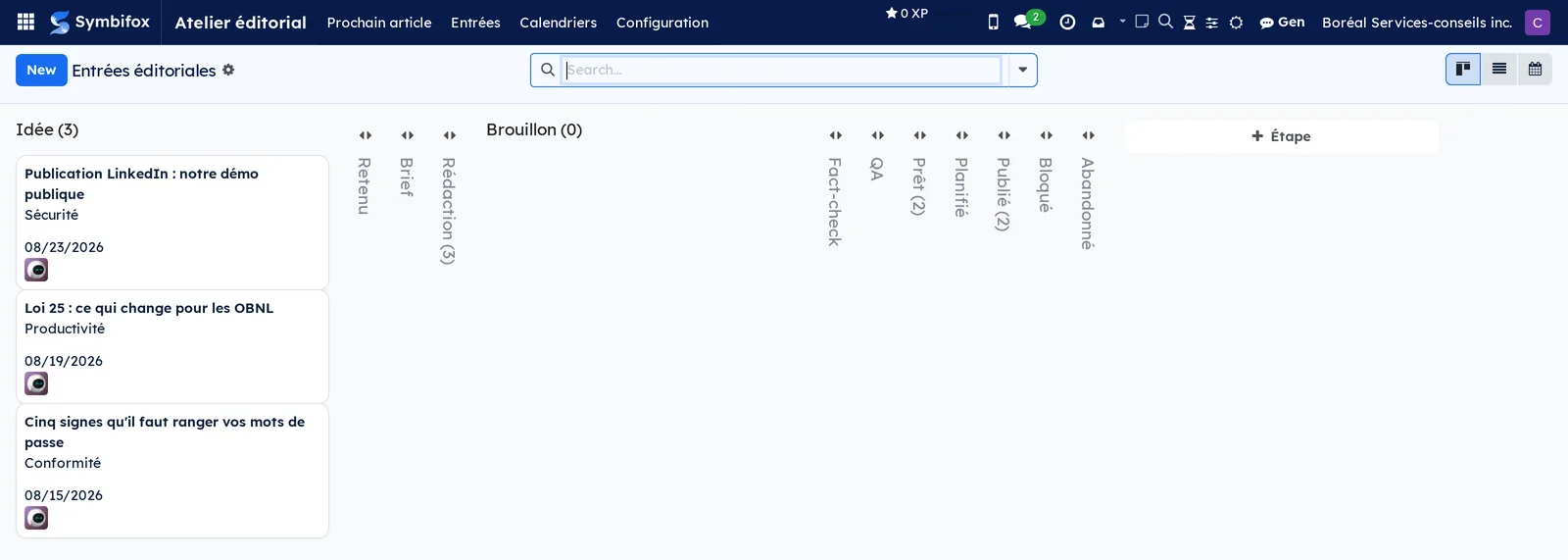
The main view is the kanban of entries, one column per stage.
The Workshop is connected to several applications. Articles and their tags live in Website, blog and eLearning. Shared links and campaigns come from Email Marketing and Link Tracker. An entry can point to a task in Project for the production work. Finally, the social distribution modules rely on the same tracked links, which ties a click from a social network to the article that produced it.
Configuration#
Access and permissions#
Two groups. Rédaction (writing) opens the application and lets people create and advance entries, run the checks and keep the lists. Direction éditoriale (editorial management) adds the Configuration menu, the upkeep of calendars and pillars, and the act of publishing: it is a decision, not a manipulation. Requesting a pass from Gen, applying it or discarding it also belongs to this group; writers see the Gen suggestions without being able to change them. Entries and calendars are separated by company.
Settings#
Two settings, in Settings, Atelier éditorial section.
- Exiger toutes les langues avant de considérer une entrée publiée (require all languages before an entry counts as published): an article released in only one language stays incomplete and does not count toward the cadence. Each calendar can override this setting.
- Revérifier les sources tous les (mois) (re-check sources every (months)): past this delay, a source is considered stale and shows up in the pre-flight guard.
The other rules live on the calendar, because a newsletter flow and a technical blog have neither the same cadence nor the same requirements.
The colour of the entries' calendar view is set elsewhere, by the administration, in Settings › Colors › Automatic rules: see The menus, one by one.
Base data#
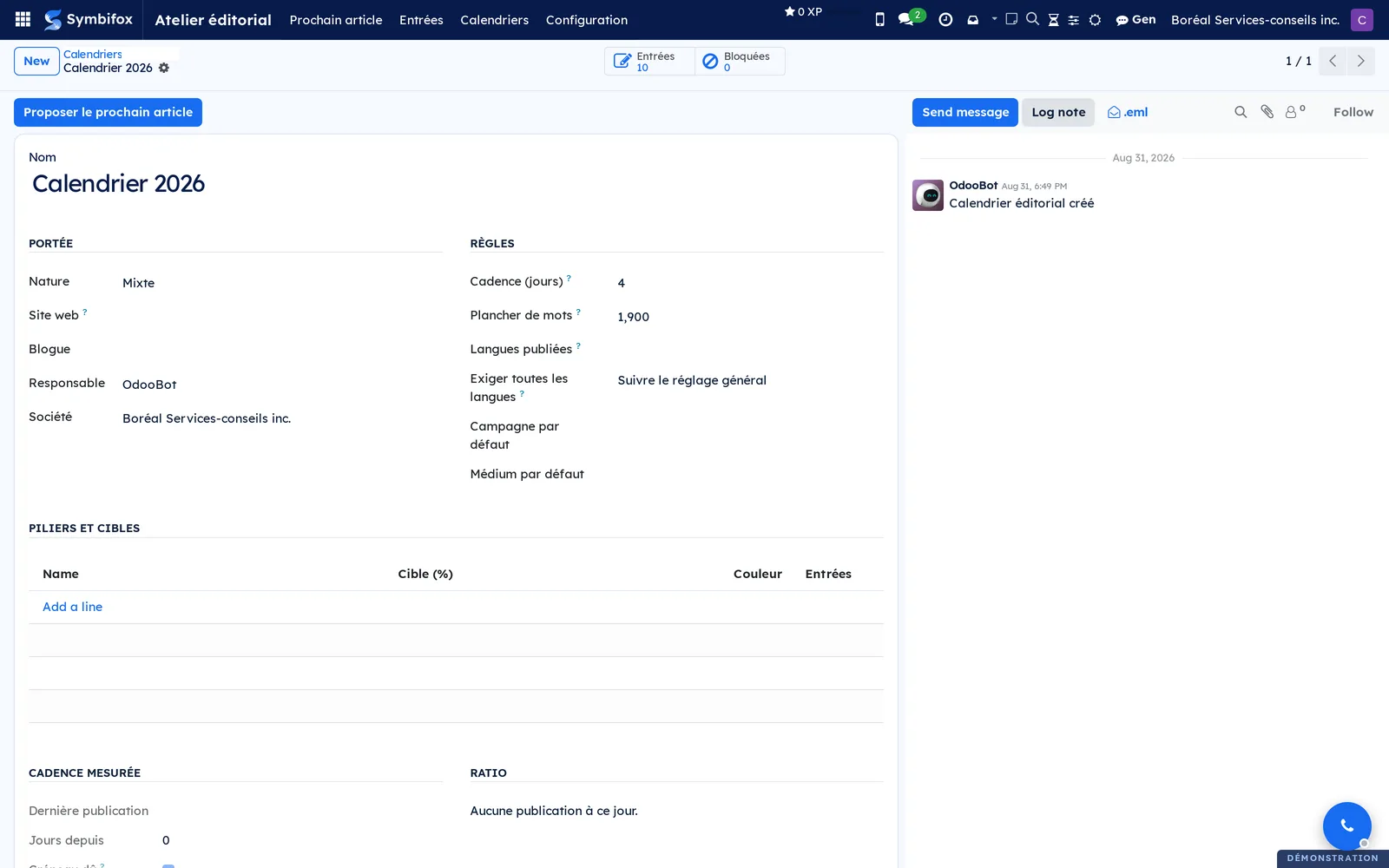
- At least one calendar. The demo has one, “Calendrier 2026”, of mixed nature, with a cadence of 4 days and a floor of 1,900 words.
- The pillars: check Pilier éditorial (editorial pillar) on the blog tag categories that matter, and give each one its Cible (%) (target). The targets of a calendar should add up to 100, otherwise the ratio reads poorly.
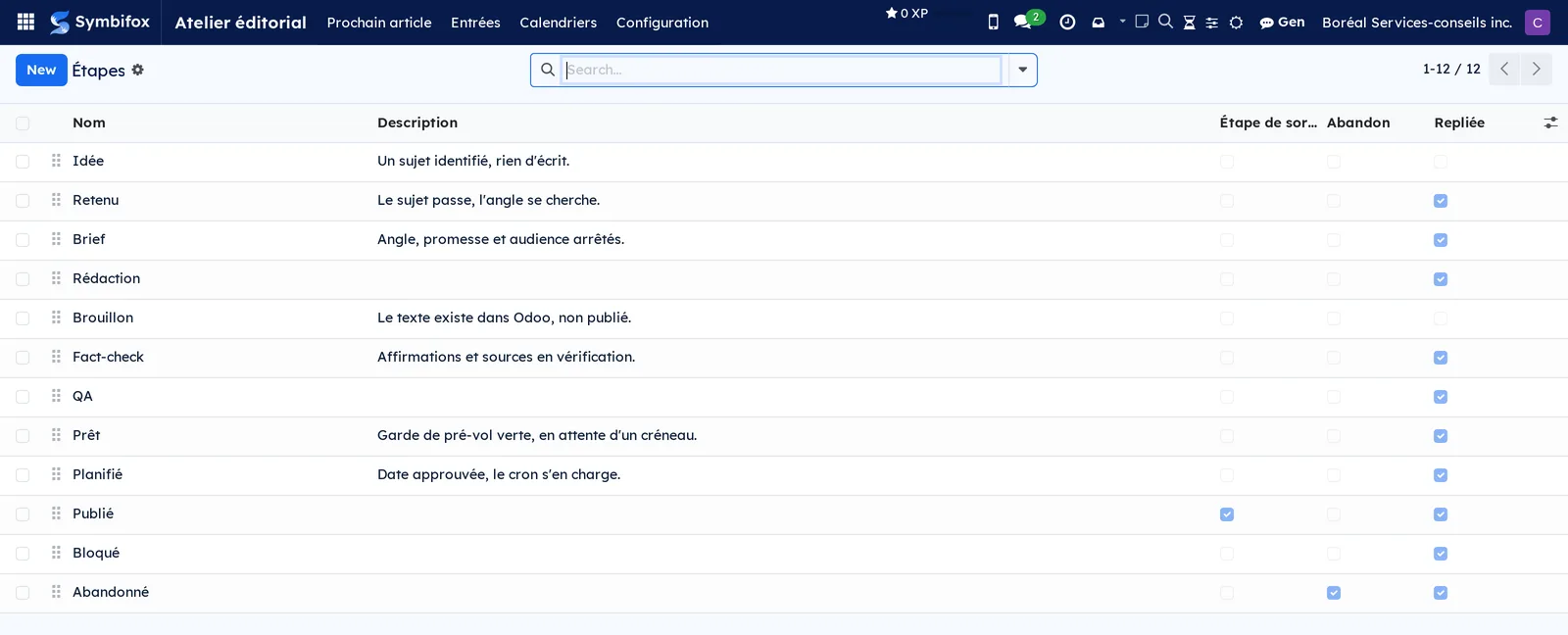
- The stages. Twelve are provided, from Idée to Abandonné (abandoned). Two flags matter: the exit stage (an entry there is published and counts toward the cadence) and abandonment (the entry leaves the statistics without counting as a publication).
- The checklist templates: the human leftovers that come back with every publication. Six are provided.
Getting started#
This walkthrough opens a demo entry, shows why it is held back, and asks the application what to publish next.
- Open Atelier éditorial › Entrées (entries). The kanban shows ten entries across twelve columns, three of them in Idée.
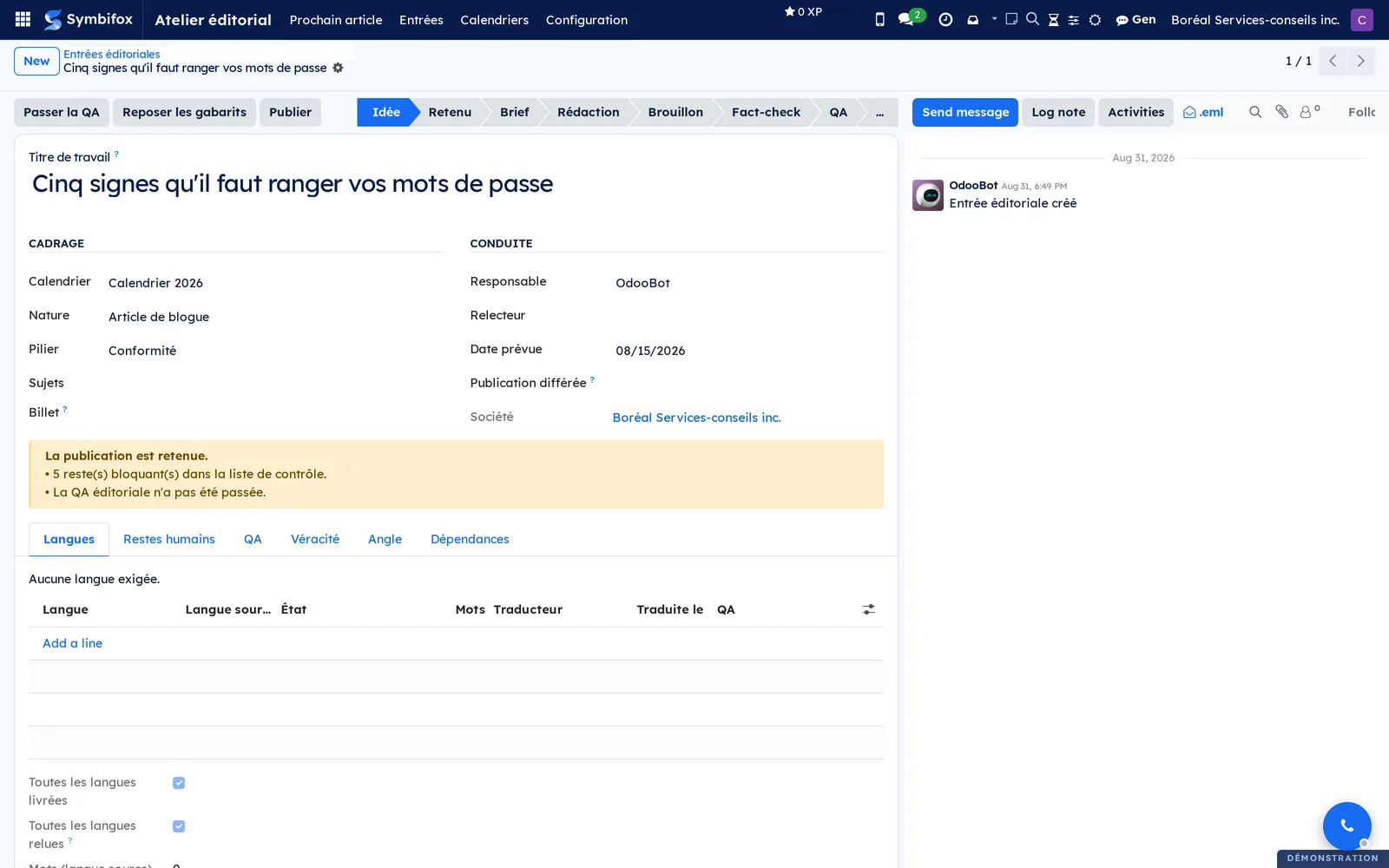
- Open “Cinq signes qu'il faut ranger vos mots de passe”.
- Read the yellow banner under the framing section: “La publication est retenue.” (publication is held back). It lists what is missing, here five blocking leftovers and the QA not run.
- Open the Restes humains (human leftovers) tab and check the lines actually done.
- Select Passer la QA (run QA), then open the QA tab to read the findings.
- Go back to the banner: the items you settled are gone, the others remain, named.
- Open Atelier éditorial › Prochain article (next article), choose “Calendrier 2026” and read the ranking.
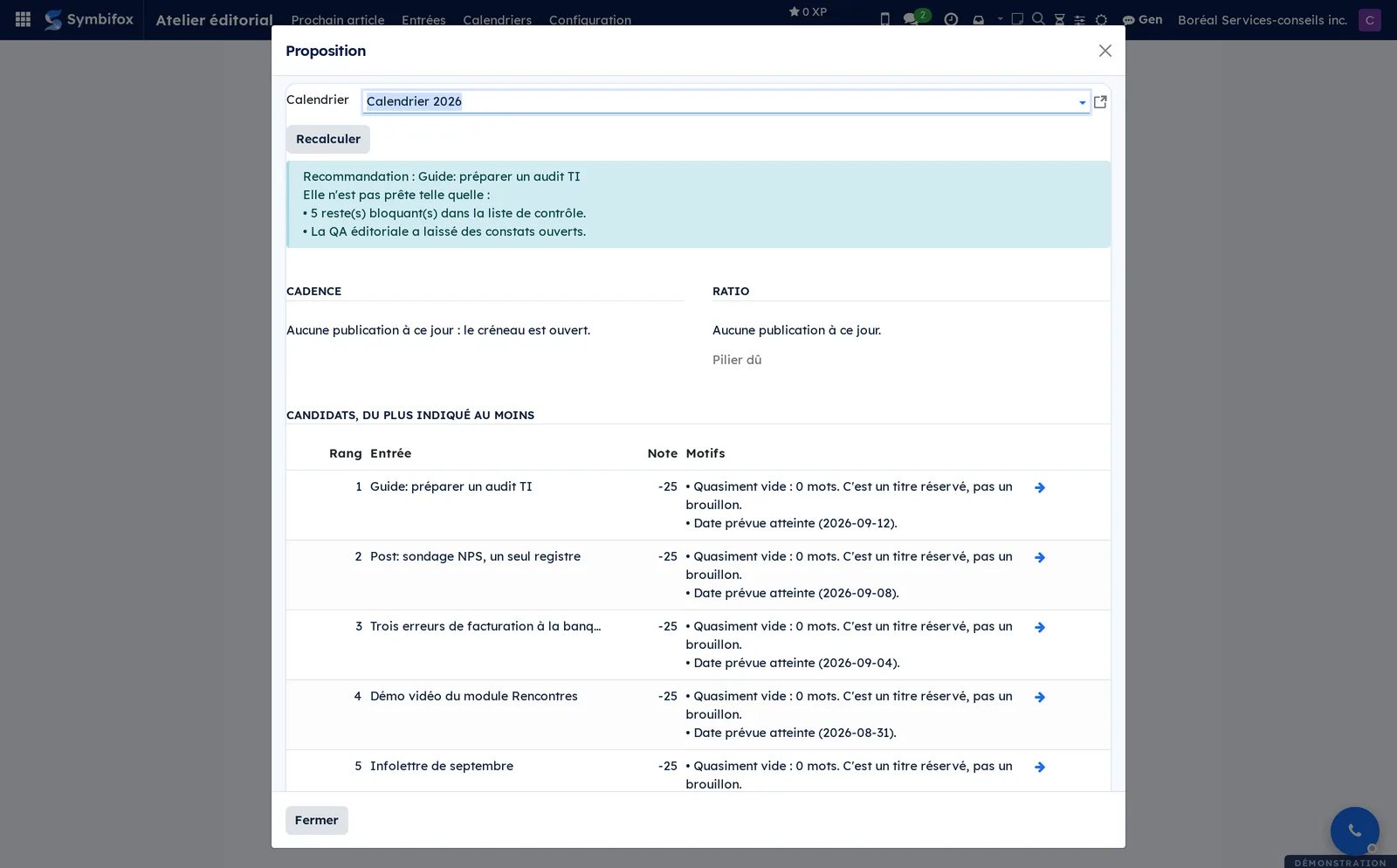
Result: you know exactly what holds this entry back, and the proposal dialog tells you which entry in the flow is the best fit, with the reason for every point given or taken away.
Common tasks#
Create an editorial calendar#
One calendar per flow: the blog, the newsletter, a separate market. Each has its own cadence and targets.
- Open Atelier éditorial › Calendriers (calendars) and select New.
- Enter the name and choose the flow's Nature.
- Choose the Site web (website) and the Blogue (blog) it feeds, or leave them empty for a flow that publishes no article.
- Enter the Cadence (jours) (cadence in days), the target number of days between two publications. Zero turns off the slot calculation.
- Enter the Plancher de mots (word floor) below which an entry cannot pass the guard.
- Choose the Langues publiées (published languages) and, if needed, override Exiger toutes les langues (require all languages).
- Under Piliers et cibles (pillars and targets), add one line per pillar with its target share, then save.
Result: the calendar shows its measured cadence (last publication, days since, slot due) and its actual ratio compared with the targets. None of this is entered by hand.
Declare the pillars and their targets#
A pillar is not one more tag: it is a blog category promoted to a tracked theme, so it can already be displayed and filtered on the public site.
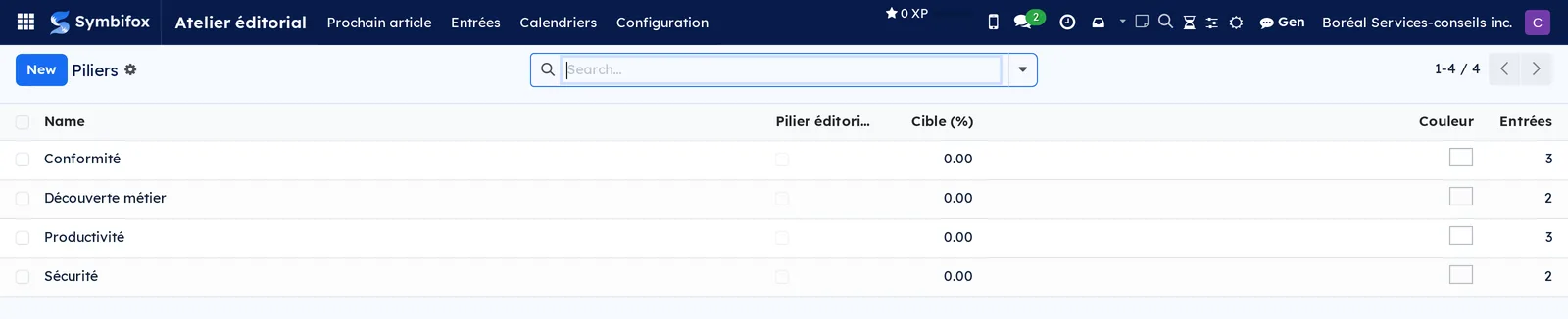
- Open Atelier éditorial › Configuration › Piliers (pillars).
- Check Pilier éditorial on the categories that matter.
- Enter the Cible (%) of each.
- Save, then check that the calendar's targets add up to 100.
Result: the Entrées column shows how many entries belong to each pillar, and the calendar's ratio compares actual production with the targets.
Create an editorial entry#
The entry exists before the text: it holds the intent, and it is what gets ranked.
- Open Atelier éditorial › Entrées and select New.
- Enter the Titre de travail (working title). It survives changes to the published title, so you can follow an entry whose article was renamed.
- Choose the Calendrier (calendar), the Nature and the Pilier (pillar).
- Enter the Date prévue (planned date) and assign the Responsable (owner) and the Relecteur (reviewer).
- In the Angle tab, enter the hook, the thesis, the reader's problem, the promise and the target keyword.
- Save.
Result: the entry appears in the kanban's Idée column, with its checklist already in place from the templates that match its nature and pillar.
Link an entry to a blog article#
An entry without an article remains a statement of intent; once linked, it measures the actual text.
- Open the entry and choose the Billet (blog post) in the framing section.
- Save. The word count, publication state and visits are now read from the text itself.
- If the language slots no longer match, take them again from the article.
Result: the entry and the article follow each other. From the article, a shortcut button leads back to the editorial entry.
Keep the language slots#
One language, one slot, one state: a late translation becomes a visible line rather than a late discovery.
- Open the entry and go to the Langues (languages) tab.
- Select Add a line and choose the language.
- Check Langue source (source language) on the language the article is written in.
- Move each slot's État (state) forward: to translate, translated, reviewed, published.
- Save.
Result: the Toutes les langues livrées (all languages delivered) and Toutes les langues relues (all languages reviewed) indicators are recomputed. The pre-flight guard checks the second one: requiring “published” before publishing could never be satisfied.
Both indicators can also be ticked, to take one decision for every required slot at once: Toutes les langues relues moves them to reviewed, Toutes les langues livrées moves them to published, and that second gesture is reserved for editorial management. Each gesture leaves a trace in the chatter. Unticking withdraws the decision, but a slot already published does not step back when you untick Toutes les langues relues.
Run the quality checks#
The checks are rules, not judgment. They give the same verdict twice in a row and depend on no outside service.
- Open the entry and select Passer la QA. From the list, select several entries and do the same.
- Open the QA tab and read the findings.
- Correct the text in the article, then run the QA again.
Result: the QA state turns green when nothing is flagged any more. The checks cover em dashes, banned phrases in French and English, empty headings, table headers without scope, images without alt text, low-contrast colours, forgotten drafting markers, the word floor, and structural consistency between language slots.
Fix mechanical defects or sign a waiver#
Two findings call for no judgment and are repaired with one button. Others are defensible on a particular article: those get signed.
- Open the held-back entry, linked to its blog post.
- For empty headings and table headers without scope, select Corriger les défauts mécaniques (fix mechanical defects), then confirm.
- Read the banner again: only the items that need a judgment or an action remain.
- If a QA finding or the word floor is acceptable on this article, select Signer une dérogation (sign a waiver).
- Read the items shown, enter why they are acceptable, then select Signer (sign).
Result: the repair writes into every language of the article, then runs the QA again. The waiver makes the refusal to publish yield on the signed items, and on those only: the QA still shows its findings, and the entry shows who signed, when and why. Lever la dérogation (lift the waiver) removes it. Signing is reserved for editorial management, like publishing.
Check sources and claims#
A checked claim carries a verdict, a date and a name. That is what lets you answer, months later, the question “where does this number come from?”
- Open the entry and go to the Véracité (accuracy) tab.
- Add the Sources: their name, address, language and, if needed, an archived copy to cite if the original disappears.
- Add the verifiable Affirmations (claims) taken from the text.
- Link each claim to its source and set its Verdict.
- Confirm the verdicts proposed by the machine: a proposed verdict is not a verdict rendered.
Result: the counters of unchecked claims and dead sources drop to zero, and the pre-flight guard stops flagging them. A source older than the configured delay comes back by itself.
Keep the human leftovers list#
These are the steps no rule can check: visuals, proofreading, cross-links.
- Open the entry and go to the Restes humains tab.
- Check Fait (done) on each completed line; the person and the date are recorded.
- Add a line for a leftover specific to this article.
- After a change of pillar or nature, select Reposer les gabarits (reapply templates) to restore the standard list.
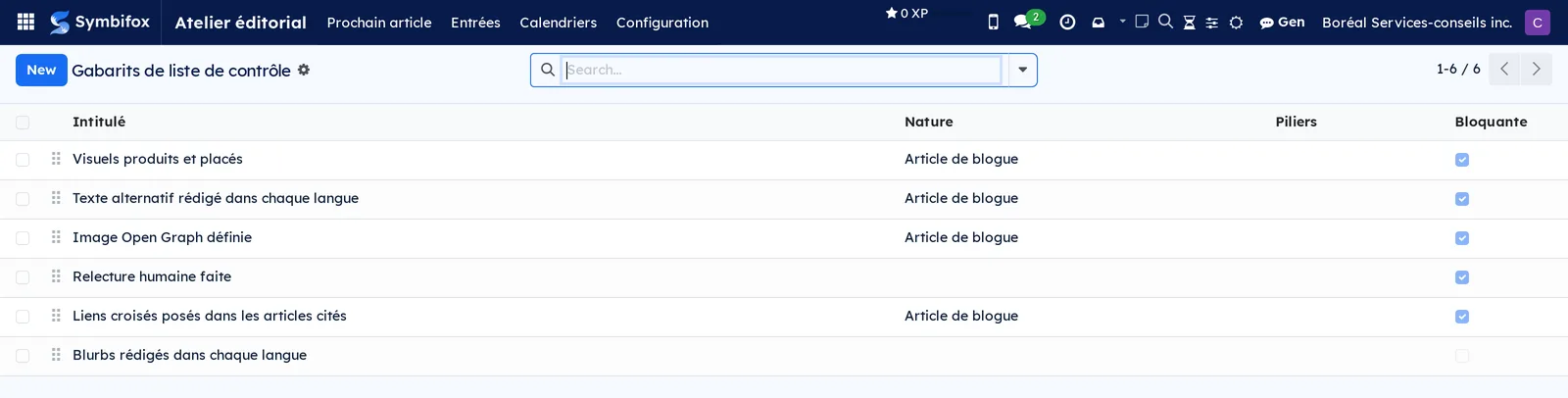
Result: a blocking line still open holds back publication and is named in the banner. The six templates provided cover visuals, alt text, the sharing image, human proofreading, cross-links and distribution blurbs.
Set a dependency between two entries#
A published article must never point to a draft.
- Open the entry and go to the Dépendances (dependencies) tab.
- In Dépend de (depends on), choose the entries that must be published before this one.
- Save.
Result: as long as a dependency is not published, the entry is marked blocked, with the exact reason, and the next-article proposal sets it aside and says so.
Publish an entry, or schedule its release#
Publishing is an act of editorial management, and the guard applies in both cases.
- Open the entry and check that the banner shows a green guard.
- Select Publier (publish) for an immediate release.
- For a later release, enter the Publication différée (scheduled publication) instead and save.
Result: the article appears on the blog and the entry moves to the exit stage. If the guard is not green at the set time, the scheduled publication does not go out and the reason is logged: an approved date is not an exemption.
Ask for the next-article proposal#
The recommendation explains itself line by line, so you can challenge it with full knowledge.
- Open Atelier éditorial › Prochain article, or select Proposer le prochain article (propose the next article) on a calendar.
- Choose the Calendrier if several flows coexist.
- Read the recommendation, the cadence and the ratio, then the ranking of candidates with their reasons.
- Select the arrow at the end of a line to open an entry.
- Select Recalculer (recompute) after a correction, or Fermer (close).
Result: a reasoned ranking. The calculation takes in the flow's cadence, the pillar's gap to its target, the article's actual readiness, whether the planned date has been reached, the articles it unblocks, the draft's age and the freshness of the documented subject.
The menus, one by one#
Atelier éditorial › Prochain article: opens the proposal dialog directly, without going through a calendar's form. It shows the recommendation, the cadence status, the ratio by pillar, the ranking of candidates with their score and reasons, and the list of entries set aside with the reason for each.
Atelier éditorial › Suggest with Gen: a command, not a screen, reserved for editorial management. It asks Gen to read the default calendar, the ranking of candidates and the idea notebook, then to give its recommendation on the next article: whether the angle still holds, whether the pillar that is behind has only one candidate, and what it would do. A “Gen is on it” notice confirms the start; the answer arrives a few minutes later under Gen suggestions. With no calendar defined, or if Gen cannot be reached, the command refuses and says why.
Atelier éditorial › Entrées: the kanban of editorial entries, one column per stage, one card per entry showing its working title, pillar, date and owner. Twelve columns on the demo, nine of them folded, and ten entries. List, calendar and form views as well. The empty screen offers to create a first entry.
In calendar view, each entry takes the colour of its pillar, the one the tag category already carries in Atelier éditorial › Configuration › Piliers. The rule “Entrées éditoriales selon le pilier” (editorial entries by pillar), provided by default, handles this. A pillar with no colour changes nothing on screen. A coloured pillar paints its entries as a softened background, like Odoo's usual colours, with text that stays readable. A line added to the rule, a value and a colour, overrides the pillar's colour for the entries only, without touching the pillar itself. The rule is kept in Settings › Colors › Automatic rules; To-do, Notepad and Timer covers rules in detail.
Atelier éditorial › Calendriers: the list of publishing flows, with their nature, owner and cadence. One calendar on the demo. Each form carries its Entrées and Bloquées (blocked) shortcut buttons, and the Proposer le prochain article button.
Atelier éditorial › Gen suggestions: every pass requested from Gen, newest first. The columns are Created on, Kind (Next article or Gen review), Entry, Status (In progress, Delivered or Failed), Stalled, Has text and Applied. A row awaiting a decision stands out in colour, an applied row is dimmed. The form shows Gen's answer in the Reading tab, and the proposed text in the Suggested text (French) and Suggested text (English) tabs when there is one. Apply to the post writes that text into the article after saving its current state on the suggestion, and refuses if the article changed since the request; Discard files it without writing anything. Both buttons are reserved for editorial management; writers see the list read-only. A pass left without news wrote nothing: launch it again from the entry.
Atelier éditorial › Configuration: grouping menu, for editorial management only.
Atelier éditorial › Configuration › Piliers: the list of blog tag categories, with the Pilier éditorial, Cible (%), colour and Entrées columns. Four on the demo: Conformité, Découverte métier, Productivité and Sécurité.
Atelier éditorial › Configuration › Étapes (stages): the list of stages, with the Nom (name), Description, exit stage, Abandon (abandonment) and Repliée (folded) columns, reordered by dragging. Twelve stages on the demo, with Publié marked as the exit stage and Abandonné marked as abandonment.
Atelier éditorial › Configuration › Gabarits de contrôle (checklist templates): the list of human leftovers placed by default on a new entry, with the Intitulé (label), Nature, Piliers and Bloquante (blocking) columns. Six on the demo, five of them blocking.
Reference#
Fields of the Editorial entry form#
| Field | Description | Required or default |
|---|---|---|
| Titre de travail | The entry's internal name, independent of the published title | Required |
| Calendrier, Nature, Pilier, Sujets | The framing: which flow and which theme the entry belongs to | Nature required |
| Billet | The blog article this entry measures | Empty for a publication outside the blog |
| Étape | Where the entry stands in production | First stage |
| Date prévue, Publication différée, Publié le | The file's three dates | Optional |
| Responsable, Relecteur, Tâche liée, Campagne | Ownership of the work | Optional |
| Accroche, Thèse, Problème du lecteur, Promesse, Appel à l'action | The declared angle, in the tab of the same name | Optional |
| Mot-clé visé, Intention de recherche, Patron, Concurrent visé | Search positioning | Optional |
| Dépend de, Bloque | Publication dependencies between entries | Optional |
| Sources, Affirmations, Fact-check du | Accuracy and its date | Optional |
| Module documenté, Version au fact-check | Flag that a documented product has changed since the check | Optional |
| Créneaux de langue | One line per language, with its state and word count | From the calendar |
| Liste de contrôle | The human leftovers, placed from the templates | Placed on creation |
| Visites (brut) | The blog's native counter, bots included | Computed |
Fields of the Editorial calendar form#
| Field | Description | Required or default |
|---|---|---|
| Nom | The flow's name | Required |
| Nature | The kind of publications the flow carries | Required |
| Site web, Blogue | What the calendar feeds | Empty for a flow outside the blog |
| Responsable, Société | Ownership of the flow | Current company |
| Cadence (jours) | The target delay between two publications; zero turns off the calculation | Optional |
| Plancher de mots | Below it, the pre-flight guard refuses | Optional |
| Langues publiées | The languages an entry must deliver | Empty, the site's language applies |
| Exiger toutes les langues | Overrides the general setting for this flow | Follow the general setting |
| Piliers et cibles | The tracked themes and their target share | Optional |
| Campagne, Médium par défaut | The tags placed on shared links | Optional |
Fields of the Checklist template form#
| Field | Description | Required or default |
|---|---|---|
| Intitulé | The human leftover to check off | Required |
| Nature | Limits the line to one kind of publication | Empty, so all |
| Piliers | Limits the line to certain pillars | Empty, so all |
| Bloquante | Holds back publication while the line is open | Cleared |
| Actif | Removes the line from new entries without erasing history | Checked |
Reports and exports#
The Workshop has no separate analysis screen: the measurement sits on the records themselves. The calendar carries its measured cadence and its ratio by pillar; the entry carries its word count, language status and visits. The proposal dialog serves as the decision report, since it lists what goes into its ranking. Any list exports to a spreadsheet through Actions › Export.
Automations#
An hourly job publishes entries whose scheduled date has arrived, provided the pre-flight guard is green at that moment. It ships turned off: a publication that goes out on its own is an operating decision, not an installation setting. Turn it on from the scheduled actions once your calendars are set. Everything else is recomputed when read: cadence, ratio, word count, language completeness, pre-flight guard.
Public pages and portal#
The Workshop adds no public page. What the public sees are the blog articles and their tags, served by Website, blog and eLearning. The public slug of a language slot is frozen at publication, so a title change does not break the link between visits and the article.
Modules that extend this application#
Six modules complete the Workshop: social distribution and its connectors, the assistant, and audience measurement. None is installed on the demo (published module, not illustrated).
The framework talks to no network in particular: each network comes in its own module. The tracked link is resolved when the post is queued, not when the blurb is written, so you can review the exact text that will go out.
The day a network's interface opens, the channel switches network and the blurbs already written stay: nothing you wrote is lost in the switch.
The manual channel stays installed and usable alongside it: both routes lead to the same place.
The connectors all implement the same contract: you add or remove them without changing anything in the queue.
An assistant review never turns the pre-flight guard green: only mechanically verifiable checks do. When the assistant cannot be reached, its buttons do not appear, rather than failing at the moment you select them.
This module does not claim to count people: it removes declared bots, nothing more, and its series starts only on the day it goes into service. It keeps the declared agent, which is a device identifier, with an adjustable retention period. That is a decision to record in your register under Law 25 (Québec's Act respecting the protection of personal information in the private sector), described in Privacy (Law 25 and other frameworks).
Understanding#
Why the guard refuses rather than warns. A warning gets dismissed; a refusal gets resolved. The guard lists every open item in plain words, and it applies to the publish button as much as to a date approved in advance. It is the only way a scheduled publication does not go out on a Sunday with an image missing. When a finding is defensible on a particular article, the way out is a signed waiver, with a name and a date, not a dismissed warning.
Why the Workshop does not rewrite an article. An article's content is translated and stored per language. A write made in the wrong language context overwrites the source language. The module always reads with an explicit language context: it reads, it measures and it refuses. It writes to the content only for the two mechanical repairs, when you ask: empty headings and table headers without scope. Anything that needs judgment, a dash to replace, a sentence to recast, a missing visual, stays a human's job.
Why the checks use no artificial intelligence. They are rules: they give the same verdict twice in a row and work offline. Judgment comes through a separate module, and it proposes without applying.
Why the visit counter is labelled raw. The blog's native counter goes up with every page view, bots included, and often exceeds the number of real traces several times over. The Workshop shows it as is, so nobody mistakes it for a readership.
What the Workshop does not do. It keeps the state and the mechanical checks. It does not judge an angle, does not decide that a subject is dead, and does not replace proofreading. Language checks cover structure and vocabulary, never the quality of a translation.
Troubleshooting#
| Symptom | Likely cause | Fix |
|---|---|---|
| Publier refuses | The pre-flight guard is not green | Read the entry's banner: it names every open item |
| A scheduled publication did not go out | The guard was not green at the set time, or the hourly job is still turned off | Settle the open items, then check the job's state in the scheduled actions |
| The QA turns red again for no apparent reason | Someone changed the article's text or title | Run the QA again: a stale green is worse than an unknown state |
| An entry stays marked blocked | An entry it depends on is not published | Open the Dépendances tab and publish the expected entry first |
| The ratio by pillar looks wrong | The calendar's targets do not add up to 100 | Adjust the pillar targets until they total 100 |
| A correct source is flagged as stale | The re-check delay has passed | Re-check the source and update its date, or lengthen the delay in the settings |
| A published entry does not count toward the cadence | A required language has not been released yet | Complete the language slot, or review the requirement on the calendar |
| The assistant's buttons have disappeared | The assistant cannot be reached | Check its status; the buttons come back by themselves when it responds |