

Part 5 · People and team
Recruitment
Track job positions and applications, assess candidates as a panel on frozen grids, and measure the cost and the source of each hire.
Watch it

The Recruitment application follows a position from opening to hire: the offer, the applications received, their stages, the decision and the hire. It is meant for the person who recruits, for the managers who sit on interview panels, and for the management team that wants to know what a hire cost. Symbifox adds what Odoo does not cover. It brings interview grids by role and by round, blind panel rating, an interview dossier, a portal where the person follows their own file, and the retention that Law 25 requires. Law 25 is Québec's Act respecting the protection of personal information in the private sector. The result is an application file that reads, a year later, exactly as it was rated.
Overview#
A job position is what you are trying to fill. An application is one person's file for one position; the same person, the candidate, can carry several applications. Each application moves from stage to stage (on the demo: New, Initial Qualification, First Interview, Second Interview, Contract Proposal, Contract Signed) until refusal or hire. This part is Odoo's, and it remains the source of truth for the file.
Symbifox grafts the assessment onto it. An interview grid describes what is judged in a given round: weighted criteria, a scale, and anchors that say, in observable behaviour, what a 1, a 3 or a 5 is worth. A session applies a grid to an application, in front of a panel. Each panel member submits their rating without seeing the others'. The interview dossier gathers all of a candidate's sessions in one document. A grid template is an entry in the catalogue delivered with the module: nobody is rated on it, you draw a grid from it and adapt that grid.
Around the file, four building blocks complete the picture. Disbursements and panel time give a cost per hire. A tracked link per job board says how many people looked at the posting. The four emails to the candidate are rewritten. The privacy bridge sets the retention period, then destroys for real. On the application, Rédiger l'offre (draft the offer) comes from the Letters application, and sending the offer for signature comes from Electronic signatures.
The application's home screen shows the open positions, one card per position.
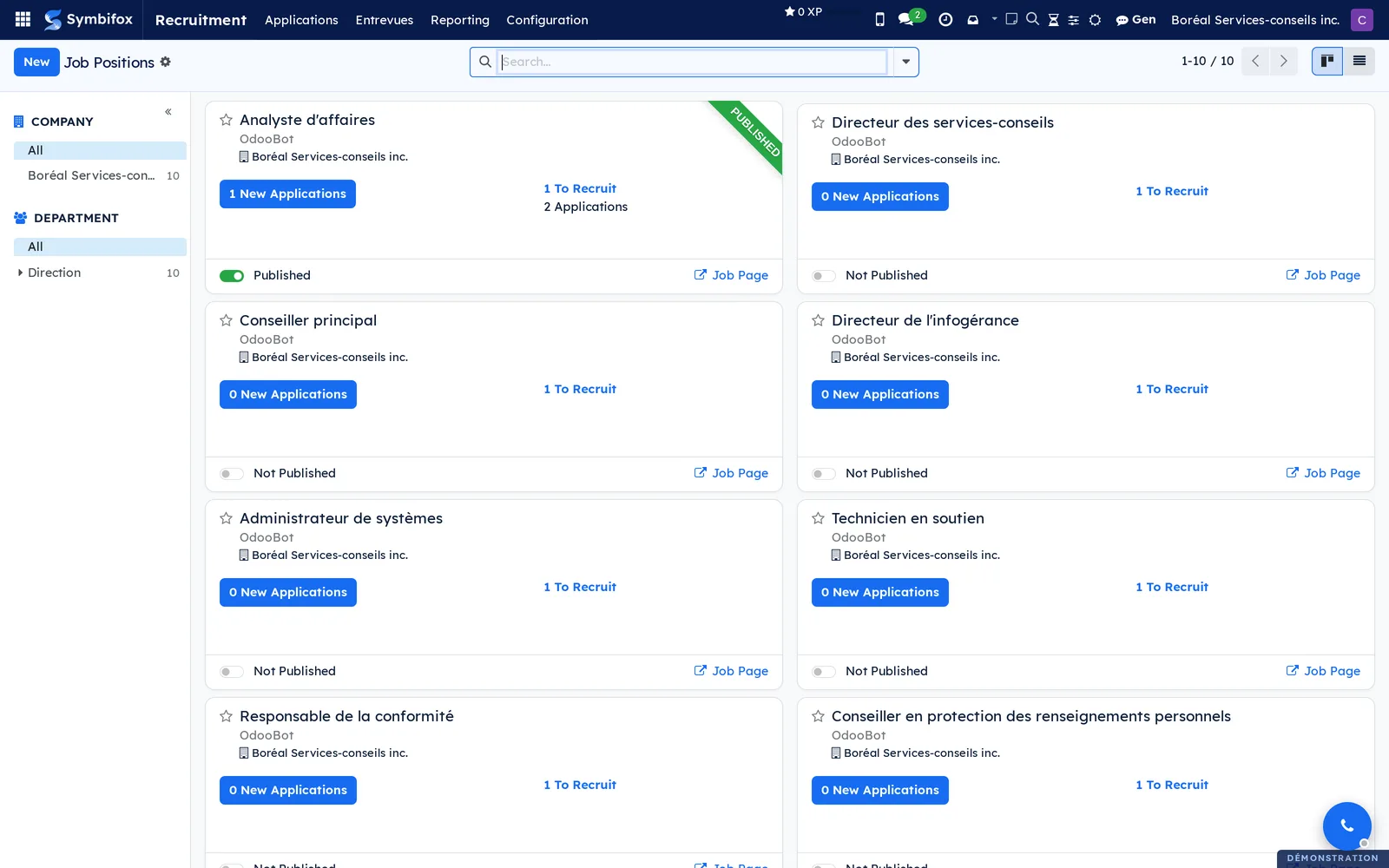
Positions and departments are shared with Employees. Disbursements go through Expenses. The retention schedule and the destruction campaigns live in Privacy (Law 25 and other frameworks).
Configuration#
Access and permissions#
The Recruitment right on the user form takes one of three values. Symbifox adds no group.
| Right | What it opens |
|---|---|
| Interviewer | Reads the grids and the catalogue, sees the sessions the person sits on, writes their own rating. The second By Job Positions entry is reserved for this right. |
| Officer | Sees everything, creates the grids and the sessions, draws a grid from the catalogue, prints the dossiers, consults Mesure des grilles (grid measurement). |
| Administrator | Deletes a grid that was never published, archives a catalogue template, adjusts the configuration. |
Two restrictions come from elsewhere. Recruitment cost amounts derive from employees' hourly cost, so only people who hold the Employees right at the Officer level can read them. The hours themselves stay visible in recruitment. The catalogue of templates is read-only for everyone, administrators included.
A rating belongs to the person who wrote it: the recruiter sees it but does not rate in their place. Once submitted, a rating can no longer be rewritten.
Settings#
Go to Recruitment › Configuration › Settings.
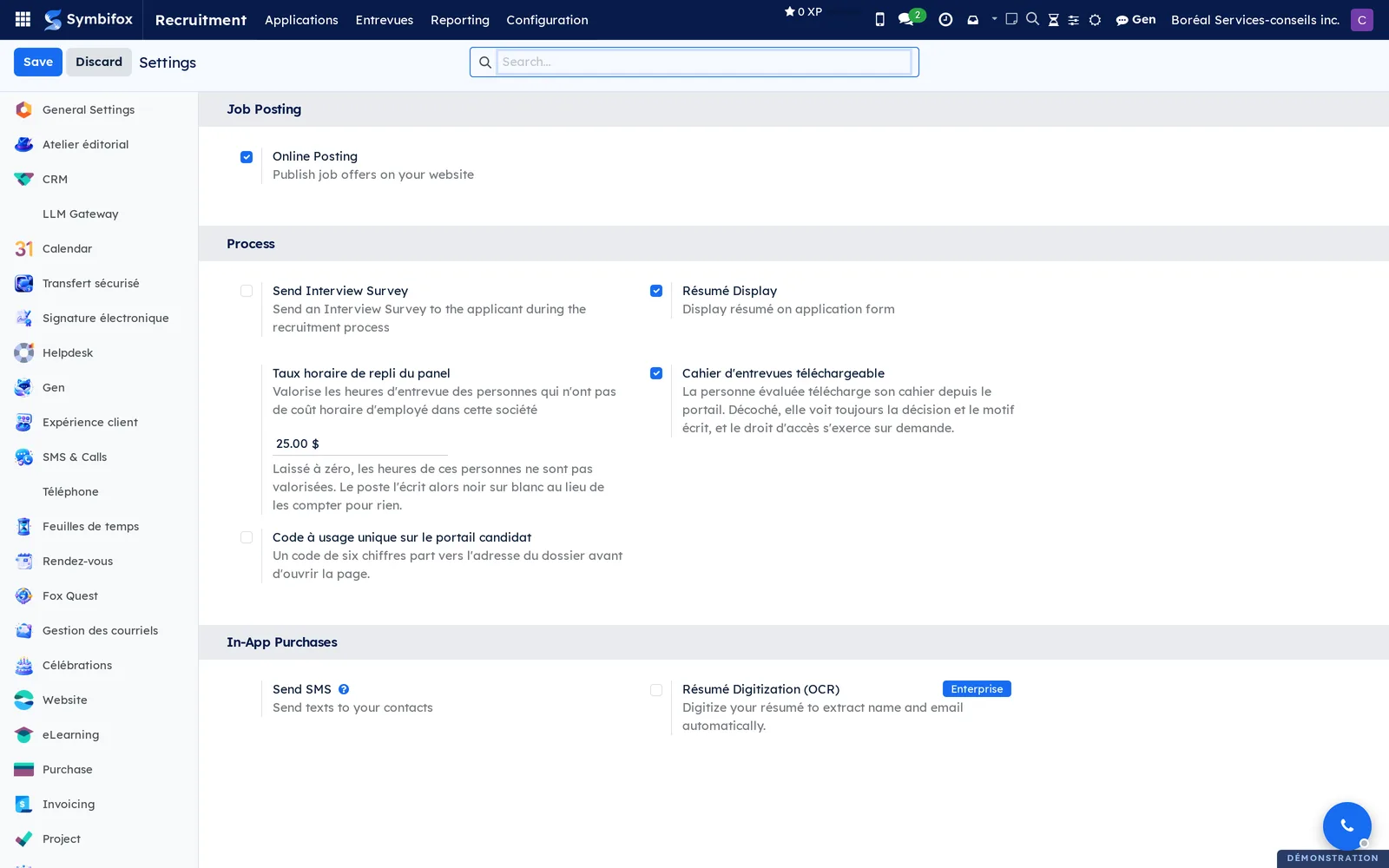
| Setting | Effect |
|---|---|
| Online Posting | Publishes the job offers on the website. Checked on the demo. |
| Send Interview Survey | Turns on the Odoo questionnaire sent to the candidate. Cleared on the demo. |
| Résumé Display | Shows the résumé in the application form. Checked on the demo. |
| Taux horaire de repli du panel (panel fallback hourly rate) | Values the interview hours of people with no employee hourly cost in this company. The demo sets it to “$25.00”. At zero, these hours are not valued and the position says so. |
| Cahier d'entrevues téléchargeable (downloadable interview dossier) | The person assessed downloads their dossier from the portal. When cleared, they see the decision and the reason, and the right of access is exercised on request. |
| Code à usage unique sur le portail candidat (one-time code on the candidate portal) | A six-digit code goes to the address on the file before the page opens. Cleared on the demo. |
| Envoyer un SMS (send an SMS) | Sends SMS messages to candidates, see SMS, calls and SIP phone. |
Résumé Digitization (OCR) carries the Enterprise label: it is not offered in Symbifox.
Base data#
Before the first application, review the following in Recruitment › Configuration:
- the Stages of the pipeline, with the email sent on entering each one;
- the Refuse Reasons, each linked to an email template;
- the Employment Types, the Degrees and the Tags;
- the Sources and Mediums, which say where an application comes from;
- the platforms under Job Boards › Emails, to recognize the applications that arrive by email from a job board;
- at least one published grid under Grilles d'entrevue (interview grids), drawn from the Modèles de grilles (grid templates);
- a Taux horaire de repli du panel if people without an employee record sit on panels.
Positions are created from Applications › By Job Positions or from Employees.
Getting started#
This walkthrough runs from opening the application to a first printed interview dossier, on the Boréal Services-conseils demo, with the Officer right.
First draw a grid from the catalogue and publish it.
- Go to Recruitment › Configuration › Modèles de grilles.
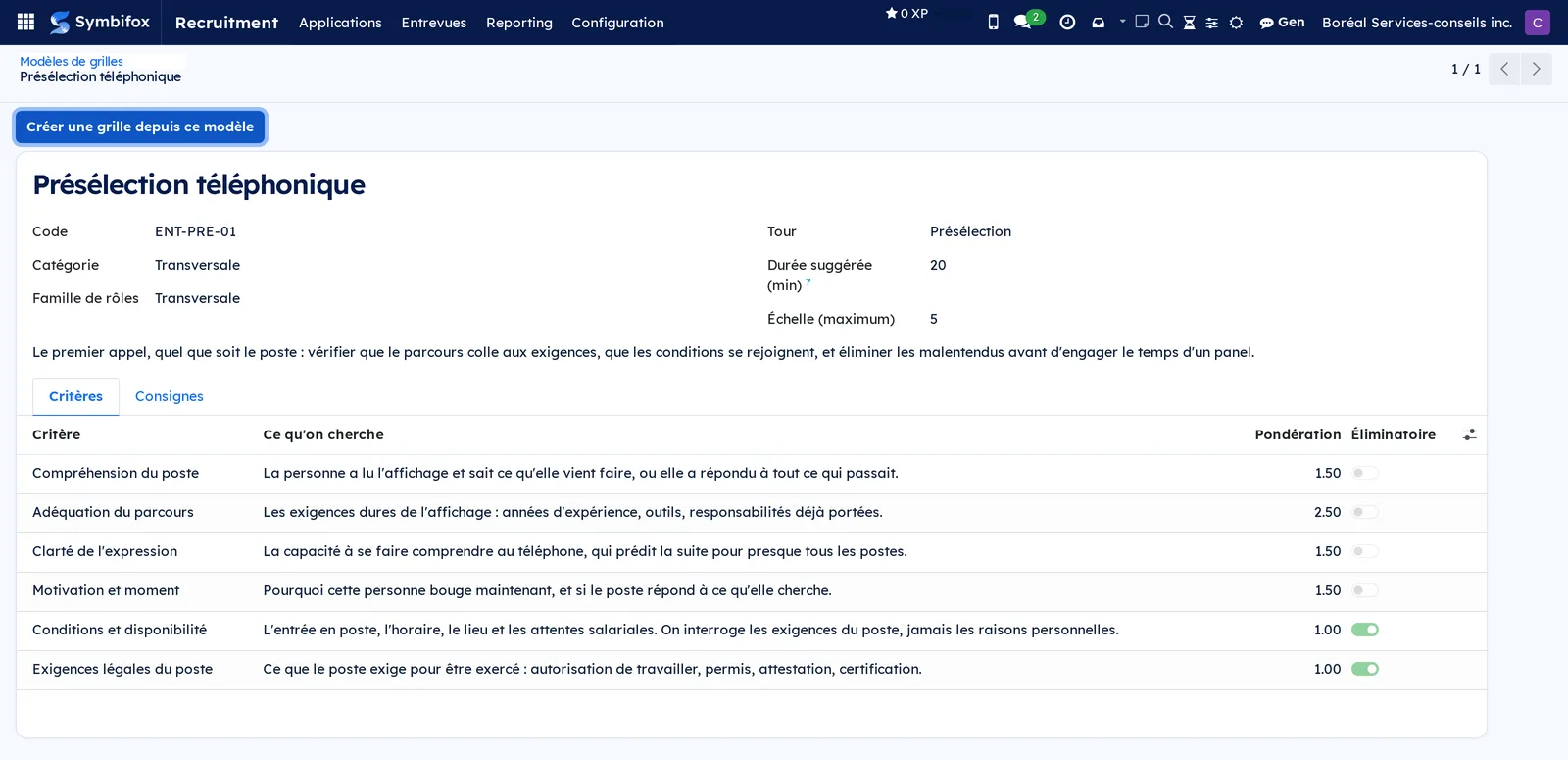
- Open “Présélection téléphonique” (phone screening). The template shows six criteria, a suggested duration of 20 minutes and a scale of 5.
- Select Créer une grille depuis ce modèle (create a grid from this template). A draft grid opens.
- In the Critères (criteria) tab, adjust the weights if a criterion carries more importance for you.
- Select Publier et geler (publish and freeze). The grid changes to Publiée (published) and carries the GELÉE (frozen) ribbon.
Then hold a session on an existing application.
- Go to Recruitment › Applications › All Applications and open an application.
- In the Entrevues (interviews) tab, add a session: the published grid, the Tour (round), the Début (start), the Durée (h) (duration in hours) and the Panel.
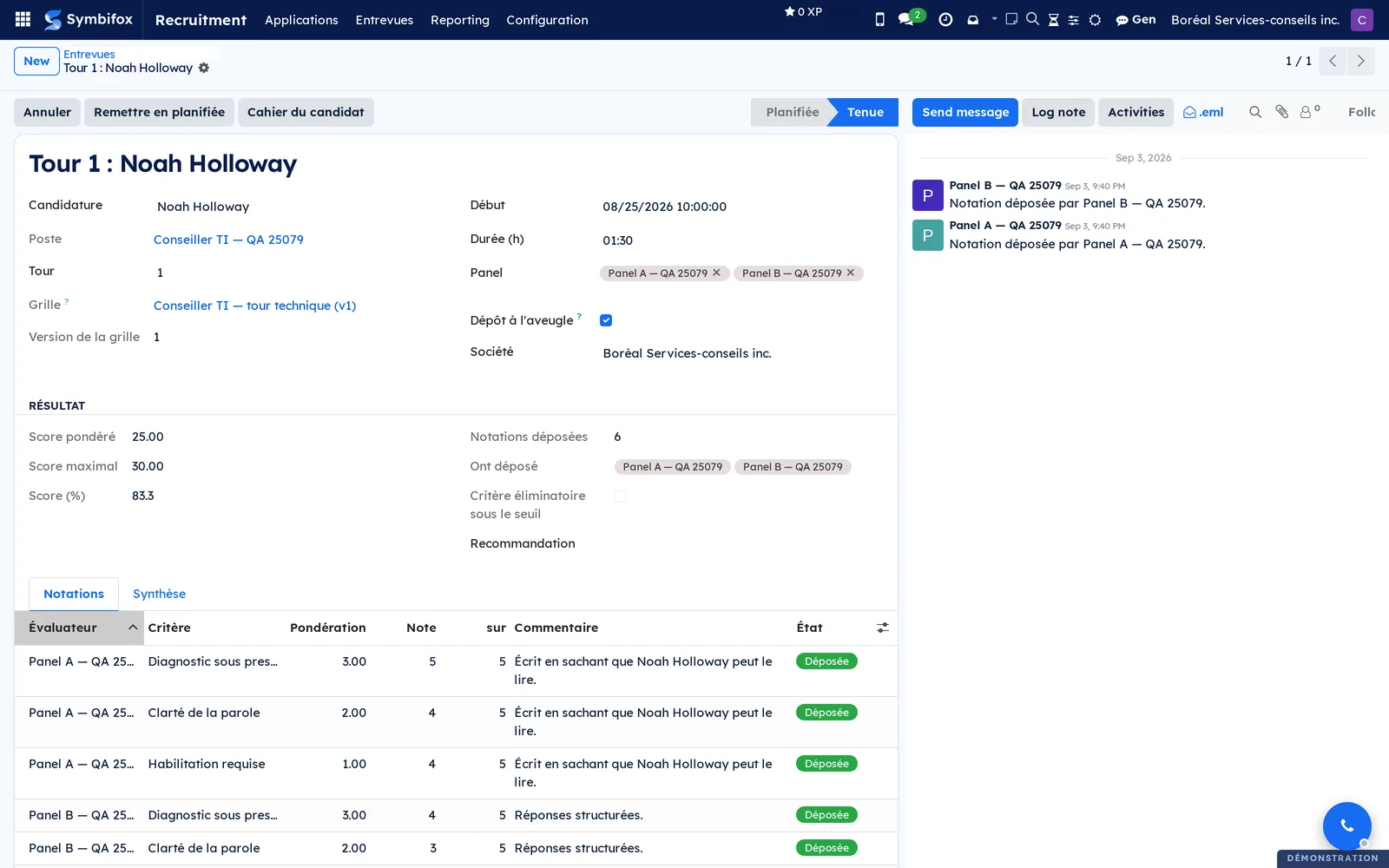
- Open the session. In the Notations (ratings) tab, fill in the Note (score) and the Commentaire (comment) on the lines that carry your name.
- Select Déposer ma notation (submit my rating). The ratings of the other panel members appear.
- Select Marquer tenue (mark as held), then fill in the Synthèse (summary) and the Recommandation (recommendation).
- Return to the application and select Imprimer le cahier (print the dossier).
The PDF dossier presents the session, its criteria, each person's scores and the weighted score. On the application, Score d'entrevue (%) (interview score) appears in the Entrevues tab.
Common tasks#
Create a position and publish the offer#
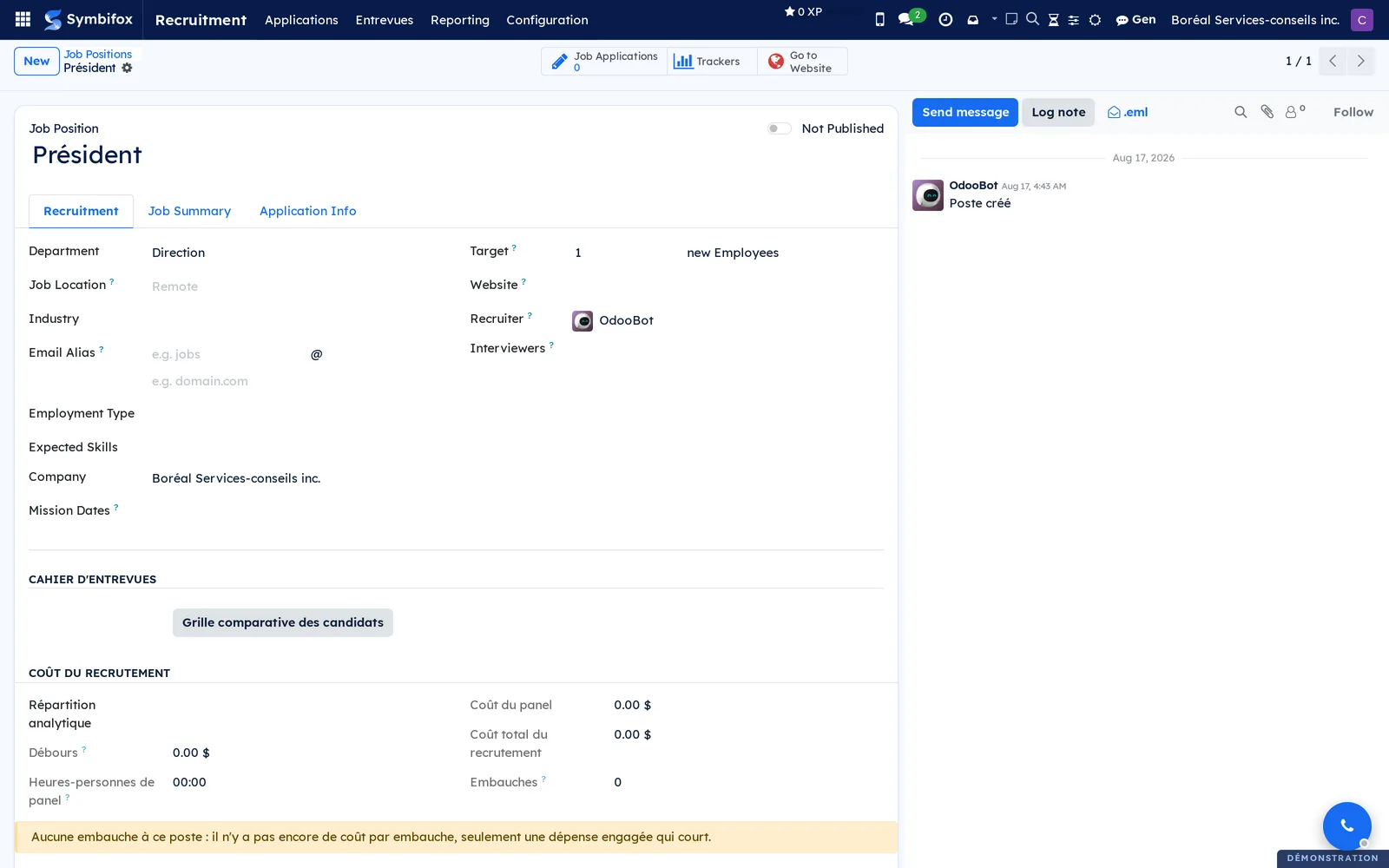
A position carries the offer, the applications and, with Symbifox, the grids, the sources and the recruitment cost.
- Go to Recruitment › Applications › By Job Positions.
- Select New and enter the name of the position.
- Open the form. In the Recruitment tab, fill in the Department, the Recruiter, the Target and the Email Alias that will receive the applications.
- Describe the position in Job Summary and the public form in Application Info.
- Turn on publishing with the toggle at the top of the form.
The position appears on the Jobs page of the website, with an application form. The shortcut Go to Website at the top of the form opens it.
Record an application#
An application arrives through the website or the position's alias, or it is entered by hand.
- Go to Recruitment › Applications › All Applications and select New.
- Enter the Candidate, their Email, their Phone and the Job Position.
- In the Details tab, fill in the Source and the Medium if you know where the application comes from.
- Attach the résumé in the chatter, the message thread at the bottom of the form, then save.
The application enters the New stage and the person receives the acknowledgement. The candidate is created if they did not exist.
Move an application forward#
The pipeline reads in the kanban view, one column per stage.
- Go to Recruitment › Applications › All Applications.
- Drag the card to the next stage, or open the application and select the stage in the status bar.
- On the card, set the status dot: In Progress, Blocked or Ready for Next Stage.
- Schedule an activity (call, interview) from the clock on the card.
If the stage carries a template, the person receives the email on entering the stage; an interview stage sends the invitation.
Draw a grid from the catalogue#
The catalogue delivers 32 templates: five cross-functional grids, seventeen role families and ten sector grids, with 193 criteria and 579 anchors.
- Go to Recruitment › Configuration › Modèles de grilles.
- Open the template that matches the round and the role.
- Read the Critères tab: criterion, what to look for, weight, knockout status.
- Select Créer une grille depuis ce modèle.
A draft grid opens, independent from the moment it is created. Tirée du modèle (drawn from the template) keeps a trace of its origin.
Write and publish a grid#
A grid is decided before the interview: you know what you are assessing before you meet anyone.
- Go to Recruitment › Configuration › Grilles d'entrevue and select New, or open a draft.
- Enter the Nom (name), the Tour, the Échelle (maximum) (maximum scale) and, as you prefer, the target Postes (positions) or a Famille de rôles (role family).
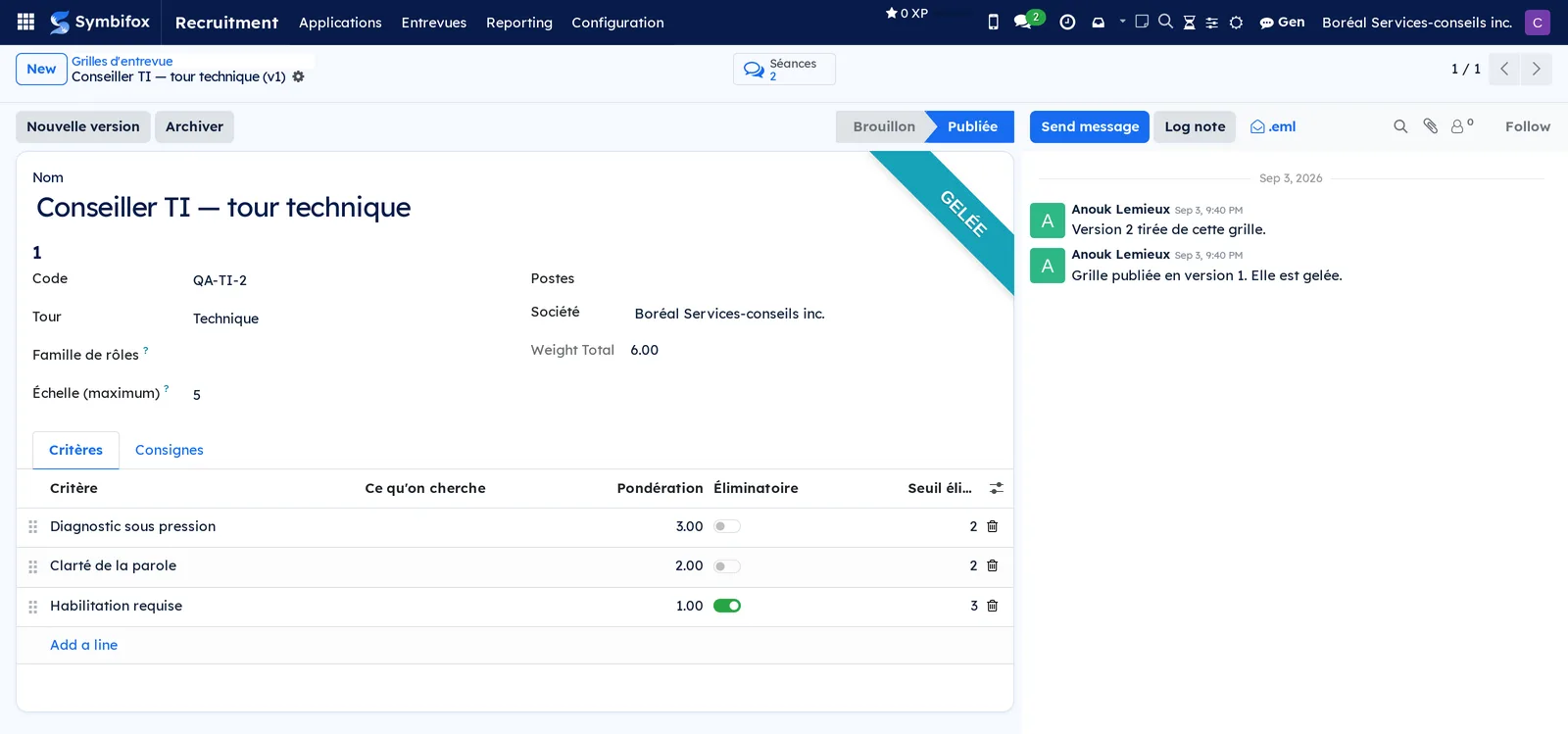
- In the Critères tab, add one line per criterion: Critère (criterion), Ce qu'on cherche (what to look for), Question à poser (question to ask), Pondération (weight).
- Check Éliminatoire (knockout) and enter the Seuil éliminatoire (knockout threshold) for a criterion that must flag the session.
- Open each criterion to describe its Ancrages (anchors): what each score is worth, in observable behaviour.
- In the Consignes (instructions) tab, write what the person who interviews needs to know.
- Select Publier et geler.
The grid changes to Publiée and carries the GELÉE ribbon: neither it nor its criteria can be changed any more. The shortcut Séances (sessions) at the top of the form counts the sessions held with it.
Revise a grid#
A published grid never goes back to draft. To change it, you draw a new version from it.
- Go to Recruitment › Configuration › Grilles d'entrevue and open the grid.
- Select Nouvelle version (new version).
- Edit the resulting draft, then select Publier et geler.
- To remove the old one from the list, open it and select Archiver (archive).
The new version is a separate record, with its Version number and a link to the Version précédente (previous version). The sessions held on the old one stay readable as they were.
Schedule an interview session#
A session carries a frozen grid, a panel, and one rating per person and per criterion. An application has as many sessions as the position has rounds.
- Go to Recruitment › Entrevues › Toutes les séances (all sessions) and select New.
- Choose the Candidature (application): the Poste (position) fills in.
- Choose the Grille (grid). Only a published grid can serve; its Version de la grille (grid version) is kept.
- Enter the Tour, the Début and the Durée (h).
- Add the members of the Panel and leave Dépôt à l'aveugle (blind submission) checked.
- Save.
The session is Planifiée (planned) and appears in Mes entrevues (my interviews) for each panel member, with one rating line per person and per criterion. The duration and the number of members will feed the position's cost.
Rate an interview and submit your rating#
Each panel member rates alone, then submits. As long as their rating is not submitted, the others stay invisible.
- Go to Recruitment › Entrevues › Mes entrevues and open the session.
- In the Notations tab, enter a Note per criterion on your lines, within the grid's scale.
- Write a Commentaire per criterion, knowing that the person assessed has the right to read it.
- Select Déposer ma notation.
Your lines change to Déposée (submitted), Notations déposées (ratings submitted) goes up, and your colleagues' ratings appear. The Score pondéré (weighted score), the Score (%) and the Critère éliminatoire sous le seuil (knockout criterion below the threshold) flag are calculated from the submitted ratings.
Close a session#
A planned session has cost nothing and does not count. Its status has to say what happened.
- Go to Recruitment › Entrevues › Toutes les séances and open the session.
- If the interview took place, select Marquer tenue.
- If the person did not show up, select Absence du candidat (candidate did not attend).
- If the interview will not take place, select Annuler (cancel).
- To go back, select Remettre en planifiée (set back to planned).
- In the Synthèse tab, write the Synthèse and choose the Recommandation.
Only Tenue (held) sessions enter the position's cost, the count of interviews held on the application, and the grid measurement.
Print an interview dossier#
The dossier is calculated, not stored: every session of a candidate in one document.
- Go to Recruitment › Applications › All Applications and open the application.
- In the Entrevues tab, select Imprimer le cahier for the internal version.
- Select Copie pour la personne évaluée (copy for the person assessed) for the copy handed to someone exercising their right of access.
- To compare the candidates for a position, open the position and select Grille comparative des candidats (comparison grid of candidates) under Cahier d'entrevues (interview dossier).
The copy for the person assessed removes the names of the raters and of the person who decided. From a session, Cahier du candidat (candidate's dossier) prints the same dossier.
Refuse an application#
A refusal pronounced after an interview has been held requires a written reason. Refusing an application that has had no interview stays frictionless.
- Go to Recruitment › Applications › All Applications and open the application.
- If an interview was held, first enter the Motif de la décision (reason for the decision) in the Entrevues tab.
- Select Refuse.
- Choose the Refuse Reason and confirm sending the email if the person is to be notified.
The application is refused and archived. Décidé par (decided by) and Date de la décision (date of the decision) keep who decided and when. The refusal email adapts to whether an interview took place, and names the right to obtain what was recorded, without sending the reason unprompted.
Hire a candidate#
The hire closes the application and opens the employee record.
- Go to Recruitment › Applications › All Applications and open the application.
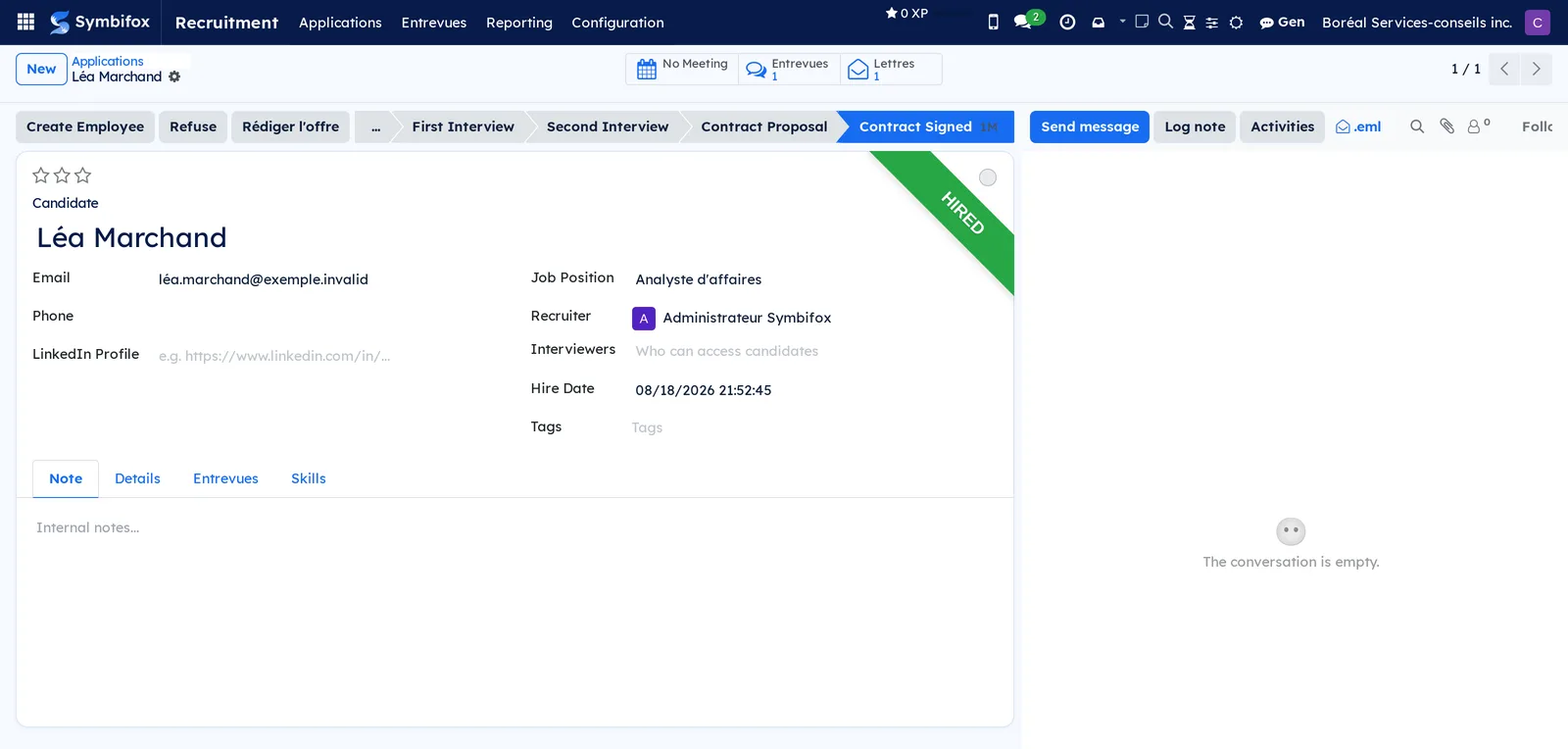
- Place it in the Contract Signed stage, the one that carries Hired Stage.
- Select Create Employee.
- Complete the employee form and save.
The application carries the HIRED ribbon and the Hire Date. The hire counts in the position's cost per hire and in the source's hire rate. The privacy bridge moves the file under the retention schedule for employee records.
Track the performance of a job board#
A tracked link per source says how many people looked at the posting, then how many applied. That link is what you paste into the posting, not the bare address.
- Go to Recruitment › Applications › By Job Positions and open the position.
- Under Sources d'affichage (posting sources), add one line per board with its Source.
- Copy the Lien à publier (link to publish) from the line and paste it into the posting.
- For a source created before the module was installed, select Créer le lien tracé (create the tracked link).
- Come back to read Clics (clicks), Candidatures (applications), Embauches (hires), Conversion (%) and Embauche (%) (hire rate).
On the position, Clics tracés (tracked clicks), Candidatures avec source (applications with a source), Candidatures sans source and Couverture des sources (%) (source coverage) sum up the sources. Candidatures on a line opens the applications that line brought in.
Attach a disbursement to the position and the board#
The cost per hire is made of disbursements and panel time. Disbursements come from expenses.
- Go to Expenses and create an expense (see Expenses).
- Choose the Site d'emploi (job board) that billed the posting; the Poste à pourvoir (position to fill) fills in.
- For a disbursement that is not a posting (travel, meals), leave the board empty and choose the Poste à pourvoir.
- Submit the expense and have it approved.
On the position, under Coût du recrutement (recruitment cost), Débours (disbursements) totals the attached expenses, refused ones excluded. Heures-personnes de panel (panel person-hours) multiplies the duration of each session held by the number of people who sat on it. Coût par embauche (cost per hire) divides disbursements and panel time by the Embauches. When an hour has no rate, Chiffre incomplet (incomplete figure) is checked and Ce qui manque au chiffre (what the figure is missing) writes how many hours are missing, in hours, never in money. On each source, Débours, Coût par candidature (cost per application) and Coût par embauche (ce site) (cost per hire on this board) count only the disbursements charged to that board.
Open the file to the candidate#
The person who applied follows their file through two doors: a signed link received in their email, and an account they create from the same page.
- Go to Recruitment › Configuration › Settings.
- Check Cahier d'entrevues téléchargeable so that the person obtains their dossier after the decision.
- Check Code à usage unique sur le portail candidat if a code must go to the address on the file before the page opens.
- Select Save.
Before the decision, the page shows the position, the date the file was submitted, the number of interviews held and the fact that the file is under review. Afterwards, it shows the decision, the written reason, the sessions and the PDF dossier, without the names of the raters. The person creates their account by invitation and finds their files under Mes candidatures (my applications).
Measure what the grids separate#
The aggregate keeps, per grid, per position and per year, what the interviews measured, with no name at all. It is calculated every night.
- Go to Recruitment › Entrevues › Mesure des grilles.
- To aggregate every year that has a rated session, select Actions › Agréger toutes les entrevues (aggregate all interviews).
- Open a line to read Séances tenues (sessions held), Personnes évaluées (people assessed), Score moyen (%) (average score) and Écart type du score (%) (standard deviation of the score).
- In the Par critère (by criterion) tab, look for an Écart type (standard deviation) close to zero, or a high Écart moyen entre évaluateurs (average gap between raters).
- To refresh a line, select Recalculer (recalculate).
A standard deviation close to zero says the criterion does not separate the candidates. A high gap between raters says it is not understood the same way, and its wording needs review.

Destroy unsuccessful applications#
Rule RH-REC-1 keeps an unsuccessful application for 3 active years and 2 semi-active years. At the end, a Privacy (Law 25 and other frameworks) campaign destroys it.
- In Recruitment › Entrevues › Mesure des grilles, make sure the year of the interviews concerned is aggregated.
- Go to Vie privée (privacy) and run the destruction campaign on the expired applications.
- Read the register: each line certifies an actual destruction.
The campaign takes the sessions, their ratings and attachments, the application, then the person along with their last application. The contact created by recruitment is destroyed if it is referenced nowhere, and archived otherwise. If the year is not aggregated, the campaign refuses and certifies nothing.
The menus, one by one#
- Recruitment: the root of the application.
- Recruitment › Applications: a grouping menu.
- Recruitment › Applications › By Job Positions: kanban of the demo's twelve positions, one card per position; list view available. This is the home screen. Screenshot
m833.png, formm833_form.png. - Recruitment › Applications › By Job Positions (second entry): the same kanban, reserved for the Interviewer right, without the list view. Screenshot
m834.png. - Recruitment › Applications › All Applications: kanban of the demo's five applications, one column per stage; list, calendar, activity, pivot and graph views. Useful filters: by position, by stage, refused, archived. Screenshot
m835.png, formm835_form.png.
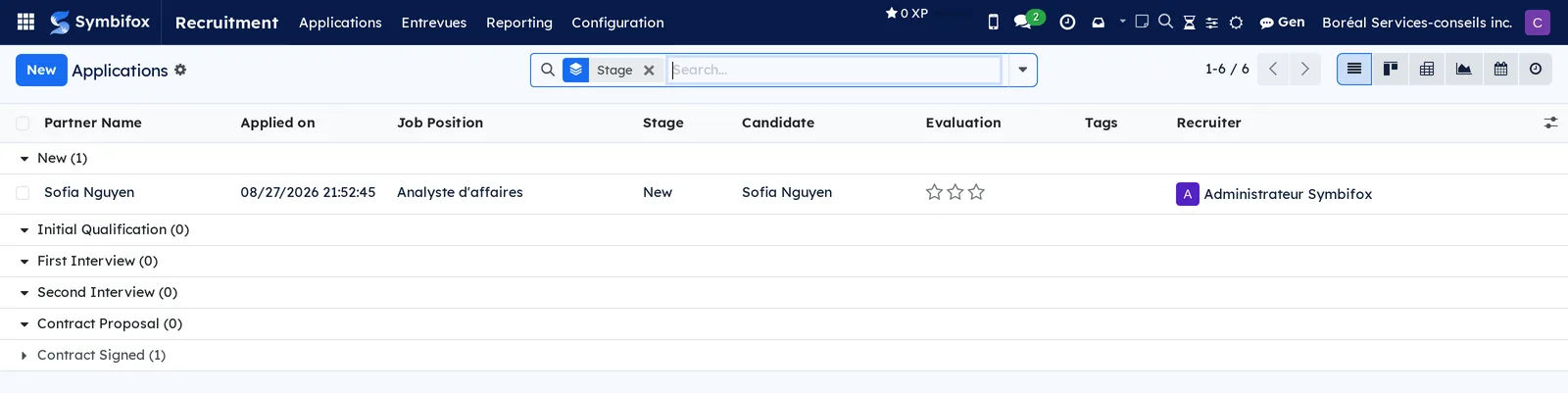
- Recruitment › Applications › Candidates: the demo's five people, each with their applications. Screenshot
m836.png. - Recruitment › Entrevues: a grouping menu added by Symbifox.
- Recruitment › Entrevues › Mes entrevues: the sessions the signed-in person sits on, with the Ma notation (my rating) column. Screenshot
m859.png. - Recruitment › Entrevues › Toutes les séances: the demo's four sessions, reserved for the Officer right. The empty screen invites you to “Planifiez une première séance” (schedule a first session). Screenshot
m860.png, formm860_form.png. - Recruitment › Entrevues › Mesure des grilles: the demo's two aggregates, per grid, position and year. Screenshot
m864.png. - Recruitment › Reporting: a grouping menu.
- Recruitment › Reporting › Recruitment Analysis: graph and pivot table of the applications, to group by stage, position, source or medium. Screenshot
m838.png. - Recruitment › Configuration: a grouping menu.
- Recruitment › Configuration › Settings: the settings described under Settings. Screenshot
m840.png. - Recruitment › Configuration › Job Positions: a grouping menu.
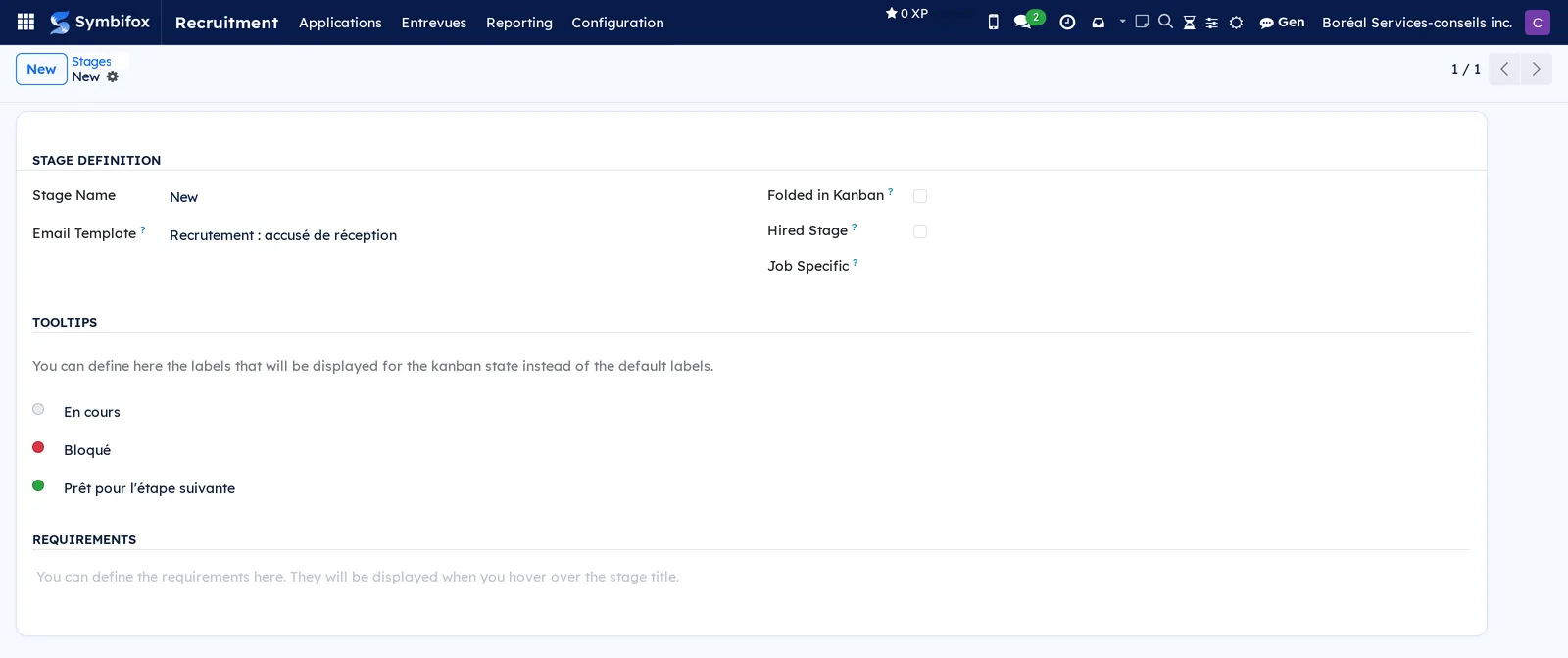
- Recruitment › Configuration › Job Positions › Stages: the demo's six stages. The form carries the Stage Name, the Email Template, Folded in Kanban, Hired Stage, Job Specific, the tooltips and the requirements. Screenshot
m842.png.
- Recruitment › Configuration › Job Positions › Employment Types: the ten contract types, shared with Employees. Screenshot
m843.png. - Recruitment › Configuration › UTMs: a grouping menu.
- Recruitment › Configuration › UTMs › Sources: the demo's eleven sources; the form carries only the Source Name. Screenshot
m845.png. - Recruitment › Configuration › UTMs › Mediums: the ten mediums (email, website, social networks). Screenshot
m846.png. - Recruitment › Configuration › Applications: a grouping menu.
- Recruitment › Configuration › Applications › Degrees: the four levels offered on an application. Screenshot
m848.png. - Recruitment › Configuration › Applications › Refuse Reasons: the six reasons, each with its Email Template; “Does not fit the job requirements” sends “Recruitment: Refuse”. Screenshot
m849.png. - Recruitment › Configuration › Applications › Tags: the four free tags of the applications. Screenshot
m850.png. - Recruitment › Configuration › Grilles d'entrevue: the organization's three grids, with status and version. The empty screen invites you to “Créez une première grille” (create a first grid). Screenshot
m861.png. - Recruitment › Configuration › Modèles de grilles: the catalogue's 32 templates, grouped by category, with Créer une grille. Screenshot
m872.png. - Recruitment › Configuration › Employees: a grouping menu.
- Recruitment › Configuration › Employees › Departments: the five departments, shared with Employees. Screenshot
m852.png. - Recruitment › Configuration › Employees › Skill Types: the two types that feed the Skills tab of the applications. Screenshot
m862.png. - Recruitment › Configuration › Activities: a grouping menu.
- Recruitment › Configuration › Activities › Activity Types: the instance's 24 activity types. Screenshot
m854.png. - Recruitment › Configuration › Activities › Activity Plans: the demo's two plans, sequences of activities launched in one go. Screenshot
m855.png. - Recruitment › Configuration › Job Boards: a grouping menu.
- Recruitment › Configuration › Job Boards › Emails: the demo's three platforms, with the Name, the Email the applications arrive from and the Regex that extracts the person's name. Screenshot
m857.png.

Reference#
Fields of the Grille d'entrevue form#
| Field | Description | Required or default |
|---|---|---|
| Nom, Code | Displayed name with its version; free short reference. | Nom required |
| Société | Company that owns the grid. | Required, current company |
| Postes, Famille de rôles | Target positions, or a family for a generic grid. | Optional |
| Tour | Interview round covered. | Required |
| Échelle (maximum) | Highest score a criterion can receive. | Required |
| Consignes à la personne qui interviewe | Text of the Consignes tab. | Optional |
| État | Brouillon, Publiée, Archivée (draft, published, archived). | Brouillon |
| Version, Version précédente, Tirée du modèle | Chain of versions and the template of origin. | Computed |
| Critères | Critère, Ce qu'on cherche, Question à poser, Pondération, Éliminatoire, Seuil éliminatoire, Ancrages. | At least one criterion |
Fields of the Séance d'entrevue form#
| Field | Description | Required or default |
|---|---|---|
| Candidature | File assessed; Poste and Société follow from it. | Required |
| Grille, Version de la grille | Published grid and its version at the time of the session. | Required |
| Tour | Number of the round. | Required |
| Début, Durée (h) | Time and duration; the duration feeds the panel cost. | Optional |
| Panel | People who rate. | Required |
| État | Planifiée or Tenue in the status bar; no-show and cancellation by button. | Planifiée |
| Dépôt à l'aveugle | Hides the others' ratings until you submit your own. | Checked |
| Score pondéré, Score maximal, Score (%) | Weighted average across raters. | Computed |
| Notations déposées, Ont déposé, Critère éliminatoire sous le seuil | Tracking of submissions, and the flag. | Computed |
| Synthèse, Recommandation | Conclusion of the panel. | Optional |
Fields added to the Application form#
| Field | Description | Required or default |
|---|---|---|
| Séances d'entrevue | List of the sessions, Entrevues tab. | Empty |
| Score d'entrevue (%) | Consolidated score of the sessions held. | Computed |
| Motif de la décision | Written to be read by the person. Required to refuse after an interview has been held. | Optional otherwise |
| Décidé par, Date de la décision | Who decided, and when. | Filled in at the decision |
Fields added to the Job Position form#
| Field | Description | Required or default |
|---|---|---|
| Grilles d'entrevue | Grids attached to the position. | Optional |
| Sources d'affichage | One line per board, with Lien à publier, Clics, Candidatures, Embauches, Refusées, Conversion (%), Embauche (%), Débours, Coût par candidature. | Empty |
| Clics tracés, Candidatures avec source, Candidatures sans source, Couverture des sources (%), Ce que les sources ne couvrent pas | What the sources explain about the applications received. | Computed |
| Répartition analytique | Analytic key used by the expenses of the position. | Optional |
| Débours, Débours imputés à un site, Débours sans site | Attached expenses, refused ones excluded. | Computed |
| Heures-personnes de panel, Heures non valorisées, Coût du panel | Time of the sessions held, and its valuation. | Computed |
| Coût total du recrutement, Coût par embauche, Embauches | Disbursements plus time, divided by the hires. Amounts reserved for the Employees Officer right. | Computed |
| Chiffre incomplet, Ce qui manque au chiffre | Warning written in hours. | Computed |
Reports and exports#
- Cahier d'entrevues (application, Imprimer le cahier): every session, the scores and comments of each rater, the weighted score.
- Cahier remis à la personne évaluée (dossier handed to the person assessed, through Copie pour la personne évaluée): same content, without the name of the raters or of the person who decided.
- Grille comparative des candidats (position): the candidates in columns, on the same criteria.
- Recruitment Analysis: graph and pivot table, exportable to a spreadsheet.
- Any list can be exported with Actions › Export (see Common actions in every application).
Automations#
- Every night, the ratings of the sessions held are aggregated per grid, position and year, for the current year and the previous one.
- On entering a stage that carries a template, the email goes to the candidate; on refusal, the email of the chosen reason goes out.
- When a posting source is created, a tracked link is created; each visit is counted, the country kept, the IP address never written.
- When an expense attached to a position is approved, the disbursement enters the position's cost; a refused expense does not.
- When an application is closed, the privacy classification is set; at the hire, it switches to the retention schedule for employee records.
- A destruction campaign that targets an application whose interview year is not aggregated, or whose person was hired, refuses and certifies nothing.
Public pages and portal#
- The Jobs page of the website lists the published positions and offers an application form that keeps the source and the medium read from the address.
- The tracked link of a source is a short address of the form
/r/…: it counts the visit, then redirects to the position's page. - The candidate portal presents Mes candidatures and the page of one application, before and after the decision. A tampered link and a destroyed file lead to the same page, which says the file is no longer available and where to write, without naming anyone.
- A page asks for the access code when Code à usage unique sur le portail candidat is turned on.
Modules that extend this application#
The six modules that follow install themselves as soon as their prerequisites are present.
The dossier works without this bridge; the bridge is what answers “for how long”.
This module stores none of its calculations: the cost fields are displayed but cannot be sorted or grouped.
The recruiter's name appears in the emails, but not their address: the reply comes back to the application through the position's alias.
The portal pages never receive the application record, only the items chosen for the person: the ratings and the names of the raters stay out of reach.
No connector to any job board: performance is measured through the link.
Understanding#
Why a published grid is frozen. A session held last year must read exactly as it was rated. If the grid could change, the file would prove nothing. You make a grid evolve by drawing a new version from it.
Why blind submission. When opinions are said out loud, the first score heard pulls the next ones. With blind submission, the comparison happens only afterwards, on opinions formed separately, and the gap between two raters becomes information.
Why no automatic ranking. The score helps a person decide; a knockout criterion below its threshold flags without refusing. This is a Law 25 requirement on decisions based exclusively on automated processing, and the emails state that a person made the decision.
Why a template is not a grid. The list of grids stays the organization's own. A module update can correct a question in the catalogue without touching the grids already drawn; a template you archived stays archived.
Why the refusal reason is not sent unprompted. The reason is written to be read by the person, who has a right of access. Sending it without a request would be another act: the email tells them they can obtain it, and the portal hands it to them as soon as the decision is made. Before the decision, they see the status and nothing else, so that the opinion of third parties is not exposed before anyone has decided.
Why the cost per hire admits what it is missing. A cost that counts zero for unvalued hours understates, all the more as the position has mobilized more people. The rate comes first from the employee's hourly cost in the position's company, then from the fallback rate. A panel member is not necessarily an employee, and an employee of another company in the group does not lend their rate. The recruiter's time outside sessions is measured nowhere and does not enter.
Why a refused application remains an application received. The refusal archives the application. The counts per source read the archived ones too; otherwise the conversion rate would collapse as the files are processed.
Why the click leaves no IP address. Publishing a tracked link on a job board means counting people who asked for nothing. The click is counted, the country kept, the address never written. A click is not a person: the same person coming back counts twice, and recognized robots do not count.
Why aggregate before destroying. The ratings are what make it possible to say whether a grid separates the candidates. Once destroyed, they cannot be reconstituted. The aggregate keeps the measure with no name at all, and the campaign refuses to destroy a year that is not aggregated. The bridge does not anonymize: the name is in the résumé, the chatter and the comments, in full. The person hired is not affected: their file falls under the retention schedule for employee records.
Troubleshooting#
| Symptom | Probable cause | Fix |
|---|---|---|
| The grid and its criteria can no longer be edited. | The grid is published, and therefore frozen. | Select Nouvelle version, edit the draft, publish it. |
| I cannot see my colleagues' scores on a session. | Blind submission is on and your rating is not submitted. | Rate each criterion, then select Déposer ma notation. |
| The refusal is blocked: a reason is required. | An interview was held on this application. | Enter the Motif de la décision in the Entrevues tab, then refuse. |
| The position shows Chiffre incomplet and unvalued hours. | A panel member has no employee hourly cost in this company, and the fallback rate is zero. | Set the Taux horaire de repli du panel in Settings, or the employee's hourly cost. |
| The conversion of a source stays at zero despite applications. | The tracked link was never used: the posting carries the bare address. | Replace the address in the posting with the Lien à publier. |
| The tracked link leads to a page not found. | The position is not published on the website. | Publish the position, then check the Poste non publié filter. |
| The destruction campaign refuses an application. | The year of its interviews is not aggregated, or the person was hired. | Select Actions › Agréger toutes les entrevues in Mesure des grilles, then run it again; an employee file is destroyed with the employee record. |
| A candidate says their link leads to “dossier plus disponible” (file no longer available). | The file was destroyed at the end of the retention schedule, or the link was tampered with. | Nothing to repair: the page says the same thing in both cases. Answer their access request by hand if there is one. |
See also#
- Employees: the positions, the departments and the employee record created at the hire.
- Expenses: the expenses that become recruitment disbursements.
- Privacy (Law 25 and other frameworks): the retention schedule and the destruction campaigns.
- Letters and Electronic signatures: the job offer drafted from the application and sent for signature.
- Website, blog and eLearning: the Jobs page and the public application form.
- Email Marketing and Link Tracker: the link tracker that counts the visits to the postings.
- Common actions in every application: filters, grouping, exports and the chatter.