
Part 8 · Buildings
Residential leasing
Record a lease of a dwelling made on the Tribunal's form, follow notices and what the lessee's silence produces, keep rent instalment by instalment, and open a portal that tells the lessee their deadlines.
Residential leasing keeps the file of a lease of a dwelling in Québec. It is for the lessor who owns a rental building, for the housing cooperative or non-profit, and for the co-owner who leases their fraction. It records what the lease agrees, computes notice time limits to the calendar month, says what the lessee's silence will produce, and follows the rent without ever concluding to a resiliation that only the tribunal can grant.
Overview#
The lease is made on the mandatory form of the Administrative Housing Tribunal, bought from the Tribunal on paper or in electronic format. The app does not reproduce it: it records what was agreed, names the form used and keeps the signed form as an attachment. It does track the notices, whose content the law prescribes, not their medium.
Around the lease:
- the notices given under the lease, each with its reply deadline and the effect of silence;
- the eviction moratorium, kept as a recorded and dated state;
- the rent instalments, the payments and the arrears;
- abandonments of the dwelling, and the effects left behind;
- the lessee's portal, read-only.
Here are the leases of the demonstration: two dwellings at Les Lofts de la Rivière, one of them leased to two solidary lessees. The demonstration company works in French, and its names stay in French on the English screens.

The leasing menus live under Properties › Persons. The organisation that leases is of nature Lessor, Housing cooperative or Non-profit housing organisation: see Divided co-ownership for the organisation record, immovables and dwellings.
Configuration#
Access and rights#
| Role | What it opens |
|---|---|
| Properties / Consultation | Read access to leases, notices, the moratorium, rent instalments and abandonments. The ground of a resiliation by the lessee stays hidden from this role. |
| Properties / Manager | Entering the whole file, the ground of a resiliation, and inviting to the portal. |
| Portal | The lessee: reading their leases, notices and rent. |
Settings#
The app has no settings screen. The organisation, immovable and dwelling are created as in Divided co-ownership. A syndicate of co-ownership does not sign a lease of a dwelling: the lessor of a leased fraction is its owner.
Base data#
- Create the organisation that leases, of nature Lessor, with its immovables and dwellings.
- Create the lessees in Contacts, with their email address if they will use the portal.
- Under Properties › Persons › Eviction moratorium, check the recorded state of the moratorium and its date.
Getting started#
Record a first lease and open it to the lessee:
- Open Properties › Persons › Leases and select New.
- Under Parties, choose the Lessor, the Immovable, the Dwelling and the Lessees.
- Under Form used, choose the Mandatory form and attach the Signed form.
- Fill in Term and Rent, then save.
- Under Properties › Persons › Rent, create the lease's instalments.
- On the lease, select Invite to the portal.
Common tasks#
Record a lease#
- Open Properties › Persons › Leases and create the lease.
- Enter the parties; check Solidary undertaking if the lessees bind themselves solidarily.
- Choose the Mandatory form: Schedule 1: Student, Schedule 3: Land for the emplacement of a mobile home, Schedule 4: Dwelling leased by a housing cooperative, Schedule 5: Any other dwelling or Schedule 7: Writing setting forth an oral lease.
- Enter the Term (Fixed term or Indeterminate term), the Beginning and, for a fixed term, the End. Check Lease of a room if needed.
- Enter the Rent, the Cost of services, the Payment period and the Method of payment.
The Restrictions section and New lessee notice section fields give the letter of the section in the form used: it changes from one schedule to another. Schedule 2: Dwelling in low-rental housing is refused, with its explanation: it is a separate regime. There is no security deposit field: the lessor may not exact any sum other than the rent (art. 1904 CCQ).
Record consent to postdated cheques#
The lessor cannot impose postdated cheques; the lessee can consent to them, and the form carries the box and their initials.
- Open the lease.
- Check The lessee agrees to give postdated cheques if the signed form provides for it.
The box is unchecked by default. What it records is a consent, never a requirement.
Declare a restriction on having the rent fixed#
In an immovable ready for five years or less, or whose use changed five years ago or less, the lessee cannot have their rent fixed by the Tribunal (art. 1955 CCQ).
- In the Restrictions on having the rent fixed (art. 1955 CCQ) section, check Restriction on applying to have the rent fixed.
- Choose the Ground for the restriction.
- Enter Immovable ready for its intended use on.
- If needed, enter the Maximum rent over five years.
The restriction requires its ground and its start date. For a lease made after February 20, 2024 on an immovable ready after that date, the maximum rent payable within five years must appear in the lease.
Record a notice#
Each notice carries its nature, its dates and what silence will produce. Silence does not mean the same thing from one notice to another: it is acceptance of a modification of the lease (art. 1945 CCQ), but refusal to leave on a repossession or an eviction (art. 1962).
- Open Properties › Persons › Notice and create the notice: lease and Nature of the notice.
- Enter Given on, Received on and Date concerned.
- Read the What silence will produce section: Effect of silence, Article, The lessee shall reply before.
The reply period runs from receipt, not from sending. For a modification, Objecting means vacating flags the exception of art. 1945: an immovable less than five years old, or a cooperative, where refusing the modification means leaving at the end of the lease.
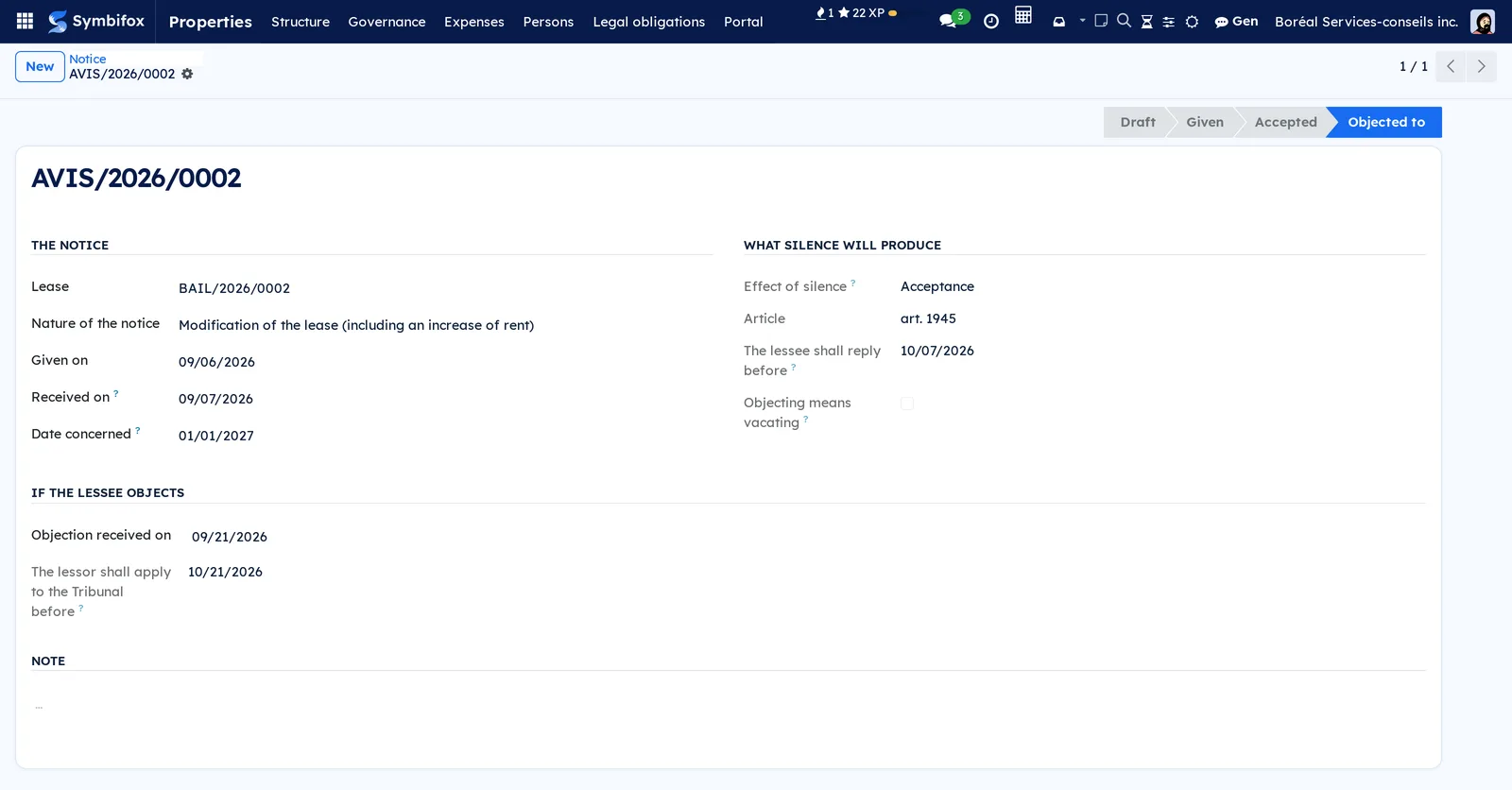
Follow an objection to a modification#
When the lessee objects to a modification, it is up to the lessor to act: they must apply to the Tribunal within one month, or the lease is renewed on the same conditions (art. 1947 CCQ).
- Open the modification notice.
- Under If the lessee objects, enter Objection received on.
- Read The lessor shall apply to the Tribunal before.
It is the only leasing time limit that runs against the lessor.
Record a resiliation by the lessee#
The Code gives the lessee three exits the lessor cannot refuse, and each requires a different attestation.
- Create a notice of nature Resiliation by the lessee (arts. 1974, 1974.1, 1976).
- Under Resiliation by the lessee, choose the Ground.
- Read Who must attest, then check Attestation received once the document is in hand.
- If needed, enter Dwelling re-leased on or Date agreed between the parties.
Resiliation effective on takes re-leasing into account: a dwelling re-leased during the notice period ends the lease sooner. The period runs from sending the notice. For art. 1974.1 (safety threatened), the attestation comes from a public servant or officer designated by the Minister of Justice, on the strength of a judgment or a sworn statement, and never from a medical certificate.
Keep the state of the eviction moratorium#
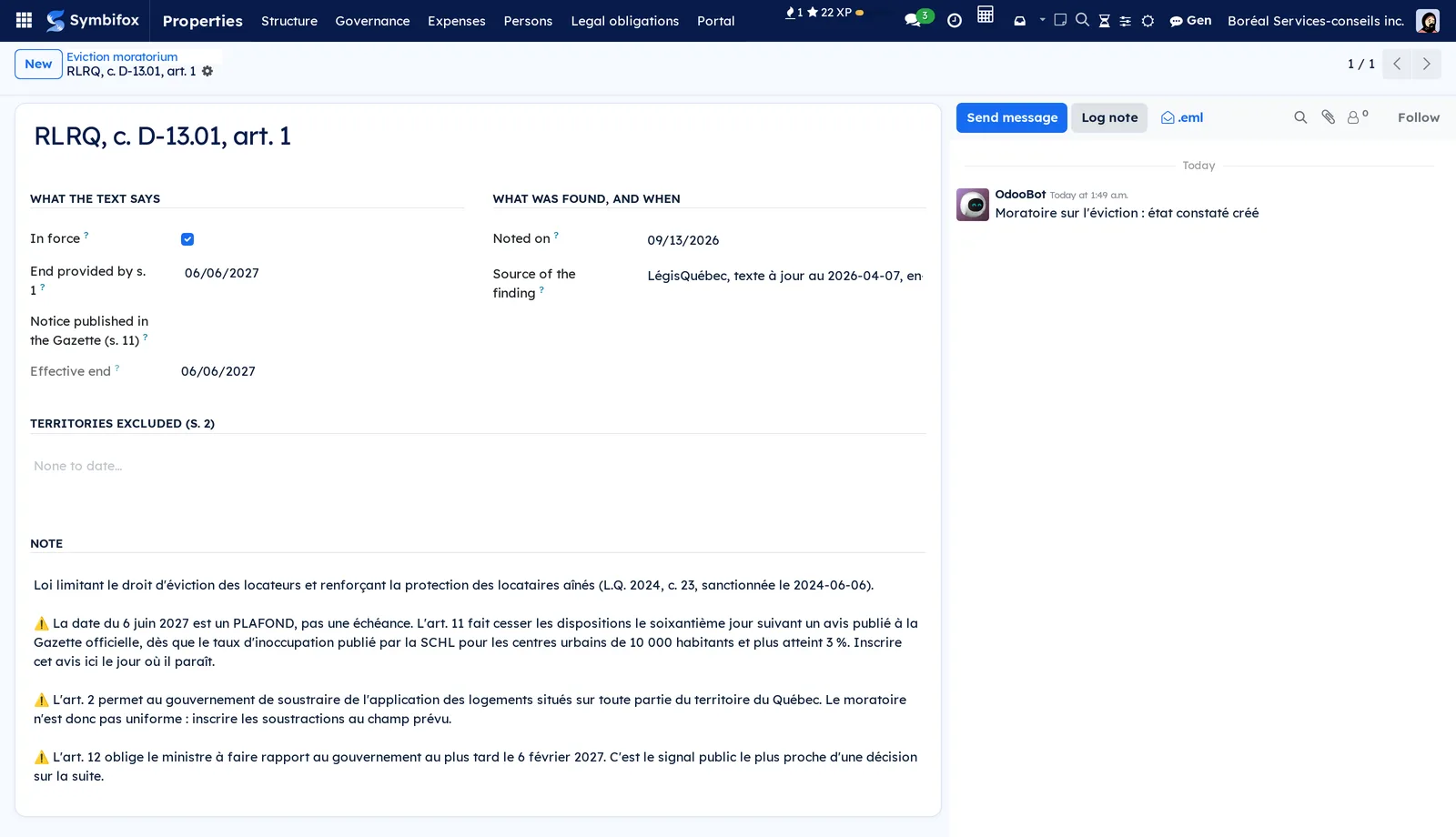
Eviction for subdivision, enlargement or change of use is suspended. The date of June 6, 2027 is a ceiling, not a due date: the moratorium ends sixty days after a notice published in the Gazette officielle, and the government can exclude territories from it.
- Open Properties › Persons › Eviction moratorium.
- Update In force, Notice published in the Gazette (s. 11) and Territories excluded (s. 2).
- Enter Noted on and the Source of the finding.
A state that is six months old says it is six months old. With no state recorded, the app blocks nothing.
Keep the rent#
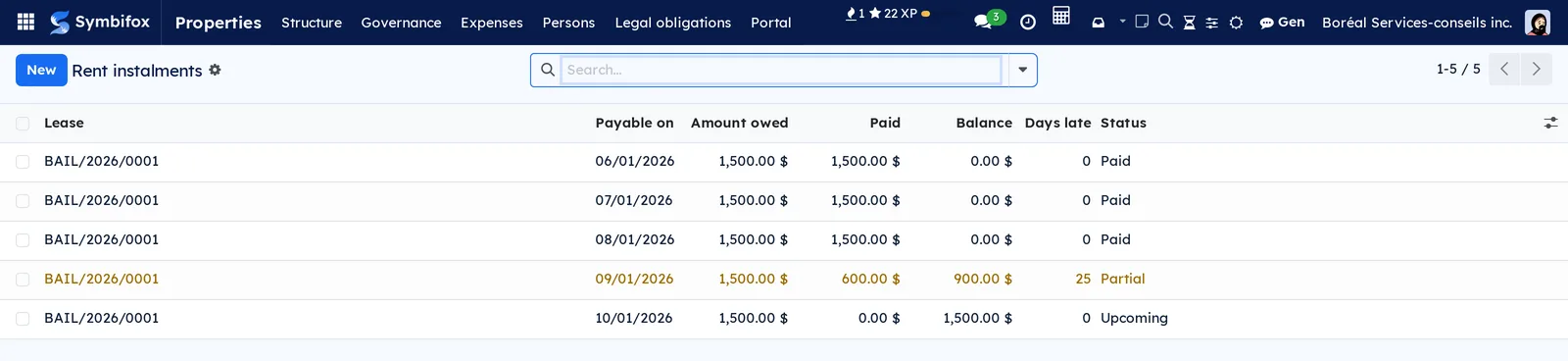
- Open Properties › Persons › Rent and create one instalment per due date: lease, Payable on, Amount owed.
- For each payment, open the instalment and add a payment: date, amount, method, Receipt given.
The Status is computed: Upcoming, Paid, Partial, Late or Deposited in the office of the court. An instalment cannot exceed the agreed rent, and a payment is always positive: a correction is made by editing the payment.
Read the arrears#
On the lease, the Rent owed section gives the Arrears, the Oldest delay (days) and The court may still grant a period. Beyond three weeks late, the tribunal can no longer order the lessee to pay within a time it sets (art. 1973): that is all the threshold changes.
Rent deposited in the office of the court with authorization (art. 1907) is marked Deposited in the office of the court (art. 1907) on the instalment: it has been paid, elsewhere, and does not count in the arrears.
Record an abandonment of the dwelling#
- Open Properties › Persons › Abandonments of the dwelling and create the record: lease, Noted on, Case.
- Check Movable effects were left and describe them.
- Enter Notice of disposal given on.
- Read Considered forgotten from and No disposal before.
- Once the date has passed, enter Disposed of on, the Manner of disposal and, for a sale, the Proceeds of the sale.
The two cases of art. 1975 are not alike: abandonment without any reason, with the effects taken, resiliates the lease by operation of law; a dwelling unfit for habitation left without notice only allows it to be resiliated. Effects left behind are considered forgotten after 90 days, and the notice of disposal also lasts 90 days; both periods can run at the same time (art. 944). Disposing means selling, otherwise giving to a charity, and only failing that disposing otherwise (art. 945). The lessor never becomes the owner of the effects (art. 946).
Invite a lessee to the portal#
- Open the lease.
- Select Invite to the portal.
Each lessee on the lease receives an invitation email; a lessee already invited receives a new link. The lease's chatter keeps the summary. Access is read from the lease, never from the dwelling: all co-lessees on one lease get access, and a person recorded on the dwelling without being a party to the lease does not.
The menus, one by one#
Leasing has no app of its own: its five entries live under Properties › Persons, next to the register of co-owners.
Properties › Persons › Leases opens the leases, with the immovable, dwelling, lessees, dates and total rent.
Properties › Persons › Notice opens the notices, their nature, reply deadline and status.
Properties › Persons › Eviction moratorium (managers) opens the recorded state of the moratorium.
Properties › Persons › Rent opens the rent instalments; a partial instalment shows in orange, a late one in red.
Properties › Persons › Abandonments of the dwelling opens the recorded abandonments and what became of the effects left behind.
Reference#
Lease form fields#
| Field | Description | Required or default |
|---|---|---|
| Lessor, Immovable, Dwelling | The organisation that leases and what it leases | Lessor required |
| Lessees | At least one: notices are given to them | Required |
| Solidary undertaking | The lessees bind themselves solidarily | Unchecked |
| Mandatory form | The schedule of the regulation used | Schedule 5: Any other dwelling |
| Signed form | The Tribunal's form, as an attachment | Optional |
| Term, Beginning, End | Fixed term with an end, or indeterminate term with none | Fixed term; beginning required |
| Rent, Cost of services, Total rent | The agreed rent and what is added to it | Rent required |
| Payment period | Monthly or weekly | Monthly |
| The lessee agrees to give postdated cheques | A consent, never a requirement | Unchecked |
Notice form fields#
| Field | Description | Required or default |
|---|---|---|
| Lease, Nature of the notice | The lease concerned and one of the eight natures of notice | Required |
| Given on, Received on | Sending and receipt; the reply period runs from receipt | Optional |
| Date concerned | The effective date requested | Optional |
| Effect of silence, Article | Acceptance, Refusal, or no effect when the notice only informs | Automatic |
| The lessee shall reply before | One month after receipt, when the notice calls for a reply (arts. 1945, 1962) | Automatic |
| Objection received on, The lessor shall apply to the Tribunal before | The objection to a modification and the following month | Optional, then automatic |
Rent instalment form fields#
| Field | Description | Required or default |
|---|---|---|
| Lease | The lease the instalment belongs to | Required |
| Payable on | The due date | Required |
| Amount owed | At most the agreed rent | Required |
| Payments | Date, amount, method and receipt given | Optional |
| Deposited in the office of the court (art. 1907) | Rent deposited with the court | Unchecked |
| Paid, Balance, Days late, Status | Computed from the payments | Automatic |
Reports and exports#
The app does not produce the lease: the Tribunal's form carries the words "Reproduction interdite" (reproduction prohibited). Lists export through the standard export, except the ground of a resiliation, reserved to managers.
Automations#
Notice time limits, the effect of silence, the effective date of a resiliation, the status of instalments, arrears and disposal dates are computed as you enter data, on real dates and to the calendar month. No scheduled task sends anything: leasing has no automatic sending and no email template, apart from the portal invitation.
Public pages and portal#
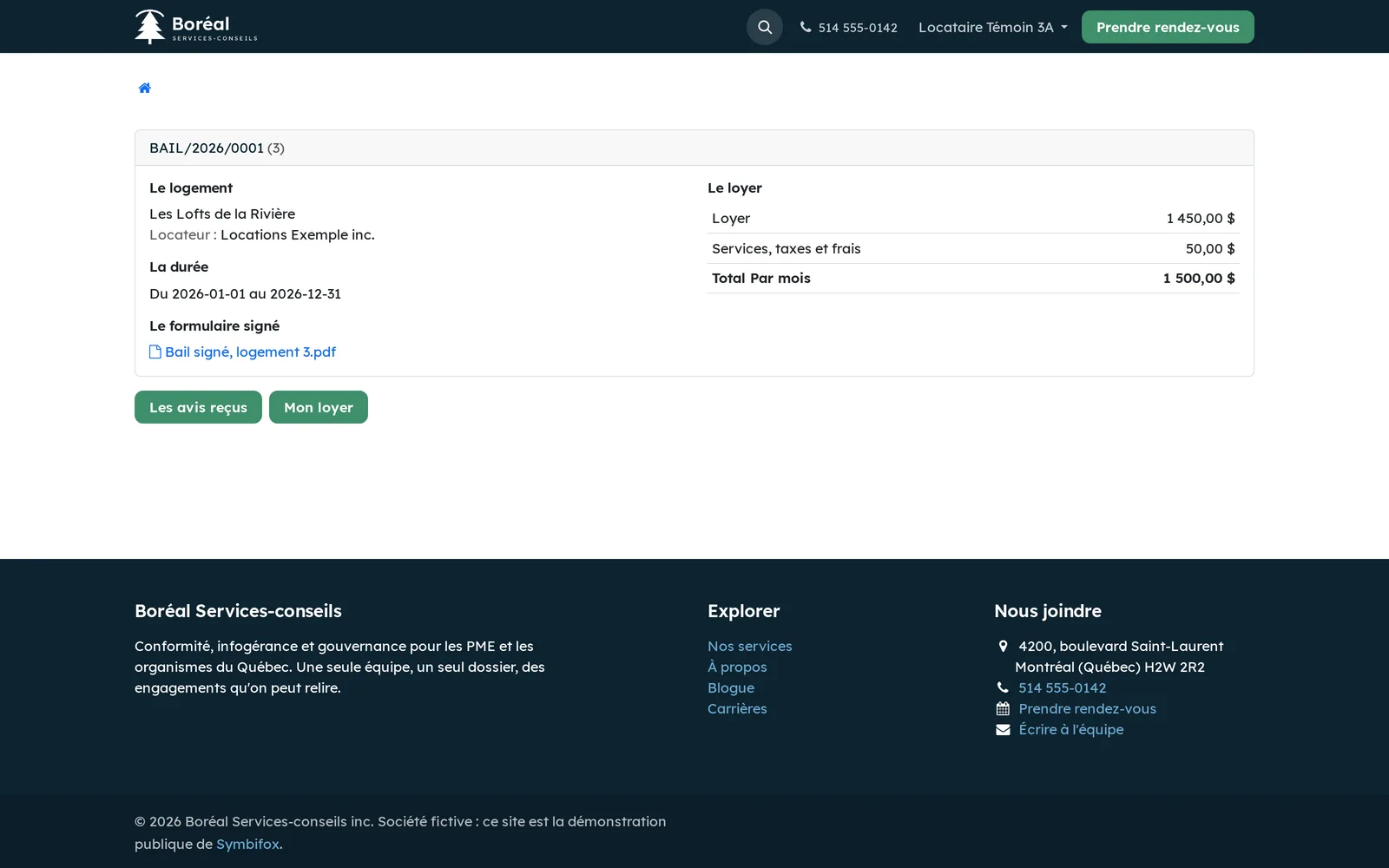
The lessee's portal has three pages, read-only, that require a session.
| Address | What it shows |
|---|---|
/my/rental |
Their leases: the dwelling, the lessor, the term, the rent and the signed form to download |
/my/rental/notices |
Notices received, their reply deadline and what silence will produce; neither drafts nor terminations given by a lessee |
/my/rental/rent |
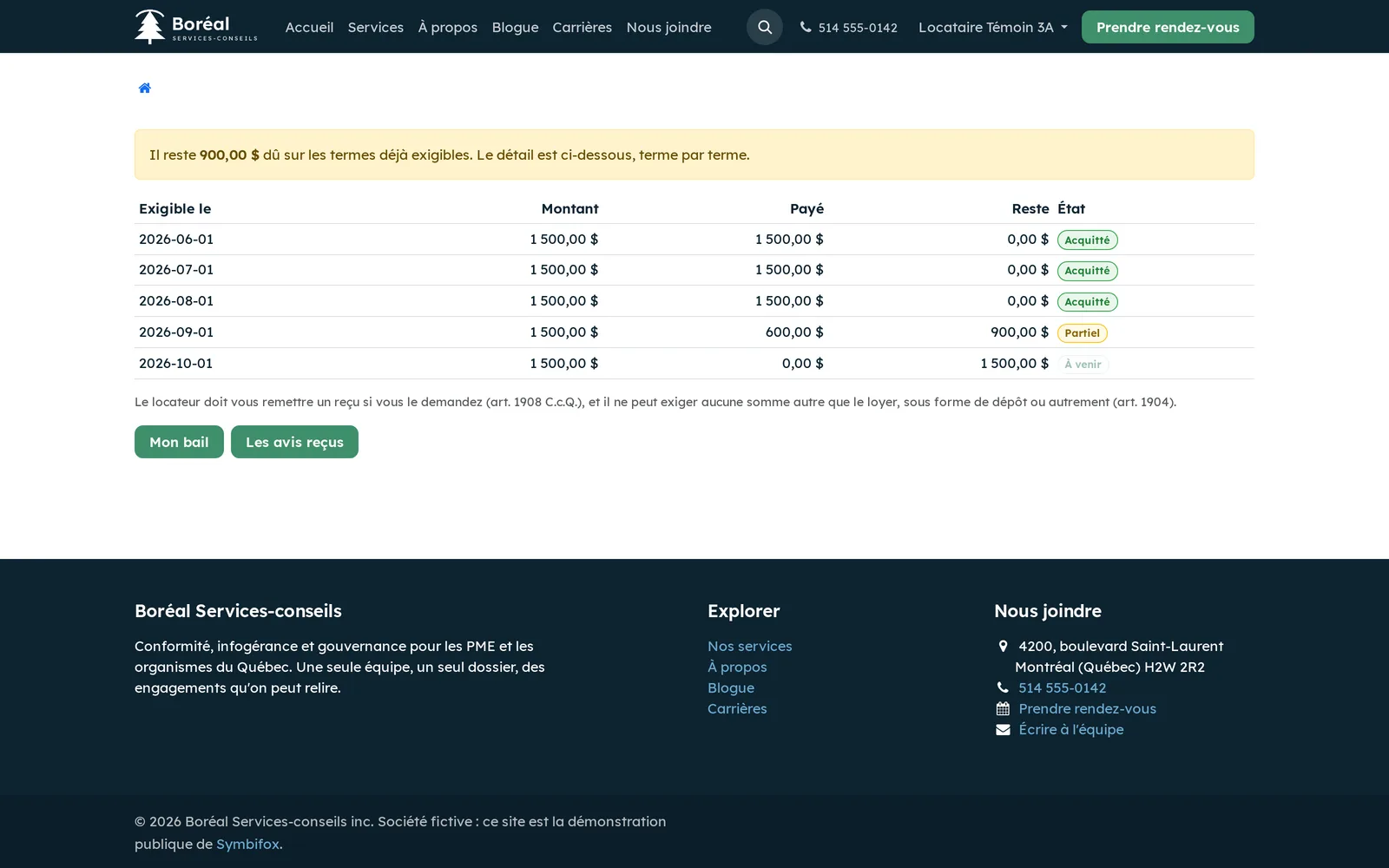
The rent instalment by instalment, what was paid and what remains owed on instalments already payable |
Here is the lease page as the demonstration's lessee sees it. The portal screenshots show the demonstration in French; the portal pages are translated into English (Canada).
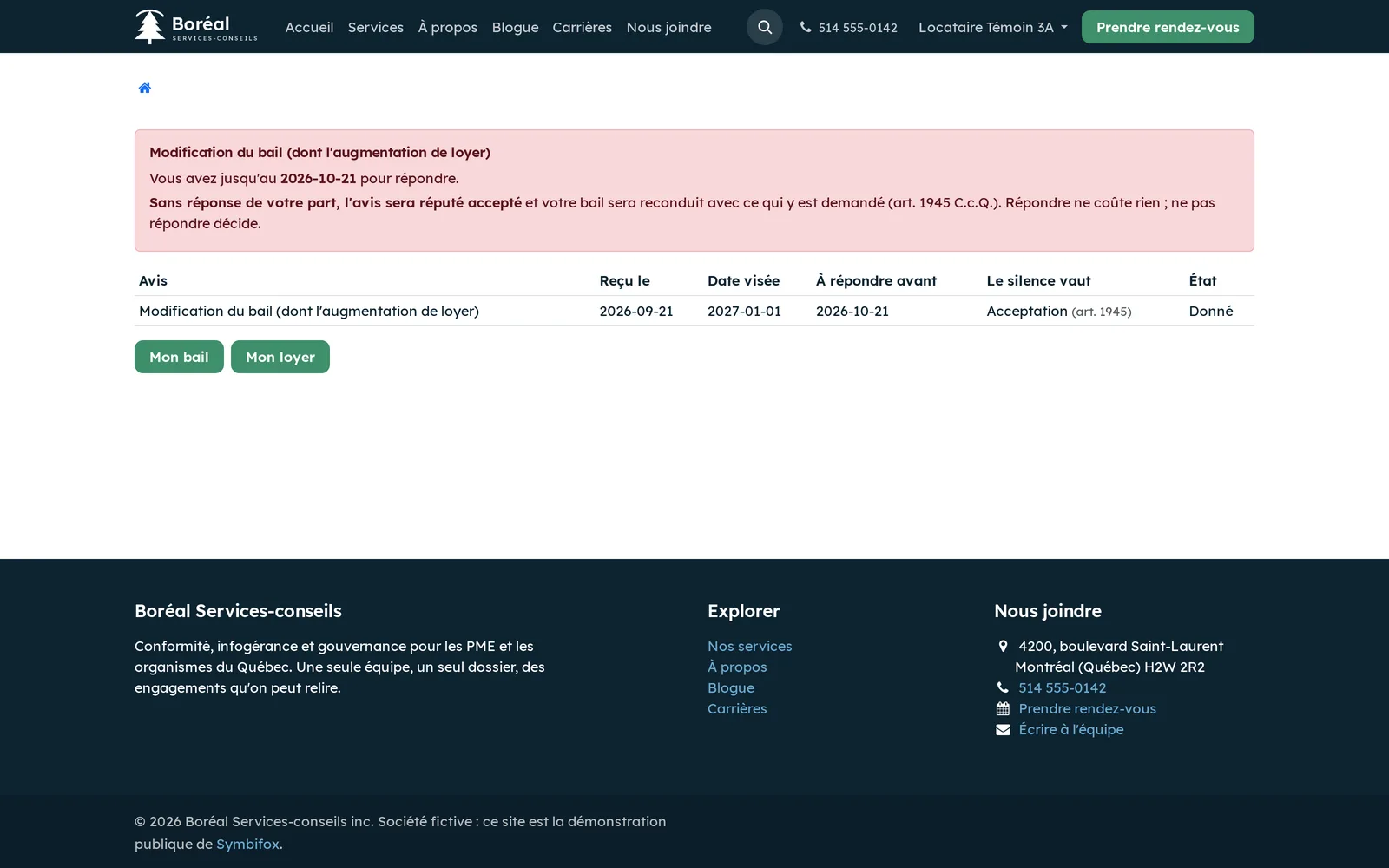
The notices page puts the deadline and the effect of silence first, in red: a lessee who lets the month pass on a modification notice sees their lease renewed with what it asks for.
The rent page gives the balance instalment by instalment, and recalls that the lessor must give a receipt on request (art. 1908) and may not exact any sum other than the rent (art. 1904).
Modules that extend this application#
Its two menus, Notice and Eviction moratorium, are described above.
It computes no interest: the legal rate is published elsewhere and revised every quarter.
The legal basis of the second processing is recorded as a legal obligation; that qualification has not been validated by a legal adviser, and the plain-language text says so. See Privacy (Law 25 and other frameworks).
Understanding#
Why the lease is not produced. The regulation imposes the Tribunal's form, and every page of it carries "Reproduction interdite". For the lease, the law prescribes the medium; for notices, it prescribes the content.
Silence, four regimes. Modification: acceptance (art. 1945). Repossession or eviction: refusal to leave (art. 1962). End of lease after more than 12 months of sublease: refusal to leave (art. 1944.1). Offer of a new lease in a private seniors' residence: refusal of the offer (art. 1959.2). A single treatment of silence would be wrong three times out of four.
Calendar months, not blocks of days. A lease from July 1 to June 30 counts 364 days, or 11.96 months by division: it would fall on the wrong side of the 12-month threshold. Every time limit is computed on real dates. Thresholds differ from one article to another: 12 months in art. 1942, 6 months in art. 1960, and days for a room.
What the app refuses to conclude. It never proposes resiliation: the lessor "may obtain" resiliation (art. 1971), by asking the tribunal. Three weeks late is not a resiliation threshold (art. 1973), and paying before judgment stops everything (art. 1883). It does not count late payments to draw a conclusion, and it does not total the rent remaining on the lease, because a clause making it all payable has no effect (art. 1905).
Unpaid is not in default. An authorized lessee who deposits their rent with the court (art. 1907) has paid, elsewhere.
What is not modelled yet. Low-rental housing, a separate regime, is out of scope. A notice's status shows at the top of the form, but no button moves it from one status to another.
Troubleshooting#
| Symptom | Likely cause | Fix |
|---|---|---|
| The lease will not save | No lessee, end before beginning, or fixed term without an end | Complete the parties and the dates |
| Schedule 2 is refused | Low-rental housing is out of scope | This lease falls under another regime |
| The lease is refused for a syndicate | A syndicate of co-ownership does not sign a lease of a dwelling | Choose as lessor the organisation that owns the dwelling |
| A restriction on having the rent fixed is refused | Ground or date the immovable was ready missing, or maximum rent over five years missing when it is required | Enter the fields the message names |
| An instalment is refused | It exceeds the agreed rent | Split the amount over the right instalments |
| A negative payment is refused | A correction is made by editing the payment | Edit the existing payment |
| The ground of a resiliation is not visible | The Consultation role cannot read it | Only a manager sees it |
See also#
- Divided co-ownership: the organisation, immovables, dwellings and the ownership register.
- Occupant portal and operations: a syndicate's occupant portal and building maintenance.
- Contacts: the lessees' records.
- Privacy (Law 25 and other frameworks): the register of processing activities.