
Part 8 · Buildings
Divided co-ownership
Keep the register of a Québec syndicate of co-ownership, call and count a general meeting under the Civil Code, call and impute common expenses, and meet the maintenance log, study and certificate obligations.
The Properties app keeps the file of a syndicate of divided co-ownership in Québec. It is for the board of directors, for the person who manages the immovable on its behalf and for the person who keeps its books. It produces what the Civil Code of Québec requires of a syndicate: a dated register of co-owners, votes counted in the order the Code sets, expenses apportioned to the cent, and documents delivered within their time limits.
Overview#
Everything starts from the organisation. Its nature is one of four: Syndicate of co-ownership, Lessor, Housing cooperative or Non-profit housing organisation. This chapter covers the syndicate. The lessor has its own chapter, Residential leasing, and the occupant portal serves both: see Occupant portal and operations.
The syndicate holds its immovables; each immovable holds its fractions (the private portions, with their relative value) and its common portions, general or for restricted use (art. 1043 CCQ). Each fraction keeps its ownership history: who holds it, since when, until when, and in what share when it is held in undivided co-ownership.
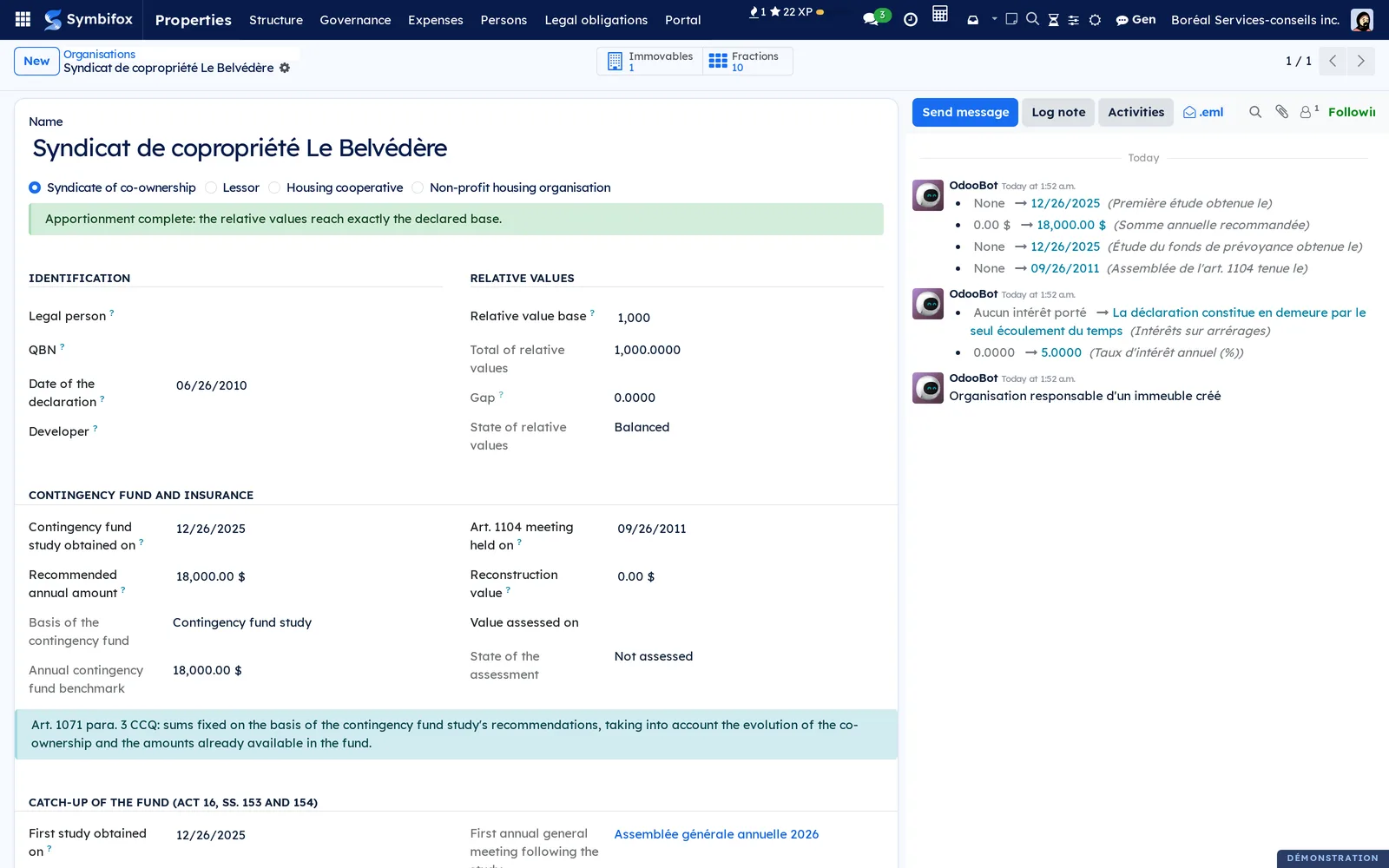
The demonstration company works in French, and its names stay in French on the English screens. Here is the syndicate record of the demonstration. The green band confirms that the relative values of the ten fractions add up exactly to the declared base of 1,000.
Around this foundation, three families of work:
- governance: general meetings of the co-owners, board meetings, resolutions and their count;
- expenses: the annual budget, calls for contributions, collections, arrears and the statement of common expenses due;
- legal obligations: the maintenance log, the contingency fund study, the certificate of the syndicate and the documents to the promisor.
Every rule shows the article it rests on, next to the result. Where the text does not decide, the screen says so rather than inventing a threshold.
Configuration#
Access and rights#
| Role | What it opens |
|---|---|
| Properties / Consultation | Read access to the whole suite: syndicates, fractions, register, meetings, expenses, legal obligations. |
| Properties / Manager | Data entry and every decision: calling a meeting, fixing the budget, sending a call, delivering a certificate, publishing to the portal, inviting to the portal. This role also opens electronic signature and secure transfer. |
| Properties / Operations | Building operations in the Maintenance app, described in Occupant portal and operations. Managers have it automatically. |
A co-owner or a lessee has no internal account: they reach the portal, read-only, for what concerns them.
Settings#
The app has no settings screen. Settings live on the syndicate record, under Properties › Structure › Organisations:
- Relative value base (1,000 for thousandths, 10,000 for ten-thousandths) and Date of the declaration;
- Developer and the fraction the developer occupies, for the cap on the developer's votes (art. 1092 CCQ);
- the Contingency fund and insurance section: reconstruction value, date of the study, floor retained, Annual interest rate (%) and the Interest on arrears rule;
- the Legal due dates section: the transitional regime that dates the log and the study;
- the Secure delivery of documents section: the Channel for the delivery code (email, or text message to the recipient's mobile).
No interest rate is set by default: without one, no interest runs.
Base data#
- Create the organisation, of nature Syndicate of co-ownership, with its relative value base.
- Under Properties › Structure › Immovables, create each immovable, with its address and cadastral lot.
- Under Properties › Structure › Fractions, enter each fraction: number, type (Residential, Parking, Storage, Commercial, Other), relative value, floor and area.
- Under Properties › Structure › Common portions, create the common portions and, for a portion for restricted use, the fractions that benefit from it.
- Under Properties › Persons › Co-owners, record who holds each fraction, since when and in what share.
A gap between the total of relative values and the base never prevents saving: an immovable is entered fraction by fraction. It shows as a banner until the figures match.
Getting started#
The shortest path to a first counted general meeting:
- Open Properties › Governance › General meetings and create the meeting, with its nature (Annual or Special), its date and its place.
- Select Load the attendance sheet: one line per co-owner and per fraction, taken from the register.
- Enter the notice date, then select Call.
- On the day, record attendance and proxies in the Attendance sheet tab, then select Mark as held.
- Add the resolutions, choose the majority required for each and open the ballot.
- Write the minutes in the Minutes tab, then select Close.
Common tasks#
Keep the register of co-owners#
Article 1070 CCQ requires the syndicate to keep a register of co-owners. Ownership is therefore recorded as a period, not as a name attached to the fraction.
- Open Properties › Persons › Co-owners.
- Create a line: fraction, co-owner, Share (%), Since.
- On a sale, enter Until on the seller's line, then create the buyer's line.
The list opens filtered on current ownerships. Simultaneous shares cannot exceed 100%; successive owners at 100% each are normal. A nightly task updates ownerships that have ended.
Call a general meeting#
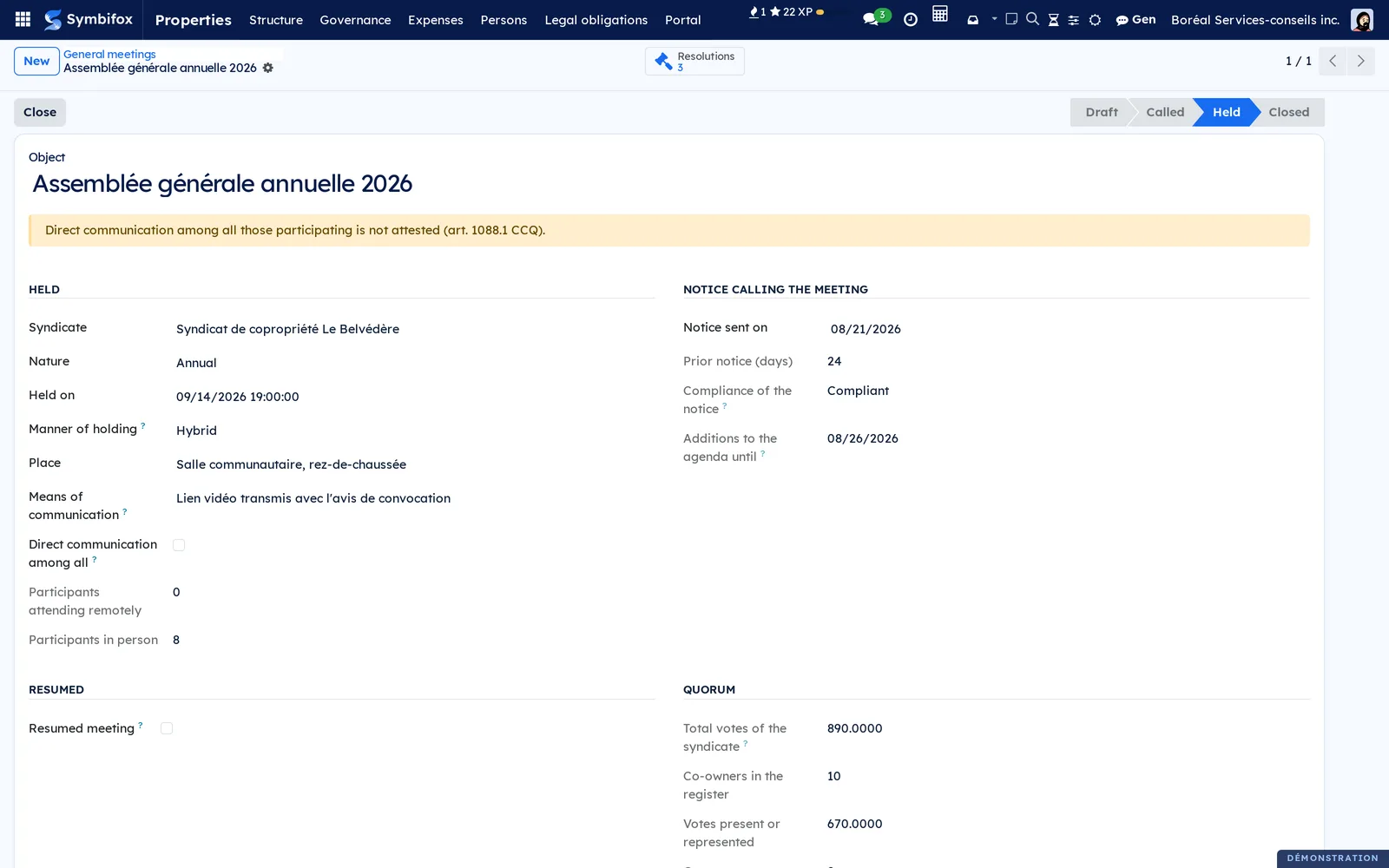
The notice is sent at least 10 days and at most 45 days before the meeting (art. 346 CCQ, which applies to the syndicate through arts. 1039 and 334). The Compliance of the notice field compares the two dates and says so, without blocking anything.
- On the draft meeting, enter Notice sent on.
- Choose the Manner of holding: In person, Remotely or Hybrid.
- For a remote or hybrid meeting, describe the Means of communication and check Direct communication among all when that is the case.
- Select Call.
The Additions to the agenda until field gives the deadline for questions a co-owner can have added (5 days after the notice, art. 1088 CCQ). For an annual meeting, the Documents of the notice (art. 1087) tab says, document by document, which ones the app produces and which ones must be attached.
Count the quorum and the votes#
The attendance sheet computes everything, in the order the Code sets: votes proportional to the relative value and shared among undivided co-owners (art. 1090), votes removed when the syndicate holds a fraction (art. 1076), deprivation of the right to vote and reductions (arts. 1094 and 1099), the presumed mandate among undivided co-owners (art. 1090 para. 2), the cap below five fractions (art. 1091), and the developer's cap (art. 1092).
The Quorum section shows the syndicate's total votes, the votes present or represented and the quorum required (a majority of the votes, art. 1089 para. 1). Check Resumed meeting for a meeting held after a lack of quorum: three quarters of those present then constitute the quorum (art. 1089 para. 2).
Apply the deprivation of the right to vote#
A co-owner who has not paid their share of the common expenses for more than three months is deprived of the right to vote (art. 1094 CCQ). The deprivation strikes the person, and therefore all of their fractions.
- Open the meeting.
- Read Deprivations that can be established (art. 1094) and, on the attendance sheet, each person's unpaid amounts.
- Select Apply art. 1094 from the arrears.
Nothing is checked automatically: a payment received yesterday and not yet entered is enough to make the deprivation fall. The app proposes it, the button applies it, and the chatter (the message thread at the bottom of the form) keeps the trace.
Vote on a resolution#
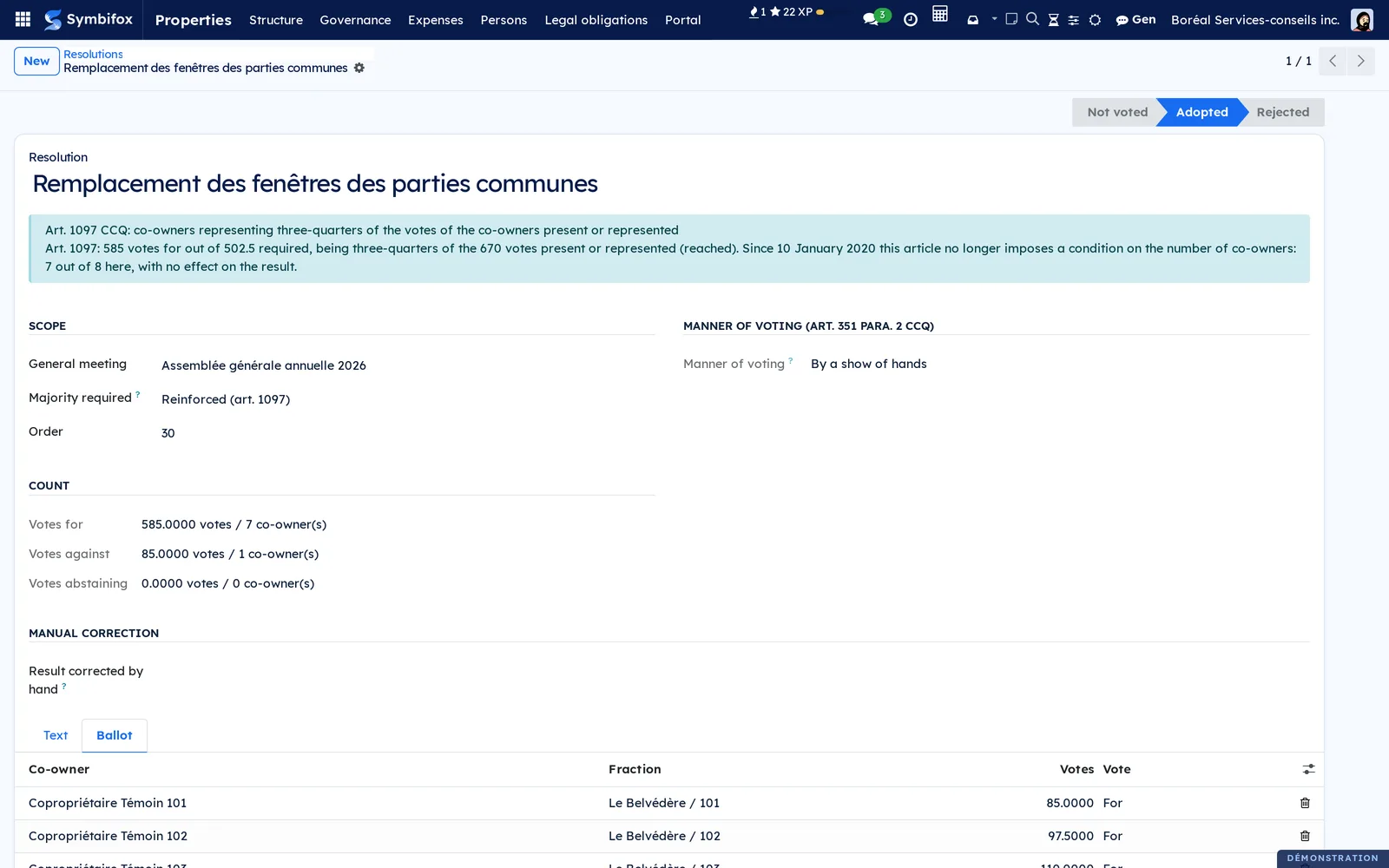
Each resolution carries its Majority required: Ordinary (art. 1096), Reinforced (art. 1097) or Qualified (art. 1098). The Code does not let the declaration change these thresholds (art. 1101), so the app offers no others.
- Open Properties › Governance › Resolutions and create the resolution, linked to its meeting.
- Choose the majority and the Manner of voting: By a show of hands or Secret ballot.
- Select Open the ballot: one line per member present or represented.
- In the Ballot tab, record each vote.
The result shows with its reason, in votes and in number of co-owners. A result can be corrected by hand, with a mandatory justification.
Hold a secret ballot#
The right to require a secret ballot comes from art. 351 para. 2 CCQ. The ballot box keeps no name, and the register keeps no choice.
- On a resolution set to Secret ballot, select Open the ballot.
- Give each voter their receipt, as shown only once.
- Select Receipts handed out, clear the list.
- For each ballot paper, select Cast a ballot paper, enter the receipt and the vote, then Cast.
- Select Recount the ballot box to check the count.
Verify a receipt lets a voter confirm what their ballot paper carries. Restart the ballot from zero stays possible until a ballot paper is cast. The Ballot papers isolated by their weight field counts the ballot papers whose number of votes gives away their author: see Understanding.
Record a board meeting#
The board fixes the budget, decides how the contingency fund is used and has the log drawn up. Its minutes go into the register on the same footing as those of the general meeting (art. 1070 CCQ).
- Open Properties › Governance › Board meetings and create the meeting.
- Enter the agenda, the manner of holding and, for a remote meeting, the means of communication.
- Write the minutes.
- Once they are sent, select Record the sending of the minutes.
The minutes are sent within 30 days (art. 1086.1 CCQ). A cancelled meeting does not start that clock; Reopen brings it back.
Fix the annual budget#
The board fixes the budget after consulting the general meeting (art. 1072 CCQ). The consultation is a prerequisite, not a vote.
- Open Properties › Expenses › Budgets and create the financial period.
- In the Budget items tab, enter each item with its Nature.
- Choose the General meeting consulted, then select Record the consultation.
- Select Fix by the board.
- Send the notice to the co-owners, then select Notify the co-owners.
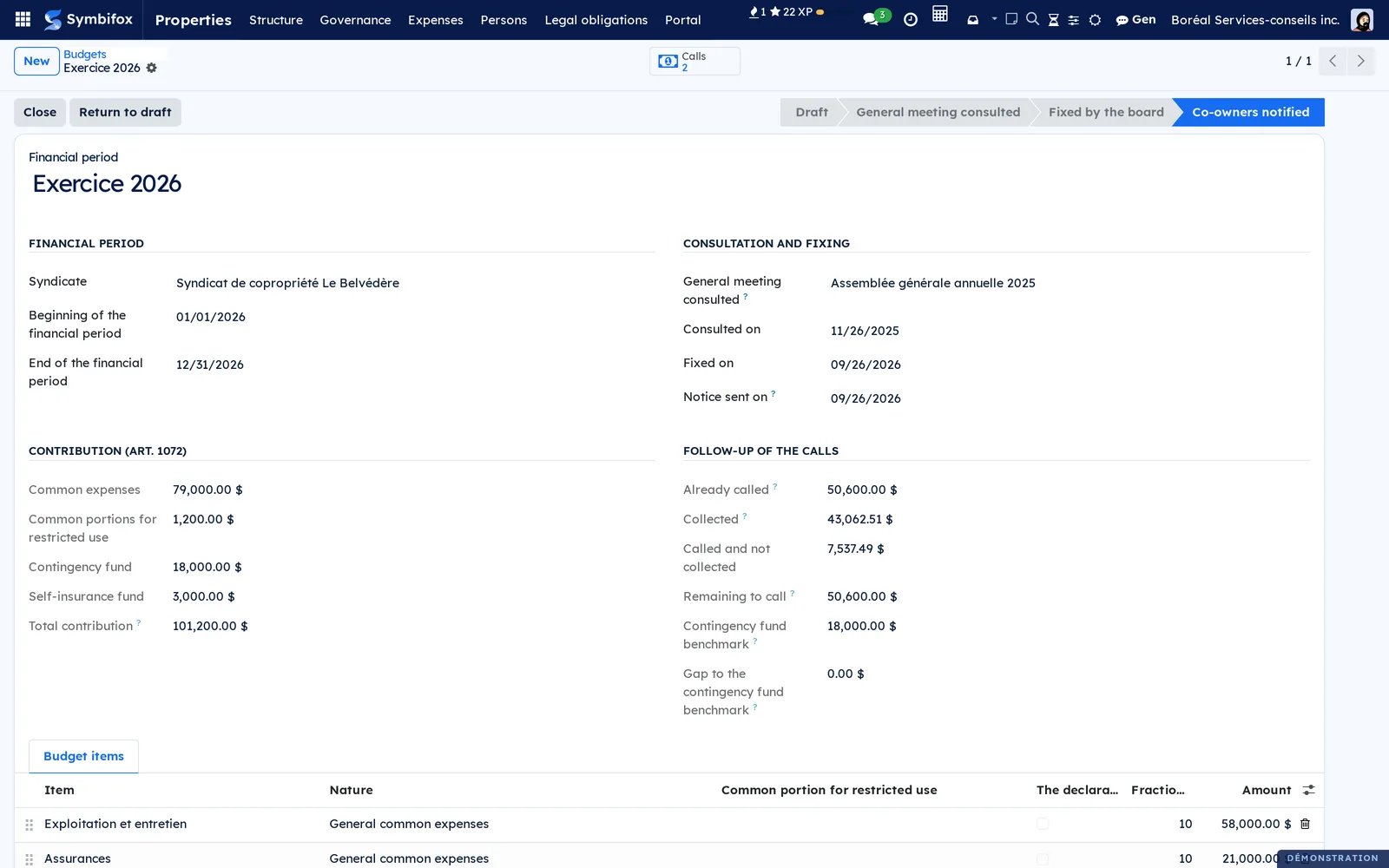
An item's nature decides how it is apportioned: General common expenses, Restricted use: maintenance and ordinary repairs (to the beneficiaries only), Restricted use: major repairs and replacement (to all fractions, unless the declaration provides otherwise), Contingency fund and Self-insurance fund. The budget then compares what was fixed, called and collected, and the Contingency fund benchmark.
Call for contributions#
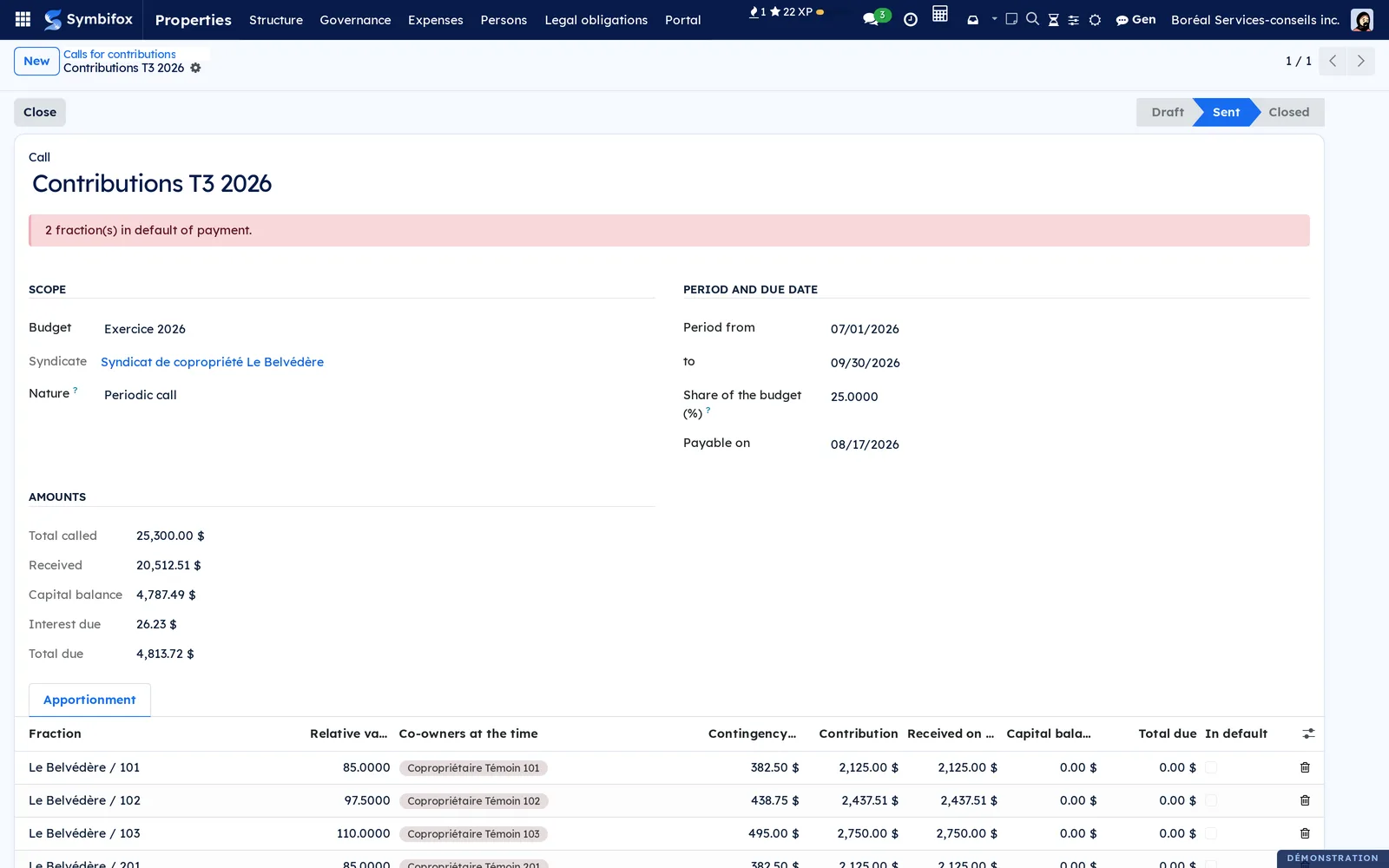
- Open Properties › Expenses › Calls for contributions and create the call: budget, Nature (Periodic call or Special contribution), period, Share of the budget (%) and payable date.
- Select Compute the apportionment.
- Review the Apportionment tab: one line per fraction, with the co-owners at the time.
- Select Send.
The apportionment is to the cent, base by base. Four calls of 25% do not necessarily cover a financial period that does not divide by four: the budget shows what is Remaining to call instead. A special contribution requires consulting the general meeting (art. 1072.1 CCQ).
Record a collection#
How a payment is imputed follows the Code, not a preference: the debtor designates the debt being paid (art. 1569), interest comes before capital (art. 1570), and failing any indication, debts that are due come first, the oldest first (art. 1572).
- Open Properties › Expenses › Collections and create the collection: payer, fraction, date, amount, method.
- Choose the Imputation: In the absence of indication (art. 1572) or Indicated by the co-owner (art. 1569).
- Select Impute (art. 1572) or enter the imputations by hand.
- Select Record in the register.
The Rule applied tab says how the imputation was made. Remove the imputations returns to draft.
Follow arrears#
Interest runs from default, never from the due date (art. 1617 CCQ), and is computed period by period on the capital owed at the time. The Fractions in default menu shows, per fraction, since when it has been in arrears, the number of days, the capital and the interest.

Provide the statement of common expenses due#
A person proposing to acquire a fraction can ask for the statement of common expenses due (art. 1069 para. 2 CCQ). After 15 days, that person is no longer bound for those expenses: it is the only time limit in the suite that runs against the syndicate.
- Open Properties › Expenses › Statements of common expenses due and record the request: fraction, proposed acquirer, date.
- Select Draw up the common expenses due.
- Notify the owner, then select Notify the owner. Without that notice, the statement is refused.
- Select Print, deliver the statement, then Provide the statement.
The printed statement shows the effect of the time limit at the top of the page. A zero prints as "$0.00", never as a dash.
Keep the maintenance log#
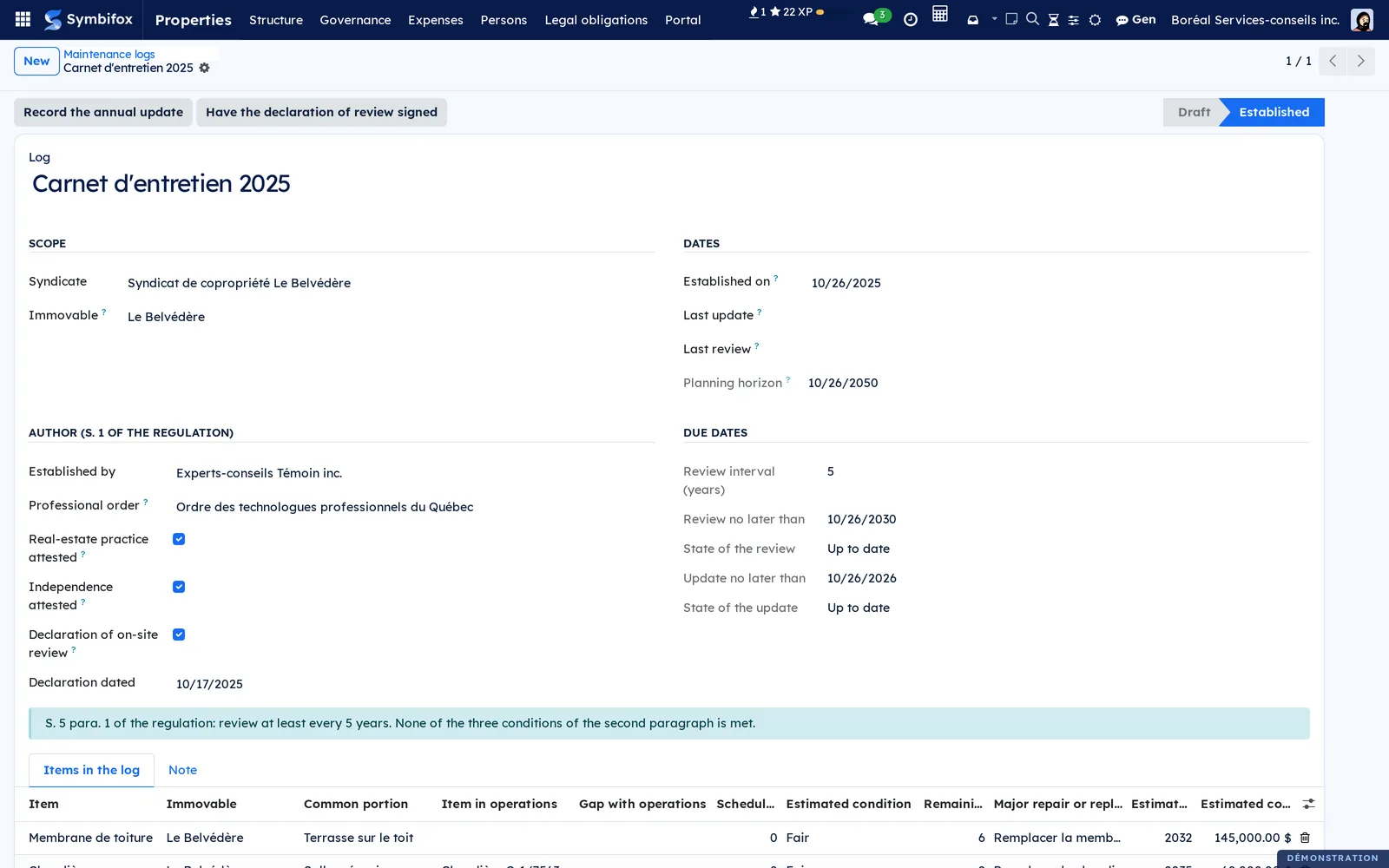
The log is drawn up by an independent professional who belongs to one of four orders: engineers, chartered appraisers, architects or professional technologists (regulation, s. 1). The manager of the immovable cannot draw it up.
- Open Properties › Legal obligations › Maintenance logs and create the log: immovable, author, professional order.
- Check Real-estate practice attested and Independence attested.
- In the Items in the log tab, record each item: installation, maintenance frequency, estimated condition, remaining useful life, planned major repair and its cost.
- Select Record as established.
- Each year, select Record the annual update.
The review interval is 5 years, or 10 years if the immovable meets one of the three size conditions. The count of private portions excludes storage spaces and parking spaces.
Record the contingency fund study#
The study depends on the log: the app refuses to record it while the log is not established, and says what is missing.
- Open Properties › Legal obligations › Contingency fund studies and create the study.
- Enter the author (the same orders, plus an independent chartered professional accountant), the balance retained and the recommended amounts.
- Select Record as obtained.
The syndicate record then takes the recommended annual amount as the fund benchmark, the catch-up if the fund is insufficient, and the deadline for fixing the amounts.
Deliver the certificate of the syndicate#
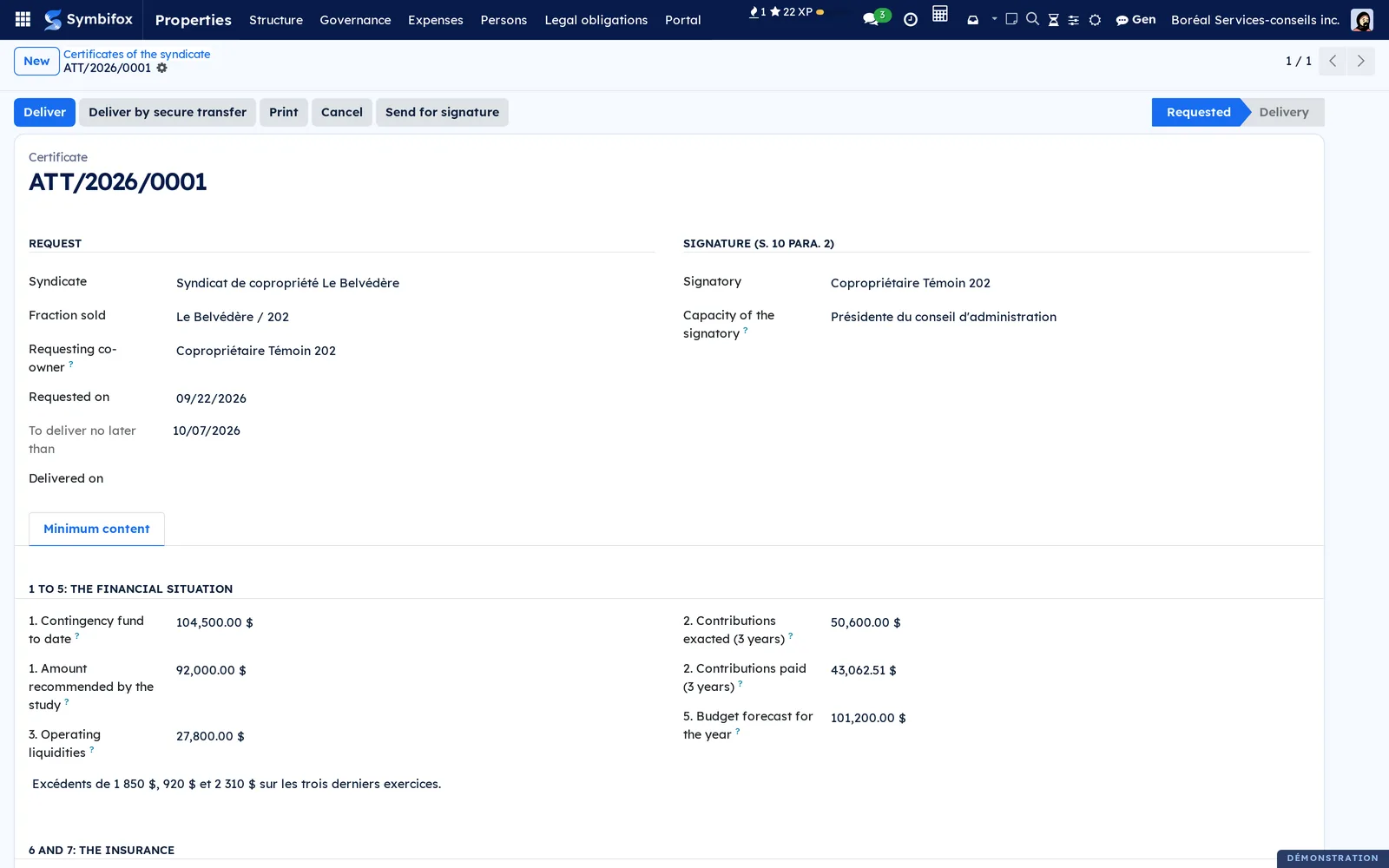
The co-owner who sells asks for the certificate (art. 1068.1 CCQ); the syndicate delivers it within 15 days. Its content is fixed by regulation, in eight points.
- Open Properties › Legal obligations › Certificates of the syndicate and record the request: fraction sold, requesting co-owner, date.
- Fill in the Minimum content tab. The What is missing field lists the points still empty.
- Enter the Signatory and the Capacity of the signatory.
- Select Print, then Deliver.
The printed certificate carries no publisher's branding: the syndicate is the one attesting. A certificate not yet delivered prints as a draft. It does not exist before the developer's handover meeting (art. 1104).
Provide documents to the promisor#
The third regime (art. 1068.2 CCQ): the promisor asks for documents, provided with diligence. The Code sets no time limit: the app counts the days without declaring any delay.
- Open Properties › Legal obligations › Documents to the promisor and record the request.
- List the documents in the Documents provided tab.
- In the Privacy tab, check Privacy review done and note what was removed or redacted.
- Select Provide to the promisor, then Send to the owner.
The promisor's authorization does not cover the personal information of the other co-owners: the review comes before delivery. A refusal is explained in the Objection tab.
Deliver a document by secure transfer#
The certificate, the statement of common expenses due and the documents to the promisor carry the Deliver by secure transfer button. The recipient receives a link that expires, and a code through the channel chosen on the syndicate record.
The Secure delivery section says when the document left, how many times it was downloaded, and whether the link expired without being opened. For the certificate and the statement of common expenses due, a copy of the document produced stays on the record: a version regenerated later would not say the same thing. Delivery is refused before the privacy review (art. 1068.2), before notice to the owner (art. 1069 para. 2), without an email address, or for a document already delivered.
Have a document signed#
Three documents can be signed electronically:
- the declaration of on-site review in the log: Have the declaration of review signed;
- the certificate: Send for signature;
- the minutes of a general meeting or a board meeting: Have the minutes signed.
The professional's signature checks the declaration and dates it to the day they signed. A date already entered is never overwritten. Signing is neither delivering nor sending: the 15-day and 30-day clocks keep running until delivery or sending. The app does not guess who signs for the syndicate: it asks.
The menus, one by one#
Properties has six groups. This chapter covers Structure, Governance, Expenses, Co-owners and Legal obligations. The other menus lead to the neighbouring chapters.
Properties › Structure › Organisations opens the syndicates and lessors, with their nature, base and the state of their relative values. The shortcut buttons at the top of the form lead to the immovables and the fractions.
Properties › Structure › Immovables opens the immovables, with their address and cadastral lot; the form's tabs list its fractions and common portions.
Properties › Structure › Fractions opens the fractions, with their type, relative value and owner. A manager finds Invite to the portal there.
Properties › Structure › Common portions opens the common portions, their Nature (General common portion or Common portion for restricted use), the fractions that benefit and, for a bookable space, its booking settings.
Properties › Governance › General meetings opens the general meetings of the co-owners, most recent first.
Properties › Governance › Board meetings opens the board meetings and whether their minutes have been sent.
Properties › Governance › Resolutions opens all resolutions, with their majority and result.
Properties › Expenses › Budgets opens the financial periods and their status.
Properties › Expenses › Calls for contributions opens the calls, with the total called, received and owed.
Properties › Expenses › Contributions opens the call lines by fraction, filtered by default on unpaid ones.
Properties › Expenses › Collections opens the collections, filtered by default on those still to impute.
Properties › Expenses › Fractions in default opens the fractions with a balance in arrears.
Properties › Expenses › Statements of common expenses due opens the art. 1069 para. 2 requests, filtered on open ones.
Properties › Persons › Co-owners opens the ownership register, filtered on current ownerships.
Properties › Persons › Leases, Notice, Eviction moratorium, Rent and Abandonments of the dwelling belong to leasing: see Residential leasing.
Properties › Legal obligations › Maintenance logs, Contingency fund studies, Certificates of the syndicate and Documents to the promisor open the four registers described above, with their due dates.
Properties › Portal › Maintenance requests, Processing times, Bookings, Announcements, Parcel, Visitors, Documents and Text-message notices are described in Occupant portal and operations.
Reference#
Organisation form fields#
| Field | Description | Required or default |
|---|---|---|
| Name | The syndicate's name | Required |
| Nature | Syndicate of co-ownership, Lessor, Housing cooperative or Non-profit housing organisation | Syndicate of co-ownership |
| Legal person, QBN | The contact that represents the syndicate and its Québec business number | Optional |
| Date of the declaration | The date of the declaration of co-ownership | Optional |
| Relative value base | 1,000 or 10,000 | 1,000 |
| Total of relative values, Gap, State of relative values | Computed from the active fractions | Automatic |
General meeting form fields#
| Field | Description | Required or default |
|---|---|---|
| Object | The meeting's name | Required |
| Nature | Annual or Special | Annual |
| Held on | The date and time of the meeting | Required |
| Place | The location; for a meeting with no room, the connection link is the place (art. 346) | Optional |
| Manner of holding | In person, Remotely or Hybrid | In person |
| Notice sent on | The date of the notice calling the meeting | Optional |
| Prior notice (days), Compliance of the notice | The gap between notice and meeting, compared with the 10 to 45 day window | Automatic |
| Resumed meeting | Check after a lack of quorum | Unchecked |
| Minutes to be sent no later than | 30 days after the meeting (art. 1102.1) | Automatic |
Call for contributions form fields#
| Field | Description | Required or default |
|---|---|---|
| Call | The call's name | Required |
| Budget | The financial period called | Required |
| Nature | Periodic call or Special contribution | Periodic call |
| Period from, to | The period covered | Required |
| Share of the budget (%) | The share of the financial period called | 100 |
| Payable on | The payable date, which starts default | Required |
Certificate form fields#
| Field | Description | Required or default |
|---|---|---|
| Fraction sold, Requesting co-owner | Who asks, for which fraction | Required |
| Requested on | The date of the request | Today |
| To deliver no later than | 15 days after the request | Automatic |
| Points 1 to 8 | The content fixed by regulation: contingency fund, contributions, operating liquidities, results, budget, insurance, self-insurance, inspections, claims, works, litigation, amendments | Optional, listed in What is missing |
| Signatory, Capacity of the signatory | The person signing for the syndicate | Optional |
Reports and exports#
- Minutes of the general meeting and Minutes of the board meeting, as PDF, in the local time of the meeting.
- Financial statement of the period: the budget against what was called and collected. For each of the six documents of art. 1087, it says whether the app produces it.
- Statement of common expenses due, with the effect of the time limit at the top of the page.
- Certificate of the syndicate, in letter format, with no publisher's branding.
- Declaration of on-site review, taken from the log.
Lists export through the standard export.
Automations#
Each night, scheduled tasks:
- update current and ended ownerships in the register;
- refresh the state of contributions in default and the time limit of statements of common expenses due;
- refresh whether the minutes of general meetings and board meetings have been sent;
- recompute the due dates of the log, the study and the transitional calendar, and the 15-day time limit of certificates.
Votes, quorum, majorities, apportionment and imputation are computed as you enter data.
Public pages and portal#
This chapter exposes no public page. Co-owners read announcements, documents and requests on the portal described in Occupant portal and operations.
Modules that extend this application#
General meetings and resolutions are held under Governance, described in the tasks above.
It also adds the Documents of the notice (art. 1087) tab to the general meeting.
The transitional regime shows on the syndicate record, in the Legal due dates section.
See Electronic signatures to follow a signature request.
See Secure transfers.
Law 25 is Québec's Act respecting the protection of personal information in the private sector. The module also compares the retention period declared in the register with the one of the parcel and visitor log, and shows the gap. See Privacy (Law 25 and other frameworks).
Understanding#
Why majorities cannot be configured. Art. 1101 CCQ deems unwritten any clause that changes the number of votes required. A configurable percentage would be a defect. A counting error can get a decision annulled (art. 1103), within 90 days: the calculation is the product, not a convenience.
Art. 1097 no longer sets a condition in number. Since January 10, 2020, only three quarters of the votes present or represented count. Art. 1098 keeps its double condition. The screen says so on each resolution.
A counter-intuitive result is not a bug. In a co-ownership of fewer than five fractions, the majority holder alone with one other co-owner never reaches quorum, because of arts. 1091 and 1099. That is what the law says.
Weight gives away the secret. A weighted ballot paper carries its number of votes. A relative value that is unique in the immovable becomes its author's signature. Secrecy only holds between ballot papers of equal weight: the app counts those their weight isolates rather than promising a secrecy the arithmetic cannot keep. A secret ballot does not reopen for a latecomer.
The general meeting does not fix the budget. It is consulted, and the board fixes (art. 1072). The notice is sent without delay, with no number of days in the text.
Three floors for the contingency fund. 0.5% of the reconstruction value at the developer's charge until the study (art. 1071 para. 4), 5% of contributions for a syndicate under the transitional regime until the amounts are fixed after its first study (Act 16, s. 153), then the study's recommendations (art. 1071 para. 3). When the regime is unknown, the screen says "basis unknown".
What the app does not do. It keeps no expenses, invoices or suppliers: "budget against actual" means fixed, called, collected. It does not apply the second rule of art. 1572 (the debt the debtor has the most interest in paying), which is a judgment: impute by hand in that case. It does not model the composition of the board or the election of its members, which the declaration sets. It sets no interest rate.
Two readings, never a day too late. When a text allows two readings, the transitional calendar keeps the earlier due date. Without an attached immovable, the log's review interval stays at 5 years.
Troubleshooting#
| Symptom | Likely cause | Fix |
|---|---|---|
| A banner says the apportionment is incomplete | The total of relative values of active fractions does not reach the declared base, often after a fraction was archived | Check the fractions and their relative values; archiving a fraction removes it from the total |
| The former owner still shows on the fraction | The end date is missing on their register line | Enter Until on the seller's line; the nightly task does the rest |
| The contingency fund study is refused | The maintenance log is not established | Establish the log first |
| The statement of common expenses due cannot be provided | The owner was not notified | Notify the owner, then select Notify the owner |
| Delivery by secure transfer is refused | Privacy review not done, recipient without email, or document already delivered | Fix the cause the message names |
| A meeting, budget, call or certificate is refused for a lessor | These objects only exist in divided co-ownership | Check the organisation's nature |
| No interest runs on arrears | No rate entered on the syndicate record | Enter the Annual interest rate (%) |
See also#
- Occupant portal and operations: announcements, documents, maintenance requests, bookings, parcels and visitors, and building maintenance.
- Residential leasing: the lease, notices and rent, for a lessor or a co-owner who leases.
- Electronic signatures: following a signature request.
- Secure transfers: the link, the code and their expiry.
- Privacy (Law 25 and other frameworks): the register of processing activities.