
Part 3 · Projects, time and knowledge
RSS feeds
Follow RSS feeds, sort their news by rules into lists addressed to a department, a project or named people, read them as cards, and share them with a client who has no account.
The Flux RSS app keeps your organisation's news watch. It polls RSS and Atom feeds at their own pace, sorts their items by rules and hands them to whoever they serve: a department, a project team or named people. Everyone reads their news in À lire (to read), in a Discuss channel or in an email digest, and what they have read leaves their pile. A list can also be shared with a client through a secret link, with no account.
The module was written in French and ships an English translation. This chapter gives each label as the French screen shows it, with its English meaning in parentheses the first time; an English-language interface shows the English label.
Overview#
Four notions carry the app.
- A source is an RSS or Atom feed, polled every few hours. A feed only keeps its latest articles: what leaves its window between two polls is lost, hence a pace set source by source.
- An item is an article, a press release or a post read from a source. It enters once, even when two feeds announce it.
- A list reads sources, applies rules and keeps what passes. It has an audience: departments, projects, people.
- A retained item is an item a list kept, with the reason written beside it.
À lire shows, as cards, the news from your lists that you have not read yet: an image when the feed provides one, source, date, title and summary.

Read state belongs to each person: what you read stays unread for colleagues on the same list. An item opened from Odoo, from a Discuss channel or from the email digest is marked read on the way.
Flux RSS builds on three apps: Employees (departments), Project (a project's team) and Discuss (one channel per list).
Configuration#
Access and rights#
All staff can read: sources, items, lists and what they retained. Each person manages their own subscriptions and does not see anyone else's.
The Gestion des flux group (feed management, category Flux RSS) adds sources, sets up lists and their audience, creates share links and sees everyone's preferences. Polling a source by hand, applying the rules to items already received and depositing to Nextcloud are reserved to it.
Settings#
The app has no settings page. Everything is set on the source and on the list, under Flux RSS › Configuration.
Master data#
Create your sources first, then your lists. A list with no source retains nothing, and a list with no audience retains without sending anything: its news stay visible under Retenus (retained).
Getting started#
This walkthrough subscribes Boréal's Infogérance (managed services) department to a security watch.
- Go to Flux RSS › Configuration › Sources and select Nouveau (new).
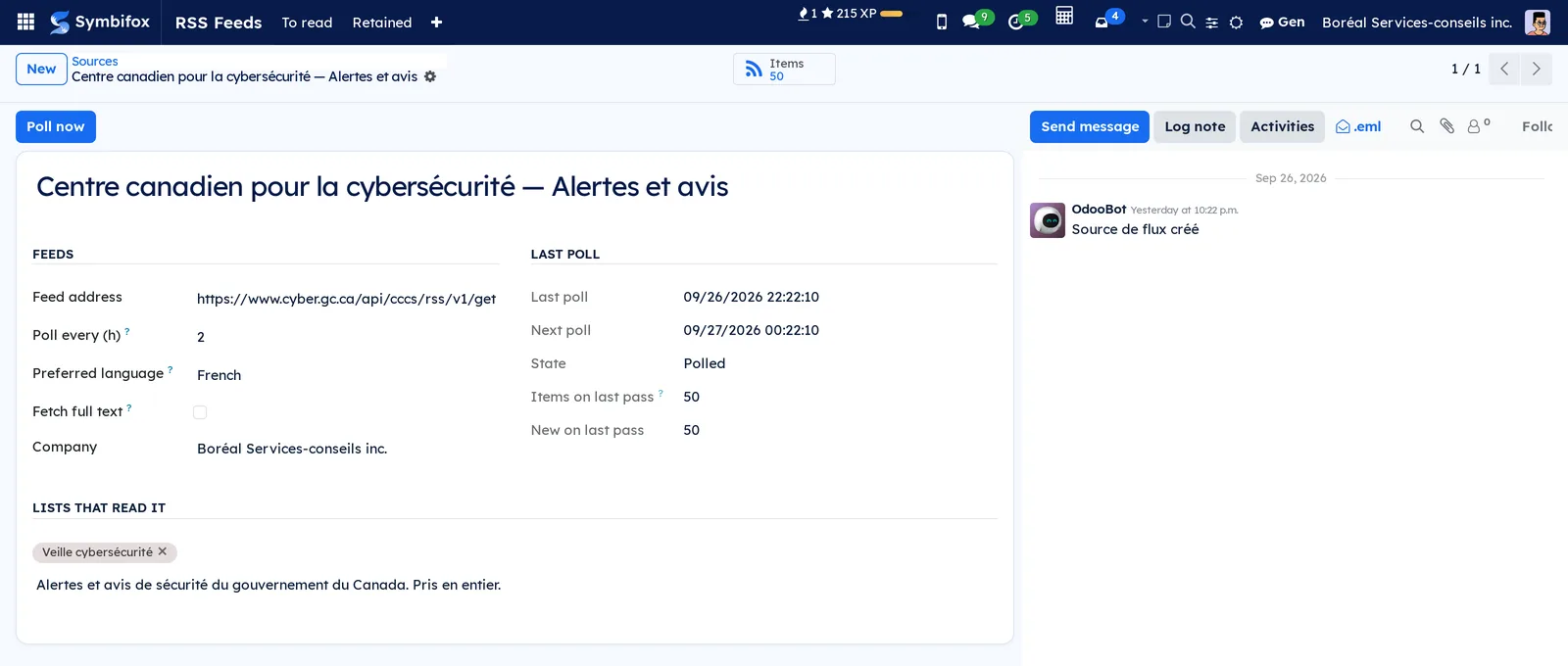
- Enter a name, for example "Centre canadien pour la cybersécurité", and the feed address in Adresse du flux (feed address), then save.
- Select Relever maintenant (poll now). The Éléments (items) button counts the articles read.
- Go to Flux RSS › Configuration › Listes (lists) and select Nouveau.
- Name the list "Veille cybersécurité", add the source in Sources, then in the Audience tab add the Infogérance department in Services (departments).
- Save, then select Appliquer aux 7 derniers jours (apply to the last 7 days) to sort what the source already brought.
- Go to Flux RSS › À lire: the list's news appear as cards.
The list also received its Discuss channel, Flux · Veille cybersécurité, whose members follow the department.
Common tasks#
Add a source#
A source is set to the speed at which its feed renews its window.
- Go to Flux RSS › Configuration › Sources, then select Nouveau.
- Enter the name and the Adresse du flux (it starts with "https://").
- Set Relever toutes les (h) (poll every, in hours). A busy feed needs a short pace.
- Choose the Langue préférée (preferred language): when an article appears in two languages under the same identifier, that version wins.
- Tick Récupérer le texte complet (fetch full text) if the summary is not enough and, if needed, enter in Couper le texte à partir de (cut text from) the line openings where the text stops (attachments, "read also").
- Save, then select Relever maintenant.
The Dernière relève (last poll) box shows the state, the number of items read and how many were new on the last pass.
Set a list's rules#
The rules decide what a list keeps. They apply in this order, in the Règles (rules) tab.
- Go to Flux RSS › Configuration › Listes and open the list.
- In Exclusions, enter what sets an item aside whatever else it contains, one line per term ("conference call", "notice to shareholders").
- In Termes du secteur (industry terms), enter the words of which one is enough to keep an item.
- In Émetteurs spécialisés (specialised issuers), enter the issuers whose every release counts.
- In Émetteurs à deux lignes d'affaires (dual-line issuers), enter those that only count alongside an industry term: their name alone keeps nothing.
- In Sources prises en entier (sources taken whole), add the sources whose category already does the sorting: everything is kept, minus the exclusions.
- Save, then select Appliquer aux 7 derniers jours to see the result on real cases.
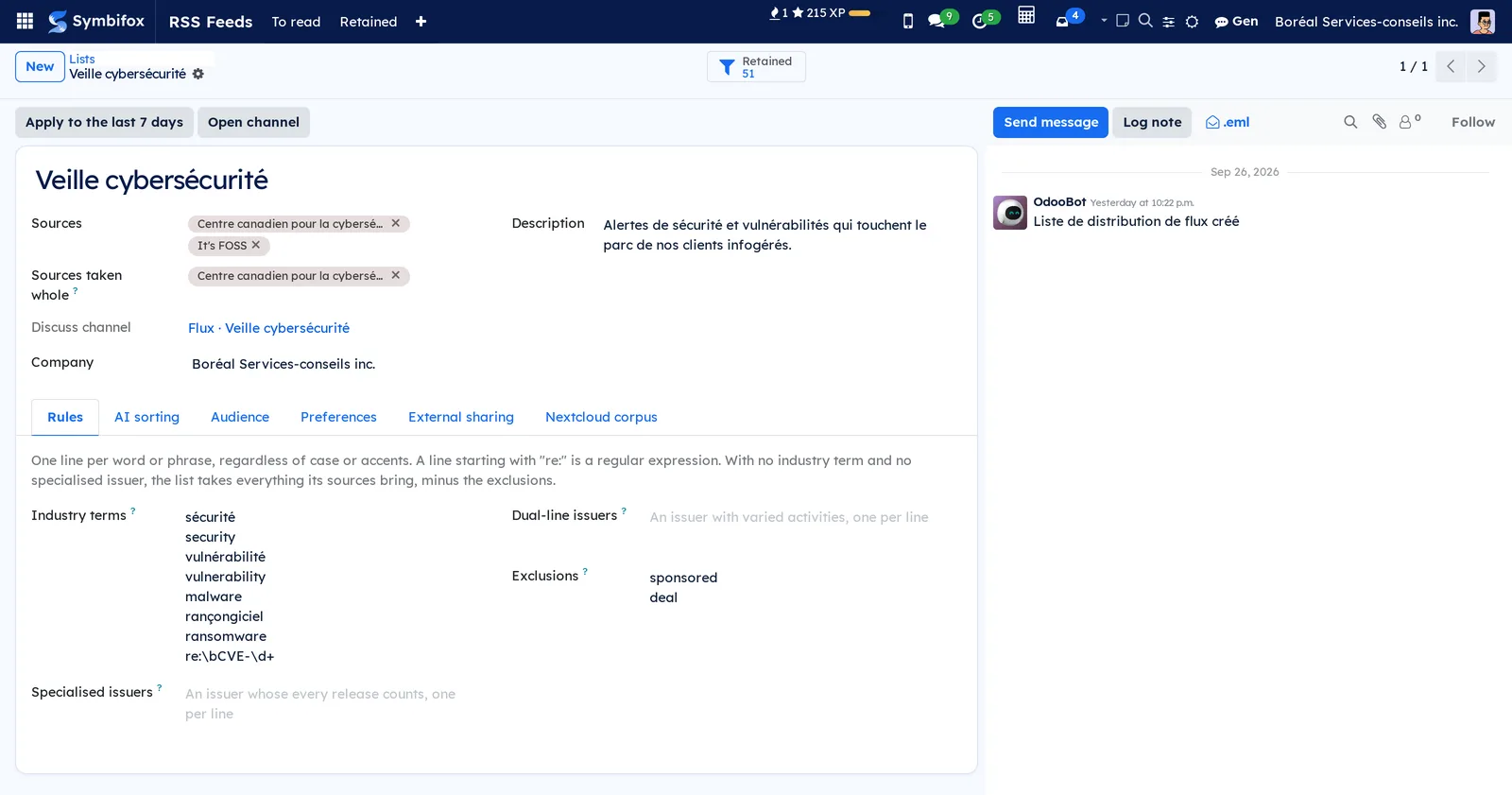
A line is matched without regard to case or accents, at the start of a word. A line starting with "re:" is a regular expression, taken as written. With no industry term and no specialised issuer, the list takes everything its sources bring, minus the exclusions.
Address a list to a department, a project or people#
A list's audience is computed, never entered member by member.
- Open the list, Audience tab.
- In Services, add the departments: their employees receive the list, sub-departments included.
- In Projets (projects), add projects: their internal followers receive it.
- In Personnes (people), add people by name, for a personal watch or a guest from another department.
- Save. Membres (members) shows the computed list.
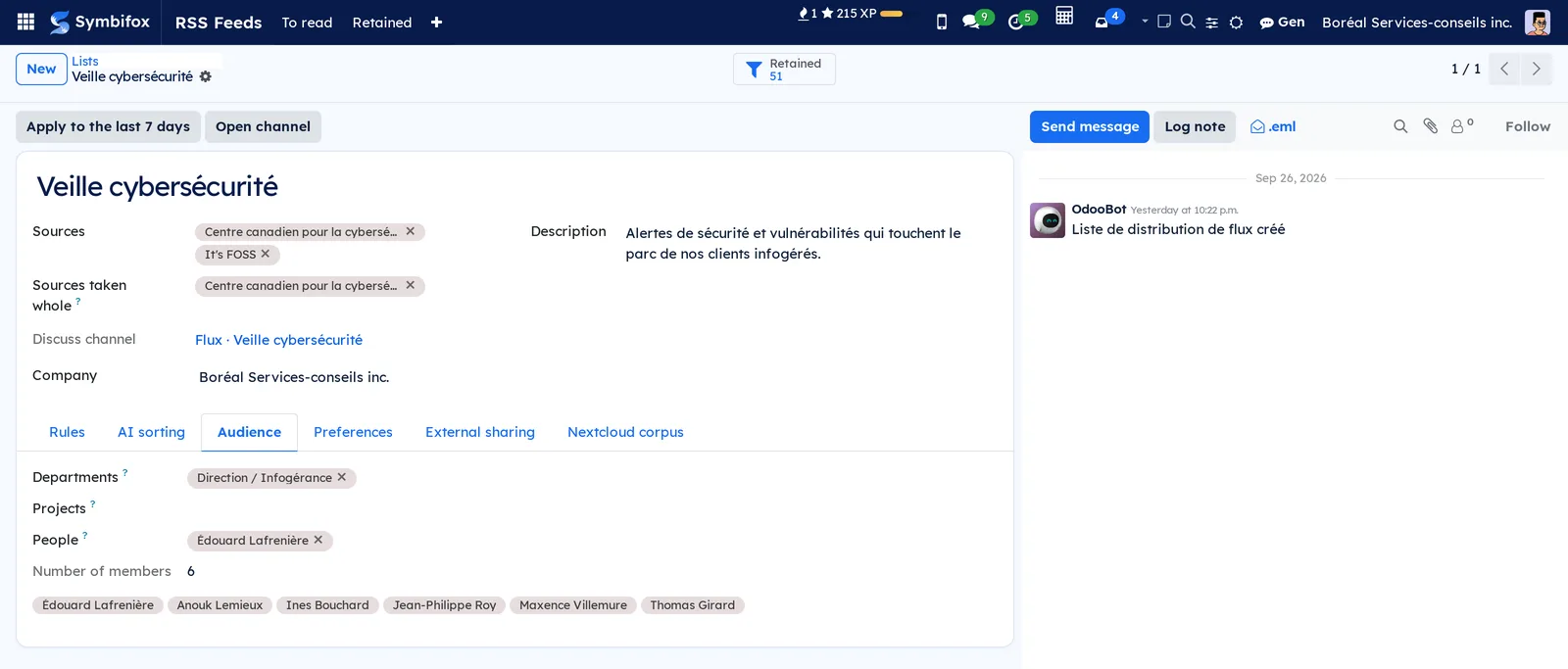
Whoever joins the department or the project team receives the list; whoever leaves stops receiving it. The Discuss channel follows, every hour.
Read your news#
- Go to Flux RSS › À lire.
- Select a card's title or Lire (read): the article opens in a new tab, and the card is marked read.
- Select Marquer lu (mark read) to remove a card without opening it.
- To find what you read, remove the Non lus (unread) filter and choose Lus (read). Remettre à lire (back to unread) undoes a read.
The Dans mes listes (in my lists) and Non lus filters apply together. To clear the pile at once, switch to the list view, tick rows and choose Marquer comme lu (mark as read) in the Action menu.
Receive your news in Discuss and by email#
Each list has a channel, named "Flux ·" followed by the list's name, where each retained item is posted once: title, issuer, date, summary, and the reason when a filter kept it.
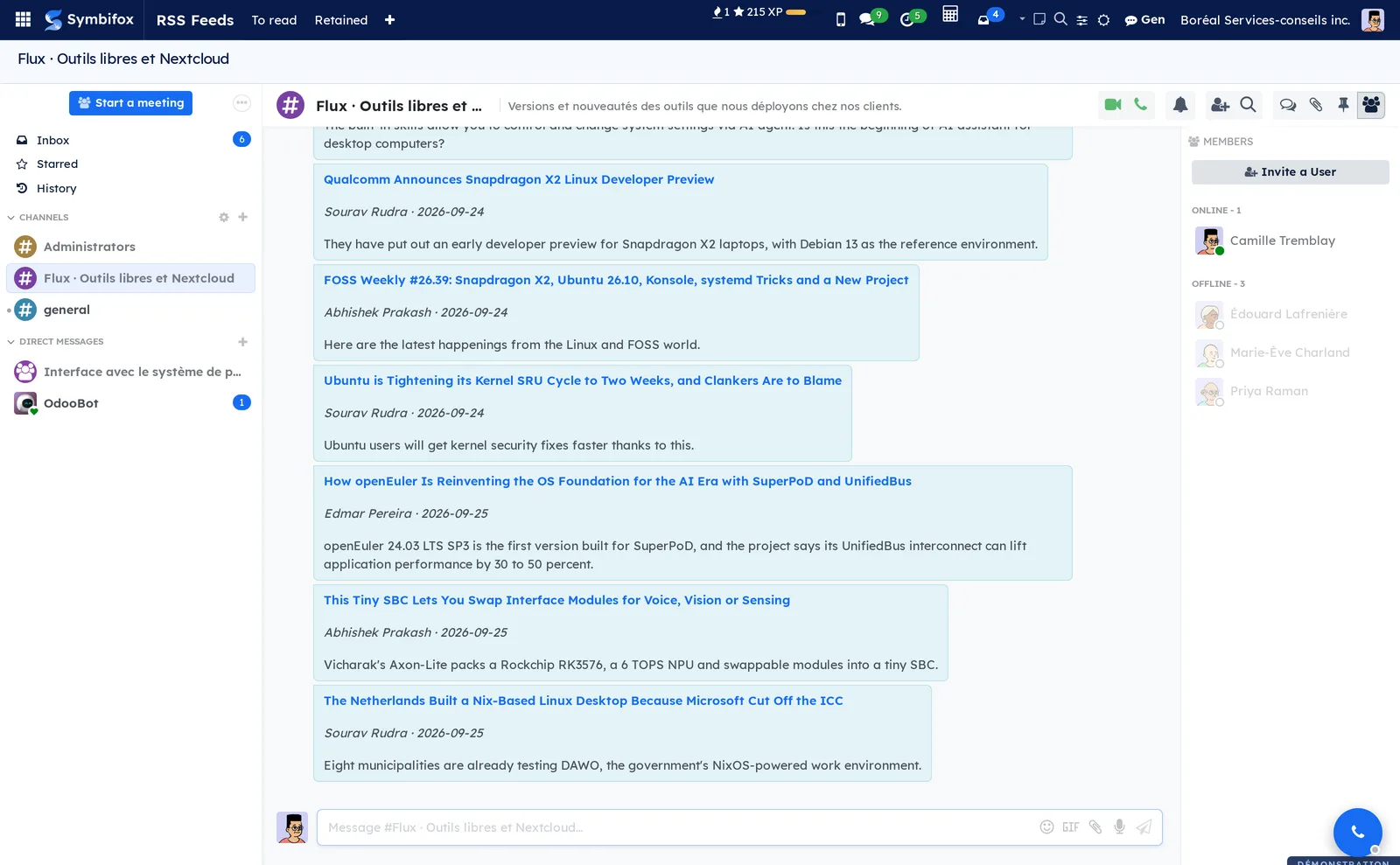
The email digest gathers your lists in one message, at most 25 items per list, with a link to the rest. It leaves out what you already read.
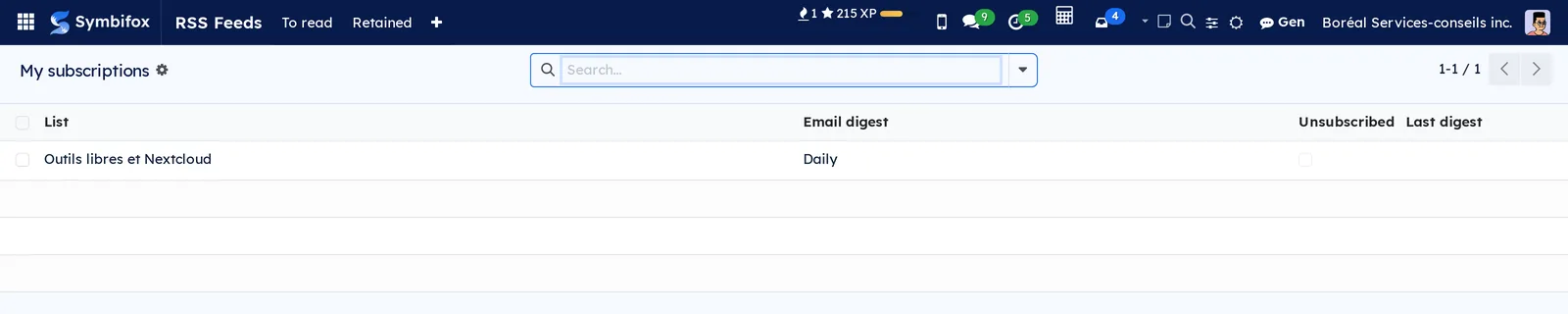
- Go to Flux RSS › Mes abonnements (my subscriptions).
- In Résumé courriel (email digest), choose Chaque jour (daily), Chaque semaine (weekly) or Pas de résumé (canal seulement) (no digest, channel only).
- Tick Désabonné (unsubscribed) to stop receiving a list, without leaving your department or your project.
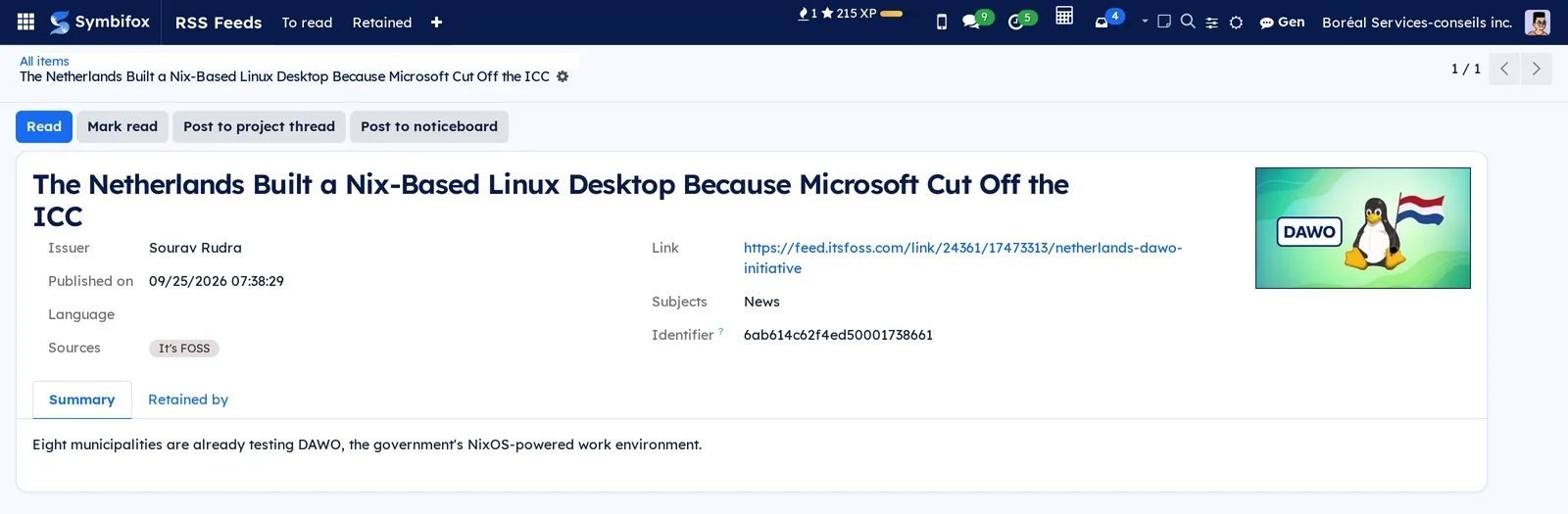
Post an item to a project's thread#
- Open the item, from À lire, Retenus or a card.
- Select Poser au fil du projet (post to the project's thread).
- Choose the Projet (the list's project is suggested) and, if needed, enter a Mot d'accompagnement (covering note).
- Select Poser (post).
The item appears as a note in the project's chatter, with its link and summary.
Share a list with a client who has no account#
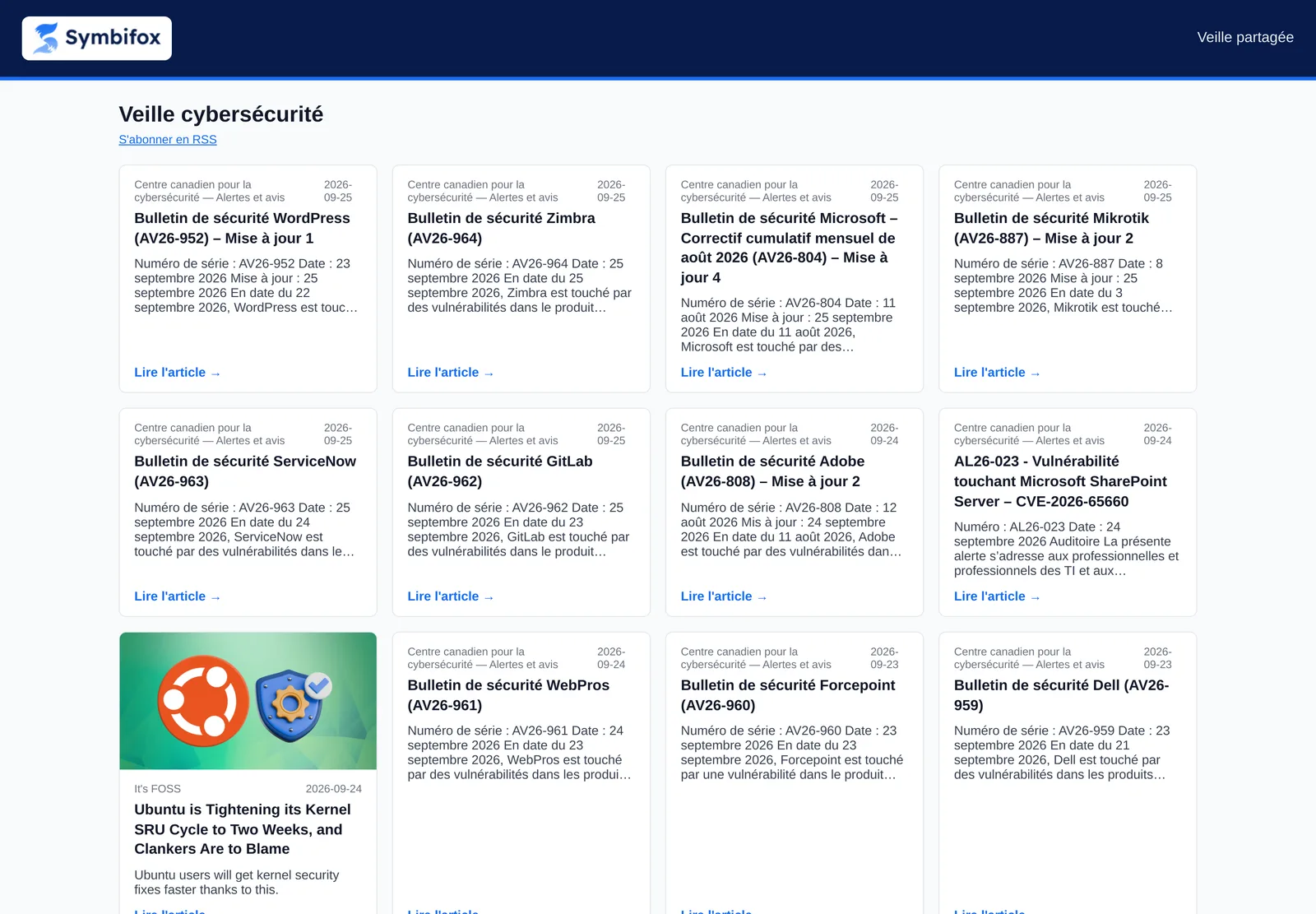
A secret link opens a public page of the watch, and the same content as RSS, without logging in.
- Open the list, Partage externe (external sharing) tab.
- Select Ajouter une ligne (add a line) and enter the recipient in Pour qui (for whom).
- Set the Échéance (expiry): 90 days by default, empty for none.
- Save, then copy the Lien de la page (page link) or the Lien RSS with its copy button.
- To cut access, untick Actif (active). The refresh button issues a new link and kills the old one.
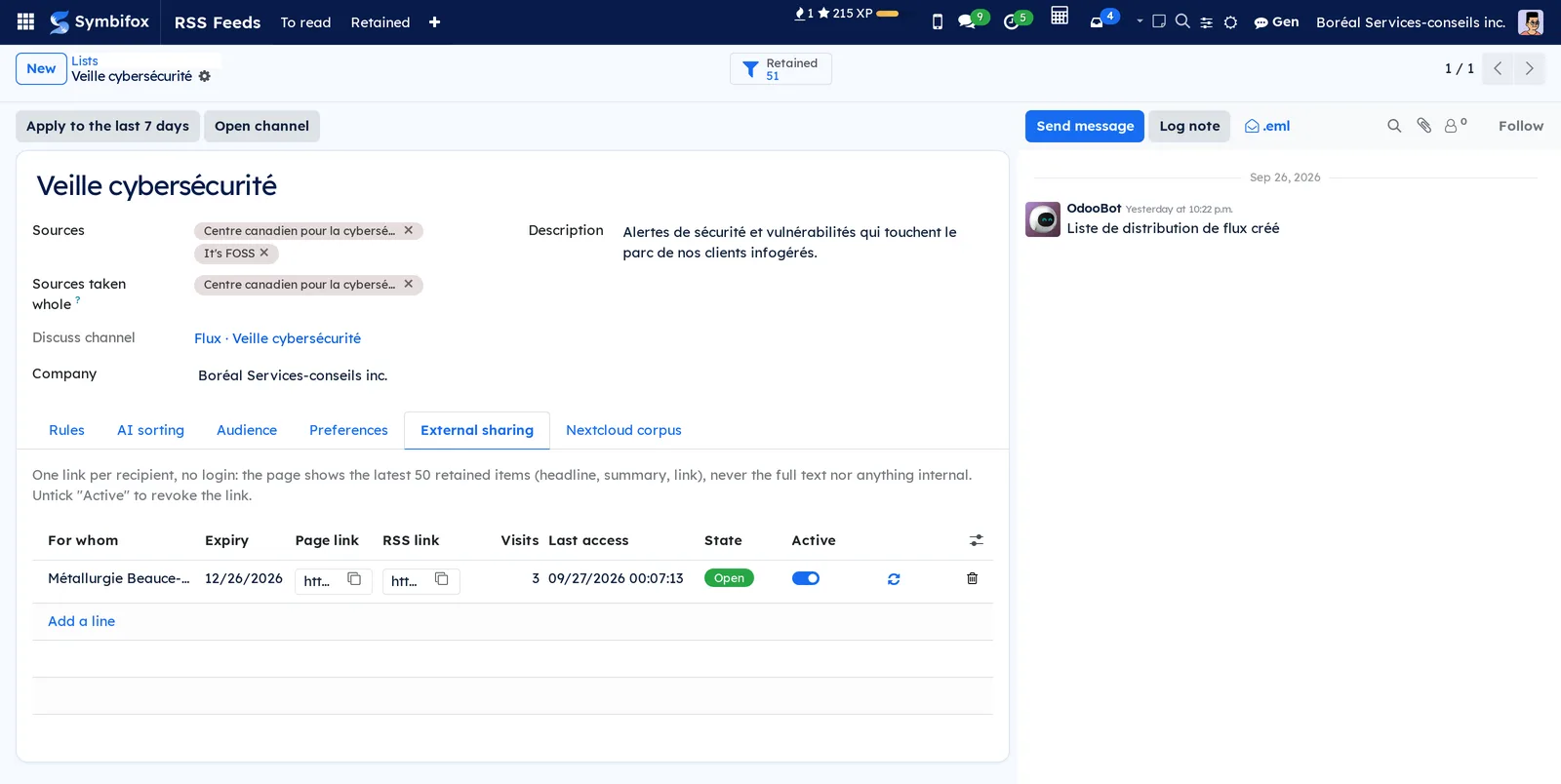
Each row counts Visites (visits) and the Dernier accès (last access). A revoked or expired link stops answering at once.
The menus, one by one#
Flux RSS › À lire: your unread news, as cards, filtered on your lists. A list view is offered. The Lus and Aujourd'hui (today) filters and grouping by Émetteur (issuer) help you find an item.
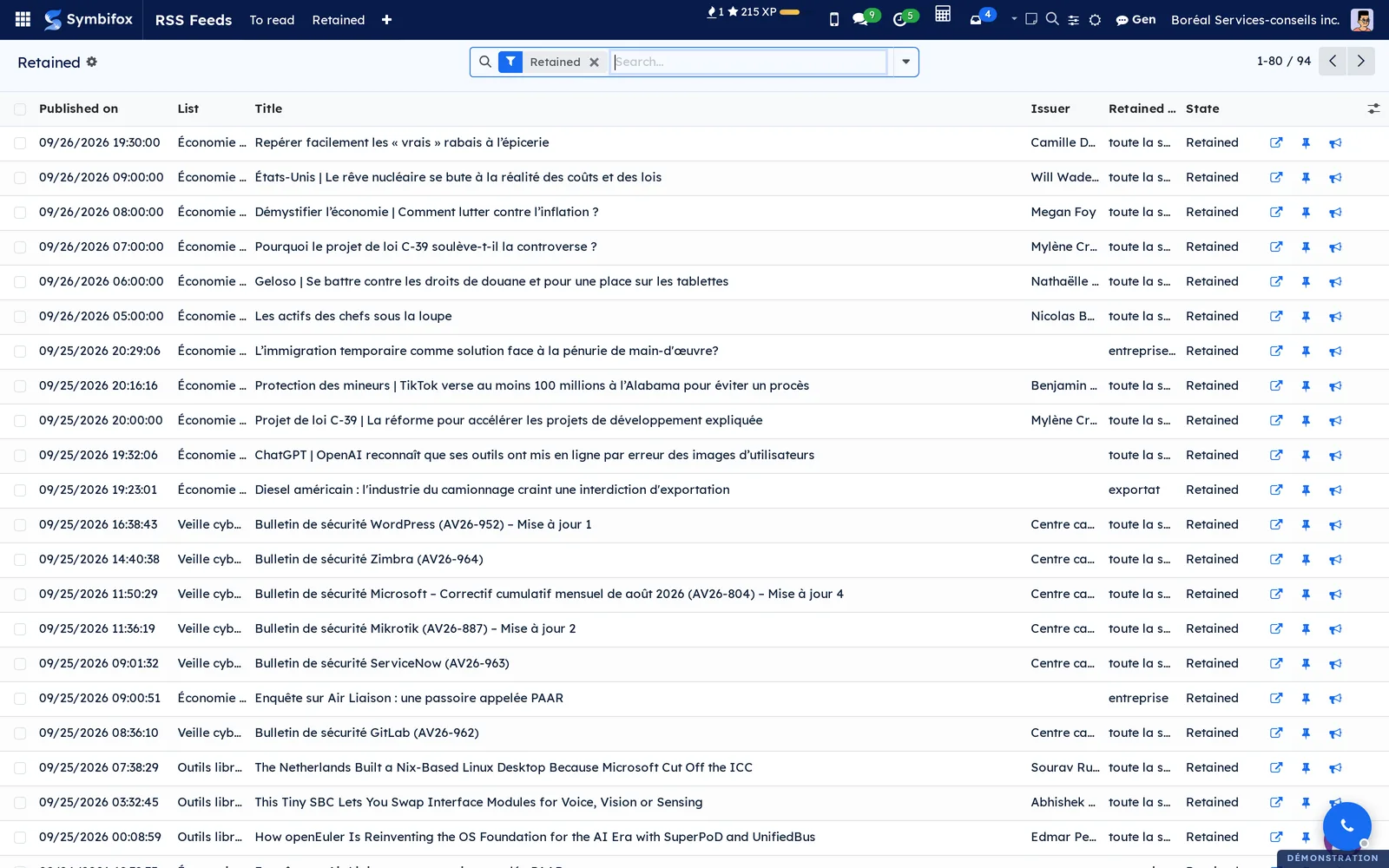
Flux RSS › Retenus: everything the lists retained, one row per list and item, with the list, issuer, reason and state. The Écartés au jugement (set aside by judgement) filter shows what AI sorting left aside.
Flux RSS › Mes abonnements: your lists, your digest frequency and your unsubscribe box. The lists of your departments and projects appear on their own.
Flux RSS › Configuration: a grouping menu, reserved to feed management.
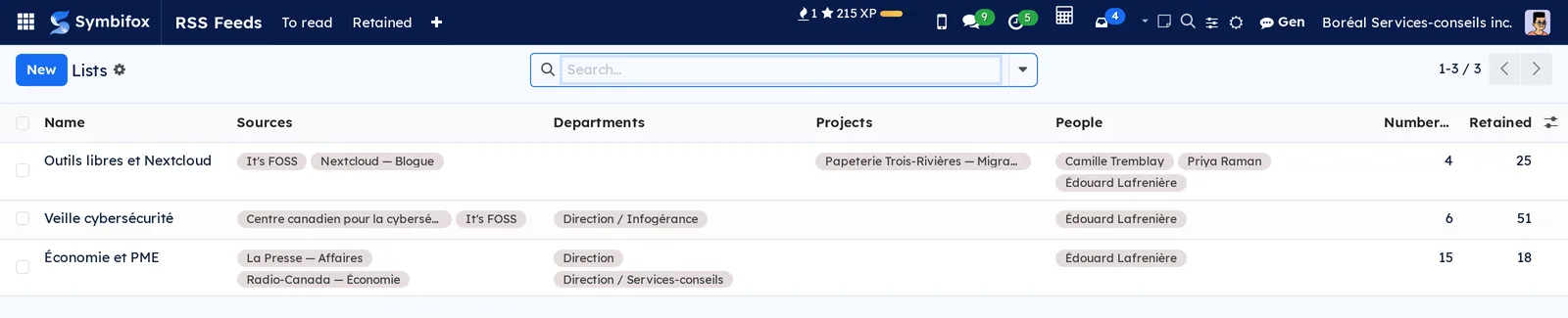
Flux RSS › Configuration › Listes: the lists, with their sources, departments, projects, people, number of members and retained items.
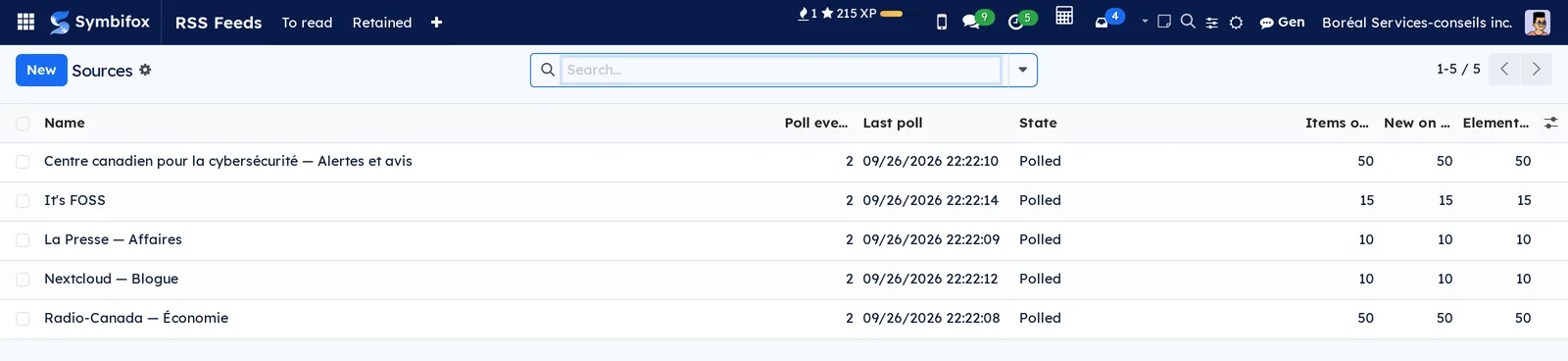
Flux RSS › Configuration › Sources: the sources, with their pace, last poll, state and number of items. A source in transient failure shows in orange, in permanent failure in red.
Flux RSS › Configuration › Tous les éléments (all items): every article read from a source, retained or not. The Texte en échec (text failed) filter shows the pages that could not be read.
Reference#
Source form fields#
| Field | Description | Required or default |
|---|---|---|
| Nom (name) | The name shown everywhere | Required |
| Adresse du flux | The RSS or Atom feed address | Required, http or https |
| Relever toutes les (h) | The polling pace | 2 hours |
| Langue préférée | The version that wins when an article appears in two languages | French |
| Récupérer le texte complet | Fetches the page of each retained item | Unticked |
| Couper le texte à partir de | Line openings where the full text stops | Empty |
| Note | What the feed brings, how dense it is | Empty |
List form fields#
| Field | Description | Required or default |
|---|---|---|
| Sources | The sources the list reads | Empty |
| Sources prises en entier | Sources whose items are all kept, minus the exclusions | Empty |
| Termes du secteur | One is enough to keep an item | Empty |
| Émetteurs spécialisés | Everything they publish is kept | Empty |
| Émetteurs à deux lignes d'affaires | Noted only alongside an industry term | Empty |
| Exclusions | Set an item aside whatever else it contains | Empty |
| Services, Projets, Personnes | The audience | Empty |
| Canal Discussion (Discuss channel) | The list's Discuss channel | Created with the list |
Reports and exports#
The Retenus and Tous les éléments views export like any Odoo list. Each share link also offers an RSS of its list's latest 50 retained items.
Automations#
- Every 15 minutes, due sources are polled, then their items sorted and posted to each list's channel.
- After six failures in a row, a source warns once, in its chatter and through an activity for the person who added it.
- Every hour, channels realign on their list's departments, projects and people.
- Every hour, due digests go out: daily or weekly, as each person chose.
- An item whose page must be read is retried up to twelve times after a transient failure.
Public pages and portal#
/flux/partage/…: the public page of a share link, with/rssat the end for the same content as RSS. Search engines do not index it./flux/lire/…: the link carried by channels and the email digest. It marks the item read, then leads to the article. It requires being logged in.
Modules that extend this application#
Here is the page a client opens with the link, with no account.
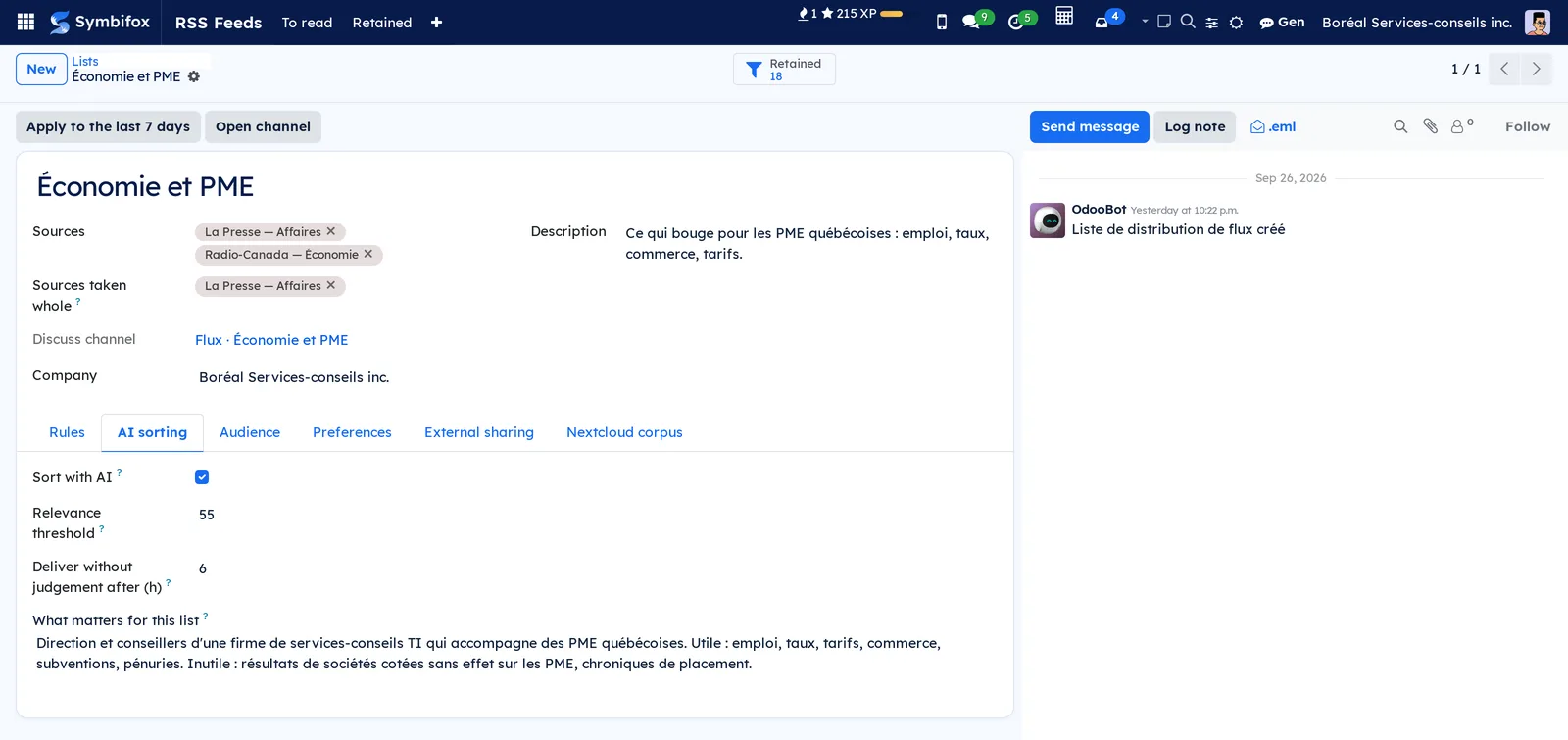
AI sorting is set in the list's Tri par IA (AI sorting) tab: a plain-language brief, a relevance threshold and a delay.
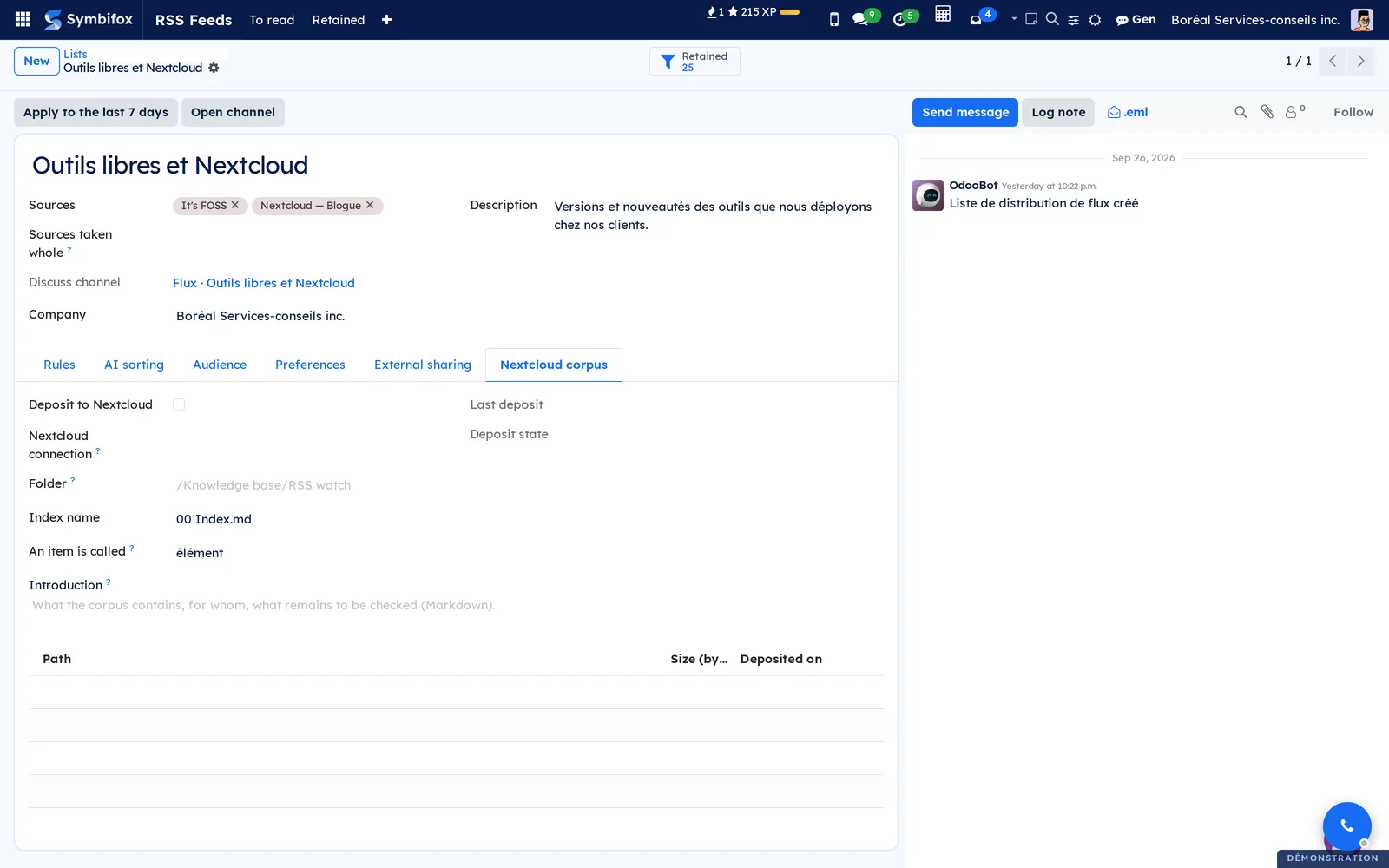
The Nextcloud corpus is set in the list's Corpus Nextcloud tab.
Understanding#
An item enters once, by the stable identifier the feed provides, never by its title or link. The same release announced by two feeds is one item, attached to both sources.
Rules come before AI for cost and clarity: they are free, deterministic, and say why they keep an item. AI only sees what passed the rules. If the model does not answer, nothing stays stuck: past the list's delay, the item is delivered on the strength of the rules, and its reason says so.
A list that takes everything from a source whose category does the sorting, and filters a general source, is built with Sources prises en entier. An exclusion always wins, even over a source taken whole.
Full text is only read for items a list retained, never for a whole feed. The module also refuses to read an address inside your network, even through a redirect: an article's link comes from outside.
Card images are loaded from each outlet's site when you open À lire. Those sites therefore see your visit, without the address of the Odoo page.
Troubleshooting#
| Symptom | Likely cause | Fix |
|---|---|---|
| A source stays in Échec passager (transient failure) | The site is rate limiting or slow to answer | Wait for the next poll; after six failures an activity warns |
| A source is in Échec définitif (permanent failure) | The address does not lead to a feed (404, ordinary page) | Correct Adresse du flux |
| The list retains nothing | No rule matches, or the source is not in Sources | Select Appliquer aux 7 derniers jours and read the reasons in Retenus |
| An off-topic item keeps coming back | A term that is too broad keeps it | Add a term to Exclusions or tighten the term with a "re:" line |
| Nobody receives the list | The list has no department, project or person | Fill in the Audience tab |
| À lire is empty | You are on no list, or everything is read | Check Mes abonnements, or choose the Lus filter |
| A share link answers "not found" | The link expired, was revoked or regenerated | Tick Actif, push back the Échéance or send the new link |