

Part 10 · Symbifox Personal
Family
Run the household's accounts, keep each child with both parents, hold papers privately and prepare an emergency card for the babysitter.
Watch it
The Family application covers the family side of a Symbifox Personal household instance: who belongs to it, who manages the accounts, the children and their parents, everyone's papers and the emergency cards. It is for every member of the household, each with what is theirs. The result: a passport that no longer catches you out at the airport, and a babysitter who knows who to call, without anyone holding the keys to everyone else's data.
Overview#
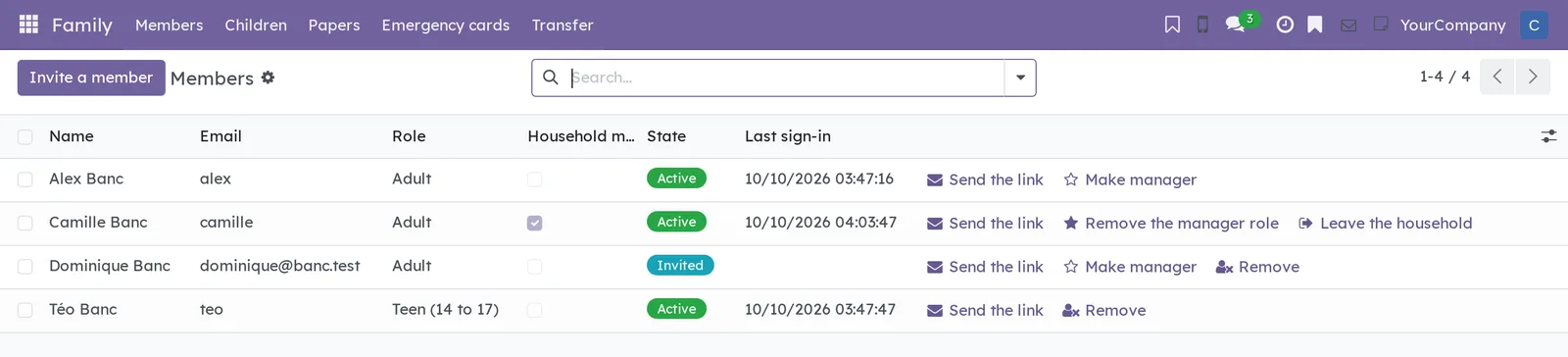
The application opens on the list of household members. Each row shows the name, email, role, the Household manager checkbox, the account's state, the last sign-in, and the actions allowed on that account.
Nine notions are enough.
- Member: a person of the household with their own account. A household has ten at most.
- Household manager: an adult member who invites the others, resends their password link and removes a teen or an account never used. A manager runs accounts, never data or permissions.
- Teen: a member aged 14 to 17, with their own account. They become an adult in the month they turn 18.
- Child: one record per child of the household. Under 14, a child has no account: their parents follow them.
- Parent and Second parent: the two adult members who keep a child's health records, papers and emergency card. The parent holds the child's records; at first, that is the member who created the record.
- Paper: a passport, a health insurance card, a licence or a certificate, with its expiry date. A paper is private: it belongs to its holder, or to the parents of the child who holds it.
- Emergency card: who to call and what to know for one person of the household. The whole household reads it.
- Babysitter link: a link that opens one emergency card without an account, for a few hours or a few days.
- Departure: an account leaving the household, on its own or on request, without anyone cutting an adult off from their own records.
Blue Fox administers the instance; no household member has that role, managers included.
Configuration#
Access and permissions#
Every household member opens the application: there is no group to tick. What each person sees depends on the record and on their role.
| Who | What the person sees and does |
|---|---|
| Any member | Read the member list, the children (first name and birthday) and every emergency card. Add a child, and become their parent. Write their own papers and their own emergency card. Leave the household. |
| A child's parent or second parent | Also: edit the child's record, keep their papers and emergency card, create and withdraw their babysitter links. |
| A member a paper is shared with | Read that paper, its photos and scans, without changing or copying it. |
| Household manager | Also: invite a member, resend a password link, make or remove a manager, remove a teen or an account never used. |
| Blue Fox, which administers the instance | Schedule an adult's removal with notice, read the register of departures. Members' papers stay closed to it, as to any other account. |
A household manager never sets another member's password, never changes their email, never touches their two-factor authentication and never removes an adult who has already signed in. Each of these would hand them the account, and so the person's private records, or cut that person off from their own records.
Settings#
The application adds nothing under Settings. Its time limits are set in advance.
| Time limit | Value |
|---|---|
| Reminder before a paper expires | Six months (183 days) for a passport or a permanent resident card, 90 days for a visa or permit, 60 days for a health insurance card or a driver's licence, 30 days for the rest. Each paper can be adjusted on its own. |
| How long a babysitter link lasts | 4 hours, 24 hours (suggested), 3 days or 7 days. |
| Removal of an adult requested from Blue Fox | 30 days suggested, during which the person keeps their access. |
| Erasing a departed account's records | Within 30 days of the departure, by Blue Fox's procedure. |
| Number of accounts | Ten per household, the most the plan allows. |
Base data#
Nothing needs creating before you start. Accounts come from a household manager's invitations, children from their parents, and everyone adds their own papers and emergency card.
Getting started#
This walkthrough adds a child, names a second parent and prepares the child's emergency card for Saturday's babysitter.
- Open Family › Children, then select New.
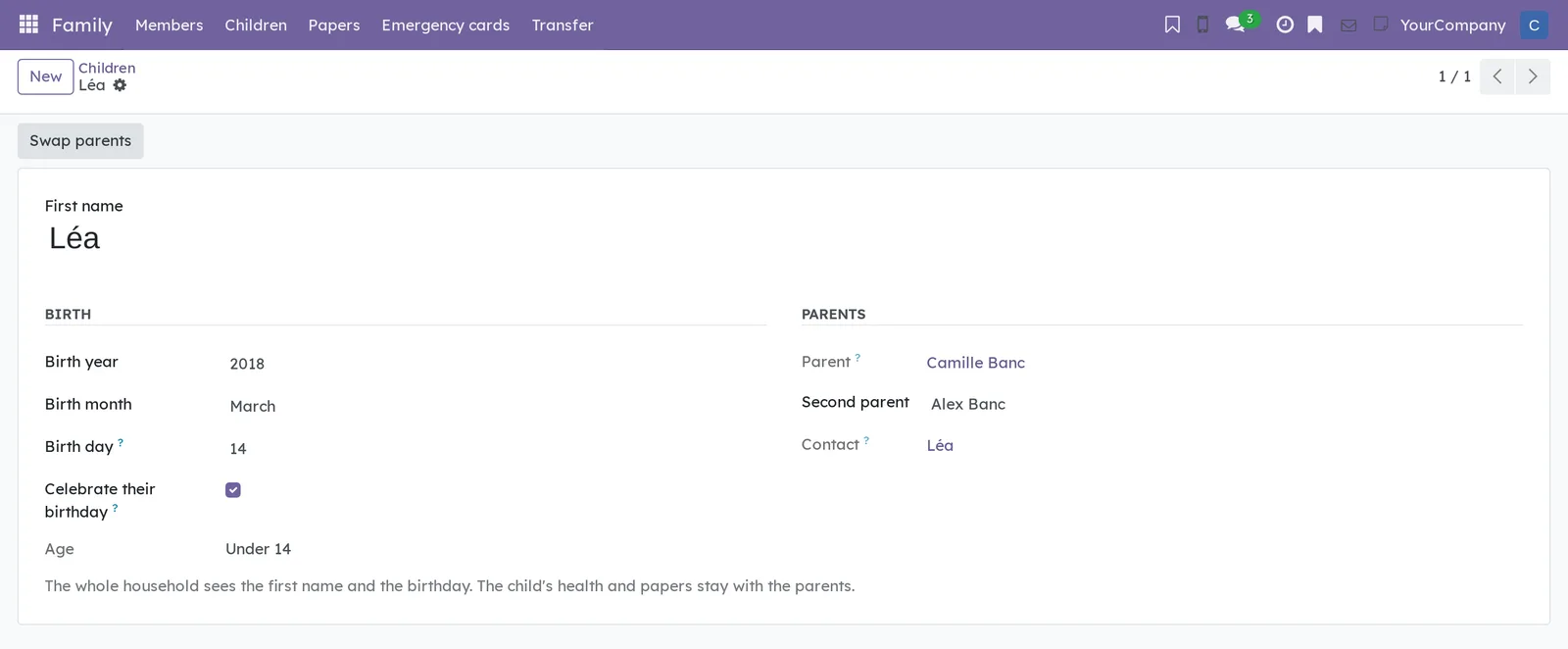
- Enter “Léa” in First name.
- Under Birth, enter “2018” in Birth year, choose “March” in Birth month and enter “14” in Birth day.
- Under Parents, choose “Alex Banc” in Second parent, then save.
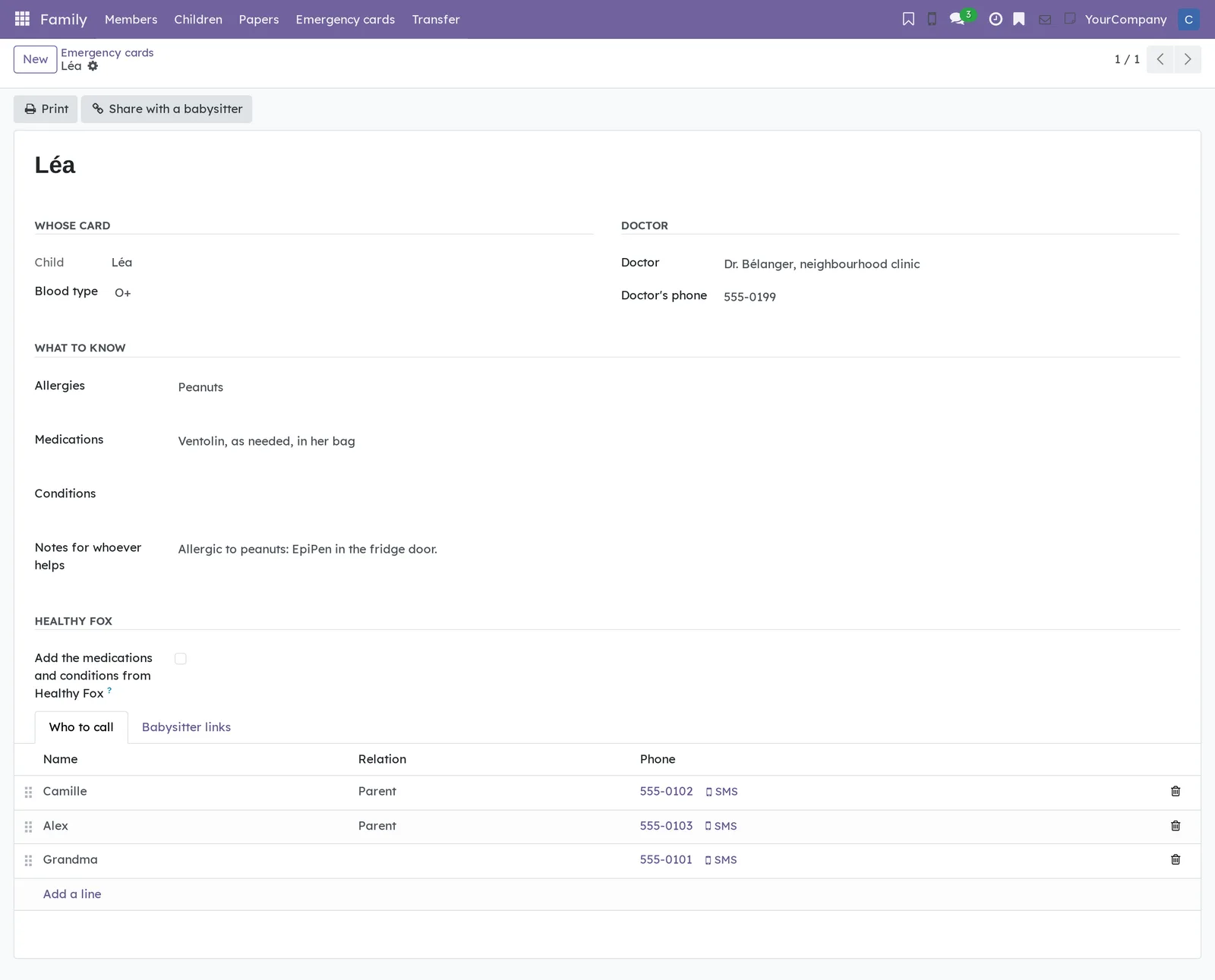
- Open Family › Emergency cards, select New, then choose “Léa” in Child.
- Enter the allergies, medications and doctor, then add one line per person to reach under the Who to call tab. Save.
- Select Share with a babysitter, enter “Babysitter, Saturday” in For, keep 24 hours, then select Create the link.
The link is shown only once: copy it and send it to the babysitter however you like. You are Léa's parent, Alex is her second parent, and the rest of the household sees her first name and birthday.
Common tasks#
Invite a household member#
A household manager invites each new person. The person chooses their own password.
- Open Family › Members, then select Invite a member.
- Enter the person's Name and Email.
- In Role, choose Adult or Teen (14 to 17).
- For a teen, choose their Birth month and enter their Birth year. For an adult, check Household manager too if needed.
- Check Accounts left, then select Send the invitation.
The invitation goes to the address you entered, and the person shows as Invited until they first sign in. A teen must be 14 to 17: under 14, the child is followed through their child record; from 18, invite them as an adult. The account takes the language and time zone of the person who invites.
Resend the password link#
A lost invitation, a forgotten password: the manager resends the link, without ever seeing or choosing the password.
- Open Family › Members.
- On the person's row, select Send the link.
The link goes to the person's own address, never to the manager's. An account that has never signed in gets the invitation again; any other gets a reset link. A person with no email address goes through Blue Fox.
Make or remove a household manager#
A household can have several managers, for example both adults.
- Open Family › Members.
- On an adult's row, select Make manager, or Remove the manager role.
The Household manager checkbox follows. A teen cannot be a manager. The last manager cannot remove the role from themselves: “You are the only household manager: name another one first.”
Remove a teen or an account never used#
A manager removes a teen, or an account whose invitation was never used.
- Open Family › Members.
- On the person's row, select Remove.
- Read the warning, then confirm.
The account closes at once and moves to Left; the Left filter finds it. Its private records stay closed to everyone until Blue Fox erases them. Remove does not show on the row of an adult who has already signed in, nor on your own.
Leave the household#
An adult leaves the household by themselves, when they choose, after taking their records with them.
- Open Family › Members.
- On your own row, select Leave the household.
- Select Export my records and keep the file.
- Read the warning about children you are the only parent of, if it shows.
- Check I understand: my account closes now, and my records stay closed until Blue Fox erases them.
- Select Leave the household.
You are signed out. A child you held with a second parent passes to that second parent; the records of a child you were the only parent of stay closed. So name a second parent before you go. Export my records shows only when the transfer module is installed.
Prepare for a removal requested from Blue Fox#
An adult who has already signed in can only be removed by Blue Fox, on request, with notice.
- Make the request to Blue Fox, which schedules the date the account closes (30 days later by default).
- The person receives the notice “Your household account closes soon” at their own address, with the date spelled out.
- Until that date, they open Family › Members, then Leave the household on their row, and select Export my records.
During the notice period, the person keeps their access and shows as Leaving. On the day, the account closes by itself. Blue Fox can cancel a scheduled removal until it happens.
Name a child's second parent#
The parent who holds the child's records names the second parent. The second parent can step back on their own.
- Open Family › Children, then the child's record.
- In Second parent, choose an adult member of the household, or clear the field to step back.
- Save.
Both parents then keep the child's health records, papers and emergency card. A teen cannot be a parent, and the two parents must be two different people. Only the parent who holds the child's records names a different second parent.
Swap parents#
The parent who holds the child's records can hand them to the second parent, for example when the child mostly lives with them.
- Open Family › Children, then the child's record.
- Select Swap parents.
- Confirm.
The second parent becomes Parent and holds the records; you become Second parent and keep your access. The button shows only to the parent, and only once a second parent is named. The change carries over to Healthy Fox when the child is followed there.
Link a teen to their child record#
At 14, a child can get their own teen account, which links to their record.
- Invite the teen as a member (see Invite a household member).
- Open Family › Children, then the child's record.
- In Own account, choose their teen account, then save.
Own account shows once the child is 14, and only their parents fill it in. It accepts only a teen account of the household, linked to one child.
Add a paper#
A passport, a health insurance card or a licence is entered once, with its expiry date.
- Open Family › Papers, then select New.
- Choose the Type.
- Keep your name in Holder, or choose one of your children in Child.
- Enter the Number, Issued by, Issued on and Expires on.
- Adjust Remind me (days before) if needed; it is suggested by type.
- Add the photo or scan under the Photos and scans tab, then save.
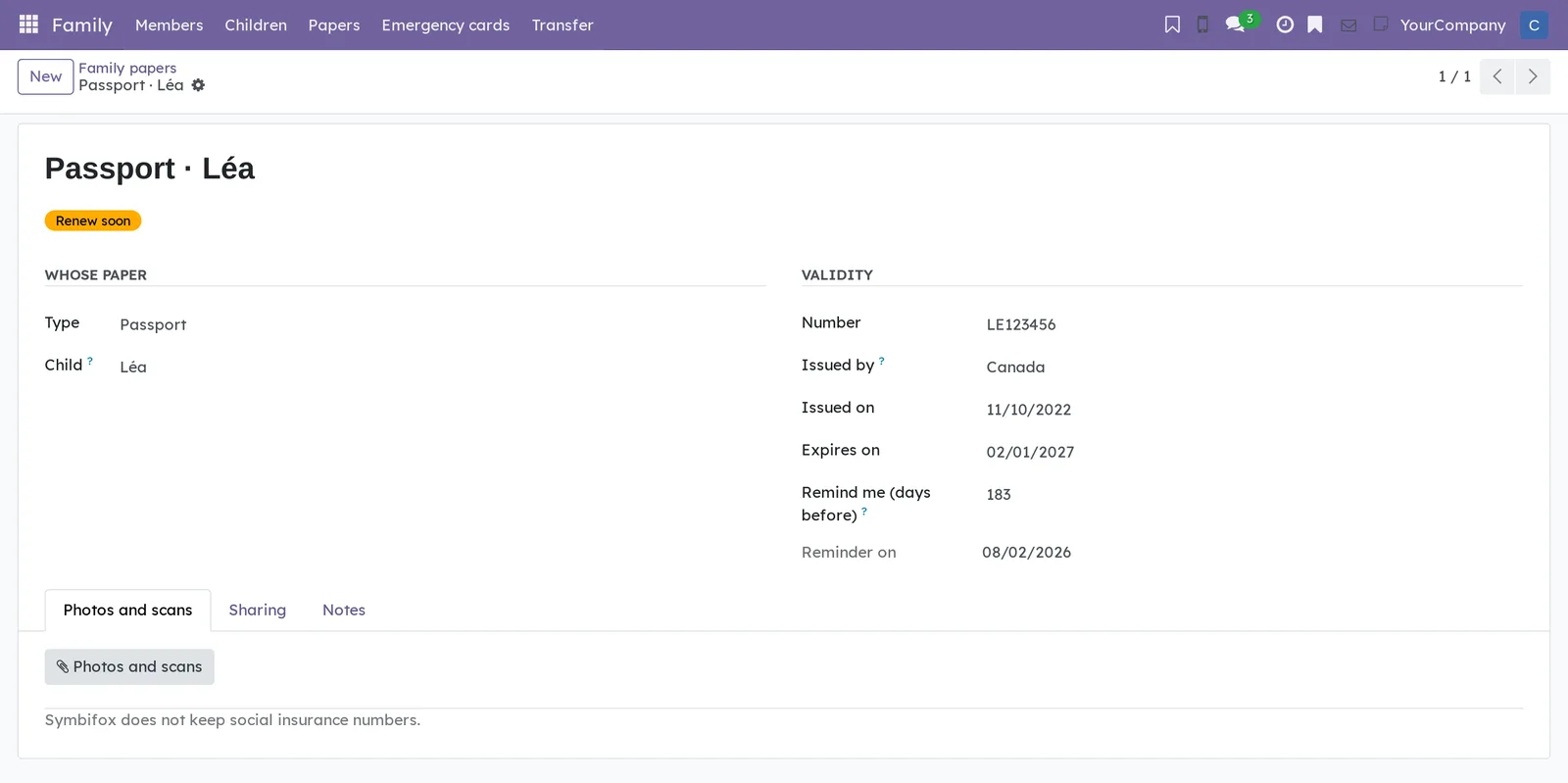
The paper is named after its type and person, for example “Passport · Léa”, and gets a status: Valid, Renew soon, Expired or No expiry. Reminder on shows the reminder date.
Share a paper read-only#
A paper stays with its holder. It is shown on purpose, one paper at a time, for example a driver's licence to whoever is planning the trip.
- Open Family › Papers, then the paper.
- Open the Sharing tab.
- Add one or more household members, then save.
The chosen members find the paper under the Shared with me filter. They can read it, photos included, but cannot change or copy it. Remove a member from the list to stop sharing. A child's second parent already holds the child's papers: there is no need to share them.
Renew a paper in time#
The reminder arrives on its own, as a private to-do. What remains is updating the paper once it is renewed.
- Open To-do and find the task “Renew: Passport (Léa)”, or open Family › Papers with the To renew filter.
- Open the paper.
- Once renewed, enter the new Number, Issued on and Expires on.
- Replace the photo under Photos and scans, then save.
The to-do is assigned to the paper's holders only, with the expiry date as its deadline. It names the type and the person, never the number. Changing Expires on or Remind me (days before) sets up a new reminder for the next expiry.
Print an emergency card#
The printed card goes on the fridge or in the child's bag.
- Open Family › Emergency cards, then the card.
- Select Print.
The PDF “Emergency card - Léa” shows the blood type, allergies, medications, conditions, who to call, the doctor and the notes, then “In an emergency, call 911.” No paper number ever appears. Any household member can print a card.
Share a card with a babysitter#
A babysitter has no account. They get a link that opens this one card, until it expires.
- Open Family › Emergency cards, then your card or your child's.
- Select Share with a babysitter.
- In For, enter a word that will remind you who received it.
- In Valid for, choose 4 hours, 24 hours, 3 days or 7 days.
- Select Create the link, then copy the Link.
The link is shown only once: Symbifox keeps only a fingerprint of it and cannot show it again. Anyone who receives the link opens the card, even if it is forwarded, so send it to the babysitter alone. The button shows to the card's own person, or to the child's parents.
Track or withdraw a babysitter link#
Each link can be followed from its card, and withdrawn as soon as it is no longer needed.
- Open Family › Emergency cards, then the card.
- Open the Babysitter links tab.
- On the row of an active link, select Withdraw.
For each link, the list shows For, Created, Expires, the State (Active, Expired or Withdrawn), how many times it was Opened and when it was Last opened. A link cannot be edited: to extend it, withdraw it and create another. Only those who keep the card see this tab.
Add what Healthy Fox tracks to an emergency card#
Medications already tracked in Healthy Fox can appear on the card, if you choose.
- Open Family › Emergency cards, then your card or your child's.
- Under Healthy Fox, check Add the medications and conditions from Healthy Fox.
- Save.
The From Healthy Fox section lists active medications with their dosage, and active or managed conditions. The whole household and the babysitter links then see them. Nothing else leaves Healthy Fox, and allergies are typed on the card.
Archive or delete a record#
A child who has grown up, an old paper, a card no longer needed: a child's record can be archived to keep it, and any record can be deleted to erase it.
- Open the child's record, the paper or the emergency card.
- Open the gear icon next to the name, in the breadcrumb.
- Select Archive (children only), or Delete.
Only the parents archive or delete a child's record; the child's contact is then archived too. Only the holders delete a paper or an emergency card. Papers and emergency cards cannot be archived: a replaced paper is updated instead (see Renew a paper in time).
The menus, one by one#
Family: the application's root. It opens on Members.
Family › Members: the household's accounts, as a list (screenshot above). The columns Name, Email, Role, Household manager, State and Last sign-in, then the buttons allowed on each row. The states: Invited, Active, Leaving and Left. The filters: Managers, Teens and Left. Rows do not open as forms: every action goes through a button.
Family › Children: the household's children, as a list. The columns First name, Birthday, Age, Parent and Second parent. With no child yet, the screen shows “Add a child of the household.”
Family › Papers: your papers, your children's and those shared with you, under the title Family papers. The columns Holder name, Type, Expires on, Status and Shared with; Reminder on can be added from the column settings. A row due for renewal shows in amber, an expired one in red. The filters: To renew, Mine, My children's and Shared with me, plus grouping by Type.
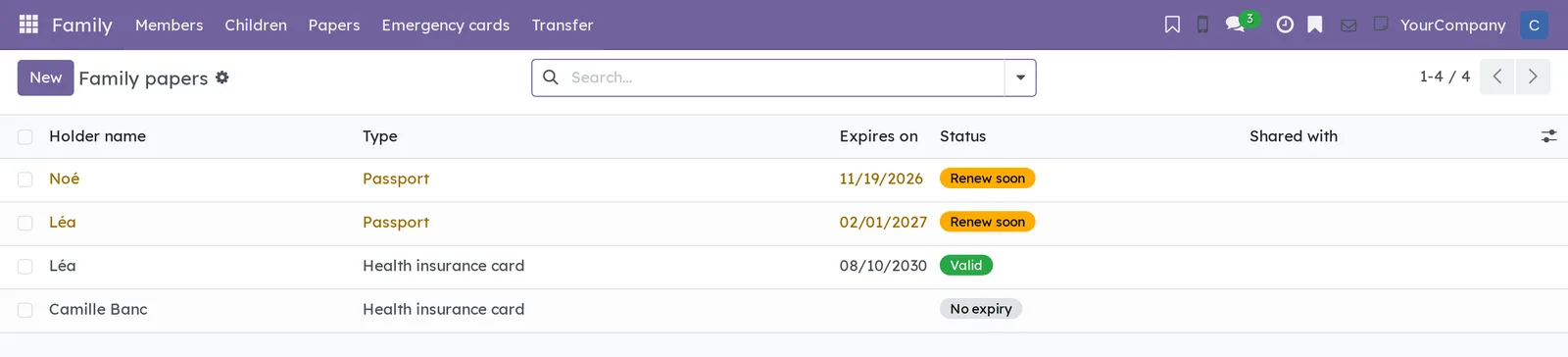
Family › Emergency cards: the cards of the whole household, as a list. The columns Person, Blood type, Allergies and Doctor. The list's Print menu prints the selected cards.
Family › Transfer: a grouping menu, added by the transfer module, with Export my records and Import records.
Family › Departures: the register of departures, reserved for the instance's administration. Household members do not see this menu.
Reference#
Fields of the Child form#
| Field | Description | Required or default |
|---|---|---|
| First name | The child's first name, which the whole household sees. | Yes |
| Birth year, Birth month | The birth, which gives the age. | Yes |
| Birth day | Needed for the birthday in the calendar and Celebrations. | Optional |
| Celebrate their birthday | Puts the birthday in Celebrations and the calendar, when the day is known. | Checked |
| Age | Under 14, 14 to 17 or 18 or older. | Calculated |
| Parent | The parent who holds the child's records, in Healthy Fox too: whoever created the record, then the other after a swap. | You |
| Second parent | Another adult member of the household. | Optional |
| Own account | The child's teen account, from 14. | Hidden under 14 |
| Contact | The contact used to invite the child to an event and for their birthday. It carries the first name only. | Created automatically |
Fields of the Family paper form#
| Field | Description | Required or default |
|---|---|---|
| Type | Passport, health insurance card, driver's licence, birth or citizenship certificate, permanent resident card, visa or permit, insurance policy, vaccination record, or other. | Passport |
| Holder | The member the paper belongs to. Hidden when a child is chosen. | You |
| Child | One of your children: a child's papers are held by their parents. | Optional |
| Number | The paper's number. A social insurance number is refused. | Optional |
| Issued by | The country, province or organization. | Optional |
| Issued on, Expires on | The paper's dates. It cannot expire before it is issued. | Optional |
| Remind me (days before) | How early the reminder comes, suggested by type. | 183 for a passport |
| Reminder on | The reminder date. Calculated. | Calculated |
| Photos and scans tab | The paper's images. | None |
| Sharing tab | The members who read the paper without changing it. | Nobody |
| Notes tab | Where the original is kept, how to renew it. | Optional |
Fields of the Emergency card form#
| Field | Description | Required or default |
|---|---|---|
| Member or Child | The card's person: yourself or one of your children. One card per person. | You |
| Blood type | From A+ to O-. | Optional |
| Doctor, Doctor's phone | Who looks after the person. | Optional |
| Allergies, Medications, Conditions | What to know. | Optional |
| Notes for whoever helps | Where the auto-injector is, what to do first. | Optional |
| Add the medications and conditions from Healthy Fox | Adds what Healthy Fox tracks to the card. | Cleared |
| Who to call tab | One line per person: Name, Relation and Phone, in the order you want. | None |
| Babysitter links tab | The links created and their log. | None |
Reports and exports#
The Emergency card PDF prints from a card or from the list. Papers and your own emergency card are exported through Family › Transfer › Export my records (see the modules below).
Automations#
Three jobs run every day.
- Accounts whose removal, scheduled by Blue Fox, has come due are closed.
- A paper whose reminder date has passed gets its renewal to-do, once per expiry. Depending on your notification preferences, the assignment also reaches you by email, without the number.
- A teen becomes an adult in the month they turn 18.
With Celebrations, the birthday of a child whose birth day is known is also posted every day, ahead of time (see the modules below). Apart from that assignment, the application sends only three emails: the invitation, the password link and the notice of a scheduled removal, each to the address of the person concerned.
Public pages and portal#
The babysitter link opens a public page, with no sign-in, that shows only the card: blood type, allergies, medications, conditions, who to call with tap-to-call numbers, the doctor, the notes, then when the link expires. The page is in the language of the person who keeps the card, contains no link into the instance and is not indexed by search engines.
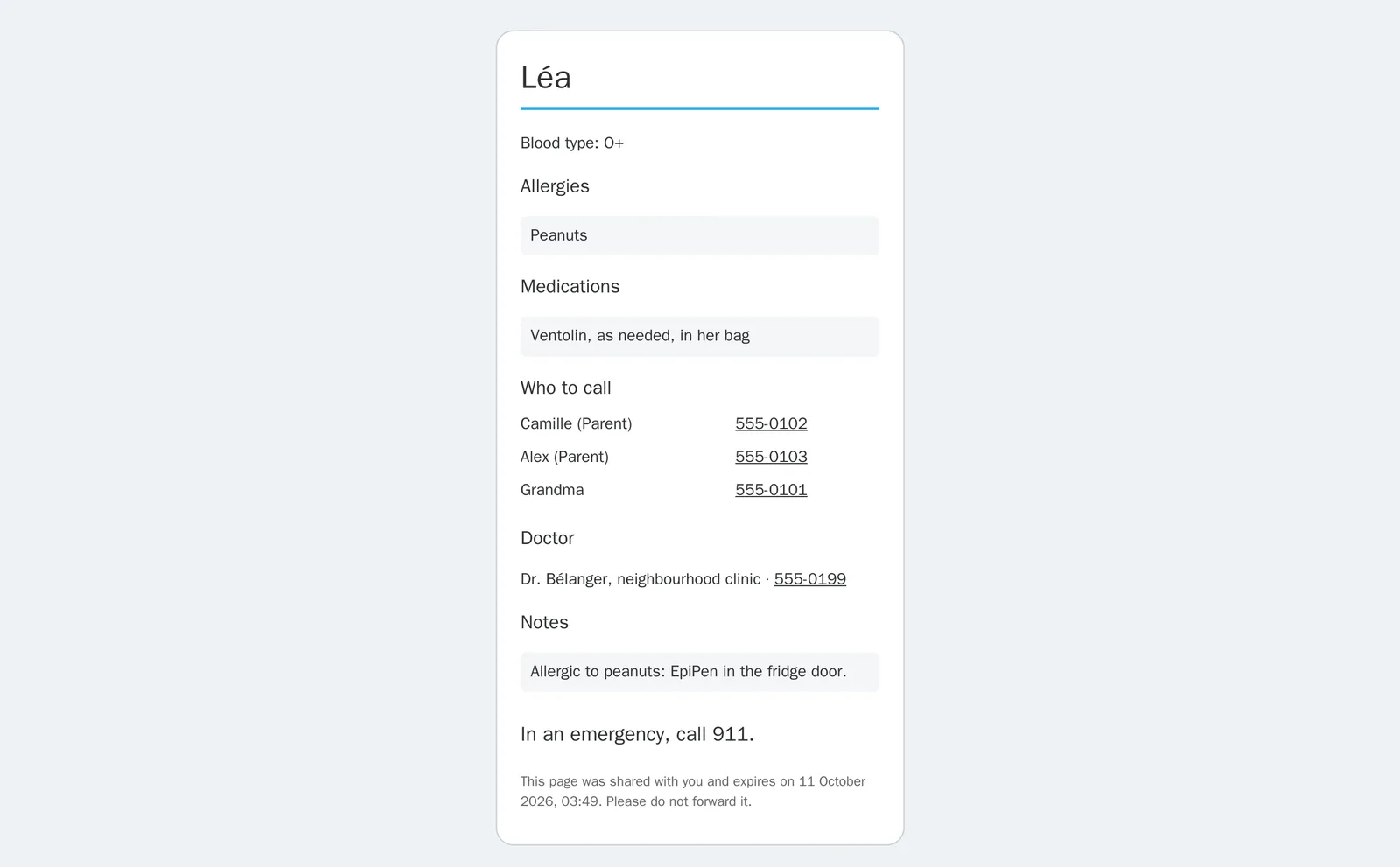
An unknown, expired or withdrawn link shows the same page: “This link is not available. Ask the person who sent it for a new one.” No response says which of the three it is.
Modules that extend this application#
The application relies on the household base. On a household instance, the household profile installs it along with everyone's apps.
Three bridges install by themselves when the other application is present.
The second bridge puts the children's birthdays on the calendar.
The last bridge lets a departing person's records go with them.
Understanding#
Why a manager without administration rights. In a household instance, everyone has private apps: health, budget, email, notes. Whoever administers the system reads everything. So the manager runs accounts and nothing else, through the buttons of the member list.
Why nobody removes an adult. Removing an adult who has used their account would cut them off from their own records. They leave by themselves, or Blue Fox removes them on request, with time to export.
What happens to a departed account. It is closed, and its private records stay in place, closed to everyone, until Blue Fox's procedure erases them, within 30 days of the departure. A child held with a second parent passes to that second parent.
What the household sees of a child. The first name and birthday, for the calendar and Celebrations, and the emergency card. Health records and papers stay with the parents. The contact created for the child carries the first name only. Of a teen, the other members see the role; their birth month and year are readable by the instance's administration only.
What “private” means for a paper. A paper can be read only by its holder, the parents of the child who holds it, and the members it is shared with. It has no chatter (the message thread at the bottom of a form), no followers and no activities. The rule applies to every account, administration included, and a closed paper is labelled “Private paper”. Private does not mean encrypted.
Why no social insurance number. Service Canada advises keeping it locked away and giving it only when the law requires it. A family file is not that place. Nine digits shaped like such a number are refused in every text field of a paper and of an emergency card.
Why six months for a passport. A Canadian passport for a child under 16 lasts five years at most and cannot be renewed: it takes a new application. Several countries also require three to six months of validity at entry. Six months leaves time to act.
Why the babysitter link expires. Anyone with the link opens the card: a forwarded email, a message preview, a browser history. Hence a short duration, one-step withdrawal, a log of openings, and a page that shows only the emergency information.
What the application does not do. It does not encrypt papers and does not send the babysitter link: you copy it and send it however you like. It keeps no custody schedule and no shared expenses.
Troubleshooting#
| Symptom | Likely cause | Fix |
|---|---|---|
| “An account already uses this address: ask Blue Fox.” when inviting. | An account, active or departed, already has this email. | Ask Blue Fox to check that account. |
| “This household already has 10 accounts, the most its plan allows. Remove an account first, or ask Blue Fox.” | The household has reached its account limit. | Remove an account never used, or ask Blue Fox. |
| “A teen account is for 14 to 17 years old.” | The month and year entered make the person under 14, or 18 and over. | Under 14, add a child record; from 18, invite the person as an adult. |
| Remove does not show on an adult's row. | The adult has already signed in. | The person leaves the household by themselves, or Blue Fox removes them on request. |
| “This looks like a social insurance number.” when saving a paper or a card. | Nine digits shaped like such a number, in a field or a note. | Remove the number: Symbifox does not keep it. |
| “You hold papers only for yourself or for your own child.” | The holder chosen is another member, or another parent's child. | Keep your name in Holder, or choose one of your children. To show someone a paper, share it. |
| The babysitter sees “This link is not available”. | The link has expired, was withdrawn, or was copied wrong. | Create a new link from the card. |
| “Healthy Fox follows this birth date to know when the child turns 14: only Blue Fox corrects it.” | The child's health is tracked in Healthy Fox. | Ask Blue Fox for the correction. The birth day can still be changed. |
See also#
- People I've Met: the other personal application of a household instance.
- To-do, Notepad and Timer: where renewal reminders arrive.
- Celebrations: the children's birthdays, with the bridge.
- Calendar: inviting a child to an event through their contact.
- Contacts: each child's shared contact.
- Common actions in every application: views, filters, grouping, archiving and printing.