

Part 10 · Symbifox Personal
People I've Met
Note the people you cross paths with, on a trip or close to home, what they like and how to reconnect, without making them contacts.
Watch it

The People I've Met application helps you remember the people you cross paths with on a trip, at an event or closer to home. It keeps where you met them, what they like, what they know about you and the detail that will pick the conversation up again. It is for each member of a Symbifox Personal household instance, for their own use. The result: finding "the one with the red bike helmet" a year later by typing "kayak", without ever adding them to the household's contacts.
Overview#
The application opens on your cards, in kanban view. Each card shows the name or the way to recognise the person, the place and city, the occasion and date, the interests as coloured tags, and the circle.
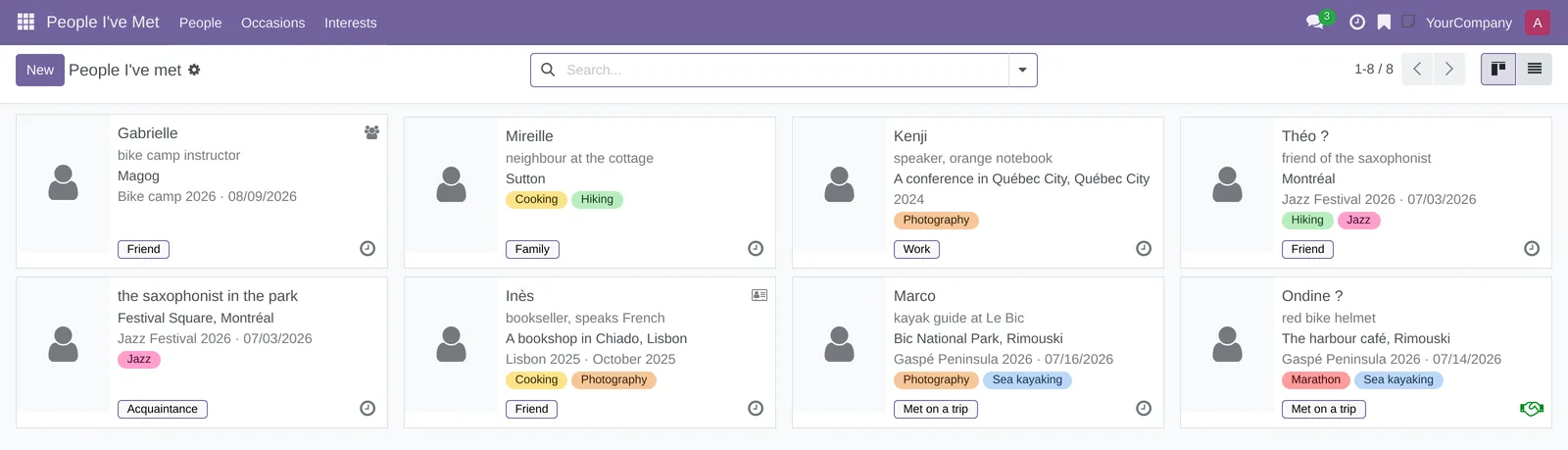
Eight notions are enough.
- Card: what you remember about a person. A card is not a contact: it shows neither in Contacts nor to the other members of the household.
- Clue: a first name, a way to recognise them, or a photo. A card needs only one; everything else is optional.
- Not sure of the name: the checkbox for when you only half remember the first name. The card then shows with a question mark, "Ondine ?", and the search still finds it.
- Occasion: what groups several meetings together, a trip, an event or a season ("Gaspé Peninsula 2026", a wedding, a summer camp).
- Interests: coloured tags you create as you go ("Sea kayaking", "Jazz").
- Circle: Family, Friend, Met on a trip, Work or Acquaintance.
- Last seen: the latest of the meeting date and your notes linked to the card. Nothing to type.
- Sharing: a card belongs to the person who wrote it. They can show it, read-only, to household members they choose.
What you jot down in the moment stays a note in the Notepad: on your phone, offline, dictated if need be. The note is then linked to the card, or becomes a card in one step. The Notes shortcut button at the top of the card counts the linked notes.
Configuration#
Access and permissions#
Every household member opens the application and writes their own cards: there is no group to tick. What each person sees depends on the card, not on a role.
| Who | What they see and do |
|---|---|
| The person who wrote the card | Everything: read, edit, share, archive, delete, make a contact, schedule a reminder. |
| A member the card is shared with | Read the card, its photo, its chatter (the message thread at the bottom of the form) and its activities. They cannot edit, follow or copy it. The writer's private notes stay invisible. |
| Any other member | Nothing. Wherever the card would be named (a link, an error message), it is called "Private card". |
Occasions and interests also belong to the person who creates them. Another member reads them only through a card shared with them.
Settings#
The application adds no setting under Settings.
Depending on how the instance is configured, the search also ignores accents: "Gaspe" then finds "Gaspé". Otherwise, type the word with its accents.
The reconnect reminder uses the Reconnect activity type, with a due date proposed three months ahead. You change the date when you schedule it.
Base data#
Nothing needs to be created before you start. Occasions and interests are created from the card: type a name that does not exist yet in Occasion or Interests, then choose the create option offered. The Occasions and Interests menus then let you date, recolour or rename them.
Getting started#
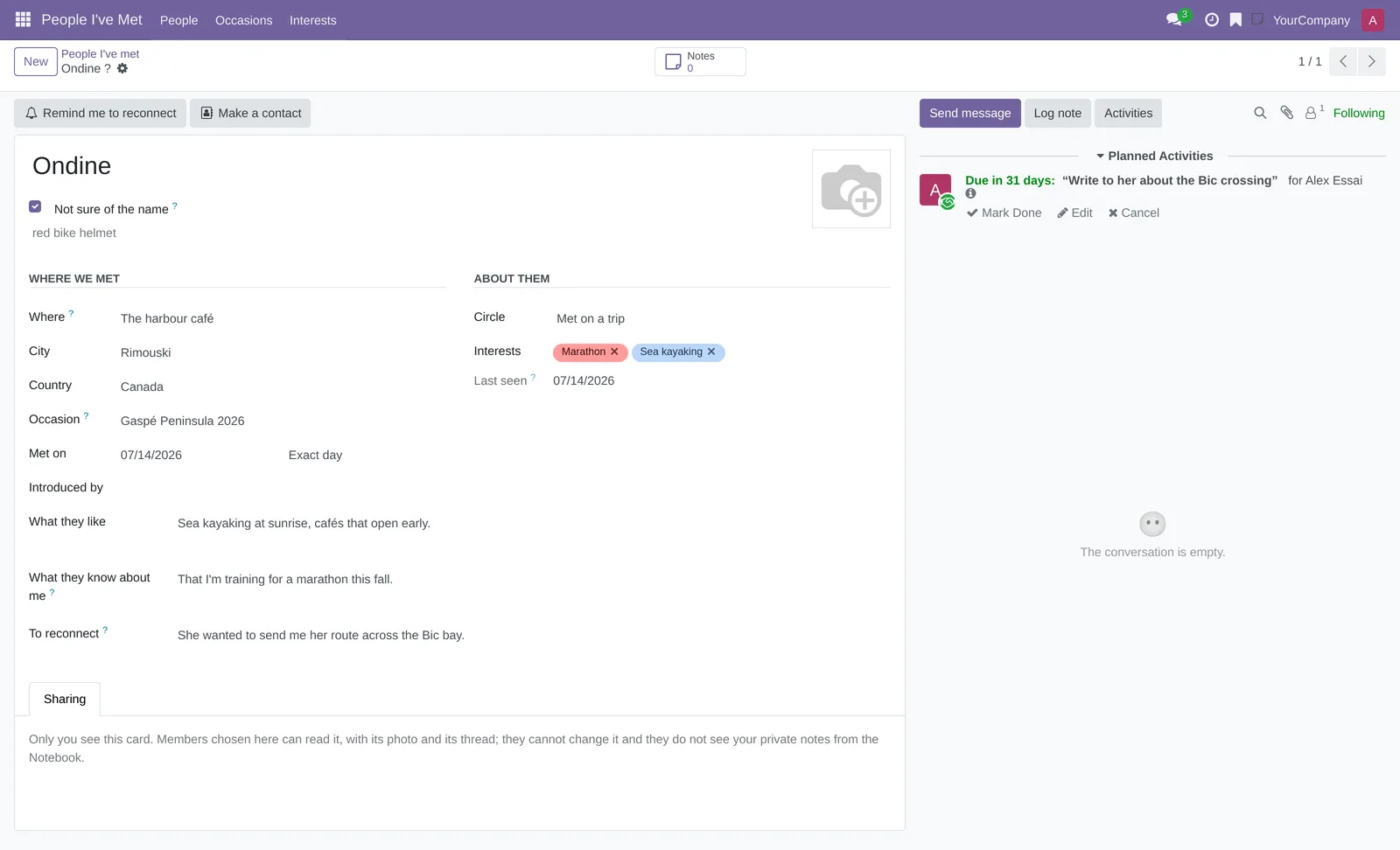
This walkthrough notes someone you met on holiday, whose first name you only half remember.
- Go to People I've Met › People, then select New.
- In the title, where it reads "First name, even approximate", enter "Ondine", then check Not sure of the name.
- Under the name, enter the way to recognise them: "red bike helmet".
- Under Where we met, enter "The harbour café" in Where and "Rimouski" in City, then choose "Canada" in Country.
- In Occasion, enter "Gaspé Peninsula 2026", then choose the create option offered.
- In Met on, pick the day; leave Exact day next to it.
- Under About them, choose Met on a trip in Circle, then create the interest "Sea kayaking" in Interests.
- In To reconnect, enter what would restart the conversation: "Their route across the Bic bay, promised by email."
- Save.
The card is called "Ondine ?" in the breadcrumb and on the cards. Last seen takes the meeting date.
Common tasks#
Note someone with a single clue#
In the moment, one detail is enough. You fill in the rest when you have a minute.
- Go to People I've Met › People, then select New.
- Enter a single clue: a first name, a way to recognise them under the name, or a photo in the frame on the right.
- Save.
With none of the three, saving is refused: "Give at least one clue: a name, a description or a photo." A card without a name goes by its description, and failing that, "Someone I met".
Date a meeting roughly#
People often remember the month or the year, rarely the day.
- Open the card.
- In Met on, pick a date in the right month or year.
- In the list next to it, choose Month only or Year only.
- Save.
The cards and the When column of the list then show "October 2025" or "2024" rather than an invented day. Leave the date empty if you have no idea.
Group people by occasion#
An occasion brings together the people from the same trip or event.
- Go to People I've Met › People.
- Open the arrow of the search box.
- Under Group By, choose Occasion.
The cards line up in columns, one per occasion, with their number of cards. Cards without an occasion fold into a None column.
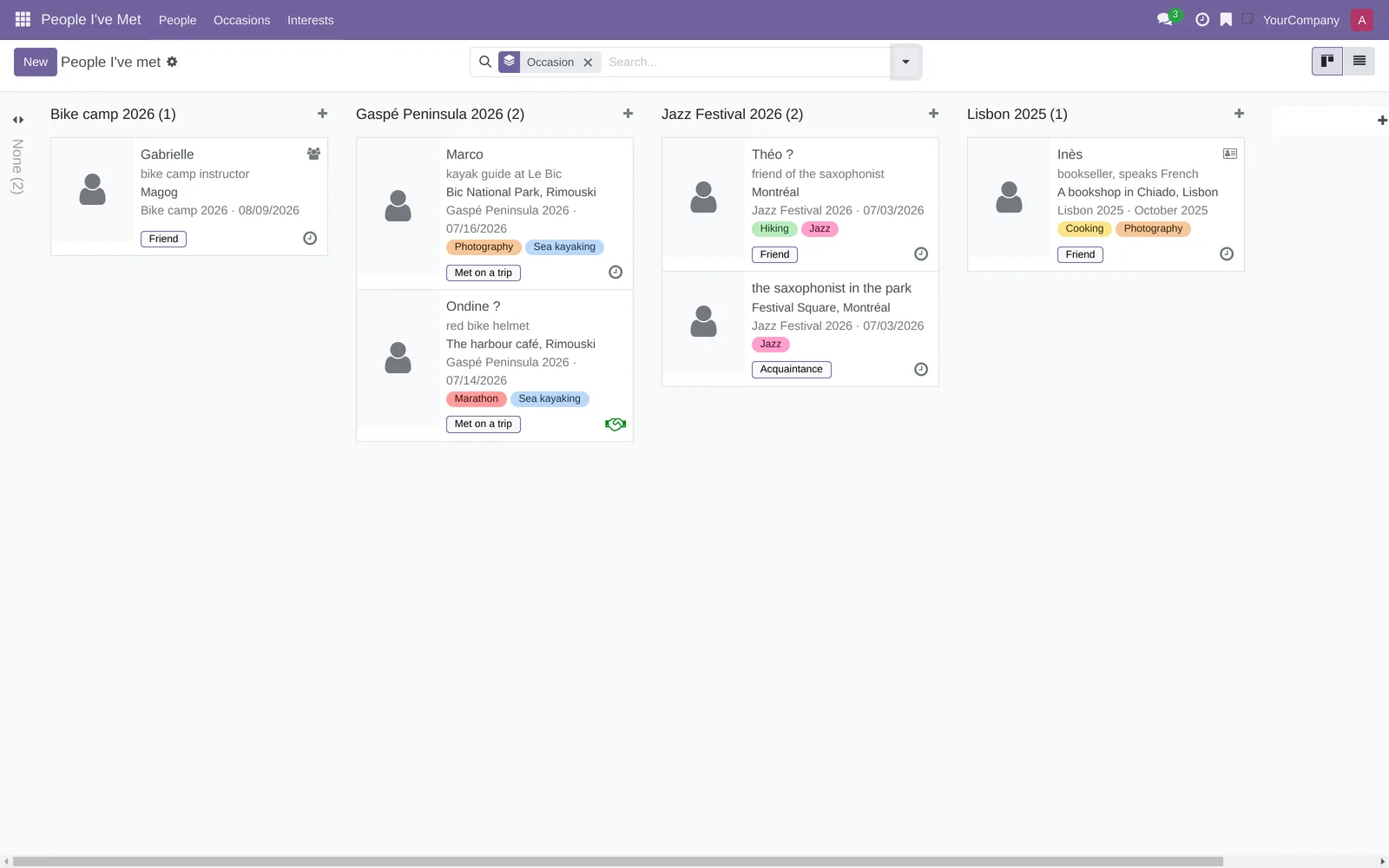
The same menu also groups by Country, City, Circle or Year met.
Find someone by what you remember#
The search box looks everywhere at once, linked notes included.
- Go to People I've Met › People.
- Type a word you remember, for example "kayak".
- Choose the Anything I remember line offered under the box.
The search reads the name, the description, the place, city and country, the occasion, the interests, What they like, What they know about me, To reconnect, Introduced by, and the text of your notes linked to the card.

The other lines offered target a single criterion: Name, Where (place, city or country), Occasion or Interests. The Not a contact yet, To reconnect and Name not sure filters combine with the search.
Make a card from a note#
You noted a meeting in the Notepad, perhaps on your phone. It becomes a card without retyping anything.
- Go to Notepad, then open the note.
- Select Make a person card.
- Complete the new card, or save it as is.
The note is linked to the card when you save: the card's Notes button counts it. Saved without a name, a description or a photo, the card takes the note's title as its description. Nothing else is guessed.
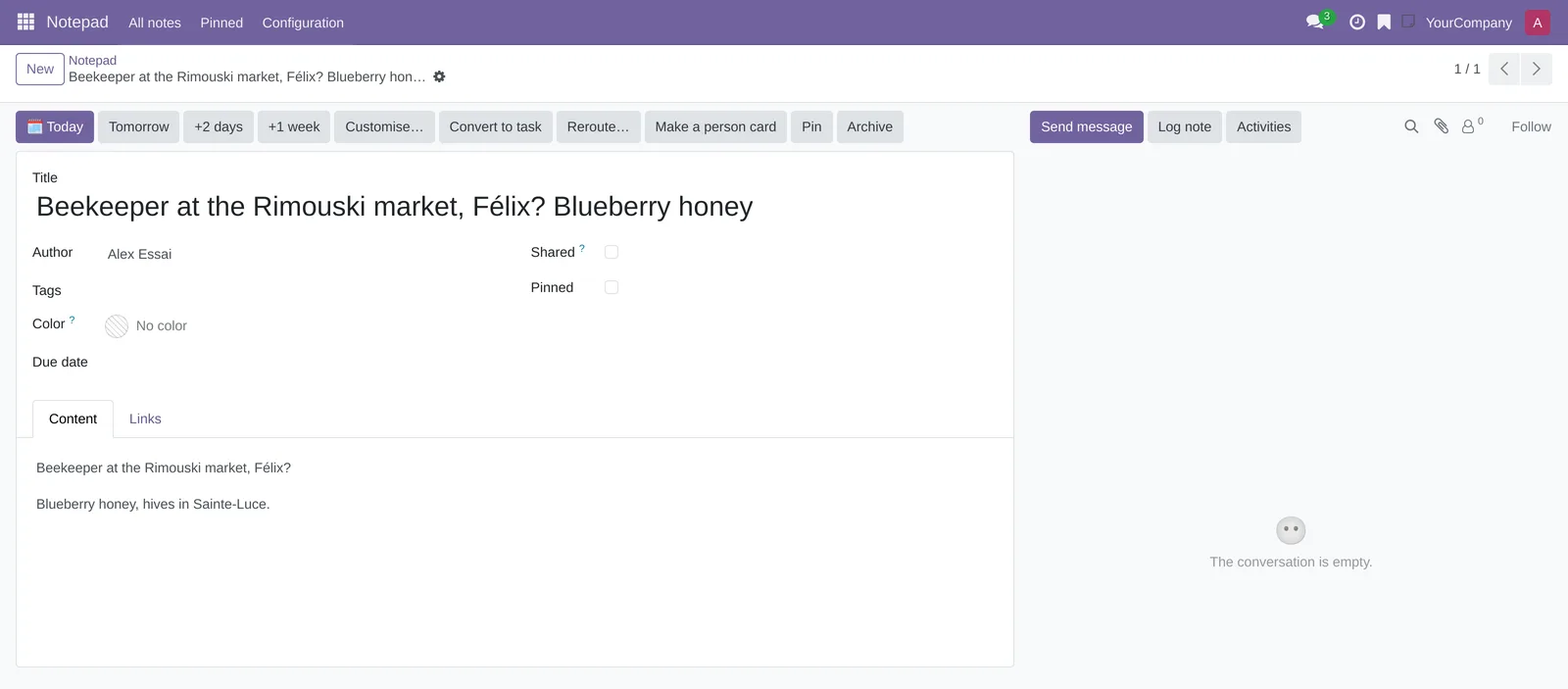
Only the person who wrote the note can make a card from it.
Link an existing note to a card#
A note you already wrote can join an existing card, for example your notes from a second coffee.
- Go to Notepad, then open the note.
- In the Links tab, add a line to the Person I've met card you want, or select Reroute….
- Save.
The steps are those of linking a note to several records, in the Notepad chapter. From an open card, the quick note in the top bar links to it as well, as long as Link to stays checked. A note more recent than the meeting date moves Last seen forward.
Schedule a reminder to reconnect#
Nothing is scheduled until you ask.
- Open the card.
- Select Remind me to reconnect.
- Keep the Reconnect type and the summary "Get back in touch", or change the summary.
- Adjust the Due Date, proposed three months ahead.
- Select Schedule.
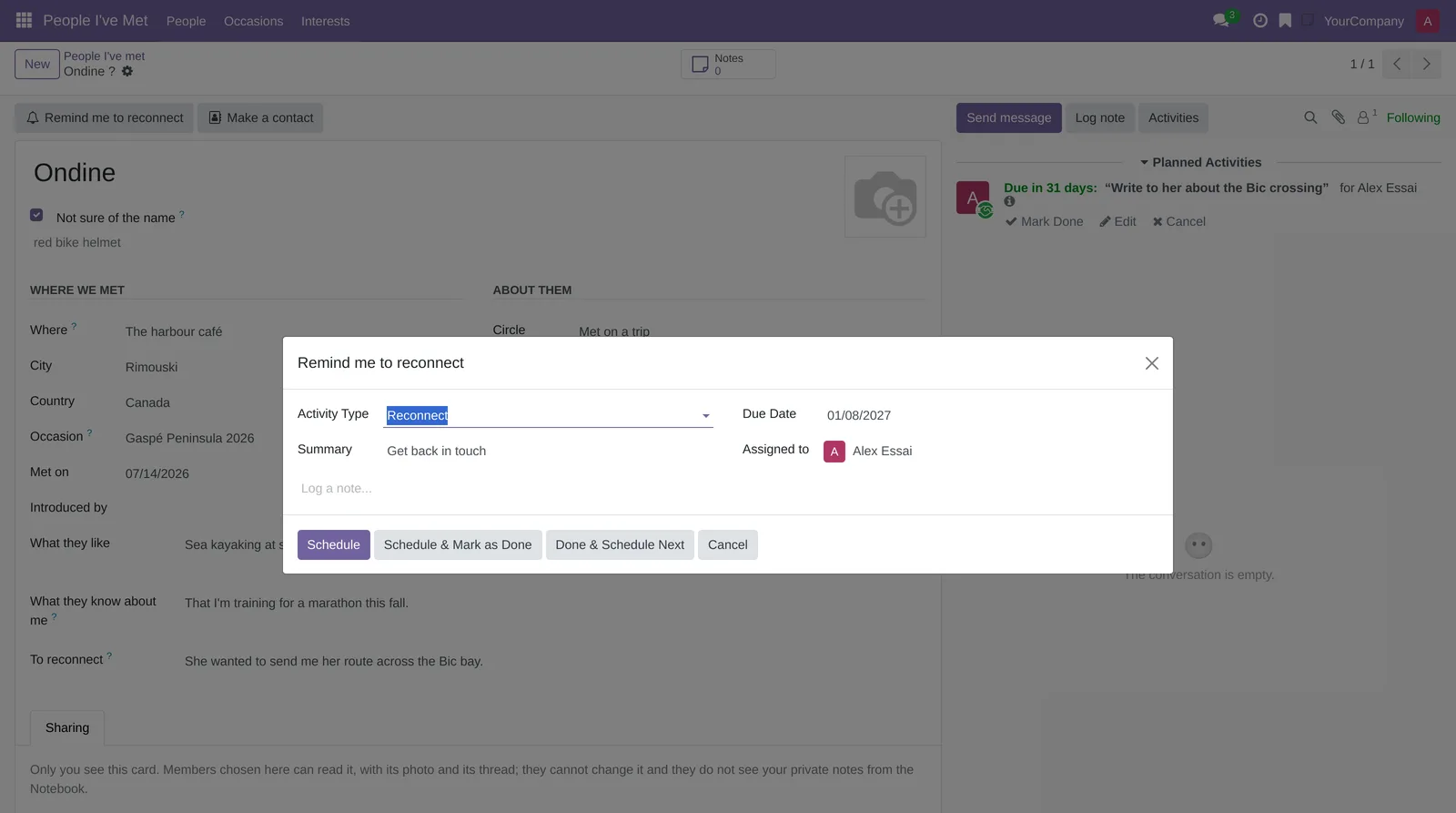
The reminder is an activity in your name. It shows in your activities, on the card, and under the To reconnect filter. No email is sent.
Make a contact from a card#
The day the person truly enters your life, the card gives a contact.
- Open the card. It must have a name.
- Select Make a contact.
- Read the warning, then select Ok.
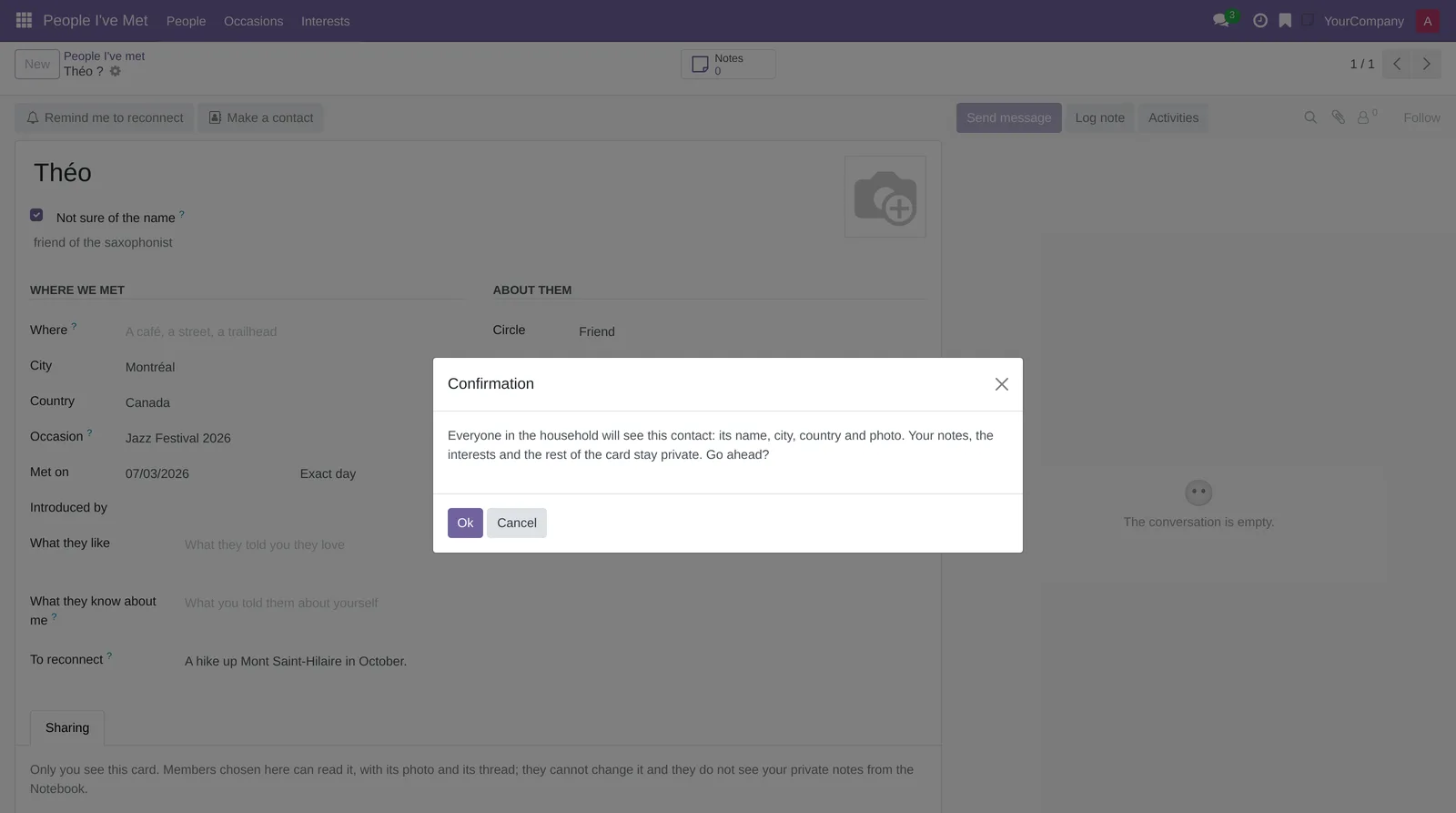
The contact receives the name, city, country and photo, nothing else. The whole household sees it, because Contacts is shared. The card stays private and keeps the link: the Contact shortcut button leads to it, and the card shows a contact card icon. Make a contact disappears from a card with no name or one already linked.
Share a card read-only#
Showing a card to a household member, for example so you can both recognise someone at the next dinner, is done card by card.
- Open the card.
- Open the Sharing tab at the bottom of the form.
- Add one or more household members under the explanation.
- Save.
The members chosen read the card, its photo, its chatter and its activities. They cannot edit, follow or copy it, and they do not see your private notes. The card shows a share icon. Remove a member from the list to stop sharing.
Read a card shared with you#
- Go to People I've Met › People.
- Open the arrow of the search box, then choose the Shared with me filter.
- Open the card.
The fields are read-only. The Shared by tab names the person who wrote it: "This card was shared with you, read-only." The Remind me to reconnect and Make a contact buttons do not show.
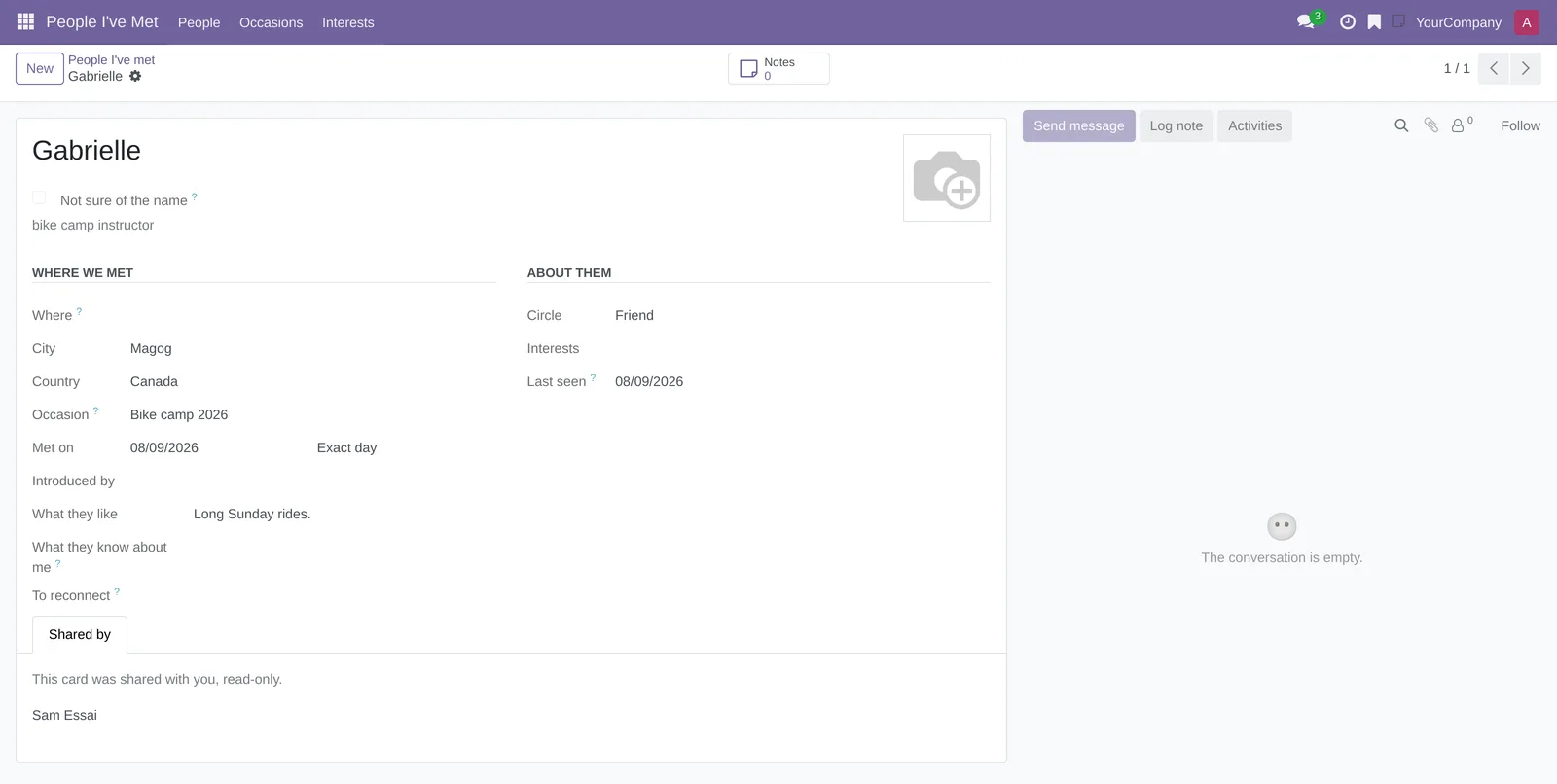
On the cards, a group icon tells these cards apart from yours. The My cards filter does the opposite.
Manage your occasions and interests#
- Go to People I've Met › Occasions (or Interests).
- Select New to add a line, or edit a line in place.
- For an occasion, enter From and To; for an interest, choose its Color.
- Select People at the end of a line to open the cards that carry it.
Two occasions, or two interests, cannot share a name for the same person. To archive an occasion or an interest, check its line, then select Actions › Archive.
Archive or delete a card#
Archiving takes the card out of the lists without erasing anything.
- Open the card.
- Open the gear icon next to the name, in the breadcrumb.
- Select Archive, or Delete to erase it.
The Archived filter finds an archived card, which you unarchive from the same menu. Either way, the linked notes stay in the Notepad.
The menus, one by one#
People I've Met: the application's root. It opens on People.
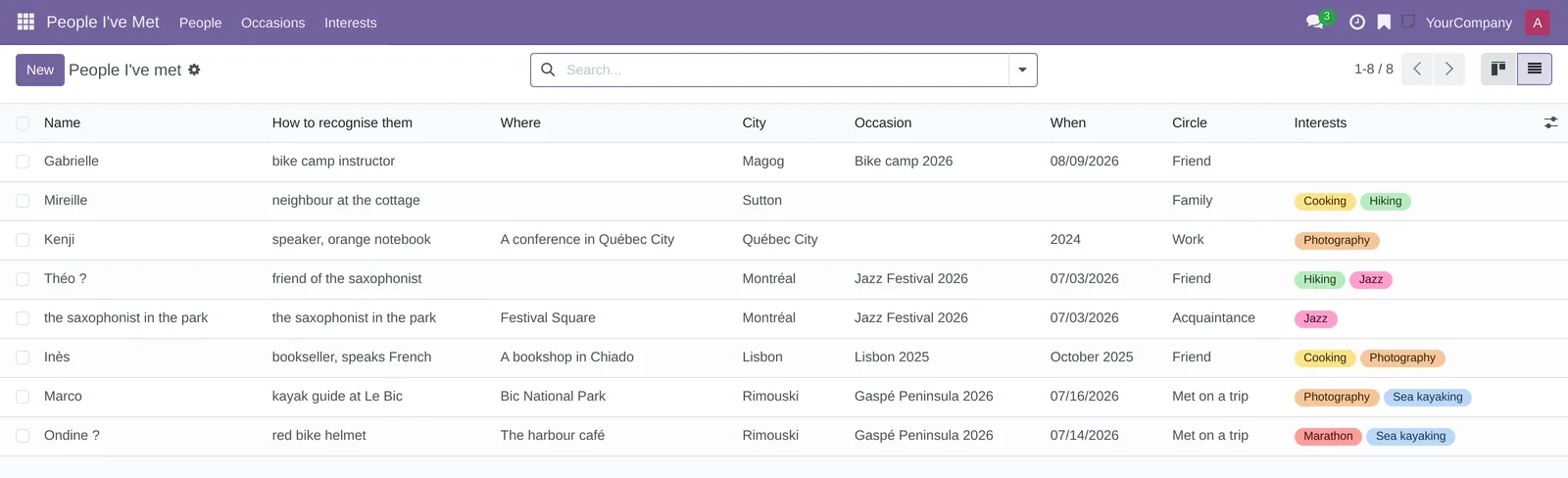
People I've Met › People: your cards, and those shared with you, in kanban view by default (screenshot above). The list view shows the Name, How to recognise them, Where, City, Occasion, When, Circle and Interests columns; Country, Last seen, Contact and Activities can be added from the column settings. The filters: My cards, Shared with me, Not a contact yet, To reconnect, Name not sure, one per circle, and Archived. With no card at all, the screen shows "Note someone you have just met".
People I've Met › Occasions: your occasions, in a list you edit in place, filtered on Mine. The Occasion, From, To and People (the number of cards) columns, plus a People button that opens those cards.

People I've Met › Interests: your interests, in a list you edit in place, filtered on Mine. The Interest, Color and People columns, plus the People button.
Reference#
Fields of the Person I've met form#
| Field | Description | Required or default |
|---|---|---|
| Name (title) | The first name, or the first and last name. | One clue among name, description and photo |
| Not sure of the name | Shows the name with a question mark; the search still finds it. | Cleared |
| How to recognise them (under the name) | A detail that brings the person back to mind. Serves as the name of a card that has none. | One clue among the three |
| Photo | The frame at the top right. | One clue among the three |
| Where | A café, a street, a trailhead. | Optional |
| City, Country | Where you met. | Optional |
| Occasion | One of your occasions. | Optional |
| Met on | The date, and its precision: Exact day, Month only or Year only. | Exact day |
| Introduced by | Who introduced you. | Optional |
| Circle | Family, Friend, Met on a trip, Work or Acquaintance. | Optional |
| Interests | Your coloured tags. | Optional |
| Last seen | The latest of the meeting date and your linked notes. Computed. | Hidden when empty |
| Contact | The contact created by Make a contact. | Hidden when empty |
| What they like | What they told you they love. | Optional |
| What they know about me | What you told them about yourself: it saves you from telling it twice, or from contradicting yourself. | Optional |
| To reconnect | Something they noticed, a plan you talked about. | Optional |
| Sharing tab | The household members who can read the card. | Nobody |
Fields of the Occasions and Interests lists#
| Field | Description | Required or default |
|---|---|---|
| Occasion | The occasion's name, unique for you. | Yes |
| From, To | The occasion's dates, which order the list (most recent first). | Optional |
| Interest | The interest's name, unique for you. | Yes |
| Color | The tag colour on the cards. | Picked at random |
| People | The number of cards that carry the occasion or interest. | Computed |
Reports and exports#
The application adds no report. Grouping by occasion, country, city, circle or year does the job of a summary.
Automations#
Nothing happens by itself, and nothing is sent. Last seen and the number of notes are computed when displayed. A reminder exists only if you scheduled it, and it is for you alone. A message written in a card's chatter notifies only the person who wrote the card.
Public pages and portal#
The application has no public page and no portal.
Modules that extend this application#
No module extends People I've Met yet. The application relies on the Notepad, which it requires.
Understanding#
Why a card, and not a contact. In a household instance, Contacts is shared: a contact created for someone you met at a café would show for everyone. A card stays yours. Make a contact remains possible, when you choose, and lets out only the name, city, country and photo.
Why a single clue. A people notebook you have to fill in like a form stops being used after the second week. An uncertain first name, a way to recognise someone or a photo is enough; the card fills in later. There is no gender field: the description says what it takes to recognise the person.
What "private" means. A card, its photo, attachments, chatter, followers and activities are readable only by you and the members you share it with. The access rules apply to every role: no group added elsewhere widens them. Only the person who wrote a card follows it, and a reminder on the card is always in their name. Nobody else can be mentioned or notified in the chatter. An access refusal is the same for everyone: it never says who owns the card.
The limits of that promise. A note marked Shared in the Notepad stays readable by the whole household, even when linked to a card: keep private the notes that talk about someone. The rules also apply to a system administrator, but that person can change the rules themselves, and the Notepad already gives them every note. In a hosted household instance, no member has that role.
Occasions and interests are yours. They do not mix from one member to another: two people in the household can each have their own "Gaspé Peninsula 2026". A card carries only the occasions and interests of the person who wrote it. Another member reads them through a shared card, without being able to put them on their own cards.
What the application does not do. It does not sync with the phone's contacts and fetches nothing from social networks. It does not track birthdays: that is the job of Celebrations, on contacts. It has no map, no email reminders and no mobile screen of its own: on the phone, you take notes in the Notepad (see Mobile apps and browser extension), and cards open in the browser.
Troubleshooting#
| Symptom | Likely cause | Fix |
|---|---|---|
| "Give at least one clue: a name, a description or a photo." when saving. | The card has no name, no description and no photo. | Enter at least one of the three. |
| Make a contact does not appear. | The card has no name, is already linked to a contact, or was shared with you. | Give it a name, or open the contact from the Contact button. Only the person who wrote the card can make a contact from it. |
| A household member cannot find the card you showed them. | It is not shared with that member. | Add the member in the Sharing tab, then point them to the Shared with me filter. |
| "Only the notes of the person who wrote this card can be linked to it." | The note comes from another household member, through a link or Reroute…. | Link one of your own notes, or copy what matters into To reconnect. |
| Another member's occasion is not offered in Occasion. | Occasions are personal. | Create your own, with the same name if you like. |
| "This card is private: you cannot mention or notify anyone on it." in the chatter. | The message mentions another member. | Remove the mention. To show the card, share it. |
| A link shows "Private card". | You cannot read that card. | Ask the person who wrote it to share it with you. |
| "Gaspe" does not find "Gaspé". | The instance is not configured to ignore accents. | Type the word with its accents, or a word from the card without accents. |
See also#
- To-do, Notepad and Timer: take the note in the moment, link it, share it or not.
- Mobile apps and browser extension: take notes on your phone, even without a network.
- Contacts: what a card becomes once it is a contact.
- Celebrations: birthdays, on contacts.
- Common actions in every application: views, filters, grouping, chatter and activities.