
Part 11 · Retail
Suppliers and orders
The days each supplier delivers, an order guide that keeps your quantities from one end of the day to the other, and the wholesaler's price file read without retyping it.
Watch it
The second half of the Retail suite keeps what you order, from whom, and when. It is for the person who walks the aisle in the morning with a tablet and decides what to order, and for the one who receives the wholesaler's price file every month. The result: the quantity to order is written beside every fact that justifies it, and the wholesaler's three hundred price rows enter Odoo without anybody typing them.
This chapter assumes the chapter Retail prices: the two modules share the cost series and the same roles.
Overview#
The order guide is a record that stays. A kitchen's is a wizard that dies when the screen closes; a store orders all day, aisle by aisle, and comes back to it. The guide keeps every quantity typed by hand and refreshes the facts around them.
Each row of the guide shows, for one item: what is on hand, the forecast at the delivery after the next one, what already sits on an unconfirmed request, the minimum and maximum of its reordering rule, the suggested quantity rounded up to the purchase unit, the supplier's price, the last delivered cost and how much it moved, and what came back as a credit over three months.
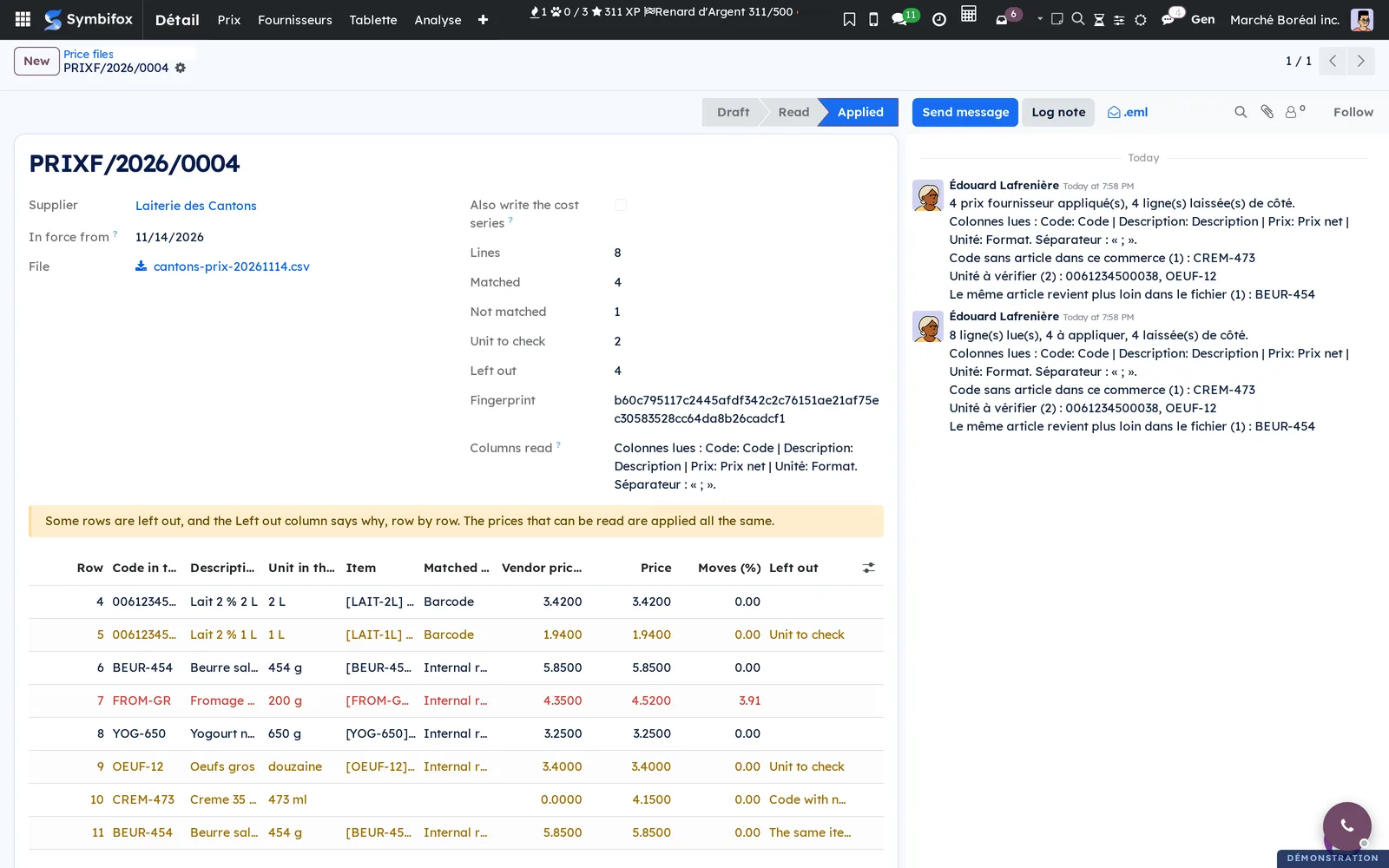
The wholesaler's price file is read in two steps: Read the file, which shows row by row what was understood, then Apply the prices, which writes. Between the two, nothing is touched.
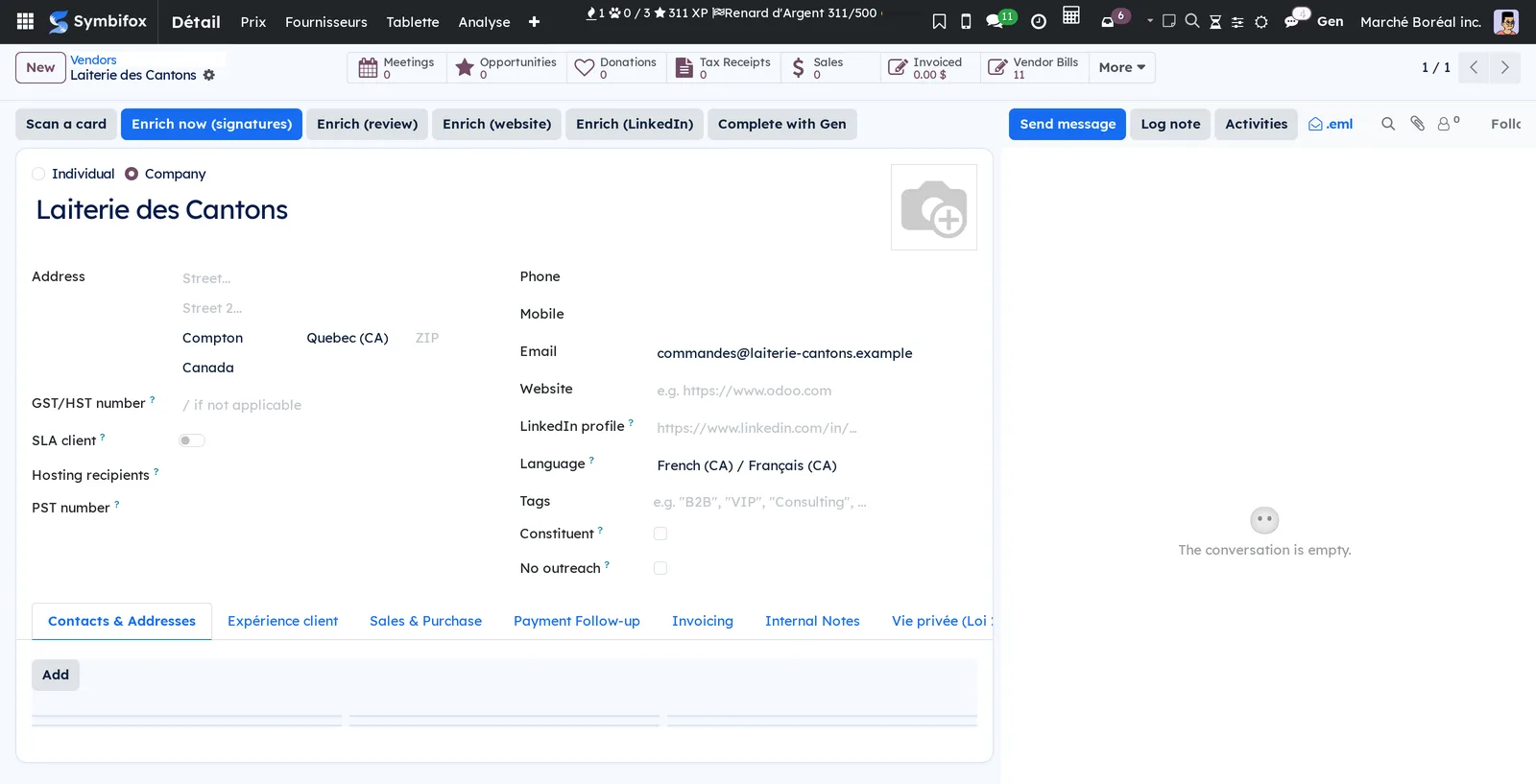
The supplier's record carries its reality: the days it delivers, the hour to order by, its lead time, its minimum order, how the goods arrive, the representative, and whether it credits what did not sell.
Configuration#
Access and rights#
The two roles are those of the chapter Retail prices: the shelf clerk sees nothing here, the retail manager does everything.
Base data#
On the supplier's record, in Contacts, Retail tab:
| Field | What it says |
|---|---|
| Retail supplier | Brings the record into the module. Without it, none of the rest appears. |
| Delivery days | The weekdays this supplier actually delivers on. A guide's delivery date comes from here. |
| Order by | The hour in the day past which the order goes out for the following delivery instead. |
| Lead time | The number of days between the order and the delivery. |
| Minimum order | The amount below which the supplier does not deliver. The guide flags it. |
| How it arrives | A van to the store, or a depot to collect from. |
| Representative | The person you speak to at that supplier. |
| Credits returns | Whether this supplier takes back what did not sell. |
On the Odoo side you also need vendor lines on the items (the purchase price and its unit) and, for the suggested quantity to mean anything, reordering rules with a minimum and a maximum.
First steps#
This walk makes the morning order at one supplier, and turns it into a request for quotation.
- Prepare the supplier's record as above: at the very least Retail supplier and the delivery days.
- Open a guide. Retail › Suppliers › Order guides › New. Give the supplier and the warehouse; the delivery date sets itself on the next day that supplier delivers.
- Compute. The Compute button. The guide fills with that supplier's items, every fact on the same row.
 4. Walk the aisle. Type quantities into the To order column. Every row you touch is marked as yours.
5. Come back later. Reopen the guide in the afternoon and press Compute again: your quantities are there, and the facts around them have been refreshed.
6. Check the total. If it falls below the supplier's minimum order, the guide says so.
 7. Send it. The Create the request for quotation button. Odoo creates its own request, in each item's purchase unit, for the delivery day at noon in the store's time zone.
8. Close the guide once it has done its work.
Everyday tasks#
Read a wholesaler's price file#
Retail › Suppliers › Price files › New. Give the supplier, attach the file (CSV or Excel), then Read the file.
The module reads the file as it arrives: whatever its column names, its separator or the sheet it sits on. It matches each row in this order: barcode, then internal reference, then the supplier's own code.
What it understood is said in plain words: which column was read as the price, and what the rows were split on. A wholesaler who sends a retail price next to a net price sends two columns of prices; "Prix de détail", "Retail price" and "Prix de vente" are never read as a purchase price.
Understand what dropped out of a file#
A partly unreadable file applies what it can: refusing the whole lot would stop the store. Every row is kept and counted, and the ones left out say why.
| Reason | What it means |
|---|---|
| Price not readable | The number could not be read without guessing. |
| Price of zero or less | A price of zero or less is not a price. |
| Row without a code | Nothing to find the item with. |
| Code with no item | The code exists, but no item matches it. |
| Unit to check | The file's label disagrees with the unit of the vendor line in place. |
| The same item twice | The same item appears on two rows of the file. |
Apply a file's prices#
Read the screen over, row by row, then Apply the prices. Each new price opens a new vendor line dated from the file and closes the one before it, carrying over everything that line held: the minimum order, the lead time, the sequence, the currency, the description.
The supplier, the attachment and the date are frozen as soon as the file is read: what is applied is what was read, even if somebody touches the record in between.
Write the cost series from a file too#
Tick Write the costs too before applying. Keep this for the store whose supplier does not bill item by item: everywhere else the cost should come from the bill, which says what was actually paid.
Find out why an item has no price#
An item whose supplier has no price in force (an expired vendor line, or none) is named as such in the guide, left out of the total, and no request goes out on it. It never appears at 0.00: absent and free are not the same thing.
Compare two suppliers for the same item#
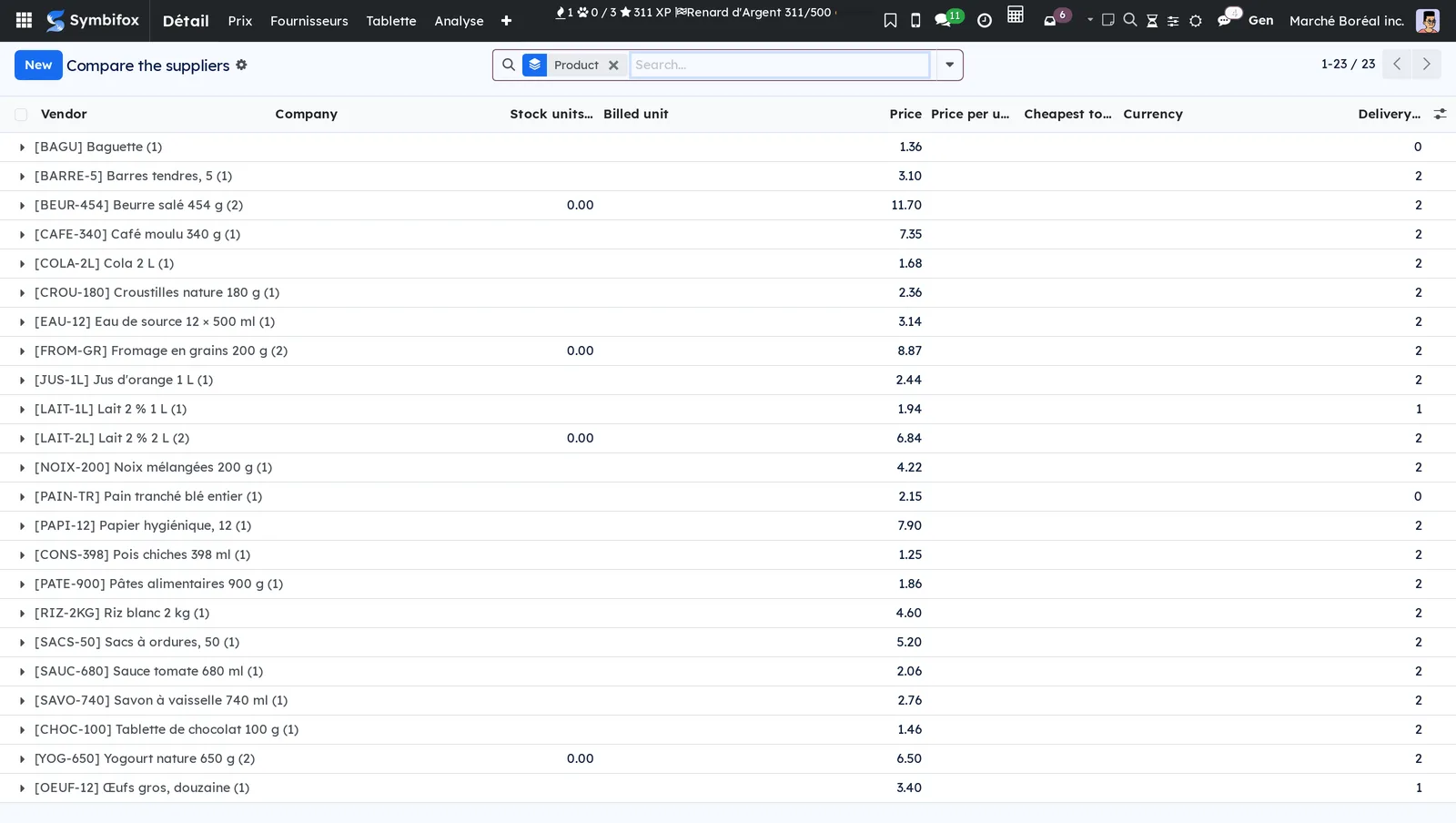
Retail › Suppliers › Compare the suppliers. The list shows vendor lines brought back to the item's own unit: a price quoted by the dozen says nothing next to a shelf that sells by the unit.
⚠️ In Odoo 18 the unit of a vendor line follows the item's purchase unit, so all of an item's suppliers share it. A supplier that sells in another pack size is therefore modelled by its minimum quantity, not by a unit of its own.
Record what came back#
Retail › Suppliers › What came back. Return credits are recorded item by item, with the quantity and the amount. They do not touch the cost series: a return does not change what the next unit costs, it says order less.
What came back over three months then shows beside the quantity to order, in the guide.

The menus, one by one#
| Menu | What you do there |
|---|---|
| Retail › Suppliers › Order guides | Build, fill and send an order. |
| Retail › Suppliers › Price files | Read and apply the wholesaler's file. |
| Retail › Suppliers › Compare the suppliers | Every supplier's price, in the item's own unit. |
| Retail › Suppliers › What came back | Return credits, item by item. |
| Contacts, Retail tab | The supplier's reality: days, hour, lead time, minimum. |
Reference#
Fields of an order guide row#
| Field | What it says |
|---|---|
| On hand | What is in stock right now. |
| Forecast | The stock expected at the delivery after the next one, not today's. |
| Already ordered | What sits on an unconfirmed request for quotation. |
| Minimum, Maximum | The item's reordering rule, when it has one. |
| Suggested | The computed quantity, rounded up to the purchase unit. |
| To order | What you decide. It is the only column you write. |
| Edited | Ticked as soon as you type a quantity. Recomputing does not overwrite it. |
| Price, Price missing | The supplier's price, or the fact that there is none. |
| Last cost, Change | What the last delivery cost, and how much it moved. |
Fields of a price file row#
| Field | What it says |
|---|---|
| Row no. | The rank in the file, so the row can be found at the wholesaler's end. |
| Code, Description, Unit in the file | What the file said, kept as it was. |
| Matched on | Barcode, internal reference or the supplier's own code. |
| Vendor price now, Moves (%) | The comparison with what is in place. |
| Left out, Unit to check | Why the row was not applied. |
What the module refuses to guess#
- The unit of a price. The price is applied in the unit of the vendor line already in place. When the file's label disagrees with it, the row is left out and named. Labels are compared as whole words, not as pieces of words: "CASE OF 12 UNITS" holds the word "units" and is still a case. The comparison is against the real unit, not its translated name, so the same file reads the same way in French and in English. The trade's own labels are known in both languages (EA, Each, Un, Unité, CS, Caisse, Doz, Dz). A label nobody recognises is a doubt, not a pass, and no factor is ever guessed from one. The column counts too: "Prix caisse", "Case price" and "Case cost" carry the price of the case. And a measure written on its own ("4 L", "750 ML") is the format of the item, not the unit it is priced in, where "12 x 1 L" and "12 UNITS" are containers.
- What a number means when the file does not say. "1,250" is 1.25 in French and 1 250 in English: the row is refused and named rather than divided by a thousand. The currency is read as noise around the number, in Canadian, American and New Zealand dollars as in euros.
- Whether a quoted price is a cost. The file writes the cost series only when asked.
- What a return credit does to the cost. Nothing: it says order less.
Automations#
With no setup at all:
- the request for quotation goes out for the next day this supplier delivers;
- the hour is set at noon in the store's time zone, not the server's;
- the quantity is converted into the item's purchase unit;
- an item with no price in force is named, not ordered;
- each new price opens its line and closes the one before it, at the file's date;
- a line set on the model is only closed once the file covers all of its variants;
- a line with no company is left as it is, for the other stores.
What the module writes on the record#
As in Retail prices, the reports left on a price file or on an order guide are log entries, not notifications: no email goes out, no bell rings, and a manager whose user carries no email address reads a file and applies it like anyone else. The body comes out in the language of the store, because what the record keeps is read later, by someone else.